
The "Digital FOB": The Ultimate Cyber Survival Guide for OUTCAN Deployments (2026)

By a Veteran ACISS-IST (1st Gen) turned "Blue Team" Cyber Defender.
If you are deploying anywhere OUTCAN, securing your digital footprint isn't just about watching Netflix; it is a strategic imperative and this guide is for you.
I’ve deployed globally in live operations. I’ve seen firsthand that internet access in operational theatres isn’t just unreliable—it is potentially hostile. When you're deployed, you are the target. The internet is and has been a battlespace.
This guide explains how to build a "Digital Forward Operating Base" (DFOB) to protect your privacy and your sanity.
BLUF: The Quick Kit List
Don't have time for the theory? Here is the "Go Bag" list. Buy these, set them up in Canada, and thank me later.
| Category | The Recommendation | Why? |
| 🏆 Best Hardware | Passive cooling (no fans to clog with sand), USB-C power, and small footprint. | |
| 🍁 Best VPN | Canadian company (subject to CAD privacy laws), R.O.B.E.R.T malware blocking, and free tier available. | |
| 🛡️ The Strategy | Airplane Mode + Wi-Fi | A VPN cannot stop a fake cell tower. You must use the router as your shield. |
The Rule: Never connect your phone directly to hotel or camp Wi-Fi.
Situation: 🎯 The Internet is a Battlespace
Treat your data like you treat your silhouette on a patrol. In the field, you use CADPAT and movement techniques to blend into the terrain. Online, a VPN is your digital camouflage. Without it, you are skylining yourself to every hostile actor on the network—from local hackers to foreign intelligence services.
Since 2010, the internet has been an active theatre of war. In the opening stages of the Ukraine conflict, we saw firsthand how nation-state adversaries used OSINT (Open Source Intelligence) and cellular signal clustering to target artillery strikes. When you deploy, you & your info are the target.
You are a target because:
- You are NATO: You represent a high-value intelligence target.
- You have data: Identity theft, credit ratings, and family info are valuable commodities on the dark web.
- You are traceable: Your habits create a Pattern of Life (PoL).
"From the moment soldiers arrive in Latvia on Operation Reassurance, they are subject to an onslaught of cyber threats. Cellphones, laptops, smart watches and other personal electronic devices are the obvious targets, but so too are Army vehicles, weapon systems, sensors, and any other point of entry into the wider Canadian Armed Forces (CAF) digital ecosystem." - by Canadian Army Today
Your personal data is at risk, and your families, very valuable for someone to steal your identities and/or money and credit ratings...
The Silent Killer: Fake Cell Towers (Stingrays)
Your biggest threat isn't just a hacker in a basement; it's the infrastructure itself.
Adversaries deploy "IMSI Catchers" (or Stingrays)—fake cell towers that mimic local carriers. Your $2,000 smartphone will automatically connect to them because they broadcast a stronger signal than the real tower. Think about that when you're not all that far from certain borders.
- The Attack: This happens at the hardware handshake level. You don't need to make a call or open a website.
- The Consequence: Once connected, they can intercept SMS, triangulate your exact physical location, and in some cases, push malware directly to your device without you ever touching the screen.
How "Stingray" & Similar Tech Works:
- Impersonation: The fake tower mimics a real carrier tower, forcing your phone to connect to it by broadcasting a stronger signal or exploiting network weaknesses.
- Interception: Once connected, the device acts as a "man-in-the-middle," intercepting all communication between your phone and the actual network.
- Malware Delivery: The attacker can then push malicious software (malware) or exploit vulnerabilities in your phone's operating system or apps, gaining deep control.
- Persistence: The malware can continue to spy and transmit data even after you disconnect from the fake tower.

The Solution: Airplane Mode + The Digital FOB
Crucial Distinction: A VPN encrypts your data, but it cannot stop a cell tower from triangulating your position.
To defeat a Stingray, you must deny it a signal.
- Harden the Device: Put your phone in Airplane Mode (Cellular OFF).
- Enable Wi-Fi Only: Turn on only your Wi-Fi.
- Connect to the DFOB: Connect solely to your Travel Router (your Digital Forward Operating Base).
By routing all traffic through your travel router's encrypted tunnel, you bypass the hostile cellular network entirely. The router becomes your hardened perimeter; your phone stays safely "inside the wire".
Mission: 🏰 The Hardware Solution
Software VPNs installed on individual devices are a good start, but in a deployed environment, they often fail due to Captive Portals (hotel login pages) or battery drain.
Enter the Travel Router. A travel router acts as your Digital FOB. It connects to the hostile Wi-Fi (WAN) and creates a private, secure bubble (LAN) for your devices.
Why you need hardware, not just an app:
- Bypass Device Limits: Pay for one Wi-Fi login, connect 10 devices (Laptop, Phone, Switch, Kindle).
- Kill Switch: If the VPN drops, the router cuts the internet. No leaks.
- DPI Defeat: High-end travel routers use obfuscation to fool "Deep Packet Inspection" used by censorship-heavy regimes.
What this looks like 👇
flowchart LR
    A[💻 User Device
Laptop/Phone]
    -->|🔒 Encrypted Tunnel| B[🌐 Internet]
    B -->|Still Encrypted 🔐| C[🛡️ VPN Server]
    C -->|🌍 Decrypted Traffic| D[🌎 Destination Website/Service]

    subgraph VPN_Tunnel["🧵 VPN Tunnel (Secure Channel)"]
        A --> C
    end

    style A fill:#d1e7dd,stroke:#2c3e50,stroke-width:2px
    style B fill:#f8d7da,stroke:#2c3e50,stroke-width:2px
    style C fill:#cfe2ff,stroke:#2c3e50,stroke-width:2px
    style D fill:#fff3cd,stroke:#2c3e50,stroke-width:2px
    style VPN_Tunnel stroke:#198754,stroke-dasharray: 5 5
Another way to see it:
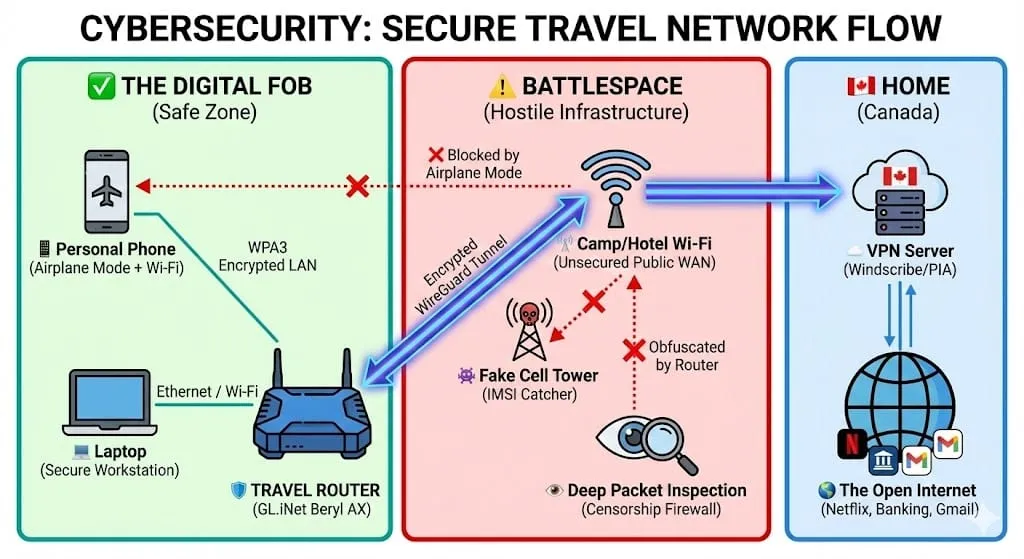
As you can see in the diagram, the Travel Router acts as the airlock. Your phone (inside the green zone) never touches the Camp Wi-Fi (red zone) directly. It only talks to the router. The router takes your data, wraps it in military-grade encryption, and punches a tunnel through the hostile network to a server in Canada. Even if the Camp Wi-Fi is monitoring traffic, all they see is a stream of gibberish.
Execution: ⚙️ Hardware Recommendations
For our use case, we want rock solid reliability, not just raw speed. In a Canadian deployment—whether it’s a dusty tent in Kuwait or a humid hide in Latvia—durability is king. My most recent usage of the Beryl AX (GL-MT3000) was during my deployment to the G7 in Kananaskis, AB in June 2025.
🏆 The Travel King: GL.iNet Beryl AX (GL-MT3000)
The "General Purpose" Field Router - This is the optimal balance of size (11.5 x 8 x 3 cm; 196 g!), performance, and durability for the individual soldier. It's a pocket-sized powerhouse that balances speed, heat, and size. It is the piece of kit you throw in your rucksack and forget about until you need it.
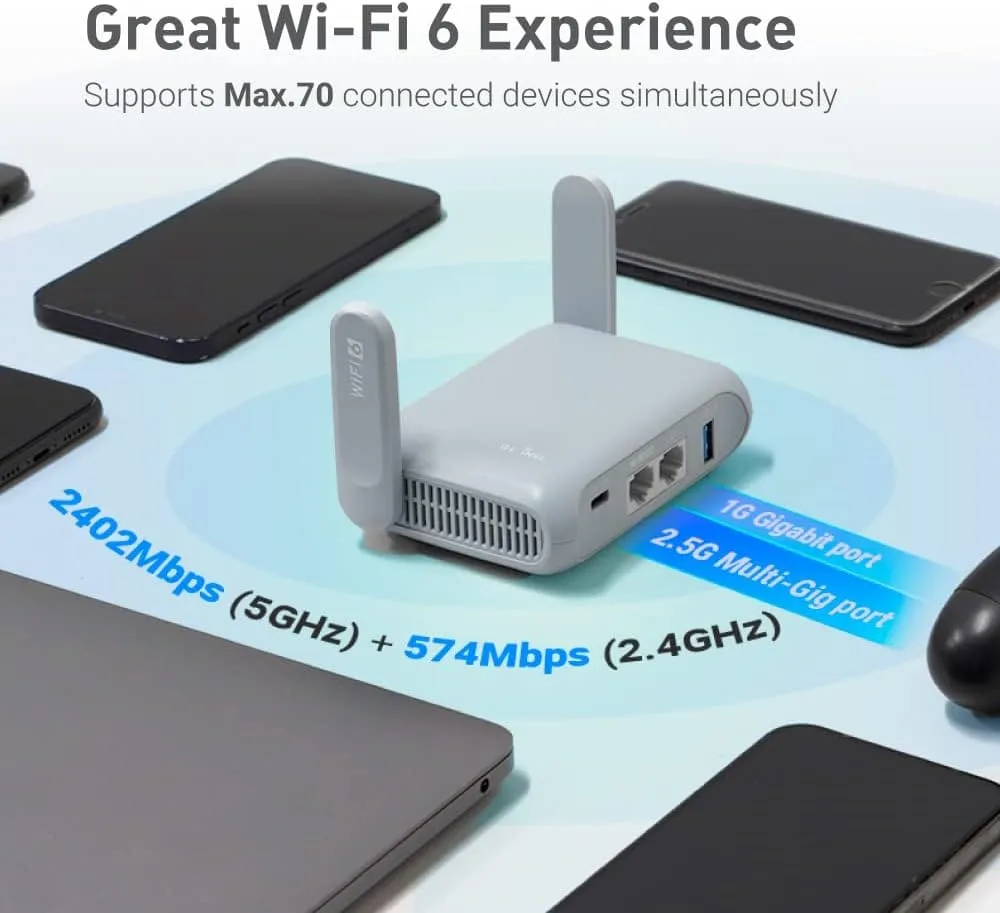
GL.iNet GL-MT3000 (Beryl AX) Pocket-Sized Wi-Fi 6 Wireless Router
Portable Internet Router & Wireless Access Point, VPN router for Public WiFi/Business/Moblie/RV/Cruise/Plane
Why it wins:
- The "Active Cooling" Reality Check: Unlike older, slower travel routers, the Beryl AX packs a modern MediaTek MT7981B (Filogic 820) processor. This chip is powerful enough to handle WireGuard at 300Mbps+, but that power generates heat.
- The Fan: It includes a small, PWM-controlled centrifugal fan.
- The Behavior: It is semi-passive. By default, it stays OFF until the CPU hits 76°C.
- In an AC Hotel Room (21°C): You will likely never hear it. It acts like a fanless device.
- In a Hot Environment (30°C+): The fan will spin up to protect the silicon.
Why I still recommend it: If you want "Gigabit-class" VPN speeds in a pocket router, you cannot cheat physics—you need active cooling. The alternative (fanless) routers will throttle and slow down your connection right when you need it most.
- SoC: MediaTek Dual-core @ 1.3GHz
- WiFi: Wi-Fi 6 (AX3000)
- VPN Speed: ~300Mbps (WireGuard) / ~150Mbps (OpenVPN)
- DPI Defeat: Supports "AmneziaWG" and high-speed WireGuard to punch through censorship firewalls and purportedly even the "Great Firewall of China"!
- Cooling: Hybrid (Passive heatsink + Safety Fan)
- Power Efficiency: Runs easily off a standard USB-C portable battery bank for hours.
- Cost: It's quite affordable at $129 CAD at time of writing.
🥈 The Runner Up: GL.iNet Slate AX (GL-AXT1800)
The "HQ Hub" If you are working out of a clean Hard Standing (HQ building) with reliable power, or setting up a welfare network for your section, this is a strong contender.
- Pros: 3x Gigabit Ethernet ports (great for wired setups) and sharing on a LAN.
- Cons: Power requirements (eats a LOT more with it's quad core CPU!), size & weight. Active cooling - it's louder as the fan is utilized far more often.
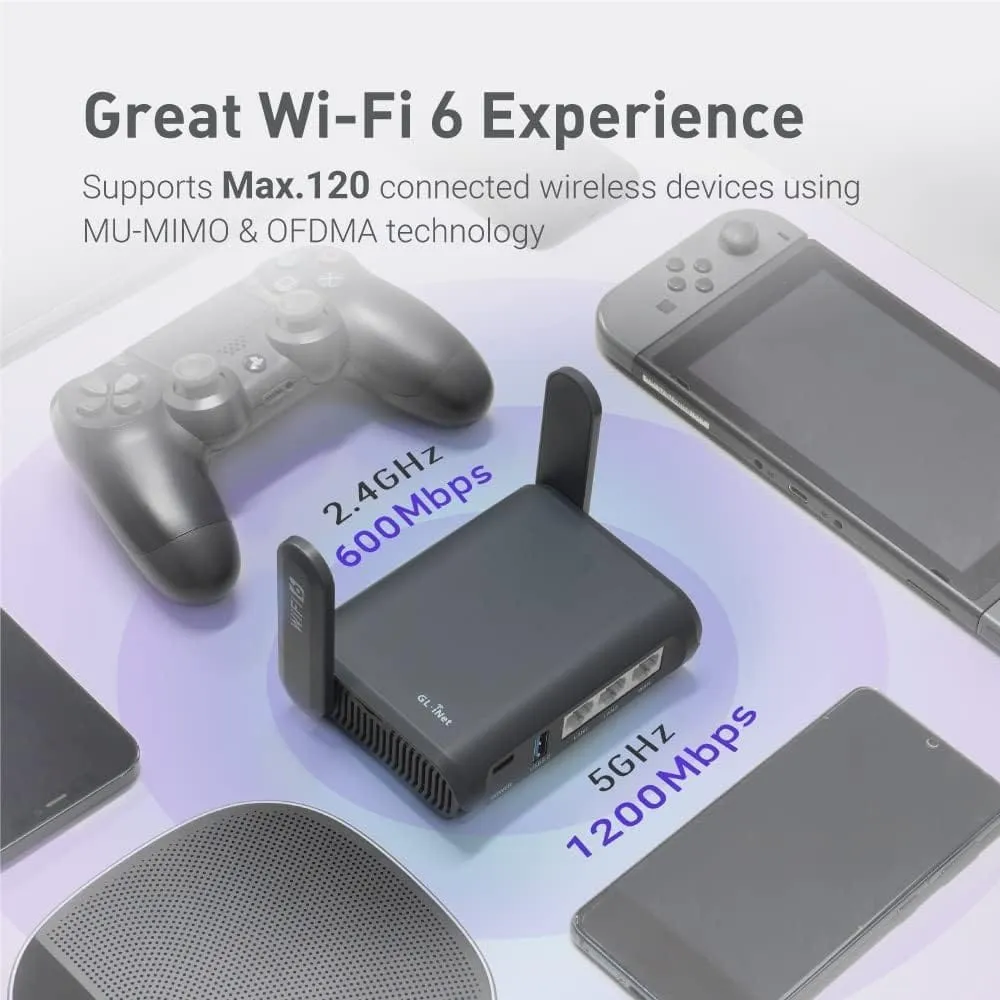
GL.iNet GL-AXT1800 (Slate AX) Portable WiFi Router
Dual-Band Wi-Fi 6 Long Range Internet Router, VPN Router for Home, Mobile Hotspot Device, Wireless Access Point with Ethernet
⚠️ The "Shiny Object" Trap: GL.iNet Slate 7 (GL-BE3600)
The "Garrison Queen" The Slate 7 is the newest flagship with Wi-Fi 7. On paper, it looks like the best buy. For a deployment, I recommend avoiding it.
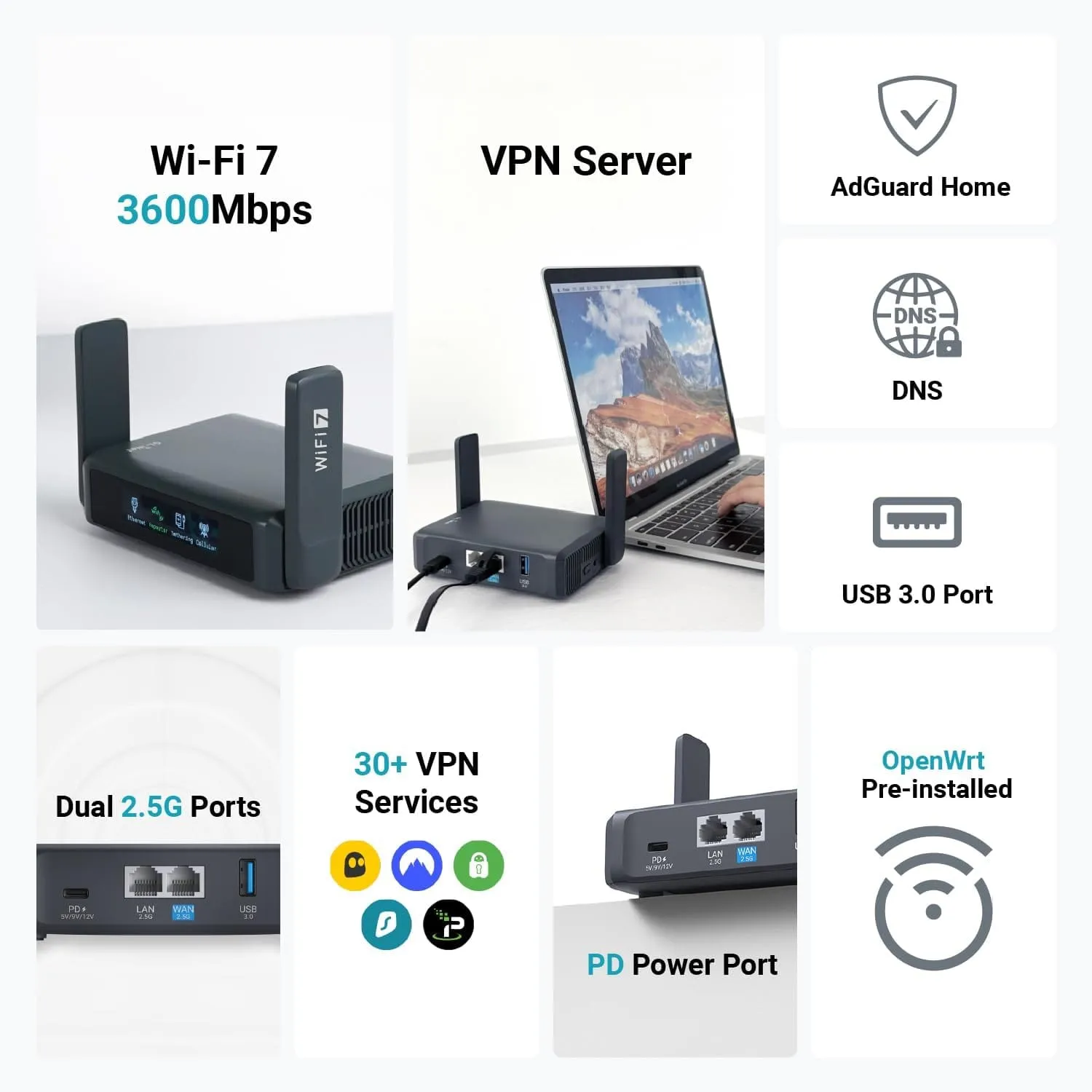
GL.iNet GL-BE3600 (Slate 7)
Dual-Band Travel Wi-Fi 7 Router, Long Range 2.5G Ethernet Wireless Router, WiFi Access Point, VPN Router for Business Trip/Hotel/Mobile/RV/Cruise
- Wasted Tech: You will never see Wi-Fi 7 speeds on Camp Wi-Fi. You are paying for features you cannot use while draining your battery bank faster.
- OPSEC Violation: It has a front-facing LED screen. In a blackout tent or shared quarters, a glowing screen is a tactical nuisance.
- Cost: At $228.99 (4 Jan 2026) it's on the pricier side, for speed you likely won't see from whatever ISP you have "over there". Doesn't meet the "bang for buck" milestone.
Comparison Tables:
| Feature | Beryl AX (GL-MT3000) | Slate 7 (GL-BE3600) | Slate AX (GL-AXT1800) |
| Role | Primary Deployable Asset | High-Speed Base Station | Legacy Command Hub |
| Chipset | MediaTek MT7981B (Dual-Core @ 1.3GHz) | Qualcomm IPQ5332 (Quad-Core @ 1.1GHz) | Qualcomm IPQ6000 (Quad-Core @ 1.2GHz) |
| WireGuard Speed | ~300 Mbps | ~490 Mbps | ~550 Mbps |
| OpenVPN Speed | ~150 Mbps | ~100 Mbps (Standard) ~385 Mbps (DCO) | ~120 Mbps (Standard) ~560 Mbps (DCO) |
| Wi-Fi Standard | Wi-Fi 6 (AX3000) | Wi-Fi 7 (BE3600) | Wi-Fi 6 (AX1800) |
| Obfuscation | Native AmneziaWG (Beta) | Planned / Beta (Coming Soon) | Manual Install Required |
| Ethernet | 1x 2.5G WAN 1x 1G LAN | 2x 2.5G (1 WAN, 1 LAN) | 1x 1G WAN 2x 1G LAN |
| Power Input | USB-C 5V/3A | USB-C PD (5V, 9V, 12V, 15V) | USB-C 5V/4A (Requires dedicated brick) |
| Cooling | Passive (Silent/Sealed) | Active (Fan + Vents) | Active (Fan + Vents) |
| Special | Programmable Switch | Touchscreen Display | 3rd Ethernet Port |
| Approx. Cost (CAD) | ~$110 | ~$230 | ~$150 - $170 |
| Feature | Slate 7 (GL-BE3600) | Beryl AX (GL-MT3000) | Military Context |
| Cooling | Active Fan (Always spinning) | Passive (Silent/Sealed) | Beryl Wins (Sand/Dust proof) |
| Wi-Fi Standard | Wi-Fi 7 (BE3600) | Wi-Fi 6 (AX3000) | Tie (Camp internet is too slow for Wi-Fi 7 to matter) |
| Ports | 2x 2.5 Gigabit | 1x 2.5G, 1x 1G | Tie (1x 2.5G is enough for Starlink) |
| Display | Touchscreen LCD | LED Status Light | Beryl Wins (More rugged, less light bleed) |
| Obfuscation | Supported (Beta Firmware) | Supported (Beta Firmware) | Tie (Both run AmneziaWG |
| Weight | ~300g | ~196g | Beryl Wins (Lighter in the rucksack) |
| Price (CAD) | ~$230 | ~$110 | Beryl Wins (Half the price) |
Once you've picked out some hardware, here's what this does for you👇
flowchart LR
    %% ==========================
    %% Devices
    subgraph Devices ["💻 Personal Devices"]
        Laptop["🖥️ Laptop / Personal Device"]
        Phone["📱 Phone"]
    end

    %% VPN Tunnel
    subgraph VPN ["🛡️ Encrypted VPN Tunnel"]
        PIA["🛡️ VPN (AES-256)"]
    end

    %% Threat Actors / Attack Vectors
    subgraph Threats ["👾 Threat Actors / Attack Vectors"]
        MITM["🕵️ MITM / Interception"]
        DDoS["🌐 DDoS Attack"]
        Phishing["🎣 Phishing"]
        Malware["💀 Malware / Trojan"]
    end

    %% Backend Services
    subgraph Services ["🌐 Protected Services"]
        Netflix["🎬 Netflix / Streaming"]
        Home["🏠 Home Network / IoT"]
        Canada["🍁 Canada Online Services"]
    end

    %% Connections
    Laptop --> PIA
    Phone --> PIA

    PIA --> Netflix
    PIA --> Home
    PIA --> Canada

    %% Threat paths (ricochet / blocked)
    MITM -.->|⛔ Blocked| PIA
    DDoS -.->|⛔ Blocked| PIA
    Phishing -.->|⛔ Blocked| PIA
    Malware -.->|⛔ Blocked| PIA

    %% Node Styling (Canadian Military Colors)
    style Laptop fill:#d62828,stroke:#a71d2a,stroke-width:2px,color:#fff
    style Phone fill:#f77f00,stroke:#d95d39,stroke-width:2px,color:#111
    style PIA fill:#0033a0,stroke:#001f66,stroke-width:4px,color:#fff
    style Netflix fill:#e63946,stroke:#a71d2a,stroke-width:2px,color:#fff
    style Home fill:#457b9d,stroke:#1d3557,stroke-width:2px,color:#fff
    style Canada fill:#ffdd00,stroke:#d4af37,stroke-width:2px,color:#111
    style MITM fill:#ff6b6b,stroke:#660000,stroke-width:2px,color:#fff
    style DDoS fill:#ff0000,stroke:#660000,stroke-width:2px,color:#fff
    style Phishing fill:#f77f00,stroke:#d95d39,stroke-width:2px,color:#111
    style Malware fill:#ffcc00,stroke:#996600,stroke-width:2px,color:#111

    %% Subgraph Styling
    style Devices fill:transparent,stroke:#888,stroke-width:1px,stroke-dasharray:4 4
    style VPN fill:transparent,stroke:#0055aa,stroke-width:3px,stroke-dasharray:2 2
    style Threats fill:transparent,stroke:#aa0000,stroke-width:1px,stroke-dasharray:4 4
    style Services fill:transparent,stroke:#005500,stroke-width:1px,stroke-dasharray:4 4
⚠️ Critical OPSEC Warning: The Supply Chain
We need to address the elephant in the room. GL.iNet is a Chinese company. In a NATO context, this raises valid supply chain concerns. However, GL.iNet remains the gold standard because of their support for Open Source software (Open-WRT!). If using it personally, I would trust it (Everything we use is made in China anyway!) but if you think it'll get used for ANY official traffic, flash it to vanilla OpenWRT.
The "Clean Slate" Protocol: If you use this hardware, you should Flash the Firmware.
- Wipe it: If you do not trust the factory default software, then -
- Flash it: Install a clean, community-verified version of OpenWRT or the Beta Beryl firmware.
- Tunnel Vision: Treat the router as a "hostile transport" if you're wearing a tinfoil hat as tight as mine. If your VPN tunnel (Windscribe/PIA) is active, the router itself cannot see your data payload.
🛠️ Tactical Guide: How to Flash "Clean" OpenWRT
The default GUI is very user-friendly for those less technically inclined! If you flash vanilla OpenWRT onto your device, be prepared to learn some networking😮
Objective: Remove the factory firmware (and any potential proprietary vendor software) from your GL.iNet Beryl AX and replace it with community-audited, vanilla OpenWRT OR flash the Beryl AX Beta firmware onto it, which includes the fantastic AmneziaWG VPN obfuscation in the GUI!
Time Required: 15 Minutes Difficulty: Easy (No coding required)
Phase 1: Prep the Payload
Before you disconnect from your home internet, you need to grab the clean software.
- Go to the OpenWRT Firmware Selector OR the Beryl AX Beta Firmware.
- Type
GL-MT3000in the model search bar. - Download the "Generic Sysupgrade" file (usually ends in
.bin). For Beryl AX Beta firmware, ends in.tar- Note: Do not unzip this file.
Phase 2: The Breach
- Power on your Beryl AX.
- Connect your laptop to the Beryl's Wi-Fi or (preferably) via Ethernet cable.
- Open your browser and navigate to the default admin panel (usually
192.168.8.1). - Login with the default password printed on the bottom of the router.
- Change this!
Phase 3: The Wipe
- On the left sidebar, navigate to System > Upgrade.
- Select "Local Upgrade".
- Upload the
Sysupgrade.binfile you downloaded in Phase 1. - Crucial Step: You will see a checkbox often labeled "Keep Settings." UNCHECK THIS. We want a scorched earth wipe.
- Click Install.
- If anything goes wrong, you can follow the vendors "Debricking" procedure here - https://docs.gl-inet.com/router/en/4/faq/debrick/
Phase 4: Verification
The router will reboot. This takes about 3-5 minutes. The LED will blink differently than before. If you went with official firmware still, you can skip this, login back to 192.168.8.1 and continue to enjoy the device.
- Once stable, your laptop will see a new open Wi-Fi network named
OpenWrt. - Connect to it.
- Navigate to
192.168.1.1(Note: The address changes from.8.1to.1.1on vanilla OpenWRT). - Login (default is usually no password, set one immediately).
- Status: GREEN. You are now running clean, open-source firmware. 👏
If you'd like to download these instructions as a PDF to print off or take with you, click the button below👇
🛡️ The Software: Choosing a VPN Provider
🍁 The Canadian Choice: Windscribe
I strongly recommend Windscribe.
- Canadian Company: Based in Toronto, subject to Canadian privacy laws.
- Services - Like R.O.B.E.R.T: Their server-side domain blocking prevents malware before it hits your device.
- RAM-Only Servers: Their servers run on RAM, not Hard Drives. If a server is seized or rebooted, all data is instantly wiped. Nothing is stored.
- Stealth Protocol: Excellent at bypassing strict firewalls, such as those in the Middle East for example.
- Competitive pricing!
- They even have a FREE (1 device, limited bandwidth) tier!
🔒 The Industry Standard: Private Internet Access (PIA)
A massive player in the space with a verified track record.
- They have many features and generally were first to market with things such as RAM only servers.
| Feature | Private Internet Access (PIA) | NordVPN | ExpressVPN | Surfshark |
|---|---|---|---|---|
| RAM-Only Servers | Yes (select locations) | Yes (limited) | Yes (all servers) | No |
| Jurisdiction | United States | Panama | British Virgin Islands | Netherlands |
| Logging Policy | Zero-logs (audited) | Zero-logs (audited) | Zero-logs (audited) | Zero-logs (audited) |
| Server Locations | 91 countries, 3000+ servers | 60+ countries, 5000+ servers | 105 countries, 3000+ servers | 100+ countries, 3200+ servers |
| Kill Switch | Yes | Yes | Yes | Yes |
| Price (monthly) | ~$11.95 | ~$12.95 | ~$12.95 | ~$12.95 |
| RAM-Only Server Availability | Expanding | Limited | Full | N/A |
Criteria I Formulated my Recommendations on🤔
Not all VPN providers are created equal. When selecting a VPN for deployment, consider the following:
- Jurisdiction: Choose a provider based in a country with strong privacy laws and a commitment to protecting user data.
- Logging Policy: Verify that the provider has a strict "zero-logs" policy and that it has been independently audited.
- Server Locations: Look for a provider with servers in multiple locations, allowing you to bypass censorship and access blocked content.
- RAM-Only Servers: Prioritize providers that offer RAM-only servers, particularly when operating in high-risk environments.
- Kill Switch: Ensure the VPN has a kill switch, which automatically disconnects your internet connection if the VPN connection drops, preventing your data from being exposed.
👉 Your Move: The "Pre-Deployment" Checklist
Do not wait until you are "wheels up" to figure this out. Downloading VPN software or flashing firmware inside a restrictive country is often blocked or incredibly slow.
Your Order of March:
- Secure the Hardware: Order the GL.iNet Beryl AX now so it arrives before you're packing until midnight.
- Flash the Firmware: As soon as it arrives, wipe it and install the clean OpenWRT OR the latest Beta firmware to get AmneziaWireguard right in the gui!
- Load the Software: Get your Windscribe or PIA account set up and download the configuration files (WireGuard/OpenVPN) while you are still on a trusted Canadian network. (Preferably wireguard!)
- Dry Run: Set up your "Digital FOB" at home. Connect your phone and laptop to it and ensure everything works before you step on the beautiful C-177 Globemaster.
📝 Final OPSEC & Disclaimer Checklist
- Command Guidelines: Always follow your Chain of Command's direction on social media usage and device emissions.
- Affiliate Disclosure: Honesty is the only currency that matters.
This post contains affiliate links. If you purchase any hardware or a VPN subscription through these links, I receive a small commission at no extra cost to you. This helps keep corelab.tech running.
Stay safe, stay connected, and keep your traffic encrypted!
❓Would you like to know more (Threat Landscape)⁉️
The Threat Landscape: Deep Packet Inspection and Internet Censorship increasing around the globe.
To select the appropriate hardware, one must first understand the defensive mechanisms employed by the adversary—in this case, the state censorship apparatus. What was once the purview of just The Middle East, many countries are locking down their borders & environments for VPN connectivity. Some only require "ID" to access; some it's forbidden and actively blocked.
1.0 The Mechanics of Deep Packet Inspection (DPI)
Standard firewalls operate at the network layer (Layer 3) and transport layer (Layer 4), blocking traffic based on IP addresses and ports. If a soldier attempts to connect to a known VPN server IP, a simple firewall can block it. However, modern censorship utilizes DPI, which operates at the application layer (Layer 7).
DPI analyzes the payload of the data packet. It looks for specific cryptographic handshakes and header patterns.
- OpenVPN Fingerprinting: OpenVPN has a distinct TLS handshake that is easily recognized by DPI systems. In restrictive environments, standard OpenVPN connections are often dropped immediately. This is child's play for someone to block.
- WireGuard Blocking: While WireGuard is faster and more modern, it was designed for performance, not stealth. It uses a connectionless UDP protocol with a fixed header structure. State censors can identify WireGuard traffic signatures and block them, rendering standard commercial VPN configurations useless.
1.1 The "Cat and Mouse" Dynamic in Kuwait (Example)
In Kuwait, the Ministry of Communication strictly regulates internet traffic. While VPN usage is not always explicitly illegal for expatriates, the government actively blocks access to content deemed "immoral" or politically sensitive. This often results in "collateral damage" where legitimate encrypted tunnels are throttled or blocked because they resemble prohibited traffic.
For a deployed soldier, this manifests as:
- Throttling: VPN connections that establish successfully but are slowed to unusable speeds (e.g., < 1 Mbps) to discourage use.
- Intermittent Connectivity: The "Great Firewall" may allow a connection for a few minutes before the DPI heuristic identifies the protocol and severs the link (RST injection).
This environment necessitates hardware that supports obfuscation—technologies that disguise VPN traffic as benign HTTPS web browsing or random noise. This requirement disqualifies most standard consumer routers (e.g., basic TP-Link or Netgear travel units) which lack the processing power and software flexibility to run obfuscation plugins


Member discussion