
Networking & Cybersecurity Roadmap: The 2026 Guide to a Secure Homelab
The "Build It and They Will Attack" Reality
So, you’ve built an incredible homelab. You are spinning up Docker containers, hoarding 4K media, and finally deleted your Google Drive account. You are the master of your own data.
But with every new port you open, a critical question arises: Is it secure?
In this roadmap you will learn:
- How to secure your network with OPNsense and VLANs
- How to safely expose & protect services using SWAG and reverse proxies
- How to reduce media server exposure risks like Plex & Jellyfin
- Understand the NAS vs Server architecture differences
- How to protect accounts with MFA and SSO
- How to remotely access your homelab using WireGuard or Cloudflare
- How to recover from disaster with proper backups
This Roadmap is for you if:
- You run Plex, Jellyfin, Home Assistant, or Docker
- You use port forwarding today
- You want remote access without exposing your network
- You are building a homelab with OPNsense, Proxmox, or Unraid
New here? Start with the three pillars that define every modern homelab:
The Core Lab Pillars
Share your score in the comments or on Reddit!
Security Scorecard
Audit your homelab against NIST and CCCS standards.
Critical Infrastructure
Toggle on = Yes (Critical Failure)
Defence Layers


Core Lab on Reddit!
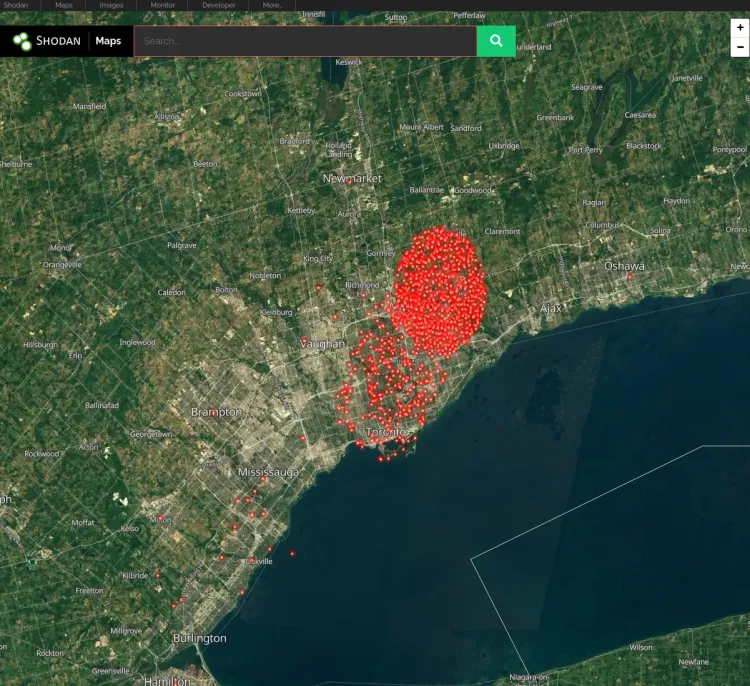
In the world of self-hosting, "Security through Obscurity" is an old myth. Automated botnets scan the entire IPv4 address space in minutes. If you expose a default-password Login page, you aren't "lucky" if you don't get hacked - you’re just next in line.
This guide is your Battle Plan. We aren't just checking boxes; we are building a practical real Defense-in-Depth strategy. We will fortify your digital castle from the muddy moat (Network Layer) up to the vault itself (Application Layer).
This is a Living Document. As threats evolve, so does this roadmap. Bookmark this post. It is the central hub for every security guide on Core Lab.
My Recommended Homelab Security Stack for 2026
- Firewall: OPNsense
- Reverse Proxy: SWAG
- Authentication: Authelia
- VPN: WireGuard
- WAF: Zenarmor
- IDS/IPS: Suricata
- Threat Blocking: CrowdSec, Fail2Ban
- Camera Security: Frigate
- Backups: 3-2-1 strategy and of course;
- Your storage & server!
This is the Core Lab's Digital Fortress.
🛡️ Level 1: The Foundation (Network Security)
Before you worry about hackers breaking into your Plex/Jellyfin server, you need to worry about them walking through your front door. You have to have your homelab networking basics down pat first. This is your Layer 3 (Network) & 4 (Transport) Defence.
Most consumer routers (ISP provided) are plastic toys. To truly secure a homelab, you need a firewall that treats your network like a battlefield. A router is not a firewall, although a firewall can additionally function as a router.
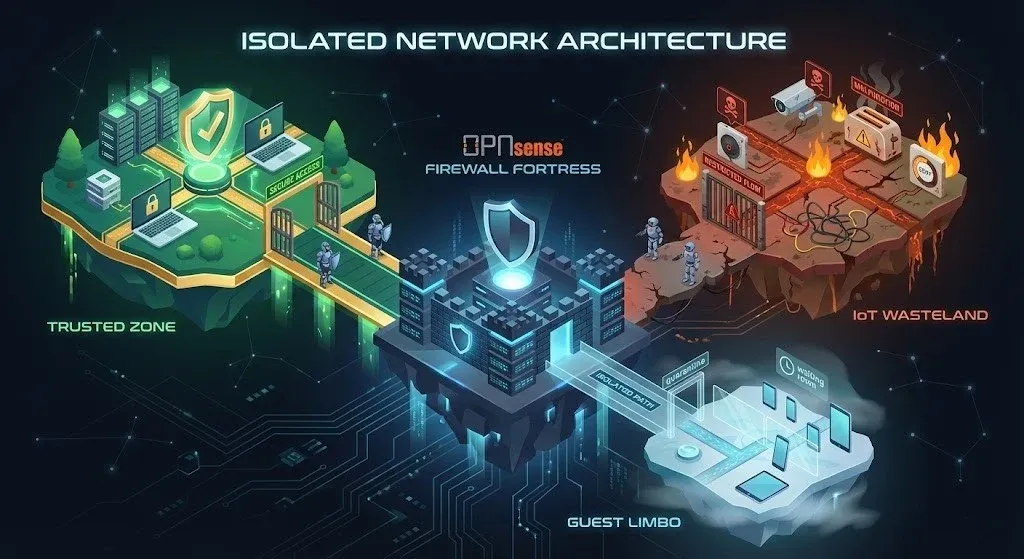
- The Philosophy: "Default Deny." Nothing talks to anything unless you explicitly allow it.
- The Strategy: VLAN Segmentation. Your IoT Toaster should not be able to talk to your NAS.
Essential Guides:
Networking Series
- [Homelab Networking Basics] - How to connect everything, and why subnets matter?
- [Homelab VLANs & Routing] - Why VLAN Segmentation is mandatory
- [Homelab NAT] - How a port forward actually works
Firewall Series
Choosing Your Firewall: OPNsense vs. Pfsense
IMO - there is no contest and I am biased towards OPNsense for many reasons. I'll prob write a dedicated post about that at some point. For the time being, all my guides for firewalls are based off OPNsense👇
- [Firewall 101: Installing OPNsense & Basic Blocklists] – Ditch the ISP router.
- [Firewall 102: VLANs & Hardening & GeoBlocking] - Isolating your IoT trash from your critical data and keeping certain places OUT.
- [Firewall 103: Enabling WAF] - Utilizing Web Application Filtering to secure your LAN
- [Firewall 104: Enabling IDS/IPS] - Setup Suricata and stop malicious packets in their tracks!
Lastly, why separation of compute and storage matters, there's always a trade-off!
🧭 Level 2: The Gateway (Reverse Proxy)
Never expose an application port directly. Opening Port 80 or 443 or 8123 to the raw internet is digital suicide.
Instead, we use a Reverse Proxy. This acts as a highly secure reception desk. It handles the SSL certificates, checks the guest list, and directs traffic to the right room. You should never expose ports directly to the internet, for any reason. This is an open invitation for attackers and is like leaving the front door of your house unlocked.
Common ports are literally constantly scanned, such as 80, 443, 8123, 22 etc... Bots and script kiddies are always on the lookout for a new easy server or NAS to pwn and bring into their crypto-minig cloud, or worse - encrypt & hold as ransom!
SWAG has become my #1 go to reverse proxy because out of the box it works, has great security when scanned, a plethora of default configs to instantly enable & serve your containers/apps and can be integrated with security solutions such as Fail2Ban, Authelia, CrowdSec and more!
- The Tool: SWAG (Secure Web Application Gateway). It's Nginx on steroids.
- The Benefit: You get
plex.yourdomain.comorjellyfin.yourdomain.comwith valid HTTPS, and the outside world only sees a hardened web server, not your messy app backend. Check out the Ultimate Media Server Guide and realize this page has the keys for you to server it securely!
Essential Guides:
SWAG Series
- [Setting SWAG Up]: - Setting up SWAG Reverse Proxy.
- [Creating your multi-layered Digital Fortreess with SWAG, My Setup: Nginx with CrowdSec & Fail2Ban & Authelia] – The gold standard for self-hosting.
- [Hardening SWAG] - Bring the pain on would-be attackers, and secure an A+ on your SSL scan!
🔐 Level 3: The Bouncer (Identity & Access)
An attacker who breaches your firewall is only as dangerous as the passwords they can guess. A hardened server is like a bank vault: even if they get into the lobby, they can't open the safe.
Here, we implement Zero Trust. We don't care if you are on the local network; you still need to prove who you are.
- The Philosophy: "Never trust, always verify."
- The Strategy: Centralized Authentication. One strong login (MFA) to rule them all.
Essential Guides:
Cloudflare Series
- [Cloudflare DNS Protection (Free)] – Hiding your home IP from the world.
- [Cloudflare Geoblocking & Bot Stopping] - Block your publicly exposed services at the very top, in the cloud!
- [Cloudflare Advanced Caching] - Obtain ISP level speeds, securely.
- [Practical Authelia Guide]: Single Sign-On & 2FA.
Join the Core Lab Inner Circle
Networking & security deep-dives, delivered directly.
- [Coming Soon] CIS Hardening: Locking down Debian & Proxmox.
⚡ Level 4: Active Defense (The "Counter-Attack")
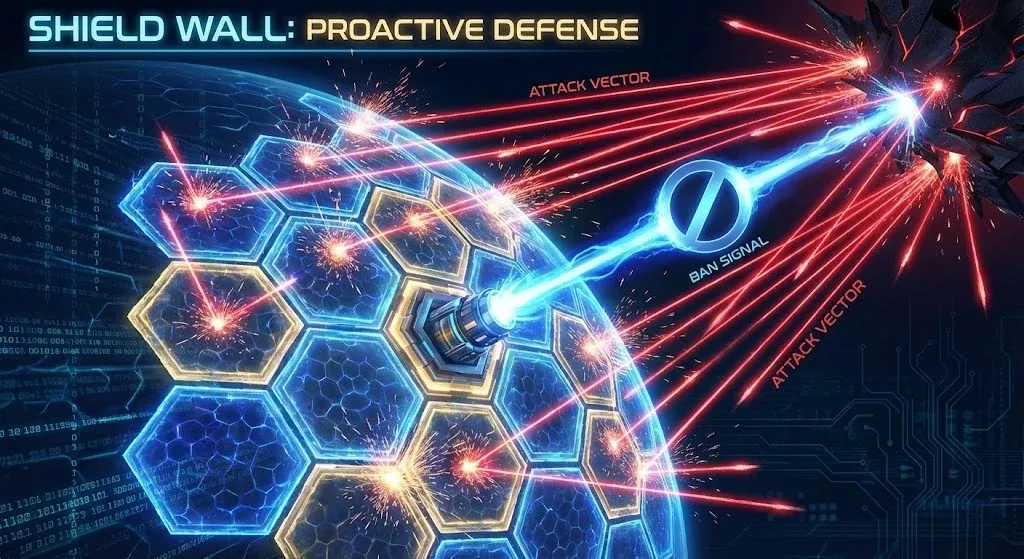
Firewalls are passive; they just stand there. Now, let's get active. We want tools that watch your logs for bad behavior and punish the offenders immediately. This absolutely deters a would-be attacker; they will look elsewhere.
- Fail2Ban: "You guessed the password wrong 3 times? You are banned for 24 hours!"
- CrowdSec: "You attacked a server in France 10 minutes ago? You are banned from my server in Canada right now!"
- Suricata: "I don't know how you made it this far, but inspecting that DNS packet shows me you're up to no good!"
Essential Guides:
- [Enhancing Fail2Ban for SWAG] – Stop brute-force attacks cold.
- [CrowdSec]: The "Waze" for Cyberattacks.
- [Zenarmor: Layer 7 Firewalling] – Filtering traffic by Application, not just Ports. Web Application Firewall baby - for FREE!
🚀 Level 5: Remote Access VPNs & CloudFlare Tunnels
Once your fortress is built, you need a way to get back inside when you are traveling.
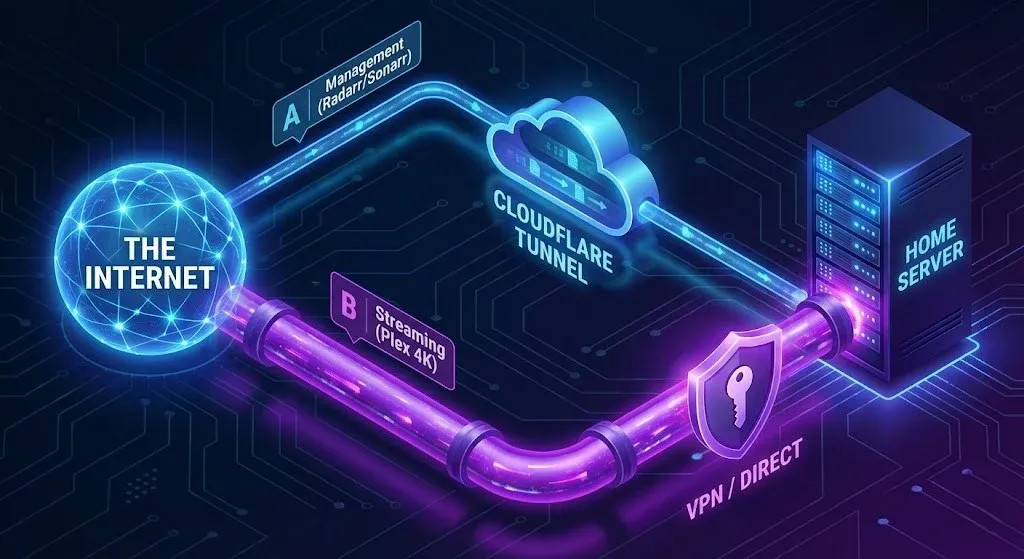
Do you use a convenient Cloudflare Tunnel? Or do you go "Dark" with a VPN? This is the most debated topic in self-hosting right now.
- The Dilemma: Convenience vs. Sovereignty.
- The Core Lab Verdict: Use the Hybrid Model. Tunnels for management, VPNs for heavy data.
Essential Guides:
VPN Series- [Cloudflare Tunnels vs. VPNs: The Definitive Guide] – Read this before you stream Plex or Jellyfin.
- [OPNsense WireGuard Guide] – The "Invisible" Backdoor.
- [Gluetun VPN Setup] – Anonymizing your download traffic, per docker.
👁️ Level 6: Surveillance (Physical Security)
Cybersecurity doesn't matter if someone steals your NAS or server right out of the rack. Physical security is the often-forgotten layer of the homelab onion.
I utilize Frigate NVR - an AI-powered camera system that runs locally. No cloud subscriptions, no data leaks. Just local, intelligent monitoring.
Essential Guides:
- [Frigate NVR Guide (2026)] – Building the "Zero False Positive" system.
- (COMING SOON)[Frigate + Home Assistant Integration] – Automating your physical response (lights, sirens).
🚰 Level 7: Disaster Recovery & Backups (The Safety Net)
The only unhackable server is a powered-off server. Since we have to run these things, we must assume that eventually, something will break (or we will break it😮).
- The Rule: 3-2-1 Backups. 3 Copies, 2 Media Types, 1 Offsite.
- The Reality: If you haven't tested your restore, you don't have a backup!
Essential Guides:
- [My Simple Docker Backup Strategy] – Scripts to save your bacon.
- [Coming Soon] The Automated "Unattended Upgrades" Guide.
Where to Start?
Don't get overwhelmed. Security is a marathon, not a sprint.
Start with Level 1. Get your Firewall right. Then move to Level 2 (Reverse Proxy).
Rome wasn't built in a day, and neither is a secure Homelab. But with this roadmap, you will at least be building on solid ground.
FAQ: The Digital Fortress
Why shouldn't I just use my ISP router's built-in firewall?
ISP routers are effectively black boxes. They usually have minimal logging, limited firewall rules, no VLAN support, and often receive updates slowly or inconsistently. A dedicated firewall such as OPNsense gives you full visibility into what is happening on your network, including which devices are making outbound connections, what ports are exposed, and whether suspicious traffic is occurring.
For a modern homelab, visibility matters more than raw internet speed. If one device is compromised, you want to know immediately.
What is the biggest threat to a 2026 homelab?
The biggest threat is no longer a single hacker trying to break in manually. Most attacks are now automated.
A compromised IoT device, exposed Docker service, or weak password can quickly lead to ransomware spreading across your network. Once inside, it may try to encrypt your NAS, media server, backups, or other systems.
That is why the two most important parts of this roadmap are:
- Level 1: Network segmentation with VLANs and proper firewall rules
- Level 7: Offline and immutable backups
If you only do two things, do those.
Is a reverse proxy better than port forwarding?
Yes. Direct port forwarding creates a straight path from the internet to your application.
A reverse proxy adds a protective layer in front of your service. It can:
- Hide the real internal IP of your server
- Provide HTTPS certificates automatically
- Block malicious requests
- Require authentication before traffic reaches your app
- Work with tools such as Authelia, CrowdSec, or Cloudflare
For services like Plex, Jellyfin, Home Assistant, Immich, or Overseerr, a reverse proxy is dramatically safer than exposing a raw port.
What is the safest way to expose Plex or Jellyfin remotely?
The safest method is:
- Put the service behind a reverse proxy such as SWAG or Traefik
- Use HTTPS with valid certificates
- Add authentication such as Authelia where possible
- Restrict access with CrowdSec, geoblocking, or firewall rules
- Prefer a VPN such as WireGuard for admin access
Plex is somewhat safer by default because it uses its own authentication and relay system, but Jellyfin can be just as secure if properly configured.
Should I use a reverse proxy or a VPN?
Use both, but for different purposes.
- Use a reverse proxy for public-facing services you want others to access, such as Plex, Jellyfin, or a personal website
- Use a VPN such as WireGuard or Tailscale for anything administrative, such as accessing your router, Docker dashboard, Proxmox, or SSH
If you only need access for yourself, a VPN is usually the safest option.
Is Cloudflare Tunnel safe for self-hosting?
Cloudflare Tunnel is generally much safer than raw port forwarding because it avoids exposing an inbound port on your firewall.
However, it is not a complete replacement for proper security. You should still:
- Use authentication
- Limit what services are exposed
- Avoid placing sensitive dashboards directly on the public internet
- Understand that you are trusting Cloudflare as an intermediary
Cloudflare Tunnel is ideal for lightweight remote access and for people behind CGNAT.
What is the best firewall for a homelab?
For most self-hosters and homelab users in 2026, OPNsense is the best overall choice.
It offers:
- VLAN support
- Advanced firewall rules
- WireGuard and VPN support
- IDS/IPS with Suricata
- Excellent plugin ecosystem
- Better interface and faster updates than most ISP routers
pfSense is still a strong option, but OPNsense tends to be more flexible and easier to work with for modern self-hosting.
Can I secure a homelab without VLANs?
You can improve security without VLANs, but you will always be more vulnerable.
Without segmentation, every device on your network can freely communicate with every other device. That means a compromised smart plug, camera, or TV could potentially access your NAS or workstation.
At minimum, try to separate:
- Main devices
- IoT devices
- Servers and NAS systems
- Guest devices
Even two or three VLANs are a huge improvement.
Is OPNsense better than pfSense for home use?
For most home users and self-hosters, yes. I greatly favour OPNsense.
OPNsense generally has:
- A more modern interface
- Faster updates
- Better plugin support
- Simpler integration with WireGuard and Zenarmor and;
- An incredible open-source community base & FOSS friendly developers!
pfSense is still excellent, especially in business environments, but many homelab users find OPNsense easier and more flexible.
What ports should never be exposed directly to the internet?
Avoid exposing these services directly whenever possible:
- SMB / Windows file sharing (445)
- Remote Desktop / RDP (3389)
- SSH (22)
- Docker dashboards
- Proxmox
- NAS management pages
- Home Assistant
- Jellyfin admin interface
- Database ports such as MySQL or PostgreSQL
If you need remote access to any of these, use a VPN!



Member discussion