
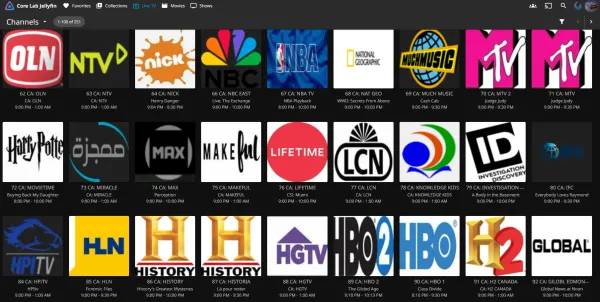
Dispatcharr Guide: Curating IPTV & EPG for Jellyfin and Plex (2026)
Curate chaotic IPTV streams into a bulletproof live TV lineup. Deploy Dispatcharr in Docker, synchronize high-accuracy XMLTV EPG data, bypass the Plex 32KB mapping bug, and stream reliably in Jellyfin and Plex.

If you have ever purchased an IPTV subscription and naively tried to paste the raw M3U link directly into Plex or Jellyfin, you already know the immediate disaster that follows.
Your media server suddenly chokes trying to parse 18,000 international channels, 95% of the channel icons fail to load, the electronic programme guide (EPG) is either missing or days out of sync, and Plex completely crashes with a cryptic "Error saving channel mappings" dialog. Worse, raw IPTV streams are notoriously fragile, offering zero stream-concurrency protection when family members click the same channel simultaneously, triggering instant provider IP lockouts.
The solution is Dispatcharr. Acting as an intelligent middleware proxy and virtual HDHomeRun tuner, Dispatcharr sits between your chaotic IPTV provider and your polished media servers.
It lets you curate, deduplicate, and renumber channels, inject custom high-accuracy XMLTV EPG sources, enforce strict stream concurrency limits, and present a clean, trimmed stream list to Plex and Jellyfin without crashing your server.
Here is my complete, production-tested guide to deploying Dispatcharr, mapping custom EPG data, pruning your lineup, and integrating it into both Jellyfin and Plex without breaking your media infrastructure.
Raw IPTV playlists choke modern media servers. This series documents the complete end-to-end homelab streaming pipeline, from network-isolated VPN tunnels and middleware curation to database optimization.
Why Raw IPTV Breaks Plex & Jellyfin
Before writing a single Docker Compose file, you need to understand the architectural bottlenecks of modern media servers when handling live TV streams:
- The Plex 32KB POST Payload Limitation: Plex Media Server relies on an older embedded C++ HTTP server. When you save channel mappings in the Plex Live TV setup wizard, your web browser issues an HTTP POST request to
/media/providers/1/lineups/...containing serialized metadata for every mapped channel. If your playlist exceeds ~450 channels, that POST payload exceeds 32,768 bytes (32KB). Plex's embedded server silently truncates the incoming request body, encounters an unexpected EOF, and throws an internal parsing error: "Error saving channel mappings". You cannot give Plex a massive IPTV list. Trust me, I spent days debugging this in my own lab. - EPG Mismatch & Timezone Drift: Most IPTV providers supply horrific EPG feeds. Half the channels lack programme metadata entirely, IDs do not adhere to standardized XMLTV conventions, and timezone offsets are wildly inaccurate, resulting in schedule guides that drift hours out of sync.
- Provider Stream Concurrency Limits: Most IPTV subscriptions only permit 2 to 4 concurrent connections. If multiple client devices or background DVR recording tasks start simultaneously, unmanaged servers exceed the limit and your provider will immediately ban your IP. Dispatcharr enforces strict account-level concurrency gates so your household never trips provider lockouts.
The 3-Tier Curated Live TV Pipeline
How Dispatcharr abstracts fragile upstream IPTV feeds into rock-solid Plex and Jellyfin tuners
- Xtream Codes API: Pull categories on demand with minimal network overhead instead of downloading multi-megabyte monolithic M3U playlists on every sync.
- Independent XMLTV (EPGShare): Bypass horrific provider guide data by sourcing clean 7-day compressed (.gz) XMLTV feeds for US, Canadian, and UK broadcast networks.
- Strict Concurrency Cap: Enforce account stream limits (e.g., 2 concurrent streams) at the server gateway to eliminate provider account suspensions.
- Regex Sanitization & Pruning: Strip annoying provider junk ([US], |FHD|, 4K prefixes) and curate 18,000 raw streams down to 150 pristine, renumbered favorites.
- Virtual HDHomeRun Tuner: Emulates a physical SiliconDust HDTC-2US tuner on port 9191 for instant native discovery by media servers.
- Plex Sub-400 Rule: Keep channel lineups strictly under 400 channels to guarantee HTTP POST save requests never breach Plex's hardcoded 32KB buffer limit.
- Jellyfin Direct Ingestion: Feed pruned M3U and XMLTV endpoints directly into Jellyfin Live TV with zero plugin dependencies.
- Host Macvlan Bypass (omv_shim): Leverage a /32 routing shim on Debian/OMV to allow bare-metal server processes to communicate with macvlan containers at wire speed.
Architecture & Stream Telemetry: Dispatcharr vs. Raw IPTV
To demonstrate the impact of adding a middleware proxy layer, I benchmarked raw IPTV ingestion against Dispatcharr's Direct Stream, FFmpeg remux, and WireGuard VPN tunnel modes on my production media stack. The telemetry below reveals dramatic differences in channel tune latency, CPU overhead, and stability:
Step 1: Deploying Dispatcharr via Docker Compose
Dispatcharr runs as a lightweight Python/FastAPI web service paired with an internal SQLite/Postgres database and an FFmpeg stream proxy engine. In my production homelab, I deploy it on my dedicated media stack attached to my macvlan LAN network (corelab_lan at IP 10.0.0.60) with NVIDIA GPU acceleration enabled.
Create a persistent directory on your storage pool (e.g., ${MEDIA_DATA}/dispatcharr/data or /docker/containers/media/dispatcharr) and deploy the following production-tested configuration:
# Core Lab Production Stack: Dispatcharr IPTV Middleware
services:
  dispatcharr:
    image: ghcr.io/dispatcharr/dispatcharr:latest
    container_name: dispatcharr
    restart: unless-stopped
    dns:
      - 10.0.0.1    # OPNsense Gateway / Local DNS
      - 10.0.0.110  # AdGuard Home / Pi-hole
    environment:
      - TZ=${TZ}
      - PUID=1000
      - PGID=100
    volumes:
      - ${MEDIA_DATA}/dispatcharr/data:/data
    # Hardware acceleration: NVIDIA NVENC or Intel QuickSync
    deploy:
      resources:
        reservations:
          devices:
            - driver: nvidia
              count: 1
              capabilities: [gpu]
    # For Intel QuickSync, swap deploy block for:
    # devices:
    #   - /dev/dri:/dev/dri
    networks:
      corelab_lan:
        ipv4_address: 10.0.0.60
    ports:
      - 9191:9191

networks:
  corelab_lan:
    external: true
Start the container from your stack directory:
Once the container is healthy, open your browser and navigate to http://10.0.0.60:9191 (or your server's IP) to complete the initial administrator account onboarding.
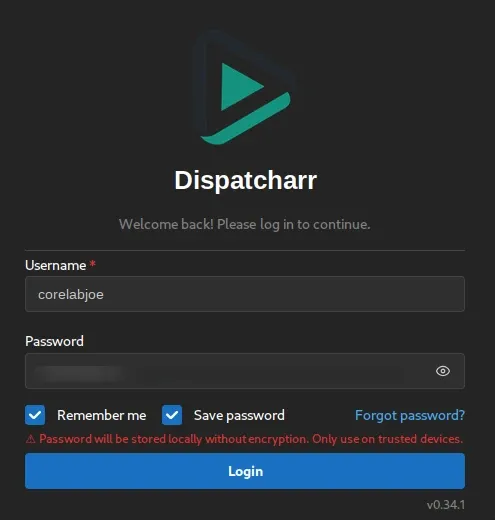
Step 2: Connecting Your IPTV Subscription (Xtream Codes vs. M3U)
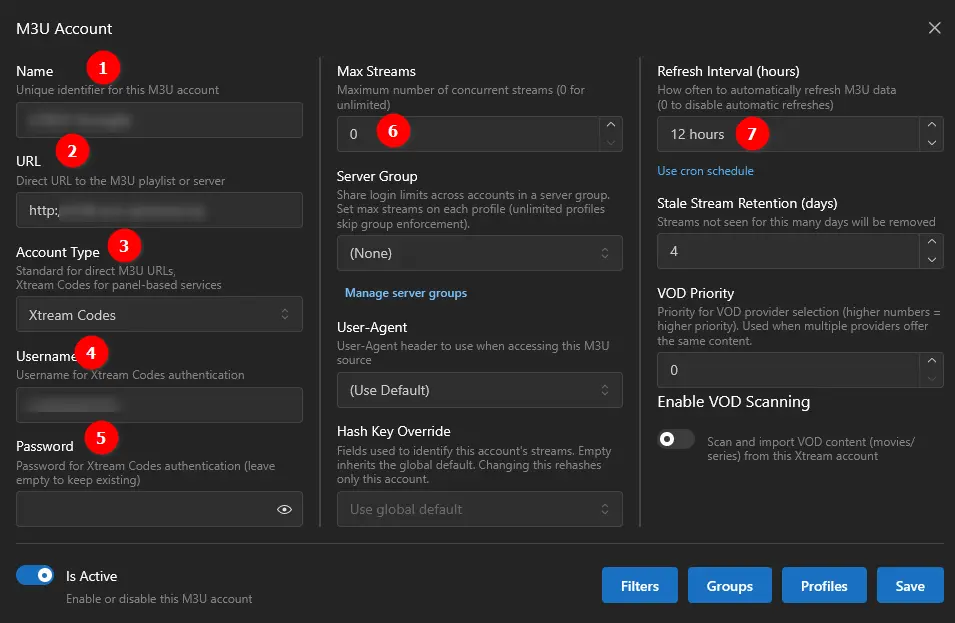
Dispatcharr supports both traditional raw M3U/M3U8 URLs and Xtream Codes API credentials. Always prioritize Xtream Codes whenever your provider provides it. It is dramatically faster to synchronize, allows Dispatcharr to query categories on demand, and eliminates the need to download bloated multi-megabyte M3U files repeatedly.
- Navigate to M3U & EPG Manager → Add Provider in the Dispatcharr navigation bar.
- Select Xtream Codes (or M3U if your provider does not support the API).
- Enter your server URL (e.g.,
http://provider-domain.com:8080), Username, and Password. - Crucial Setting — Max Streams: Set this strictly to the concurrent stream limit allowed by your subscription (e.g.,
2or3). When this threshold is met, Dispatcharr will gracefully reject surplus requests or serve an informative busy card rather than allowing your provider to trigger an IP ban. - Click Sync. Dispatcharr will connect to the provider API, index categories, and catalogue all available live channels in the background.

Step 3: Mastering EPG (Sourcing & Fuzzy XMLTV Mapping)
A live TV interface without a functioning TV guide is unusable. While IPTV providers typically supply an XMLTV URL, provider-supplied guides are notoriously unreliable and prone to massive timezone drift. Dispatcharr allows you to integrate independent external XMLTV feeds and map them seamlessly to your streams. Do this, spend some time on this, or this whole plan of yours will fail!
Recommended External XMLTV Sources
- EPGShare (Free / Crowdsourced): Provides pristine, highly accurate 7-day broadcast schedules for Canadian, US, UK, and Australian networks. Compressed
.xml.gzfeeds minimize network overhead. - IPTV-org EPG: A massive public repository of international broadcast XMLTV guides covering global specialty networks.
- Provider Fallback: Use your provider's native XMLTV URL strictly as a fallback for niche premium sports or regional pay-per-view channels that lack standard OTA broadcast guides.
Configuring EPG in Dispatcharr
- Go to EPGs → Add EPG.
- EPGs are in the bottom 1/2 of the config page of M3U & EPG Manager.
- Paste your external XMLTV URL (e.g.,
https://epgshare01.online/epgshare01/epg_ripper_CA1.xml.gz). - Configure the Update Schedule (every 12 to 24 hours is optimal). Dispatcharr natively decompresses
.gzarchives in memory automatically to conserve bandwidth. - Navigate to Channels. You can manually map channels or trigger Dispatcharr's automated fuzzy matcher to pair channel names (e.g., "TSN 1 HD", "Sportsnet Ontario") with standardized XMLTV entries.
Step 4: The Art of Channel Pruning & Custom Profiles
Do not export your master channel list. You do not need 5,000 obscure foreign feeds or 8,000 looping sitcom streams cluttering your guide grid.
Dispatcharr features a powerful Profiles system. Profiles allow you to create distinct virtual lineups. For example, I maintain a curated Plex-Safe profile containing strictly 140 channels of local news and live sports, and a broader Family profile for Jellyfin.
Building a Curated Profile
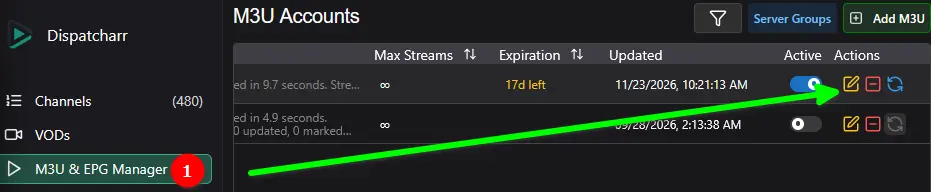
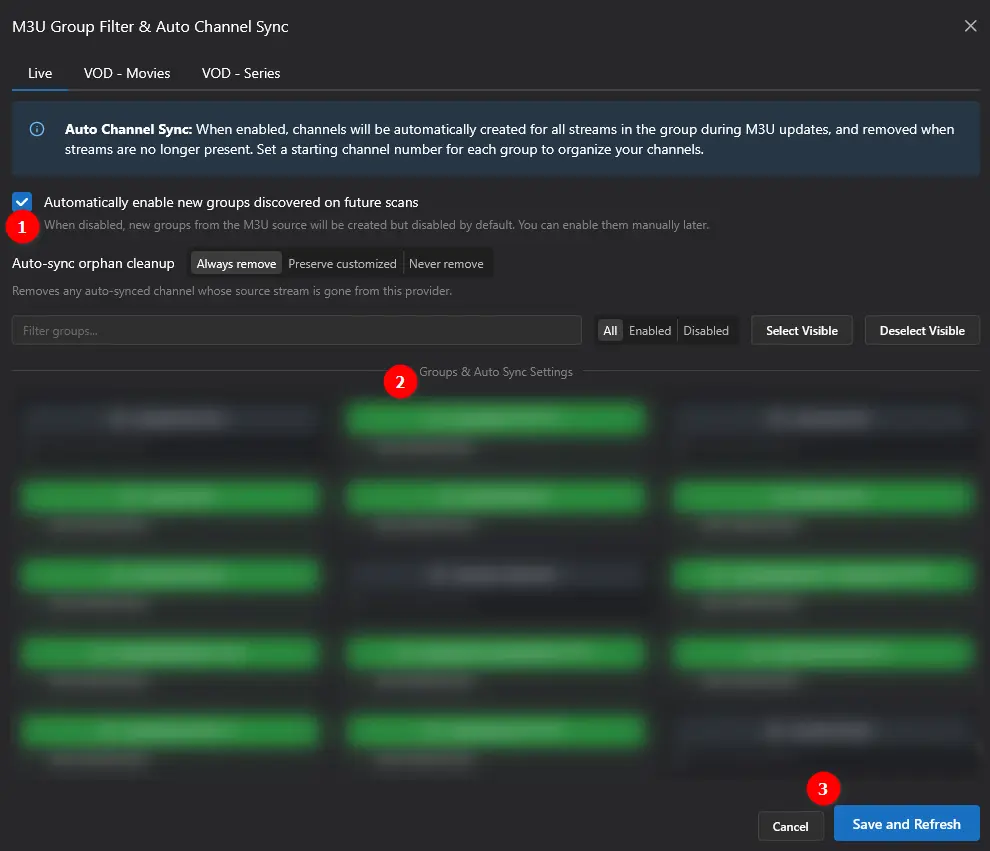
- Navigate to M3U & EPG Manager → Edit Your Provider (e.g., name it
Plex-Safe). - Use Category Filters to select only the packages you care about (e.g., Canada - Regional, US - Local Broadcast, US - Major Sports).
- Be PICKY - it's tempting to want to add a lot, just pick what you will actually watch, you can always go back to it and add more later 😉
- Renumbering & Clean Names: Assign logical channel numbers (e.g., 2, 4, 7 for major networks, 100+ for sports). Strip annoying provider prefixes like
[US],|US|, orFHD:using Dispatcharr's bulk regex rename tool.
Now you go to the tab Channels (top left), and actually start matching the Streams to your Channel Lineup! This is where the "magic" begins...
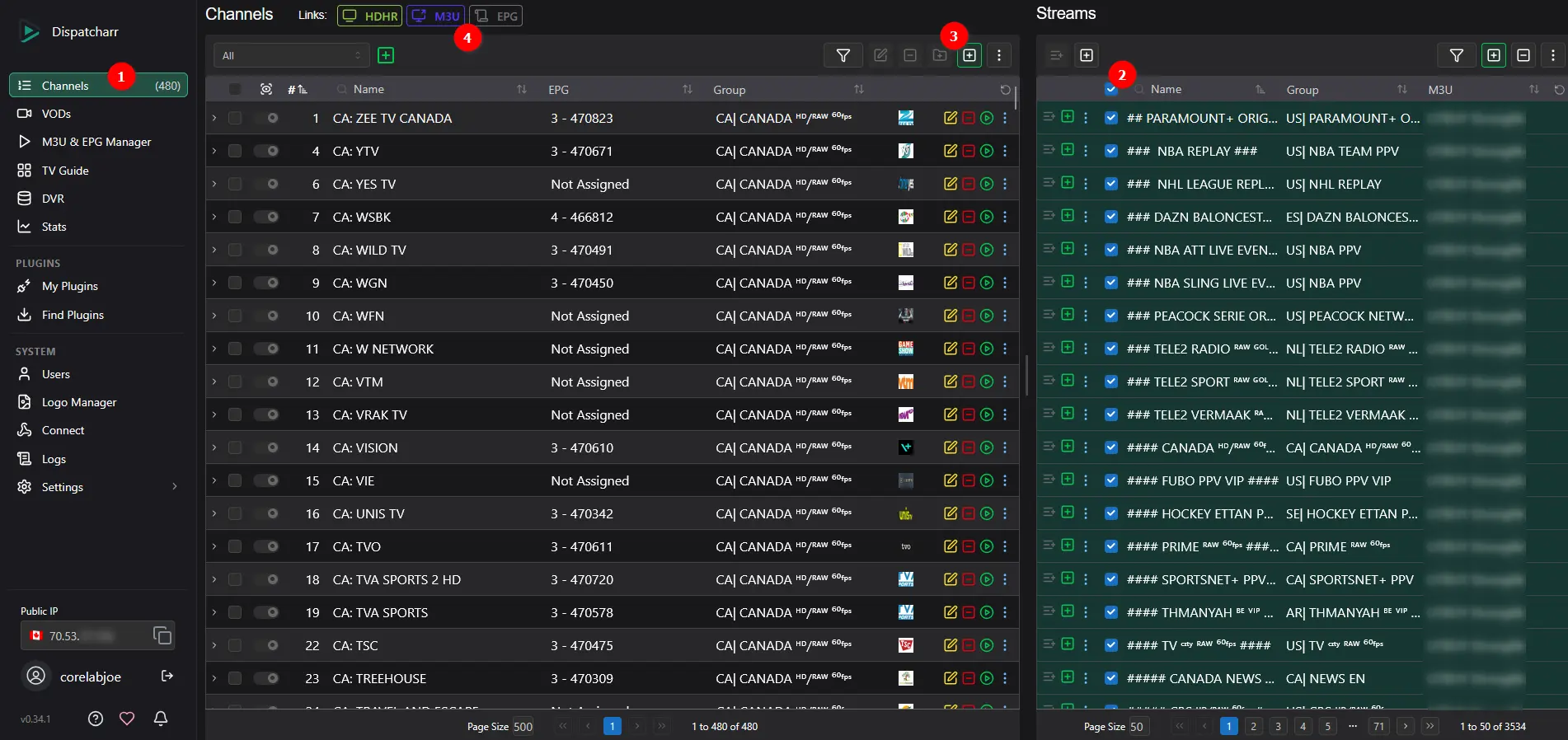
- Select the channels you want on the left side, and click the green ➕ slightly to the left, almost centre screen (item #3 in the picture above) if on a full screen and if you hover over it, it says "Add Channel". Click that and a give your new Channel profile a name. "All" could be generic, for most of your chosen channels.
- Match your EPGs to your newly chosen channels! It's the 3 dot menu right in the centre of the screen!
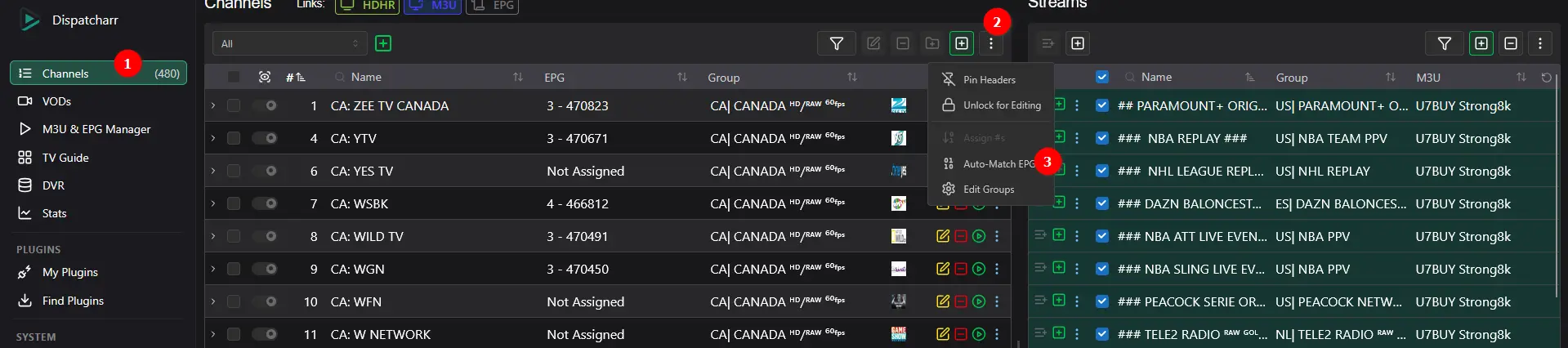
- Save your Profile. Dispatcharr generates dedicated, profile-specific production endpoints. You will see these if you click HDHR or M3U or EPG as #4 in the picture above. These are buttons in the top centre of the screen, slightly to the left.
- Profile M3U Endpoint:
http://10.0.0.60:9191/output/m3u/<profile_name> - Profile XMLTV EPG Endpoint:
http://10.0.0.60:9191/output/epg/<profile_name> - Virtual HDHomeRun Discovery:
http://10.0.0.60:9191/hdhr/<profile_name>/discover.json
Automated Channel Hygiene: epg_janitor & Event Channel Managarr
Initial channel curation is only half the battle. IPTV playlists are notoriously volatile: channel streams migrate, upstream XMLTV IDs break, and pay-per-view (PPV) or live sports packages generate hundreds of empty, dormant feeds that display "No Programme Information Available" for 98% of the week. Left unmanaged, these dead feeds clutter your electronic programme guide and quickly push your lineup past Plex's strict 400-channel limit.
To eliminate manual weekly maintenance, I deploy two custom automation plugins inside Dispatcharr's plugin engine (/data/plugins/):
- EPG Janitor: Runs scheduled background health audits across assigned channel lineups. If an active channel loses its schedule data or the upstream provider changes stream metadata, EPG Janitor evaluates regional broadcast databases (Canada, US, UK, Germany), station callsigns, and aliases to automatically fuzzy-match and heal the missing electronic programme guide. It also cleans stale or broken XMLTV mappings from hidden channels to prevent background sync errors.
- Event Channel Managarr: The ultimate solution for homelab sports enthusiasts. It continuously monitors the EPG schedule of designated live event and PPV groups. When a channel has no active broadcast scheduled, Event Channel Managarr automatically hides it from your output profiles. As soon as a live game or fight is populated in the EPG timeline, the plugin reveals the channel in your Plex and Jellyfin guides. Once the broadcast ends, the channel returns to hidden state automatically.
By letting these two background workers automate your guide hygiene, your media server lineup remains permanently pruned, lightweight, and accurate without requiring manual intervention.
Step 5: Connecting to Jellyfin
With your curated lineups and synchronized guide feeds online, connecting Jellyfin takes less than two minutes. Jellyfin features first-class native support for M3U tuner proxies or you can pick HD Homerun, and XMLTV guide feeds without requiring third-party plugins or complex shims.
First, register Dispatcharr as an M3U stream tuner:
- Log into your Jellyfin web dashboard as an administrator.
- Navigate to Dashboard → Live TV.
- Under Tuner Devices, click + (Add) and configure the stream parameters:
- Tuner Type: Select
HD Homerun. - File or URL: Enter your profile M3U URL:
http://10.0.0.60:9191/hdhr/All - Simultaneous Streams: Set to your allotted concurrent stream limit (e.g.
1or up to4, whatever you paid for).
Next, link your synchronized electronic programme guide:
- Under TV Guide Data Providers, click + (Add):
- Type: Select
XMLTV. - File or URL: Enter your profile EPG URL:
http://10.0.0.60:9191/output/epg/<profile_name>
Click Save and trigger a manual Guide Refresh. Jellyfin will parse the clean channel list and populate your Live TV grid in seconds.
Step 6: Connecting to Plex (And Bypassing the 32KB Bug)
Connecting to Plex requires careful discipline to avoid the infamous 32KB mapping crash.
Never connect a profile with more than ~400 channels to Plex. When you map channels in the Plex Live TV setup screen, the browser POST request will silently truncate if it exceeds 32KB, throwing "Error saving channel mappings". With Dispatcharr, ensure your Plex profile is pruned to only the channels you actively watch (e.g. 100 to 250 channels).
Adding Dispatcharr as an HDHomeRun Device in Plex
Dispatcharr natively emulates a physical SiliconDust HDHomeRun network tuner. Plex automatically discovers HDHomeRun devices on the local subnet without requiring third-party plugins.
- In Plex, navigate to Settings → Live TV & DVR → Set up Plex DVR.
- If Plex does not auto-discover Dispatcharr on the LAN, manually enter its IP and port:
http://10.0.0.60:9191/hdhr/<profile_name>(orhttp://10.0.0.60:9191). - Plex will recognize the virtual HDHomeRun device and display your channel count.
- When prompted for your Electronic Programme Guide, do not select Plex's built-in postal code guide unless your channel names match OTA broadcast standards verbatim. Select Use XMLTV and provide your Dispatcharr EPG endpoint:
http://10.0.0.60:9191/output/epg/<profile_name> - Map your channels to the EPG entries and click Finish. Because Dispatcharr feeds a pruned, clean list under 400 channels, Plex will save the setup instantly without error.
Operational Gotchas & Network Engineering
Running live TV middleware in a high-density homelab introduces several critical network and transcoding edge cases:
1. Host-to-Macvlan Routing Shim (omv_shim)
If Dispatcharr is deployed on a Docker macvlan network (e.g., 10.0.0.60) and your Plex Media Server runs directly on the bare-metal Linux host, Linux kernel security isolation will prevent the host from communicating directly with the container child interface. To bridge this gap, I create a local macvlan shim interface (omv_shim) with an explicit /32 bypass route:
#!/bin/bash
# Bridge host processes (Plex) directly to Docker macvlan containers

# 1. Clean up stale interface
ip link delete omv_shim > /dev/null 2>&1 || true

# 2. Create local macvlan shim linked to VLAN 7 parent NIC
ip link add omv_shim link enp37s0f1.7 type macvlan mode bridge

# 3. Enforce MTU & assign /32 host gateway address
ip link set dev omv_shim mtu 1500
ip addr add 10.0.0.254/32 dev omv_shim
ip link set omv_shim up

# 4. Route traffic to Dispatcharr directly across the shim interface
ip route add 10.0.0.60/32 dev omv_shim
2. Stream Proxying: Direct Stream vs. FFmpeg Remux
In Dispatcharr's settings, you can choose between Direct Stream (passes the raw MPEG-TS/HLS stream directly to Plex/Jellyfin) and FFmpeg Proxy (re-packages the stream in a containerized pipeline). Always use Direct Stream as your baseline to keep host CPU usage below 0.5%.
However, if you have client devices that choke on uncompressed MPEG-2 streams or multi-channel audio tracks (common on older Fire TV sticks or Apple TV setups), toggle FFmpeg Proxying with your NVIDIA GPU reservation (nvidia runtime) or Intel QuickSync (/dev/dri) enabled in your Compose file. Dispatcharr will remux or transcode the stream on the fly with minimal latency and zero CPU exhaustion.
3. VPN Tunnels & Defeating ISP Throttling
If your ISP actively throttles UDP or IPTV traffic during live weekend sporting events, route Dispatcharr's outbound requests through a dedicated WireGuard VPN container. Check out my companion architectural guide: Routing IPTV Through a Dedicated VPN: Dispatcharr & Gluetun Integration as well as my Gluetun Docker Setup Guide.
# 1. Query the live virtual HDHomeRun discovery endpoint
$ curl -s http://10.0.0.60:9191/hdhr/discover.json | jq .
{
  "FriendlyName": "Dispatcharr HDHomeRun",
  "ModelNumber": "HDTC-2US",
  "FirmwareName": "hdhomerun3_atsc",
  "FirmwareVersion": "20200101",
  "DeviceID": "12345678",
  "BaseURL": "http://10.0.0.60:9191/hdhr",
  "LineupURL": "http://10.0.0.60:9191/hdhr/lineup.json",
  "TunerCount": 10
}

# 2. Inspect the curated output M3U playlist header
$ curl -s http://10.0.0.60:9191/output/m3u | head -n 3
#EXTM3U x-tvg-url="http://10.0.0.60:9191/output/epg" url-tvg="http://10.0.0.60:9191/output/epg"
#EXTINF:-1 tvg-id="1" tvg-name="CA: CBC HD" tvg-chno="2" group-title="Canada Regional",CA: CBC HD
http://10.0.0.60:9191/proxy/ts/stream/9b4bb694-0561-4da4-bd8e-05bf225323dfDedicated Transcoding & Stream Proxy Appliances
If you plan to run live FFmpeg stream transcoding or re-packaging alongside WireGuard VPN encapsulation, offloading Dispatcharr and your media stack to a dedicated low-power Mini-PC (Intel N100 or Core Ultra with dual 2.5GbE NICs) keeps idle power draw below 8W while delivering multi-stream QuickSync hardware acceleration.
Summary: Clean Live TV in Your Homelab
IPTV providers deliver an overwhelming, uncurated firehose of unstable streams. By inserting Dispatcharr as an intermediate translation and middleware layer, you regain total architectural control: verified EPG schedules, strict concurrency enforcement, custom channel numbering, and seamless integration into both Jellyfin and Plex without triggering buffer crashes.
For more homelab media architecture blueprints, explore my Ultimate Media Server Guide (2026) and my Plex Optimization Guide.
Frequently Asked Questions
Does Dispatcharr transcode video streams, or does it only act as a proxy?
By default, Dispatcharr operates as a high-performance, lightweight stream proxy. It passes raw MPEG-TS or HLS streams directly from your IPTV provider to Plex or Jellyfin with near-zero CPU utilisation (typically < 1% CPU on an Intel N100 or Core Ultra processor). However, Dispatcharr also includes an internal FFmpeg engine that can be enabled per profile to remux transport streams into clean HLS feeds or transcode codecs on the fly if client playback devices struggle with raw interlaced broadcast feeds.
Why does Plex crash with "Error saving channel mappings" on raw IPTV playlists?
Plex Media Server’s embedded C++ web server enforces a strict ~32KB buffer limit on incoming HTTP POST request payloads. When you attempt to save channel mappings for an uncurated IPTV playlist containing more than 400 to 450 channels, the browser's serialized form payload exceeds 32,768 bytes. Plex’s web server abruptly truncates the payload, encounters an unexpected end-of-file, and fails with an error. Dispatcharr resolves this by pruning your lineup into a lean, custom profile (typically 50 to 200 channels) and serving it as an emulated SiliconDust HDHomeRun tuner.
Can I route Dispatcharr through a WireGuard VPN to prevent ISP throttling?
Yes. In Docker Compose, you can route all outbound IPTV traffic through a dedicated WireGuard VPN container (such as Gluetun) by setting network_mode: "service:gluetun" on the Dispatcharr service. This encapsulates all provider requests and stream chunks inside an encrypted tunnel, defeating ISP throttling during high-bandwidth live sporting events while keeping the Dispatcharr web interface accessible on your local LAN.
How does Dispatcharr prevent exceeding IPTV provider concurrent connection limits?
Dispatcharr enforces a strict account-level max_streams concurrency gate at the middleware layer. If your subscription allows two concurrent connections and family members attempt to launch a third stream, Dispatcharr intelligently queues or rejects the excess request locally rather than forwarding it to your upstream provider. This prevents your provider's security systems from detecting simultaneous over-limit requests and issuing an immediate account or IP ban.
Should I use M3U Tuner or HDHomeRun emulation when connecting Dispatcharr to Jellyfin?
For Jellyfin, using the M3U Tuner option (pointing to http://<ip>:9191/output/m3u/<profile>) is generally recommended because it preserves native channel categories, stream tags, and custom channel numbering directly from the M3U metadata. However, Dispatcharr also fully supports HDHomeRun emulation (http://<ip>:9191/hdhr/<profile>), which Jellyfin auto-discovers on the local subnet. Both options function reliably; choose M3U Tuner if you want granular group filtering in Jellyfin's Live TV interface.
What is the difference between EPG Janitor and Event Channel Managarr?
Both are automated background hygiene workers included in Dispatcharr. EPG Janitor audits existing channel mappings, continuously checking external XMLTV databases to repair drifting or missing electronic programme guide data. Event Channel Managarr dynamically manages temporary pay-per-view (PPV) and live sports feeds: it automatically hides dormant event channels when no broadcast is scheduled, and unhides them in your Plex and Jellyfin guides only when an active game or fight appears in the guide schedule.
Written by
On this page
What's Next?

The Homelab Digital Estate: Building an End-of-Life Disaster Response Plan (From Markdown to ReMemory)
What happens to your homelab and encrypted family photos if you die tomorrow? How I built a two-tier digital estate response plan, combining plain-language family runbooks with offline Shamir threshold cryptography using ReMemory.

Cybersecurity Threat Intel: What the Critical PHP RCEs and Tailscale Disclosures Mean for Homelabbers
The past 72 hours delivered a brutal one-two punch: critical PHP RCEs ('php2shell') followed by a 12-hour-old Tailscale SSH socket vulnerability disclosure. Here is my technical breakdown and how I hardened my homelab.