
Stremio + Debrid Guide (2026): The "Netflix Killer" Setup
Stop paying for streaming services. Learn the 2026 "AIOStreams" setup for Stremio + Real Debrid. Includes critical fixes for iOS, Fire TV, and Canadian ISP blocks.
Navigating the world of media can be complex. You have two choices: Build a massive, high-maintenance homelab server (Plex/Jellyfin), or use the "Cloud" approach. If you don’t want to buy hard drives, manage Linux ISOs, or worry about transcoding hardware, Stremio + Real-Debrid is the answer.
It's the "Netflix Killer" that actually works. Think of this as the "Dark IT Magic" approach to media sovereignty.
Works with:
✓ Fire TV
✓ Android TV
✓ iPhone/iPad
✓ Rogers
✓ Bell
Time required: Roughly ~15 minutes
Best for:
People who want Netflix simplicity without a Plex/Jellyfin server.
TL;DR - Already know what you're doing?
- Get RD/Torbox account
- Configure AIOStreams
- Install Stremio
- Test playback
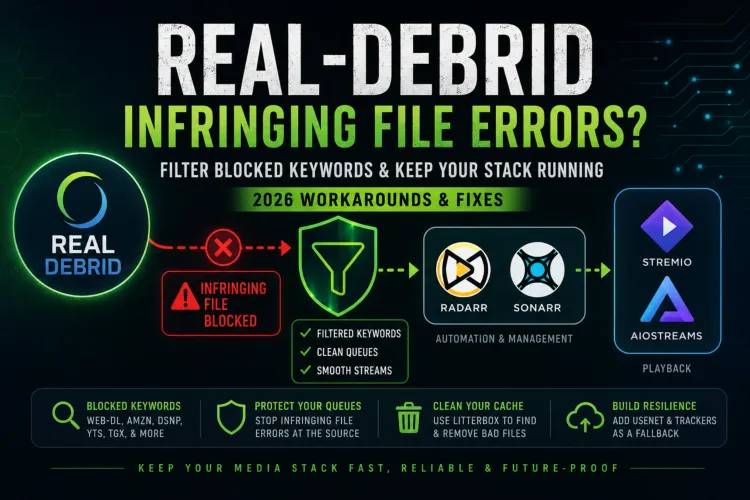
💥 Update June 12 2026 - Real Debrid 'Filtering' Fisco
The ElfHosted version of the AIOStreams Tomtaro SEL template now includes the necessary filters to exclude the banned search terms. Simply re-import or rebuild your template and Real Debrid should be working again. You'll likely notice fewer available links than before, but the setup remains functional.
Additional instructions below outline how to apply similar filters in Sonarr and Radarr as a final catch-all safeguard.
Following Real Debrid's legal challenges and subsequent cache purges earlier this month, many users migrated to Torbox. After evaluating the landscape, I've decided to continue using Real Debrid for now, as it's still working reliably for me 9 times out of 10. That said, I'll also be experimenting with Torbox as part of a more resilient, failover-friendly approach going forward.
Ultimately, both Real Debrid and Torbox can be used successfully, and the right choice comes down to your own priorities around reliability, content availability, and redundancy.
In this guide, I won’t just show you how to set it up. I’ll show you how to make it indestructible using the AIOStreams Aggregator Protocol - the latest evolution in the streaming meta. This is a beginner friendly guide, it will be detailed but the result is nothing short of incredible. Please read completely and carefully so you cast this dark magic properly...
This is part of my Real-Debrid Media Server Series:
Choose Your Media Journey
Start with the path that best matches how you want to watch and manage your media.
Fastest Setup
Stremio + Real Debrid (2026)
Netflix simplicity with virtually no maintenance. No hard drives, no server, just press play.
Automation
Decypharr: Instant Downloads & Streaming
Automatically find and queue content while still leveraging Debrid services behind the scenes.
Ultimate Control
Plex/Jellyfin + Debrid (DUMB)
Share with family, build a true media server, and unlock the full power of the hybrid approach.
1 - You must have fast internet service to utilize 4K and high qual HD streams from Stremio & Real Debrid! Grandma's 5Mbps won't cut it. You should have at least 100Mbps download service.
2. This solution can NOT be shared the same way that Plex/Jellyfin can be. Real Debrid actively monitors for account sharing and does (often!) slap people with service bans without refunds! See their TOS here.
Plex or Jellyfin & Real-Debrid to address this👇
 Core Lab Joe
🛠️ Pre-Requisites: Stremio & Real-Debrid Accounts
Step 1: Stremio Account: Sign up for free at stremio.com.
🇨🇦 Canadian ISP Blocks: Fixing Rogers and Bell
If you are on Rogers Ignite or Bell Fibe, your ISP’s "Advanced Security" might be killing your connection to Real-Debrid before the movie even starts.
The Symptom: Stremio opens and search works, but when you click a link, it hangs on a black screen or shows "No streams found."
For Rogers (Ignite/Xfinity users):
Rogers uses "Advanced Security" to block what it deems "suspicious" cloud traffic.
- Open your Rogers Xfinity (Ignite WiFi) App.
- Go to the Account tab -> Security.
- Toggle Advanced Security to OFF.
- Note: If you want to keep it on, you must "Allow" the blocked Real-Debrid domain for 1 hour at a time—save yourself the headache and just disable the toggle.
For Bell (Fibe/Giga Hub users):
Bell's "Guard" feature often intercepts DNS requests.
- Disable "Guard": Open the Bell WiFi App and turn off the "Guard" or "Privacy" feature.
- Fix Your DNS: The Bell Giga Hub (and newer 2026 hubs) makes it hard to change DNS at the router level. For the best experience, change the DNS directly on your Streaming Device (Shield, Fire Stick, or Apple TV) to:
- Primary:
1.1.1.1(Cloudflare) - Secondary:
8.8.8.8(Google)
- Primary:
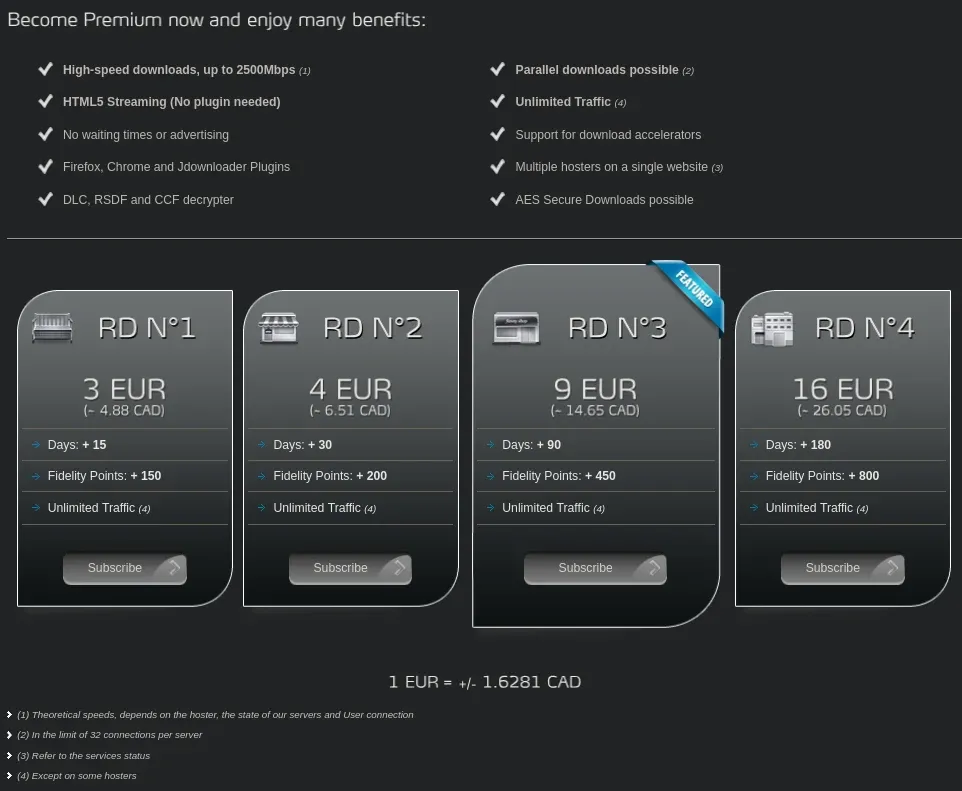
Step 2A: Real-Debrid Account: This is the engine. It costs ~$4/CAD month. If you don't mind, sign up with my referral link which helps support the site.

Step 2B: TorBox Account - Newer engine, after the filtering legal fiasco Real Debrid has just undergone, this may be your preferred choice. VERY CHEAP!

NOTE: If using a pre-existing Stremio account - Make sure you delete any non-official plugin (Click the Puzzle Piece Addons tab on the left, and make sure the Official Tab matches the My Addons Tab). You need a "clean slate" for this setup to work well.
- Tip: Buy the 180-day package for the best value.
- Note: You can use AllDebrid as a backup, but Real-Debrid has the largest cache of content. By far.
Privacy & Data Sovereignty Concerns
Encryption & Legal Compliance Your connection to Real Debrid is encrypted, meaning your ISP can see that you are using the service, but not what specific files you are accessing. However, please be aware that Real Debrid is not a "no-logs" VPN. Real Debrid is based in France and complies with French laws regarding data retention (1-year IP logging). While the service functions as a legal cloud storage solution, users are personally responsible for their usage choices and compliance with copyright laws. See the Real Debrid TOS for more information. Like your ISP or any compliant service provider, they must respond to valid court orders or warrants by disclosing the user information and IP logs they retain.
How can I protect my privacy?
These items are beyond the scope of this guide, but if you're truly worried (I'm not):
- Sign up with an anonymous new email address.
- Utilize a VPN when connecting to their services to signup/pay.
- Pay for their service via cryptocurrency.
The AIOStreams Aggregator: Why Torrentio is Dead
The new major plugin is AIOStreams. Think of AIOStreams as a master-wrapper. Instead of you querying Torrentio, Comet, MediaFusion, and KnightCrawler individually (which crushes your Stremio client), AIOStreams queries all of them simultaneously on the backend, de-duplicates the results, sorts them by your custom rules, and feeds them to Stremio in one clean, lightning-fast list, optimized for the settings you chose.
The Updated 2026 Addon Roster:
| Addon | Verdict | Reason (2026 Status) |
| AIOStreams | ✅ Essential | The New King. Aggregates Torrentio, Comet, MediaFusion, and more into one feed. |
| Torrentio | ❌ Cooked | Rate-limited to death. Do not install standalone. Let AIOStreams handle it. |
| Comet | ❌ Cooked | Same as above. Let AIOStreams pull from it. |
| The Movie Database | ✅ Essential | Better metadata and posters than Cinemeta. |
| USA TV | ⚠️ WARN | Feeds die daily. Use a paid IPTV service for reliability. |
🛑 Stop Installing Junk: Please uninstall broken or redundant addons like Jackettio, standalone Torrentio, or Annatar. You need a "clean slate" for AIOStreams to work its magic.
How to Install and Configure AIOStreams
You've got 3 ways to run AIOStreams progressing from medium, to easy, to easy-peasy.
Once you’ve accepted that the "old way" (Torrentio, multiple separate addons) is broken, you need to decide how to host your AIOStreams instance. You have two choices: use a free (or paid) for convenience version, or build for control.
Path 1: Managed Hosting via ElfHosted (easiest)
If you want the "it just works" experience without managing containers or worrying about IP blacklists, this is the gold standard.
- The Provider: ElfHosted offers dedicated, private AIOStreams instances. Open the link from a browser as you'll have to do quite a bit of config up front.
- The Benefit: They handle the infrastructure, auto-updates, and - most importantly - if you select their private paid version, they provide clean egress IPs that aren't rate-limited by the indexers. Plus, a portion of the subscription goes back to the AIOStreams developer.
- I am using the free version.
- Setup: It’s a one-click deployment. You get a private URL (e.g.,
yourname.elfhosted.com), which you’ll use in the next step to configure your scrapers.
- Here's my guided config with pictures, first you load the site linked above:
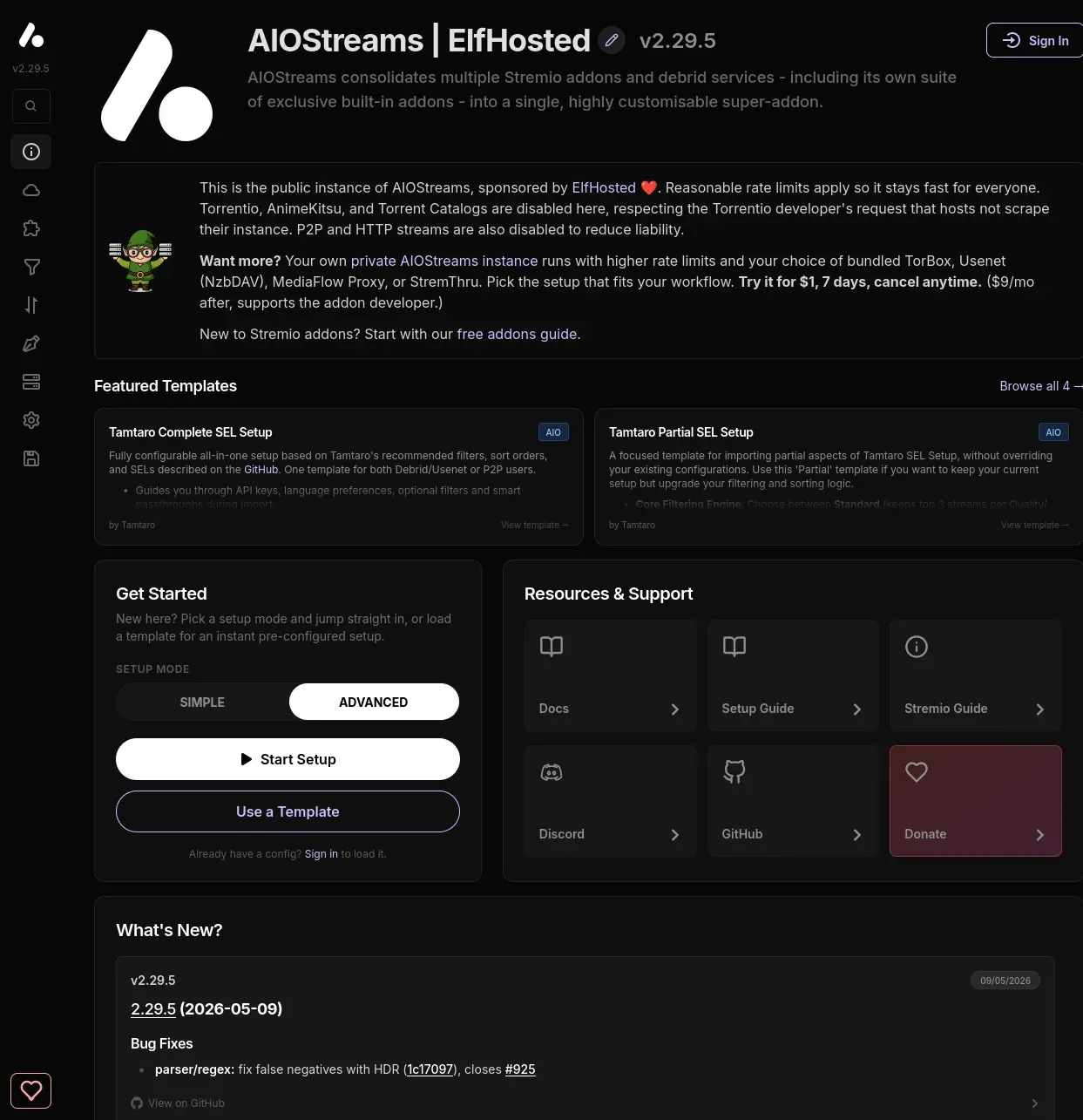
- I recommend you select Tamtaro's Complete SEL Setup but have a look and read about the options:
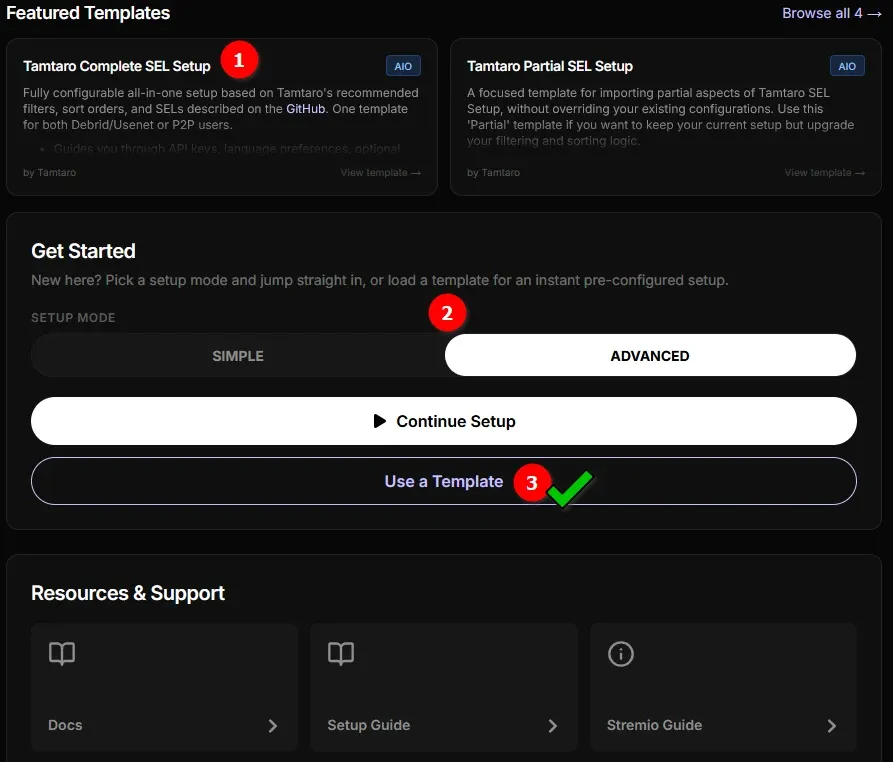
- Ensure you pay attention to the
Device Specific Exclusionsbelow:
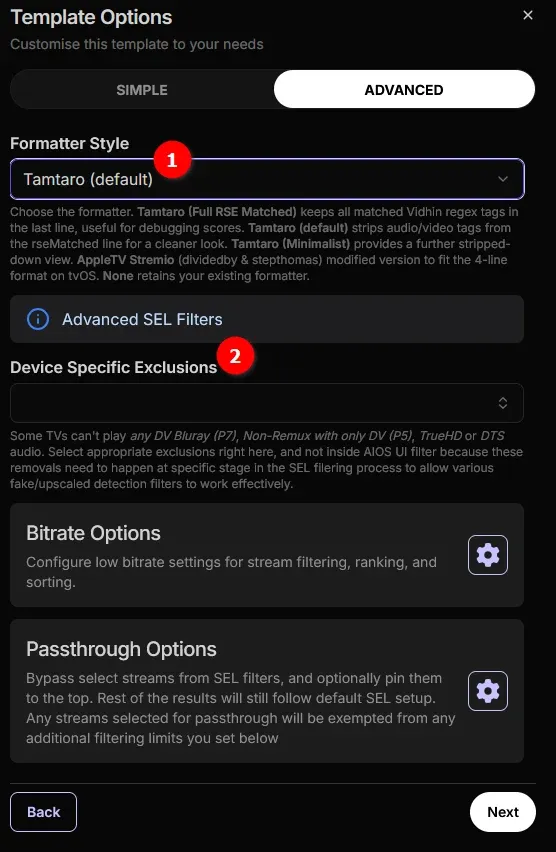
Also ensure you review the Bitrate & Passthrough options.
- Ensure you have your Real-Debrid API key ready to paste into the config, and make sure Real-Debrid is at the top (By default it is) of the Services page.
- 👊Make certain that the checkbox "Only Show Cached Streams" is selected💯
- Select additional addons you might want, I included
- MediaFusion, Comet, Kitsune (Anime) & USA TV.
- Languages: Ensure you set your primary language setting! ALL the filtering & searching is based on this...
- Stream Types & Resolutions: You can now dig into the very nitty gritty details of various streams if you want, but the template above has already optimally set them up for you. This is where you would de-select 4k if you don't have a 4k TV for example.
- Once you've went through the remainder of the Wizard you select "Install" and can then generate a Manifest URL. I copy that in case of an installation issue (It has all your settings!).
- Click to install via Stremio (App), or Stremio Web if you don't have the Stremio app installed on the computer you're configuring this on.
- You can optionally just paste that Manifest URL directly into Stremio to install as well!
Join the Core Lab Inner Circle
Networking & security deep-dives, delivered directly.
📡 Did you know your Debrid account isn't just for movies?
Check out my CachyOS Linux Gaming Guide to see how to plug your API key into Hydra Launcher to download your PC game archives at unrestricted speeds.
Path 2: The Stremio Account Bootstrapper (easy as well)
For simplicity & speed, I suggest using the Stremio Account Bootstrapper. This simplifies the configuration even further and is how I got started.

🥾Bootstraping Stremio Setup | What Addons Etc
- Click on this Bootstrap Setup link to get started
- Follow the instructions provided. As it warns, it will wipe your existing Stremio Setup.
- Select the options you prefer on their Steps 1 through 10. I suggest:
- Step 1 - All-in-One (This is AIOStreams!)
- Step 2 - Your language preference
- Step 3 - When it asks for a Debrid API Key, just use either your RD API or AD API. If you don't use a Debrid service, everything works by downloading or streaming ❗torrents to your home and your ISP can see this❗
- Step 4 - Your choice, I selected USA TV & Anime Kitsu. USA TV has live tv & sports!
- Step 5 - I ignored this, do with it as you please.
- Step 6 - Defaults, if you put a a Debrid API key in there, you can select "Cached-only (debrid)". This is what you want👏
- Step 7 - I put my TMDB key in here, while it was working, allows you to fetch metadata & posters faster etc... Not required but optional.
- It just gives you ratings on the posters you'll see, up to you!
- Step 8 - Click the Load Preset, decide which addons you want, I suggest:
Addon Verdict List
| Addon | Verdict | Reason (2026 Status) |
| AIOStreams | ✅ Essential | The New King. Aggregates Torrentio, Comet, MediaFusion, and more into one feed. |
| Torrentio | ❌ Cooked | Rate-limited to death. Do not install standalone. Let AIOStreams handle it. |
| Comet | ❌ Cooked | Same as above. Let AIOStreams pull from it. |
| The Movie Database | ✅ Essential | Better metadata and posters than Cinemeta. |
| USA TV | ⚠️ WARN | Feeds die daily. Use a paid IPTV service for reliability. |
h. Step 9 - I left blank.
i. Step 10 - Click Sync (Bootstrap) to Stremio! 😁
📺 Recommended Devices for Stremio in 2026
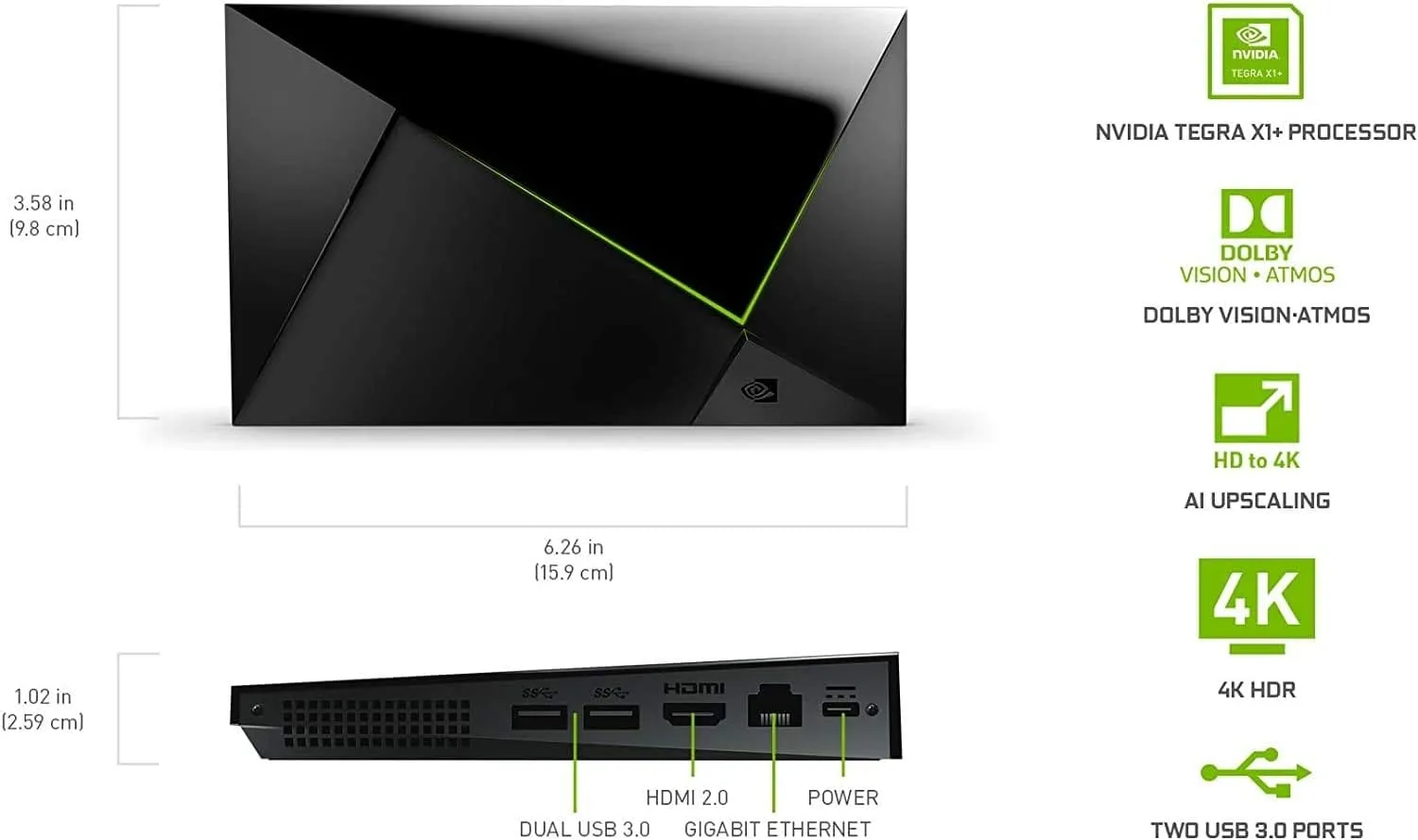
NVIDIA Shield Pro
Android TV Pro | 4K HDR Streaming Media Player, High Performance, Dolby Vision, 3GB RAM, 2x USB, Works with Alexa
Top Tier: NVIDIA Shield TV Pro
- Why: It is still the undisputed king. It handles 4K Remuxes without breaking a sweat, has AI upscaling, and most importantly for Stremio users, has USB ports. This allows them to attach a cheap SSD to create a massive cache buffer, preventing stuttering on large files even with spotty internet. Also the only device that handles Dolby Vision Profile 7 and Lossless Audio (TrueHD Atmos) perfectly. If you have a home theater system, this is mandatory.
- The Sell: The 'Buy It Once' solution. Never worry about lag, buffering, or unsupported audio formats again.
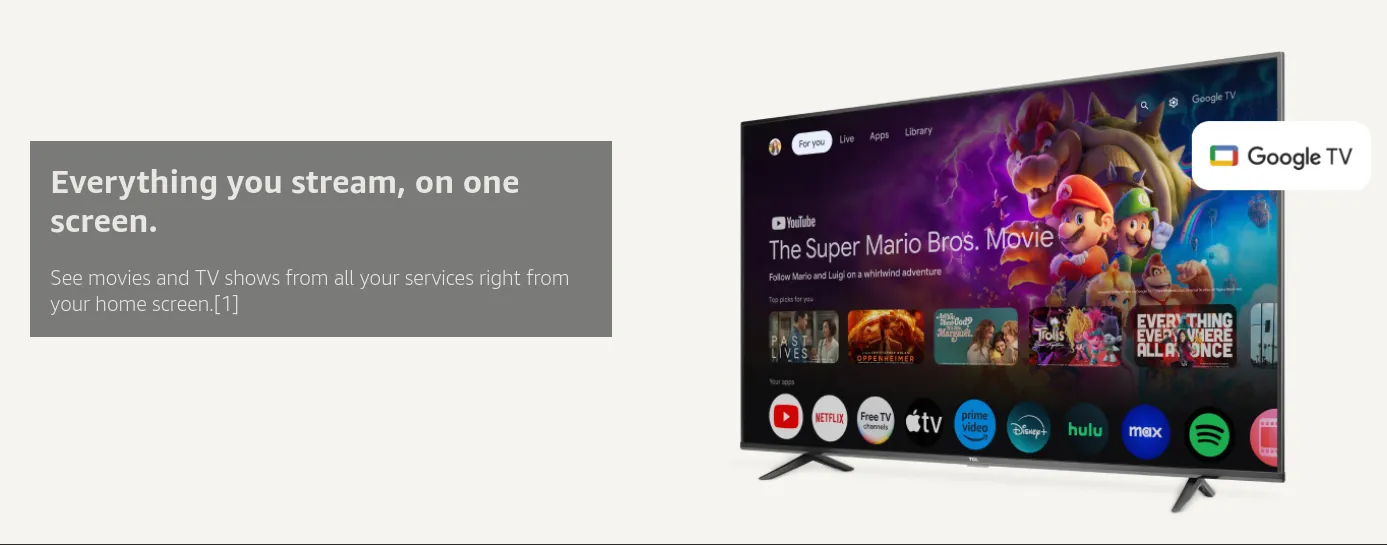
Fast Streaming Entertainment With Voice Search Remote - Watch Movies, Shows, Live TV, and Netflix in 4K HDR - Smart Home Control - 32 GB Storage
The "Modern" Choice: Google TV Streamer 4K
- Why: This replaced the Chromecast. It has 32GB of storage (huge for Stremio caching) and a much faster processor. It is the best mid-range option.
- The Sell: The cleanest interface and double the storage of most streaming sticks.
☁️ What & Why Stremio + Debrid is the 2026 Standard
Most people think this is just "torrenting." It isn't. This is basically "Dark IT Magic" 😉
- Stremio: The beautiful, Netflix-like interface on your TV (The Frontend).
- AIOStreams: The central intelligence. It queries multiple indexers (Torrentio, Comet, MediaFusion) simultaneously on the backend and delivers a deduplicated, high-speed list of results to your screen (The Logic Bridge).
- Real-Debrid / AllDebrid: The "Cloud" that sends you the video file instantly via high-speed, encrypted HTTPS (The Backend).
The Result: You get 4K Remux (Blu-ray Quality) streaming with zero buffering, zero P2P uploads, and zero letters from your ISP.
OPTIONAL Path 3: Self-Hosted Docker Deployment (Complex!)
I smashed through it but I need to refine this section. More to come!
Torrentio Legacy Setup Guide
If you'd still like to configure Torrentio the oldschool way. Open your Torrentio Config in Stremio:
- This looks like a little gear/cog wheel on the far right side, after you've already entered "addons" on the LEFT side of Stremio which looks like a puzzle piece.
- and choose the following optional yet recommended settings.
- Providers: 12
- Quality & Seeders
- No Priority Foreign Language
- Exclude Qualities: Pick what does or does not work on the device you will be watching videos on! If your TV does not support 4k HDR, EXCLUDE these. Generally you want to exclude these lower quality items - 720p | 480p | Screener | Unknown
- Max Results: 5 or 10
- No Change for Video Limit - leave it as default/blank so it allows large/unlimited file sizes.
- Put your RD/AD API Key in next.
- In Debrid Options choose the 2nd option only!
- If you did it right, your Torrentio should now say Torrentio RD/AD. If it does then your all set for Torrentio!
Comet Setup
- As with Torrentio, open the Comet Config & follow the recommended yet optional settings.
- Preferred Language - Pick, but I suggest always leaving English as well
- Resolutions - Go with what your client device can support - I selected 4K - 2160p, Full HD - 1080p, HD - 720p an SD - 480p
- Max Results: I chose 5, you can do 10 or more, but it gets messy on the screen
- Max Size (GB): Default 0 (unlimited)
- If you have slow or not good internet, you may need to limit the size of the files it returns.
- If you did everything right, you should now see Comet with the | RD at the end as well.
📱 Stremio iOS Setup: How to Watch on iPhone & iPad
"Stremio doesn't work on iPhone." False. Apple blocks the app store version, but the Web PWA (Progressive Web App) works perfectly.
- Download "Outplayer" (or VLC) from the App Store.
- Open Safari and go to
web.stremio.com. - Tap the Share Icon (Square with arrow) -> "Add to Home Screen".
- Open the new "Stremio" icon on your home screen.
- Go to Settings -> Play in external player -> Select Outplayer.
- Result: Clicking a movie will instantly launch Outplayer and begin streaming.
🕵️ Troubleshooting & Addon Management
- "Torrentio - Rate Limit Exceeded": This is why we installed Comet & MediaFusion! Just scroll down your source list and pick a "Comet" or "MediaFusion" link instead.
- "Playback Error": If a 4K file stutters, your internet (or Wi-Fi) is likely the bottleneck. Try a 1080p link or wire your device with Ethernet.
- USA TV / Live Sports: You can install the USA TV addon, but be warned: Live TV on Stremio is experimental. It often buffers. For reliable sports, we recommend an IPTV service, not Stremio.
Stremio Addon Manager - Reorder your Addons!
If you want to re-organize your addons and the order in which things appear in your Stremio home screen, you'll need to utilize Stremio Addon Manager.
Very straightforward, fill out your credentials, re-order the addons as you see fit and click Sync to Stremio!
🏁 Conclusion: The Streamer vs. The Dragon
You’ve just successfully cast some Dark IT Magic. Your Stremio setup is now a "Netflix Killer" that actually works, giving you 4K quality without the hard drive headache.
But as you’ve seen, there are two distinct paths to media mastery:
🐉 Feeling more like a Dragon?
If you find yourself wishing you could share this library with your family, or if you're worried about content disappearing from the cloud, it might be time to level up.
In my next guide, I’ll show you how to build the Hybrid "Zurg" Setup—a way to use Real-Debrid speed inside the beautiful interface of Plex or Jellyfin. You get the cloud storage of a streamer with the sharing power of a dragon.
Ready to build a server? 👇
 Core Lab Joe
🙋♂️ The Definitive Stremio & Real-Debrid FAQ (2026 Edition)
- Is Stremio + Real-Debrid legal in Canada and the US?
- Stremio is a legal, open-source media player, and Real-Debrid is a legal cloud-caching service. While streaming copyrighted content is a legal gray area, the "Dark Magic" here is encryption. Because Real-Debrid uses HTTPS, your ISP cannot see what you are watching, only that you are connected to a private cloud server.
- Why are no streams loading on Rogers or Bell?
- As of 2026, many Canadian ISPs have aggressive "Advanced Security" features that block Debrid services. You must disable "Advanced Security" in the Rogers Xfinity app or turn off "Guard" in the Bell WiFi app. For the best results, change your streaming device's DNS to 1.1.1.1 (Cloudflare).
- Do I need a VPN to use Real-Debrid with Stremio?
- No. Using a VPN with Real-Debrid is redundant and will only slow down your connection. Real-Debrid already encrypts your traffic (SSL/TLS) between their servers and your device.
- Can I share my Real-Debrid account with family and friends?
- No. Real-Debrid actively monitors IP addresses. If you stream from two different public IP addresses at the exact same time, your account will be permanently banned without a refund. To share media, you must build a self-hosted Plex or Jellyfin server.
- Why should I use AIOStreams instead of standalone Torrentio?
- Standalone scrapers like Torrentio and Comet are suffering from massive API rate-limiting and downtime due to popularity. AIOStreams acts as a master aggregator, querying multiple scrapers simultaneously on the backend to guarantee a lightning-fast, deduplicated list of links.
- Can I watch Stremio on an iPhone or iPad?
- Yes. While Apple blocks the official app from the App Store, you can use the Stremio Web PWA. Go to web.stremio.com in Safari, add it to your Home Screen, and set the "Play in external player" setting to an app like Outplayer or VLC.
- Why does Stremio buffer on 4K Remux files?
- Buffering on high-bitrate 4K files is almost always a network bottleneck or a weak streaming device. Ensure you have at least 100Mbps download speeds, wire your device via Ethernet if possible, or upgrade to a device with a massive cache buffer like the NVIDIA Shield TV Pro.

Member discussion