
Are Cloudflare Tunnels Safe for Media Servers? A Cybersecurity Vet's Analysis
A deep dive into securing self-hosted media servers. Explore the pros and cons of Cloudflare Tunnel and why you should consider Headscale or direct WireGuard for better privacy.

"No Open Ports."
In the self-hosting world, this phrase is the ultimate aphrodisiac. We are taught from Day 1 that opening Port 32400 on your router is like leaving your front door unlocked. So when Cloudflare Tunnel (cloudflared) arrived, promising to expose Plex to the world without touching your firewall, the community went all in.
But as a cybersecurity professional, I have to ask the question nobody wants to hear: Is it actually safe?
The answer is Yes... but mostly No.
In this deep dive, we are going to look at the encryption architecture, the "Man-in-the-Middle" reality, and why streaming 4K Remuxes through a Tunnel might get your account permanently banned.
🛡️ The Good: Why Tunnels Are Seductive
Let’s acknowledge why we are even having this conversation. Cloudflare Tunnel is undeniably powerful technology. Cloudflare Tunnel tech operates as a reverse proxy that establishes a secure, outbound connection to Cloudflare’s Software Defined Network (Edge), typically utilizing the QUIC protocol to transport data.
- CGNAT Buster: If you are on Starlink or 5G home internet, you don't have a Public IP. Traditional port forwarding is impossible. Tunnels punch out to the internet, bypassing this entirely.
- DDoS Protection: Your home IP address is hidden. If an attacker tries to DDoS
plex.yourdomain.com, they are hitting Cloudflare’s massive global network, not your home modem. - Zero Trust Auth: You can put a "Login Screen" (Google/GitHub Auth) in front of your apps. Very nice!
For lightweight apps like Sonarr, Radarr, or Home Assistant, this is the "Gold Standard" of security. But Plex & Jellyfin are different.
🕵️ The Bad: The "Man-in-the-Middle" (TLS Termination)
Here is the dirty secret of Cloudflare Tunnels (and any Reverse Proxy service): They have the keys to your "ride".
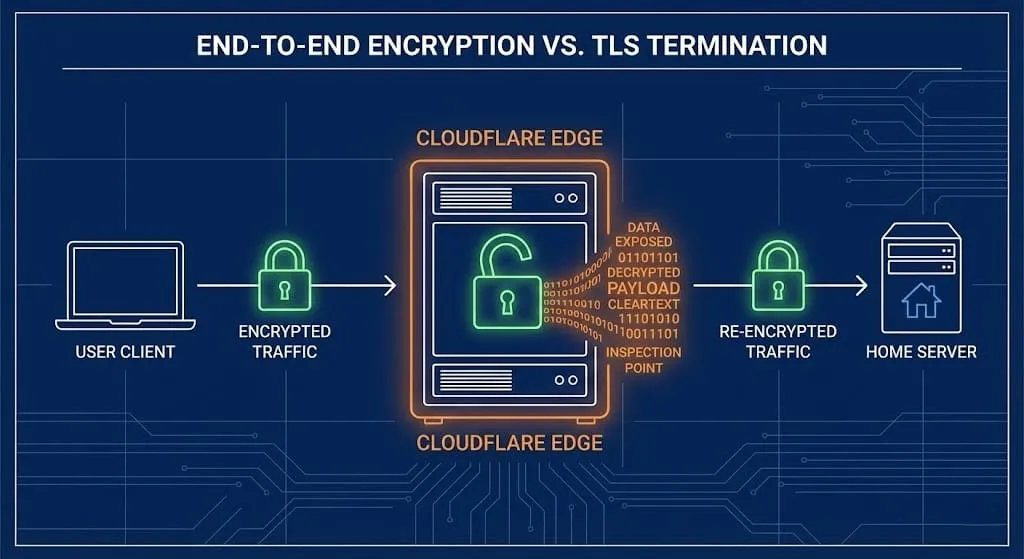
When you connect to your Plex server via https://plex.yourdomain.com, the encryption works like this:
- Leg 1 (User -> Cloudflare): Encrypted. Cloudflare holds the SSL Certificate for your domain.
- The "Middle": Cloudflare DECRYPTS your traffic.
- Leg 2 (Cloudflare -> Your Home): Re-encrypted (via the Tunnel daemon).
Why does this matter?
To perform its magic (WAF, caching, DDoS protection), Cloudflare must be able to see inside the packet.
This means, Cloudflare sees your data, in the clear.
For a "secure" mindset, this is a violation of the End-to-End Encryption principle. While I trust Cloudflare more than a random coffee shop Wi-Fi, you are technically handing a third-party corporation the ability to inspect every frame of video and every photo you stream.
If you are hosting sensitive personal data (e.g., Nextcloud or Immich), this architecture disqualifies Tunnels as a "Private" solution.
⚖️ The Ugly: The "Ban Hammer" (Terms of Service)
Even if you don't care about privacy, you should care about losing your account.
Cloudflare’s Section 2.8 (Self-Serve Subscription Agreement) effectively bans serving "non-HTML content" (i.e., massive video files) on the Free Plan.
"Use of the Services for serving video or a disproportionate percentage of pictures, audio files, or other non-HTML content is prohibited..."
The "Caching" Myth
You will read Reddit threads claiming: "Just disable Caching with a Page Rule, and you're safe!" This is false.
Even if you bypass the cache, Bandwidth costs money. If you stream a 60GB 4K Remux movie, that is 60GB of data traversing Cloudflare’s backbone. They pay for that egress. If you are a Free user pushing terabytes of Plex traffic, you are a cost center. They will eventually detect it, and they will ban your domain. They have done this to some.
Usually you get a warning first, in the form of an email with them asking you to upgrade within 7 days or have your service de-activated.
🏆 The Core Lab Verdict: The "Hybrid" Strategy
So, do we burn it all down? No. We use the right tool for the job! If you'd like to still utilize some of Cloudflare's great functionality, there's a great middle ground to be found.
The optimal setup for a secure media server uses a Hybrid Approach:
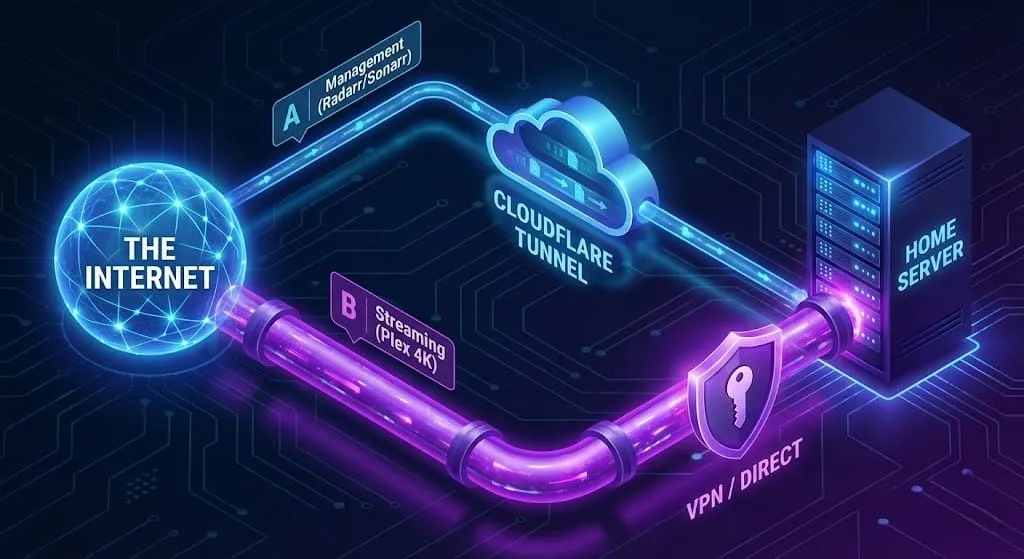
Step 1. Use Tunnels for CONTROL (Low Bandwidth)
Use Cloudflare Tunnel for your "Management" stack. These apps use tiny amounts of text-based data and benefit heavily from Cloudflare's Zero Trust login protection.
- Sonarr / Radarr
- Tautulli (Plex Dashboard)
- Overseerr (Requests)
Step 2. Use VPNs for STREAMING (High Bandwidth)
Do NOT route the actual Plex video stream through the Tunnel. Instead, use a direct, encrypted peer-to-peer connection.
Option A: Tailscale (The Easy Way)
Install Tailscale on your server (see my [Hardware Guide]) and on your phone/laptop.
- Pros: True End-to-End Encryption. Cloudflare sees nothing. No open ports.
- Cons: You must install the app on the client or their network and route the client through it (hard for Grandma's Smart TV).
Option B: The "Digital FOB" (Travel Router)
If you are traveling, bring a GL.iNet Beryl AX ([Read the Review]).
- Your router connects to your home WireGuard server.
- Your Apple TV / Roku connects to the router.
- The tunnel is invisible to the client device.
Option C: Direct Port Forward (The "Standard" Way)
Also known as: "Just clicking the button in Plex." This is how Plex operates by default.
This is how Plex is designed to work. You open Port 32400 on your router, and Plex handles the rest.
- The Magic: Plex.tv acts as a secure directory. It gives your server a "Hidden" domain (like
ip-address.plex.direct) with a valid SSL certificate. - Pros: It just works. The "Plex App" on your TV automatically finds the server. No domain to buy.
- Cons: You expose your home IP address directly to the internet (on that specific port).
- Verdict: Best for 99% of users. Just make sure you have a strong Plex password and/or MFA setup on your Plex account.
Option D: The "Vanity" Direct Route (Custom Domain)
For users who want plex.myname.com. If you already own a domain and want to use it for Plex without breaking the Terms of Service:
- Create an A Record in Cloudflare pointing to your Home IP.
- Grey Cloud It (DNS Only): Turn off the orange proxy cloud. This tells Cloudflare "Don't touch the traffic, just tell people where I am. DNS only!"
- Click the Orange Cloud icon until it turns Grey. This tells Cloudflare: "Do not protect this. Do not proxy this!"
- Setup your reverse proxy of choice to serve Plex/Jellyfin.
- My preference is SWAG; follow my step-by-step SWAG reverse proxy guide to take advantage of prebuilt security configurations for your media server.
- You can use almost any reverse proxy, and I walk through configuring the top options in my Jellyfin HTTPS reverse proxy tutorial.
- Why do this? Ultimate security, privacy and control, possibly some vanity too, or to consolidate all your services (Nextcloud, Immich, Plex) under one domain name for ease of memory & access.
Option E: The "Sovereign Door" (Reverse Proxy / SWAG)
Best for: Jellyfin users who want the "Netflix Experience" (easy sharing) but refuse to let Cloudflare inspect their traffic.
This is the traditional self-hosting path. You use a Reverse Proxy (like SWAG or Nginx Proxy Manager) to handle SSL and routing.
- The Setup: You open Port 443 (HTTPS) on your router and point it to your Reverse Proxy container.
- The Security: You own the SSL certificate (via Let's Encrypt). The traffic is encrypted from the coffee shop straight to your server. No middleman decryption.
- The Hardening: Since you are opening a port, you must add bouncers. SWAG comes with Fail2Ban (bans IPs that spam bad passwords) and geoblocking built-in.
- Why choose this? It offers the convenience of a public URL (
jellyfin.corelab.tech) without violating the End-to-End Encryption principle.
☢️ The Nuclear Options: Total Sovereignty (Headscale or OPNsense)
For the privacy purist, relying on any third party—whether it’s Cloudflare or Tailscale—is a vulnerability. And even "Option E" (SWAG) requires you to open a public port (443) and allow knocking on your door.
- Cloudflare Tunnel: Decrypts your data (Man-in-the-Middle).
- Standard Tailscale: End-to-End encrypted, but you rely on their "Coordination Server" to exchange keys. They know when you connect and who you connect to (Metadata).
If you want to own the entire stack, you have two "God Tier" options below👇
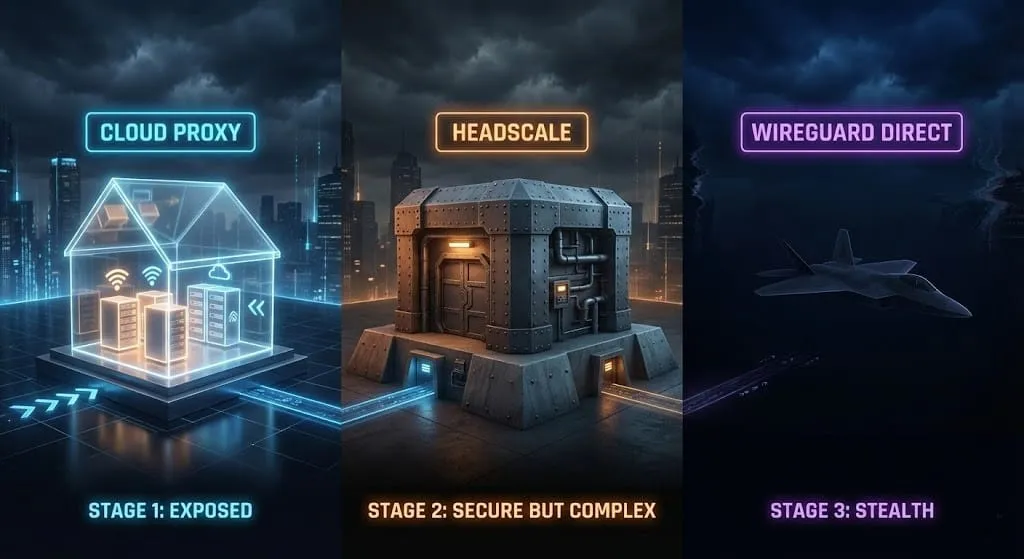
1. Headscale (The "De-Googled" Tailscale)
Tailscale the client is open source. Tailscale the server is proprietary. Headscale is an open-source implementation of the control server that you host yourself.
- The Win: You get the magic of Tailscale (easy DNS, NAT traversal) but YOU control the login and key exchange. Tailscale Inc. knows nothing.
- The Cost: It requires setting up a VPS or a public-facing server (docker container even!) to act as the coordinator.
2. "Naked" WireGuard on OPNsense (The Veteran's Choice)
This is the raw, unadulterated pipe. No coordination servers. No fancy apps. Just pure mathematics.
- How it works: You run WireGuard directly on your edge firewall (like OPNsense or pfSense). You generate the keys. You distribute the config files.
- The "Digital FOB" Standard: This is how I run my infrastructure. It is stateless, silent, and invisible to port scanners. Unless you have the private key and the pre-shared key, my network doesn't even exist to you.
- The Setup: It requires more manual work (managing keys, dynamic DNS), but the security, privacy & performance is absolute.
- 👉 [Read my guide on setting up WireGuard on OPNsense here]
 Core Lab Joe
🏁 Conclusion: Pick Your Poison☠️
Cloudflare Tunnels are an incredible tool for management, but a dangerous trap for streaming. The "No Open Ports" dogma is great for lightweight apps, but when you are pushing 50Mbps 4K streams, you are playing with fire (and your privacy).
Here is the Core Lab Verdict depending on who you are:
- For the Plex User (Simplicity): Stop overthinking it. Use the Direct Port Forward (Option C). Plex's encryption is solid, and the "Hidden" domain keeps you obscure. It just works. I've been using it this way literally since 2012 or so.
- For the Jellyfin User (Convenience): Use a Reverse Proxy like SWAG (Option E). Yes, you have to open Port 443.
But you own the encryption keys, not Cloudflare. Pair it with Fail2Ban and CrowdSec, and you are secure.
 Core Lab Joe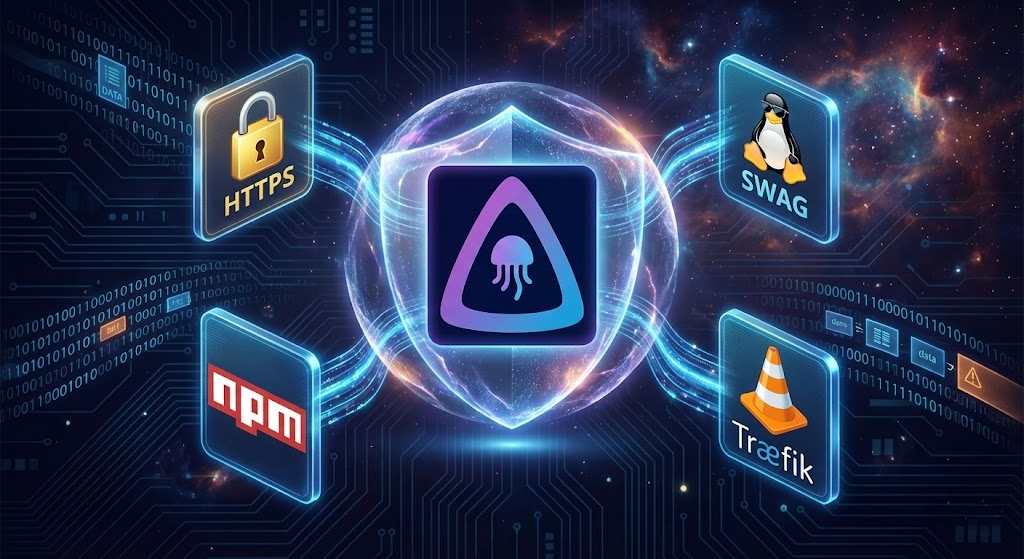
- For the "Privacy Purist" (Paranoia): Do not expose your web interface to the internet at all. Use Tailscale or WireGuard. It is slightly more friction for clients (you need the app installed), but it offers total sovereignty and invisibility.
 Core Lab Joe
- For the "Architect": Use the Hybrid Model. Put your *Arrs, Overseerr, and Tautulli behind a locked-down Cloudflare Tunnel, but route your video streams via SWAG or dedicated OPNsense WireGuard tunnel. Best of both worlds.
The "Cheat Code" Alternative If all of this networking headache sounds exhausting, there is an escape hatch. You can bypass the need for any upload bandwidth or port forwarding by moving your consumption to a [Stremio + Real Debrid Setup]. This offloads the heavy lifting entirely to the cloud, so you can keep your ports closed and your firewall tight.
 Core Lab Joe
Stay tinfoil hat-like. Stay secure.
❓ Frequently Asked Questions (FAQ)
Is Cloudflare Tunnel actually safe for exposing Plex or Jellyfin?
Mostly no, despite how popular it is. Cloudflare Tunnel is genuinely great for lightweight, text-based apps like Sonarr, Radarr, or Home Assistant, but for high-bandwidth media streaming it introduces a TLS termination step where Cloudflare decrypts your traffic to inspect it, and its Terms of Service effectively prohibit serving large amounts of video content on the free plan anyway.
Does Cloudflare actually see my Plex traffic if I use a Tunnel?
Yes. To provide DDoS protection and caching, Cloudflare has to decrypt your traffic in the middle: your connection is encrypted from you to Cloudflare, decrypted at Cloudflare, then re-encrypted from Cloudflare to your home server. That means Cloudflare technically can see inside every frame of video or photo you stream, which breaks true end-to-end encryption.
Can I get banned for streaming Plex through a Cloudflare Tunnel?
Yes, this is a real risk, not just theoretical. Cloudflare's Self-Serve Subscription Agreement prohibits using the free plan to serve a disproportionate amount of video, audio, or other non-HTML content. Disabling caching with a page rule doesn't fix this, since the violation is about bandwidth and content type, not caching.
What's the recommended setup for securing a media server: Tunnel or VPN?
A hybrid approach: use Cloudflare Tunnel for lightweight management apps (Sonarr, Radarr, Tautulli, Overseerr) where its Zero Trust login protection genuinely helps, and route the actual high-bandwidth Plex or Jellyfin video stream through a direct VPN connection like Tailscale or a traditional port forward instead, so the video traffic never passes through Cloudflare at all.
Is Tailscale a good alternative to Cloudflare Tunnel for streaming?
Yes, for the video-streaming leg specifically. Tailscale gives you a true end-to-end encrypted, direct connection with no open ports and nothing visible to Cloudflare. The tradeoff is that it requires installing the Tailscale client on every device that connects, which is straightforward on a phone or laptop but impractical on something like a smart TV.
Written by
On this page
What's Next?

tcpdump on the docker bridge network, we trapped the specific container IP responsible for the beacons, proving it was an isolated workload and not the host OS.

Cybersecurity Threat Intel: What the Critical PHP RCEs and Tailscale Disclosures Mean for Homelabbers
The past 72 hours delivered a brutal one-two punch: critical PHP RCEs ('php2shell') followed by a 12-hour-old Tailscale SSH socket vulnerability disclosure. Here is my technical breakdown and how I hardened my homelab.

The "Digital FOB": The Ultimate Cyber Survival Guide for OUTCAN Deployments (2026)
Don't connect directly to camp Wi-Fi. This guide explains how to build a "Digital FOB" using travel routers and VPNs to defeat Deep Packet Inspection and cellular tracking. The ultimate "Go Bag" tech list for Canadian soldiers deploying in 2026.