
The Hybrid Pipeline: Real-Debrid with a Usenet Backstop
Build the ultimate automated media pipeline by bridging Real-Debrid and Usenet. Learn how to use Sonarr delay profiles and a Block Account to create a 100% reliable backstop.

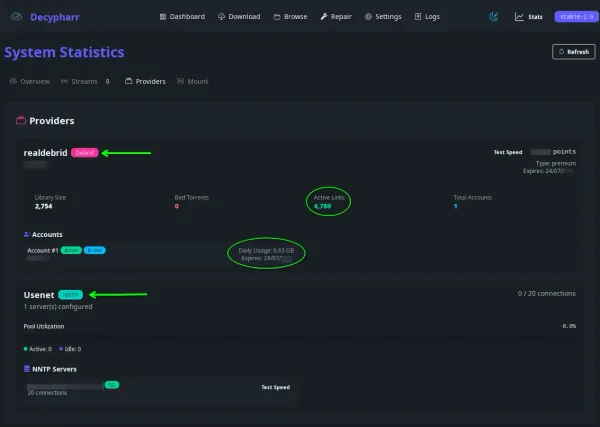
In my initial Decypharr setup guide, we've established that Real-Debrid paired with Decypharr handle & stream cached torrents flawlessly. Did you know that Decypharr can stream Usenet too? Now, we need to bridge the two into an automated, hierarchical pipeline!
The goal: A "backstop / backup setup" where Real-Debrid or Usenet (You pick!) handles 95% of your media. If you follow my recommendation and use Debrid as your primary, and Usenet as the backup, Usenet automatically steps in to catch the missing 5% and is highly effective (cost wise!).
Mastering Infinite Media & Debrid Architecture
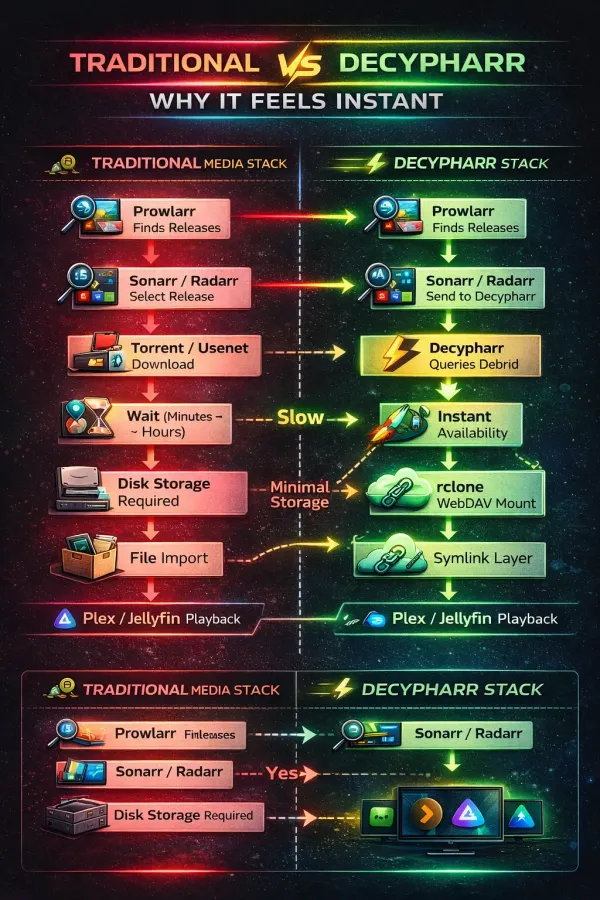
Replace expensive NAS drive arrays with instant cloud caching, deploy Decypharr virtual symlinks, configure automated Usenet fallbacks, and eliminate playback errors.
Building the Ultimate Safety Net
flowchart TD
    %% Node Definitions
    A["🎬 Sonarr / Radarr"]:::arr
    B{"🧲 Is it a Torrent?"}:::decision
    C["⚡ Real-Debrid
(Decypharr QBittorrent)"]:::download
    D{"⏱️ Delay Profile Passed?"}:::decision
    E["⏳ Wait for Torrent"]:::wait
    F["📰 Usenet
(Decypharr SABnzbd)"]:::download
    G["📁 Virtual Mount"]:::mount

    %% Flow Connections
    A --> B
    B -- "Yes" --> C
    B -- "No (NZB)" --> D
    D -- "Wait 2 Hours" --> E
    D -- "Time Expired" --> F
    C --> G
    F --> G

    %% Color Styles
    classDef arr fill:#e0f2fe,stroke:#0284c7,stroke-width:2px,color:#0369a1;
    classDef decision fill:#fef3c7,stroke:#d97706,stroke-width:2px,color:#92400e;
    classDef download fill:#dcfce7,stroke:#16a34a,stroke-width:2px,color:#15803d;
    classDef wait fill:#ffedd5,stroke:#ea580c,stroke-width:2px,stroke-dasharray: 4 4,color:#9a3412;
    classDef mount fill:#ede9fe,stroke:#7c3aed,stroke-width:2px,color:#5b21b6;
Step 1: Prowlarr Indexer Priorities
Sonarr and Radarr need to know which indexers to prefer. By default, they will grab whatever release hits their RSS feed first. Because TV shows often hit Usenet minutes before they hit torrent trackers, we need to artificially deprioritize Usenet.
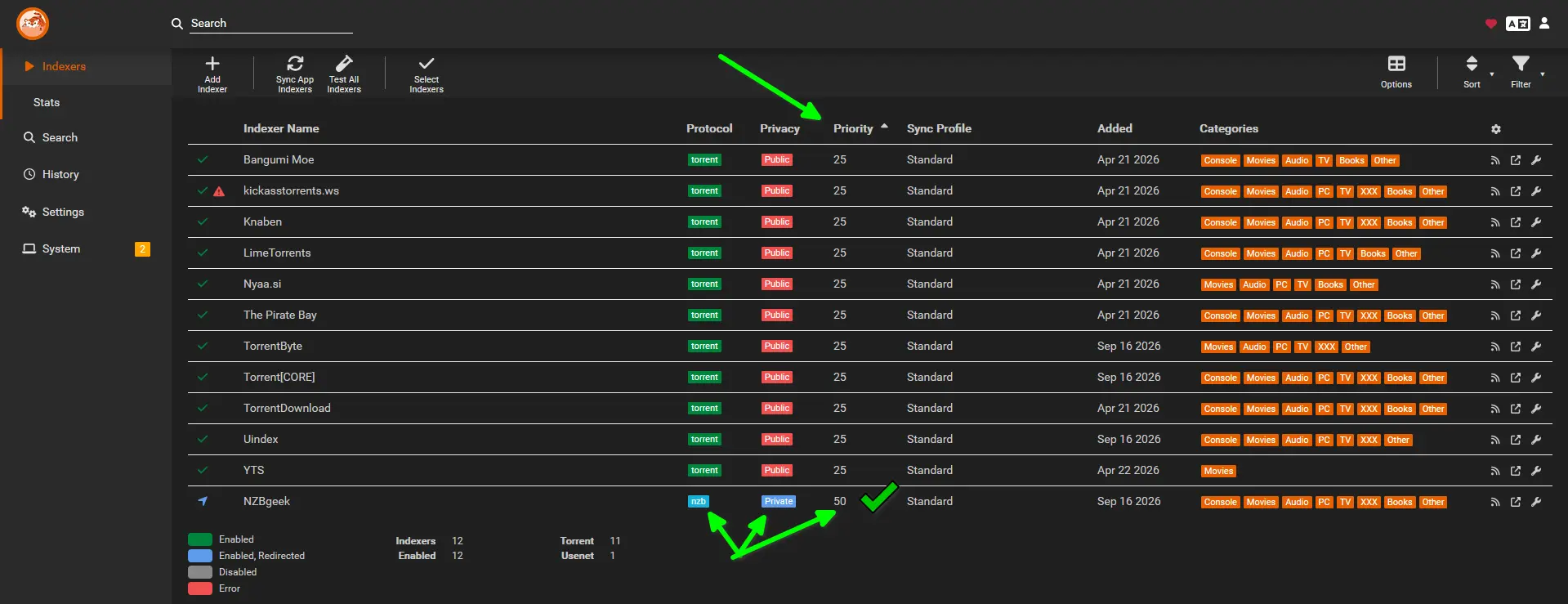
In Prowlarr, set all of your Torrent indexers (e.g., TorrentLeech, 1337x) to Priority 1 or 25. Set your Usenet indexers (e.g., NZBGeek) to Priority 30, or 50 in my case. The Usenet indexers just have to be last.
Once you have the Torrent indexers all setup to be a higher priority, their results will always be preferred first.
Step 2: Decypharr Usenet Setup
Part 1 - Usenet Settings
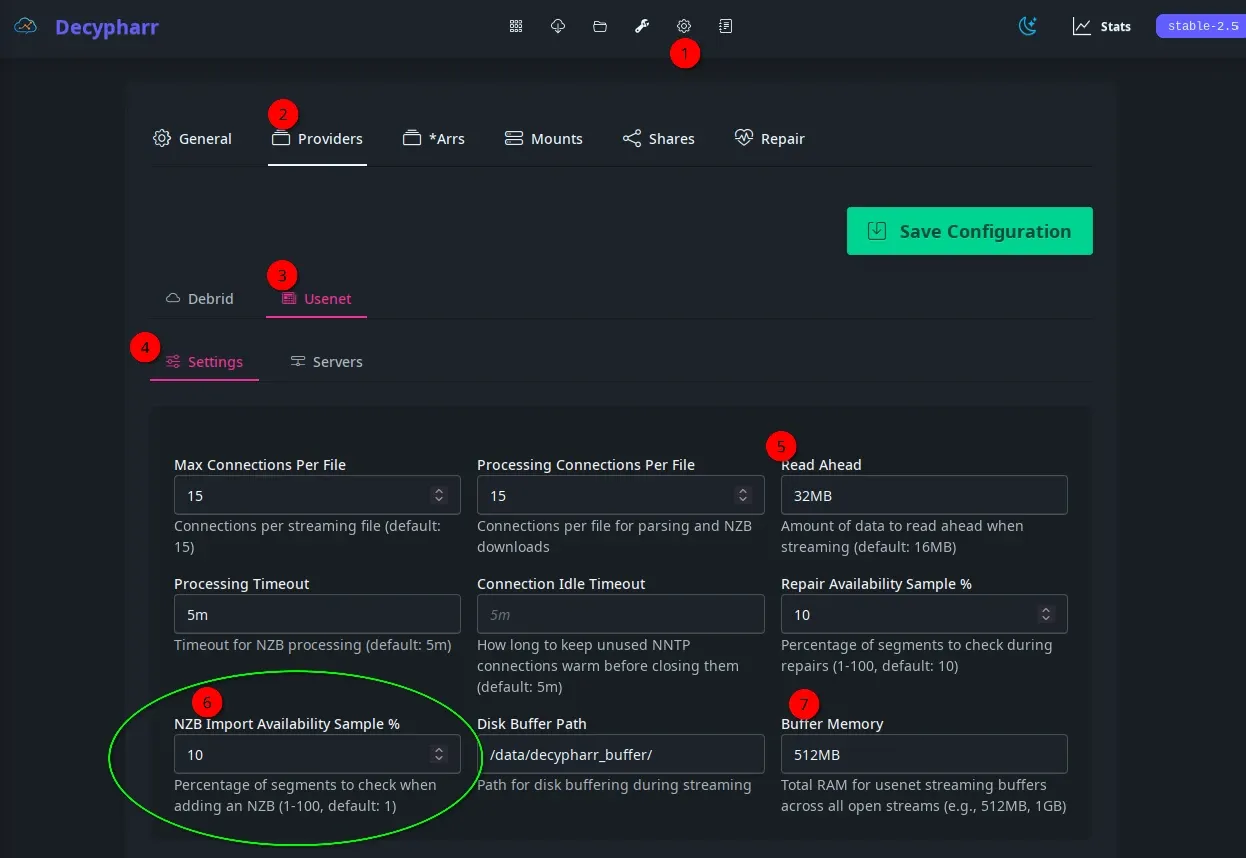
Login to your Decypharr instance, hit the settings gear wheel toggle, and select Providers. Settings ➡️ Providers ➡️ Usenet ➡️ Settings.
The goal here is to change a few basic settings to ensure that Decypharr pulls enough of the NZB file and checks it, to ensure it's useful/real. So far I've found that two main settings help with this.
Set NZB Import Availability Sample % to 10% (Default is only 1!) and;
Set Read Ahead to 32MB (Default 16MB.
Next hit the Servers tab to configure your Usenet provider. ➡️ Providers ➡️ Usenet ➡️ Servers.
If you don't have a Usenet provider yet, hop over here to Newsgroupdirect and sign up! They have fantastic levels both unlimited and "blocks per Terabyte".
Signing up costs nothing extra and simply supports this site, so I can keep dishing out practical guides like this.
Here you want to set this up as per your provider, they may have specific max connections, backbone or port settings. The key setting here is simply to slap your account info in, and make certain that Use SSL is selected!
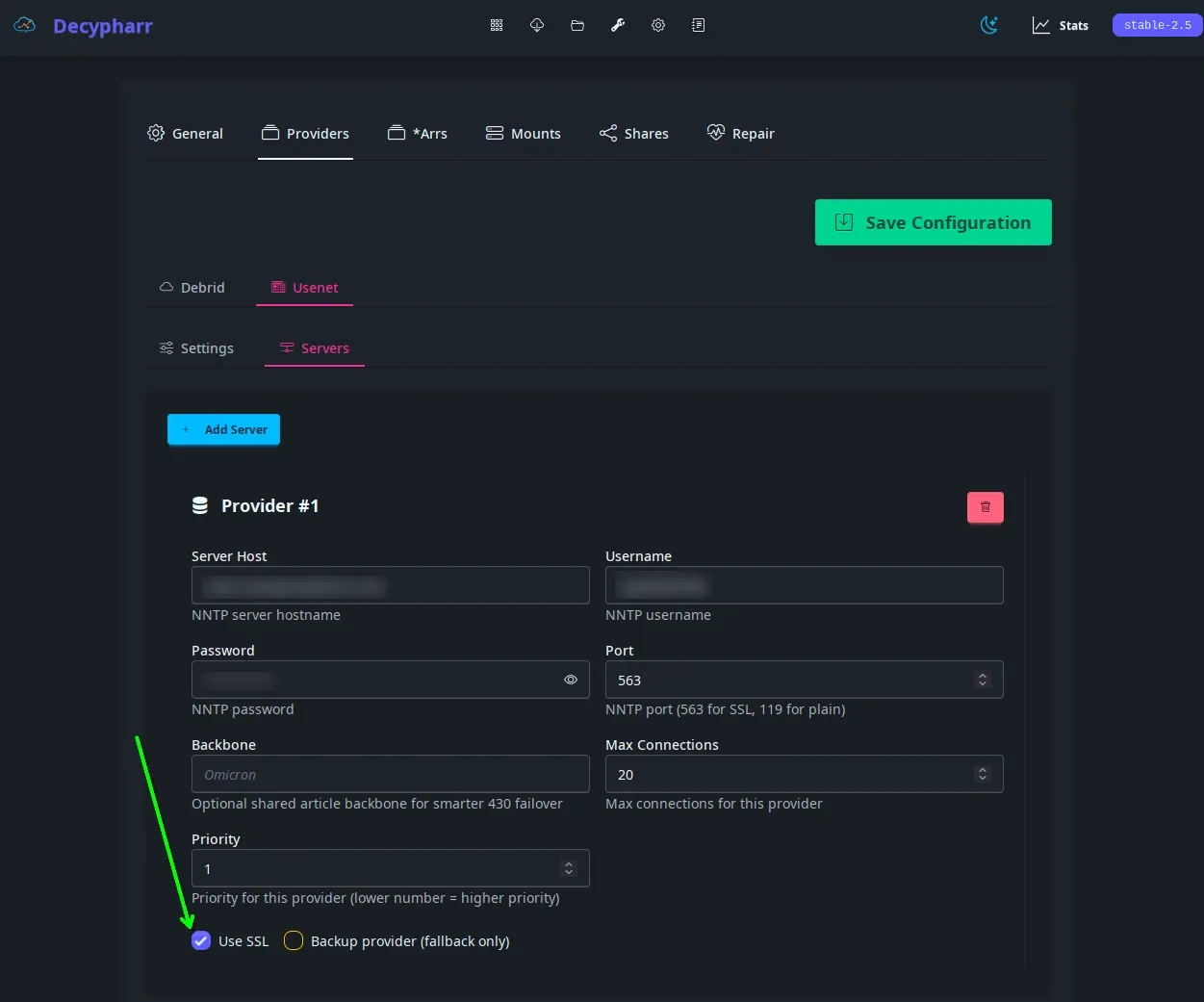
One great benefit of Usenet (like Debrid services) is encryption. Your ISP can see that you connected to a Usenet or Debrid server, but they cannot see what the traffic is, which is fantastic. This means no VPN needed, however you may opt to still use one of course. Also like Debrid service, prepare to obliterate and absorb your max download bandwidth when using these services - enjoy!
Join Core Lab!
Media Server Masterclasses & Security deep-dives, delivered directly to your inbox.
Step 3: Adding Decypharr's Usenet to Sonarr & Radarr
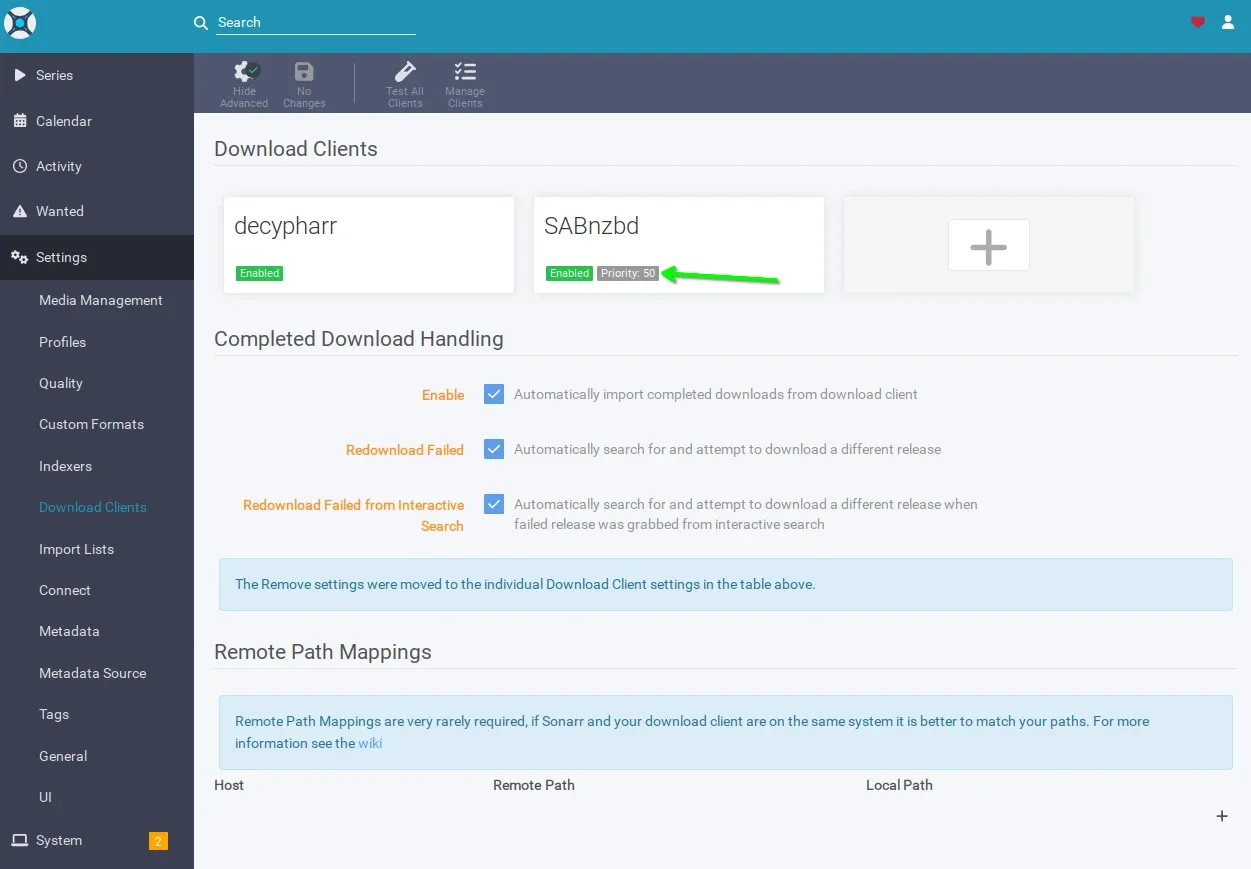
To add your newly setup Decypharr Usenet config, login to your Sonarr or Radarr and hit Settings ➡️ Download Clients ➡️ and the ➕, adding SABnzbd as the new download client. The Decypharr documents show this in great detail, have a read if needed. Add it with one key setting in mind - Priority: 50. It just has to be lower priority than your existing Decypharr and/or other Download Clients! You want it last.


Once you've added it, it should look like this:
Sonarr & Radarr Delay Profiles
Prioritizing the indexer isn't enough. If an episode drops on Usenet 10 minutes before the torrent exists, Sonarr will grab the Usenet release instantly because it doesn't see a Priority 1 alternative yet. This burns your precious block data if you have a block account!
BulkNews) for $15 or on Terabyte Tuesday, $5...
This will likely last you about 3 years setup this way!
To fix this, we use Delay Profiles.
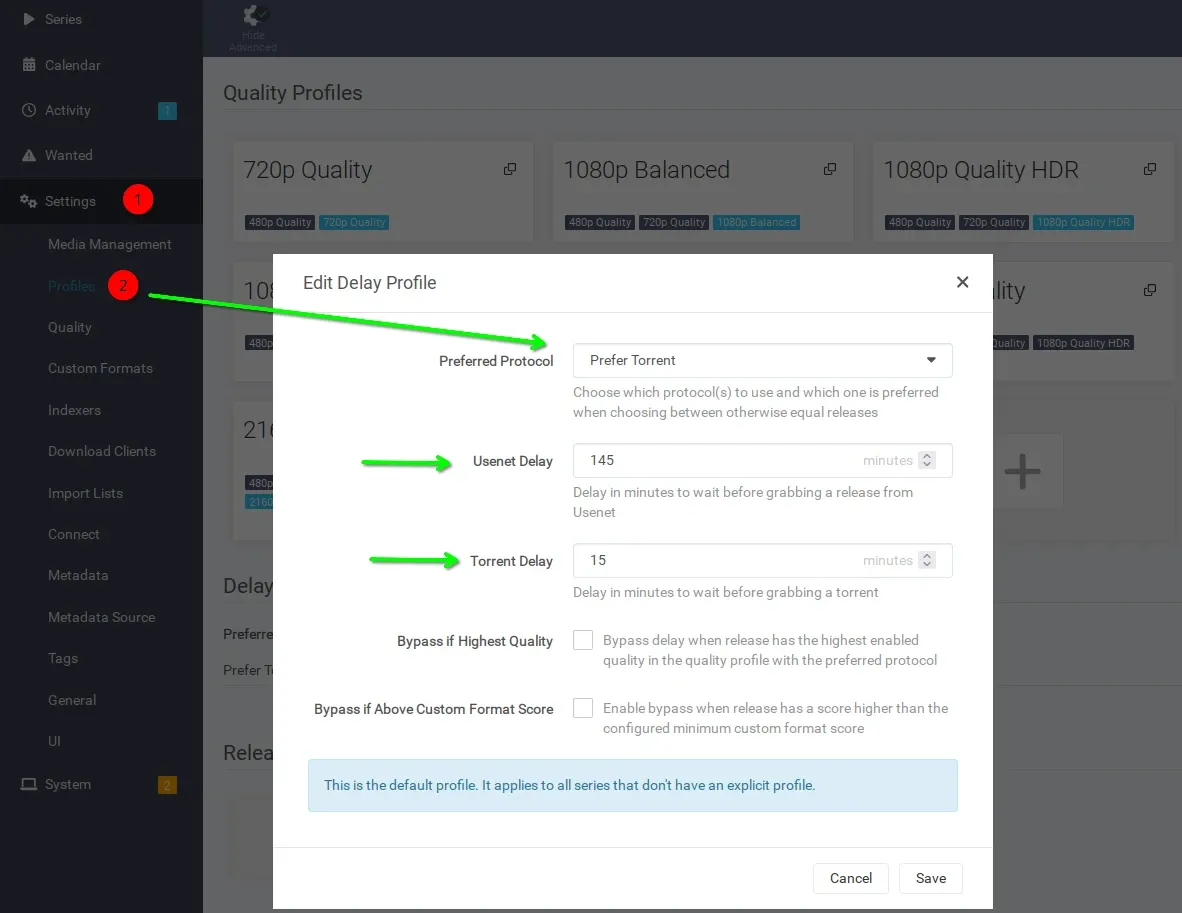
- Go to Settings -> Profiles -> Delay Profiles.
- Enable Usenet Delay and set it to
145minutes. Or whatever floats your boat!
The Logic: When Sonarr or Radarr sees a new release on NZBGeek, it queues it but waits 2+ hours. If a torrent release appears during that window, it drops the Usenet release and grabs the torrent (sending it through Real-Debrid on your existing subscription). If 2 hours pass and the torrent never materializes, it falls back to Usenet, keeping your automation seamless and ensuring you still get the media you want!
Frequently Asked Questions
Why use Usenet as a backstop instead of another torrent tracker?
Usenet doesn't rely on peer-to-peer seeders. If a torrent is dead, old, or highly obscure, you can still download it at maximum gigabit speeds on Usenet due to server-side retention.
Do I need a VPN to use Usenet with Decypharr?
No. Just like Real-Debrid, Usenet providers offer SSL encryption. Your ISP can only see that you are connecting to a secure server, not the media you are downloading.
What is a Usenet Block Account?
Instead of paying a monthly subscription, a Block Account gives you a set amount of data (like 1TB) that never expires. Since Usenet is only used as a backup in this hybrid setup, a single block account can last for years.
Why set the Sonarr Delay Profile to 145 minutes?
TV shows often hit Usenet slightly faster than torrent trackers. A 2-hour delay gives the torrent swarm and Real-Debrid cache time to populate. If it doesn't appear after 2 hours, it automatically falls back to your Usenet block.
Written by
On this page
What's Next?