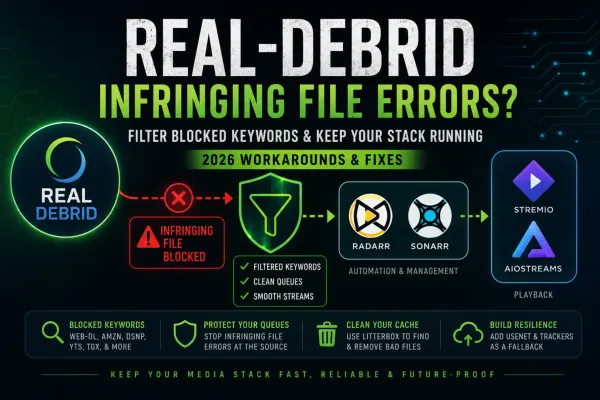
How to Fix Real-Debrid "Infringing File" & "Infringing Torrent" Errors (2026)
Real-Debrid now blocks many releases with automated filtering, causing “infringing file” errors. Here’s the ultimate 2026 fix for Sonarr, Radarr, Stremio, and Decypharr.

Earlier in May 2026, the French-operated premium link & caching service Real Debrid was forced to comply with new French laws forcing them to setup an automatic filter, removing all content from rights-holders following formal notice from the Fédération Nationale des Éditeurs de Films (FNEF).
If you have been running a self-hosted media stack backed by Real-Debrid over the last few days/weeks, your "download" queues likely ran into a brick wall.
What Does API Error 35 (infringing_file) Mean?
In the Real-Debrid API, blocked releases return HTTP error code 35 with the raw payload label infringing_file. If you see this in your Sonarr, Radarr, or Stremio add-on container logs, it means Real-Debrid’s backend regex filter has blacklisted that specific release string.
Well folks, it had to happen at some point, sadly I've only been using Debrid services myself for about a year, I wish I had discovered this 10 years ago! But, with a little 🏴☠️ Yarr spirit, we can move past these issues.
The platform systematically blocks specific tracking markers, release group strings, and structural scene tags, throwing instant "infringing file" errors back to your automation pipeline.
Commonly Targeted Tags:
WEB-DLWEBRipAMZNDSNPYTSTGXTorrentGalaxy
This is part of my Real-Debrid Media Server Series:
Mastering Infinite Media & Debrid Architecture
Replace expensive NAS drive arrays with instant cloud caching, deploy Decypharr virtual symlinks, configure automated Usenet fallbacks, and eliminate playback errors.
What Changed With Real-Debrid in May 2026?
In a sudden shift to comply with enforcement mandates, Real-Debrid was forced to comply with legal requirements to roll out an automated keyword filtration system. This means Real-Debrid uses a REGEX style query to automatically block files from being cached in their service. Simple, effective, and stream destroying!
The platform now systematically blocks specific tracking markers, release group strings, and structural scene tags, throwing instant "infringing file" errors back to your automation pipeline! Many said this is the end of Real-Debrid... I don't think it is, but it definitely has had an effect... The "community" at large has already begun dealing with the fallout, and I use the term loosely as there is no "official" Real Debrid or Debrid community other than some subreddits, Discord's and forums.
Engineering Note on Content Availability: Because markers likeWEB-DLand platforms likeAMZNorDSNPconstitute a massive percentage of current automated indexer results, filtering them will sharply lower your automated catch rate. This filter is designed as a protective operational shield for your debrid queues, not a silver bullet for content discovery.
Part 1: Clean Your Cache with ElfHosted Litterbox
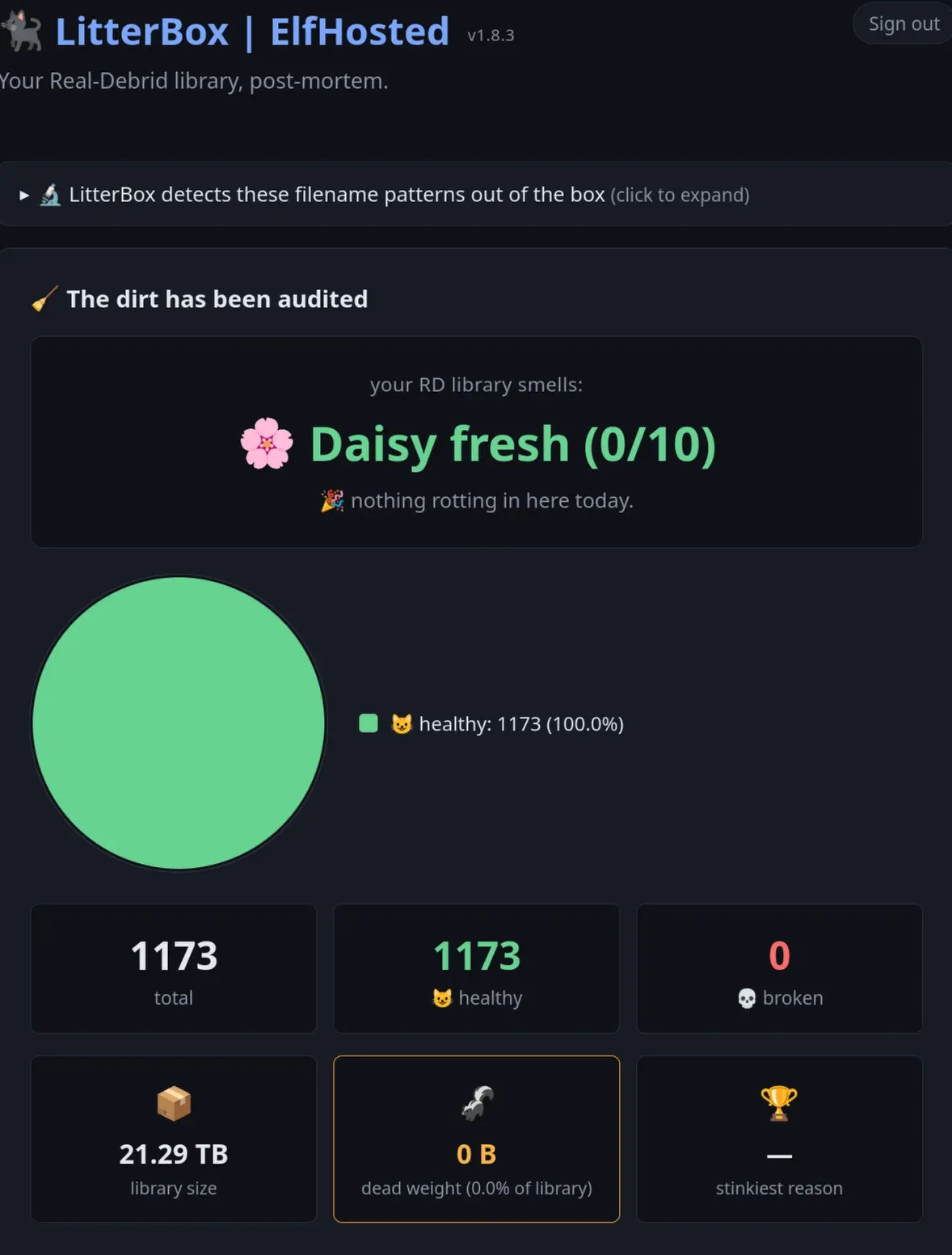
You can check your RD-cache with Elfhosted's Litterbox to see your full list of 'casualties'.

Using ElfHosted LitterBox to Clean Your RD Library
In my 21+TB library of RD cache, about 90% of it was 'bad'... I chose to let them 'scoop' out my litterbox of bad files and start over, after finding the proper filters to implement! Don't worry, it uses in-browser only authentication and won't 'steal' your API key. Elfhosted has become a major player in the streaming community. Their tool will help you to:
- See how much of your cached library are now dead / infringing links.
- Allow you to purge all the bad links quickly, efficiently and cleanly
When services like Decypharr or, AIOStreams plugins for Stremio attempt to resolve these automated grabs, the pipeline locks up trying to process files that are permanently blacklisted on the backend. Rather than micro-managing your queues or waiting for an upstream fix, here's a few ways to perform the cleanest mitigations depending on your tech stack.
Part 2: The Sonarr & Radarr Fix (Custom Formats)
Inject these blocked terms straight into your Arrs as negative criteria. By doing this, your applications filter out problematic releases before they ever hit your download client. If you're using Stremio / direct player, skip to Part 3 below.
Sonarr & Radarr Fix (Custom Formats)
Sonarr & Radarr handle release evaluation elegantly through Custom Formats linked directly to your Quality Profiles. This configuration penalizes matching indexer flags to ensure they are ignored during routine RSS feeds and interactive parsing cycles. In other words, every time Sonarr or Radarr do their search, they automatically filter out the banned links from Real-Debrid. This is how you build resilience into your media automation stack!
Need to access Jellyfin when outside the house? Jump on Core Lab's Securing your Jellyfin Streams guide!
You can also serve what you need across the world with the power of your very own self-hosted SWAG reverse proxy!
Step 1: Create a New Custom Format
Navigate to Settings > Custom Formats. Click the + Add New button. Set the format name to RD Infringing Block or a similar internal identifier.
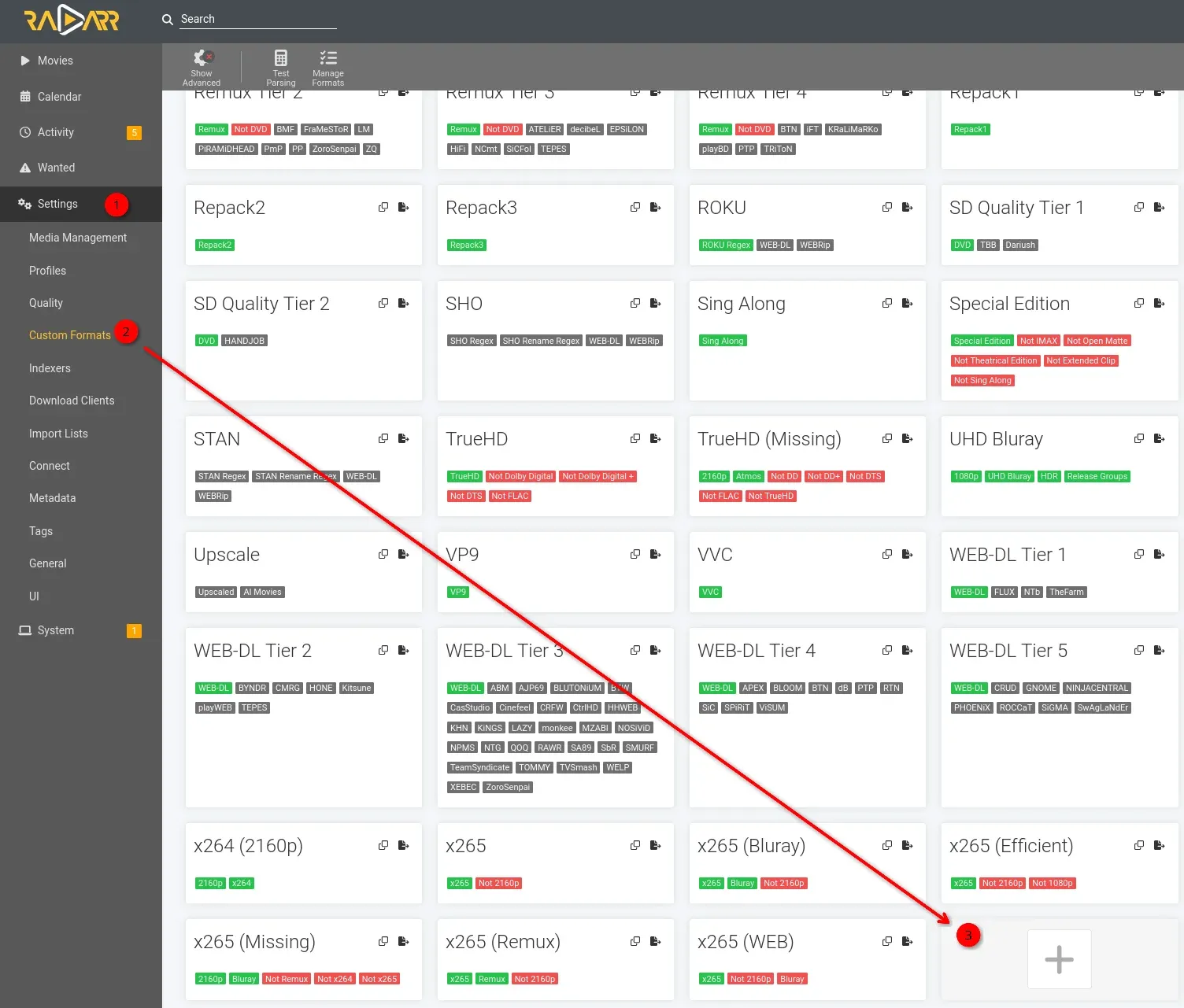
Step 2: Configure the RegEx Specification
Add a condition under the Specifications block. Set the type to Release Title. Paste the regex token with the case-insensitive inline flag prepended:
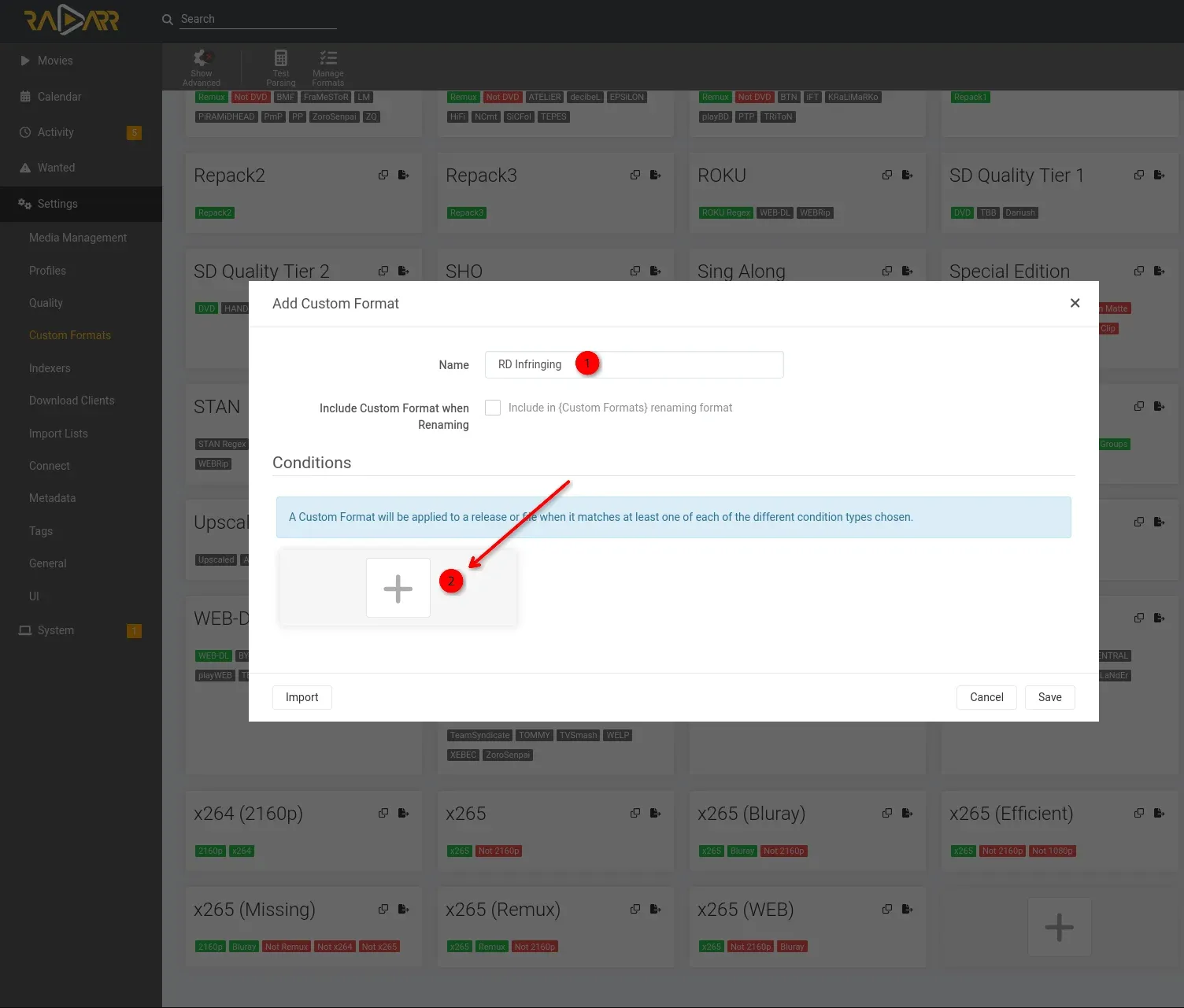
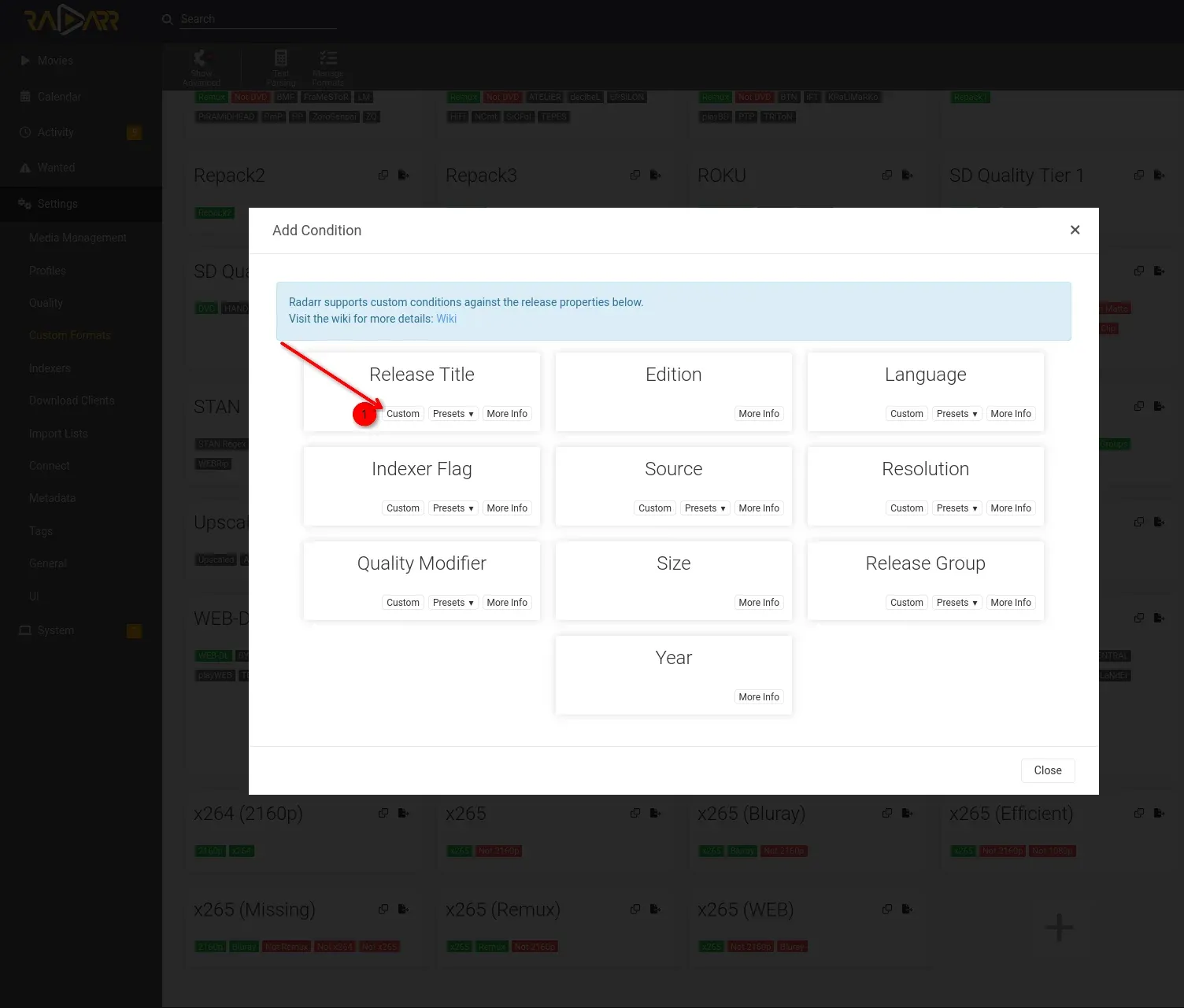
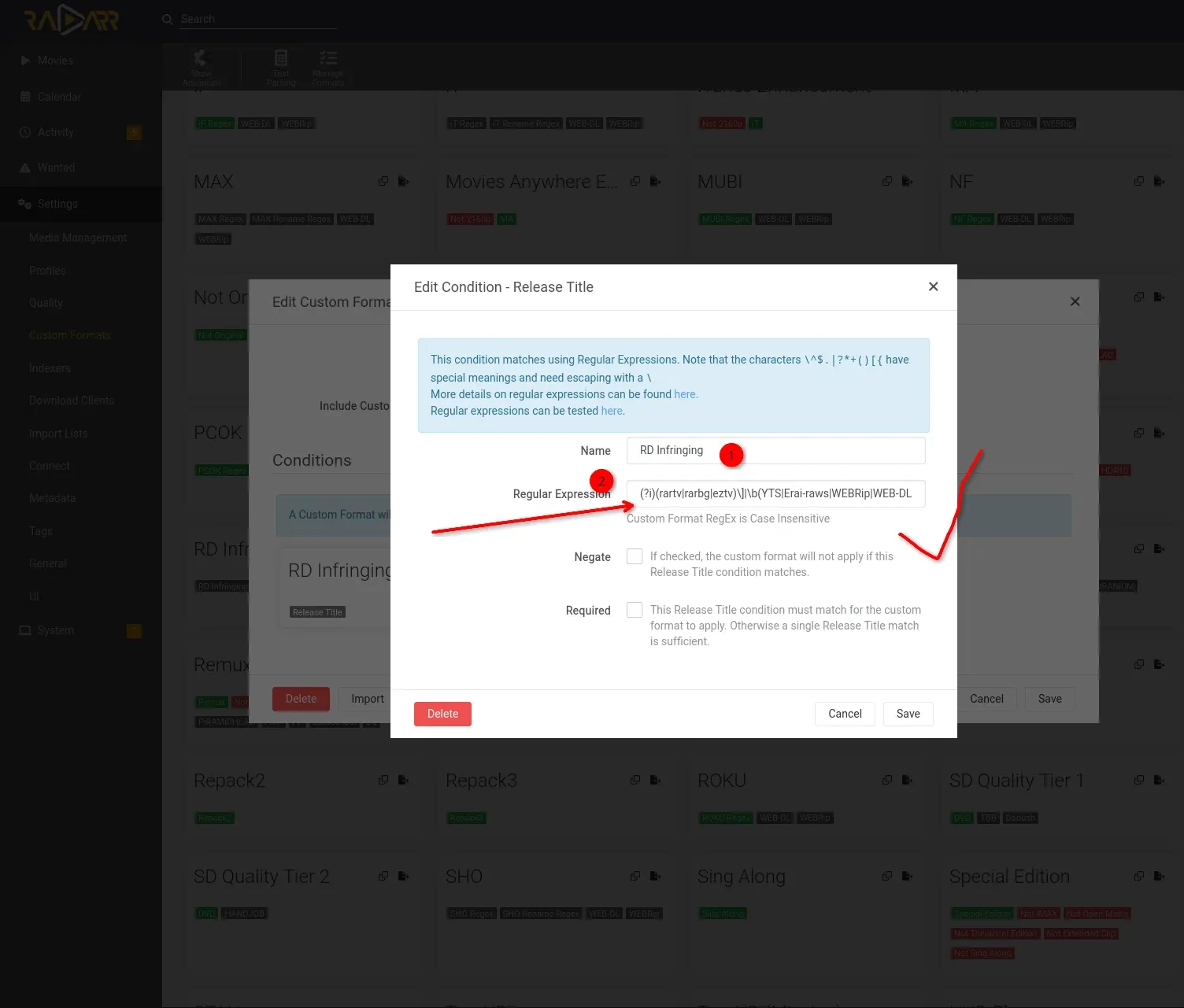
Each picture here walks you through creation of the custom filter profile.
(?i)\b(WEB-DL|WEBRip|BDRip|HDRip|DVDRip|HDTV|AMZN|NF|DSNP|CR|YTS|TGX|TorrentGalaxy|FGT|LOL|KILLERS|EPSiLON|Erai-raws)\b|rartv|rarbg|eztvNote: The regex is case-sensitive, so ensure you paste it exactly as is!
Save the custom configuration block.
Step 3: Assign a Negative Score
Go to Settings > Profiles and open your primary Quality Profile. Scroll down to the Custom Formats scoring section. Locate your new filter profile, toggle the checkmark to active, and assign it a heavily punitive score value such as -10000. Or if you're like me, you have a lot of custom profiles in there so I put -999999. Save your profile changes.
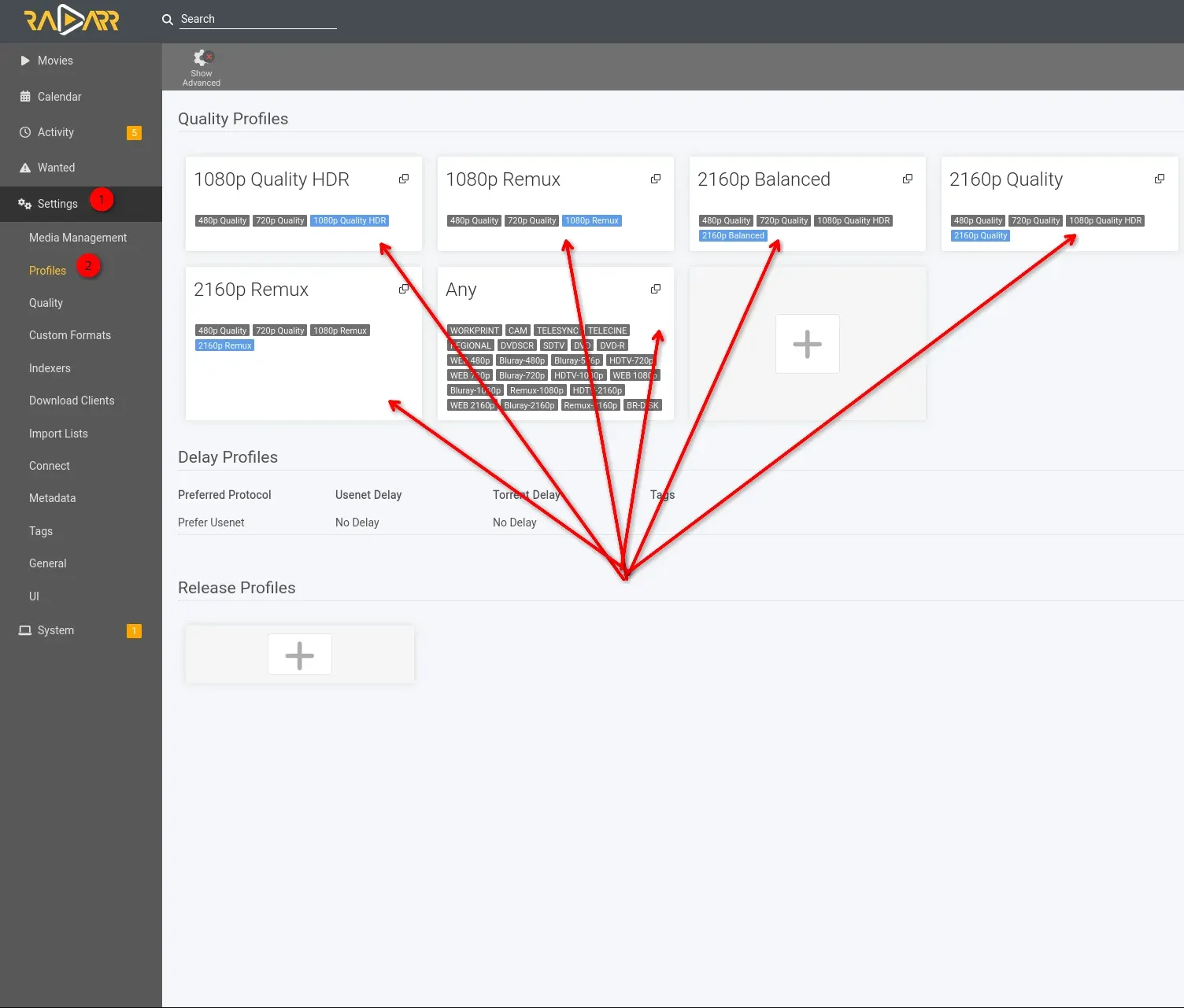
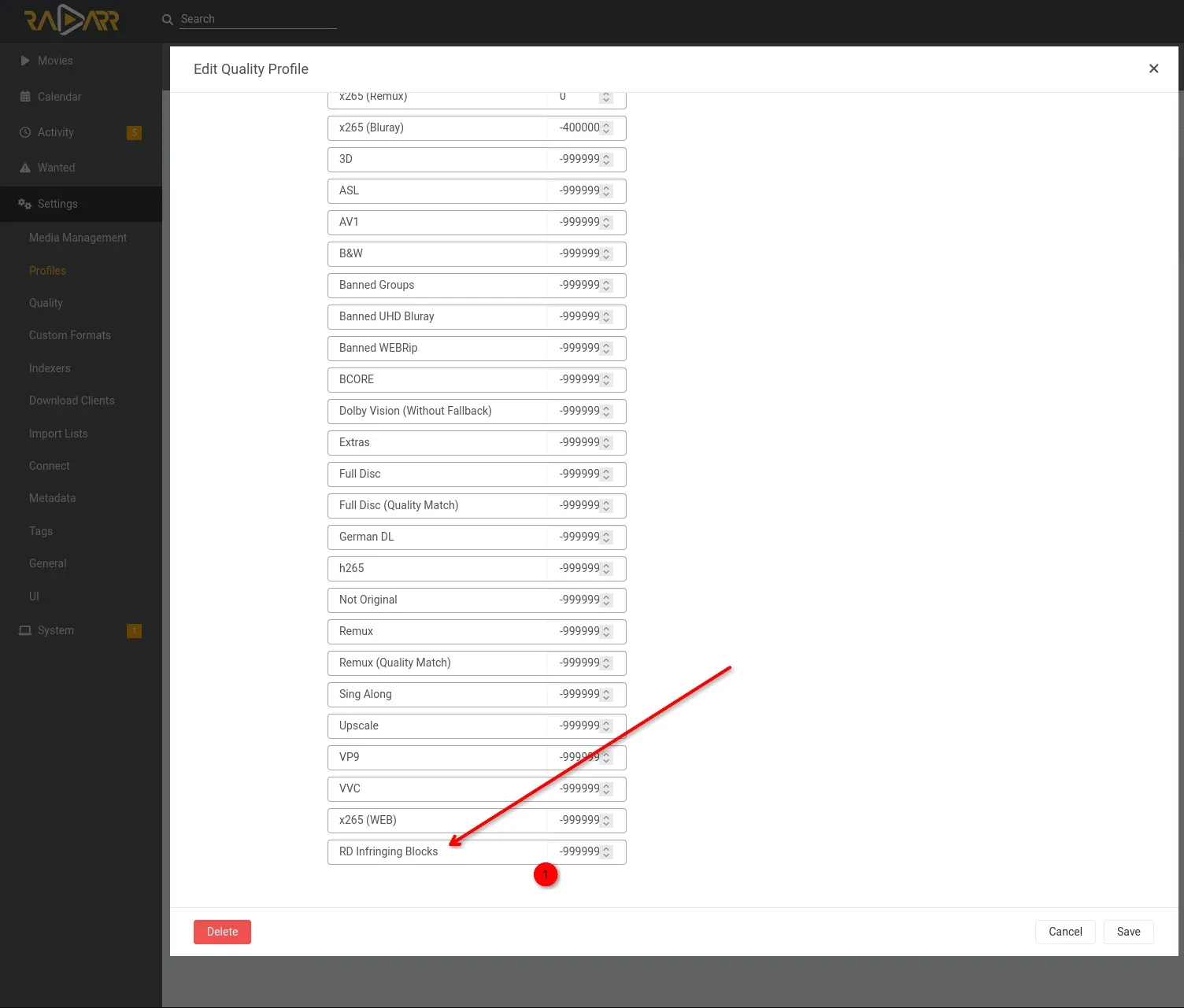
Once you've assigned this negative score, Radarr & Sonarr will ignore / discard any and all results they see that match. This provides you with only clean, working Real-Debrid cached content!
Part3: The Stremio Fix (AIOStreams & Tam-Taro)
Option 1: Use Tam-Taro SEL Profiles (Recommended)
Hit the setup page for your AIOStreams and/or update your AIOStreams to use Tam-Taro's SEL Profile (full or partial), which includes the blocks by default (My recommendation!).
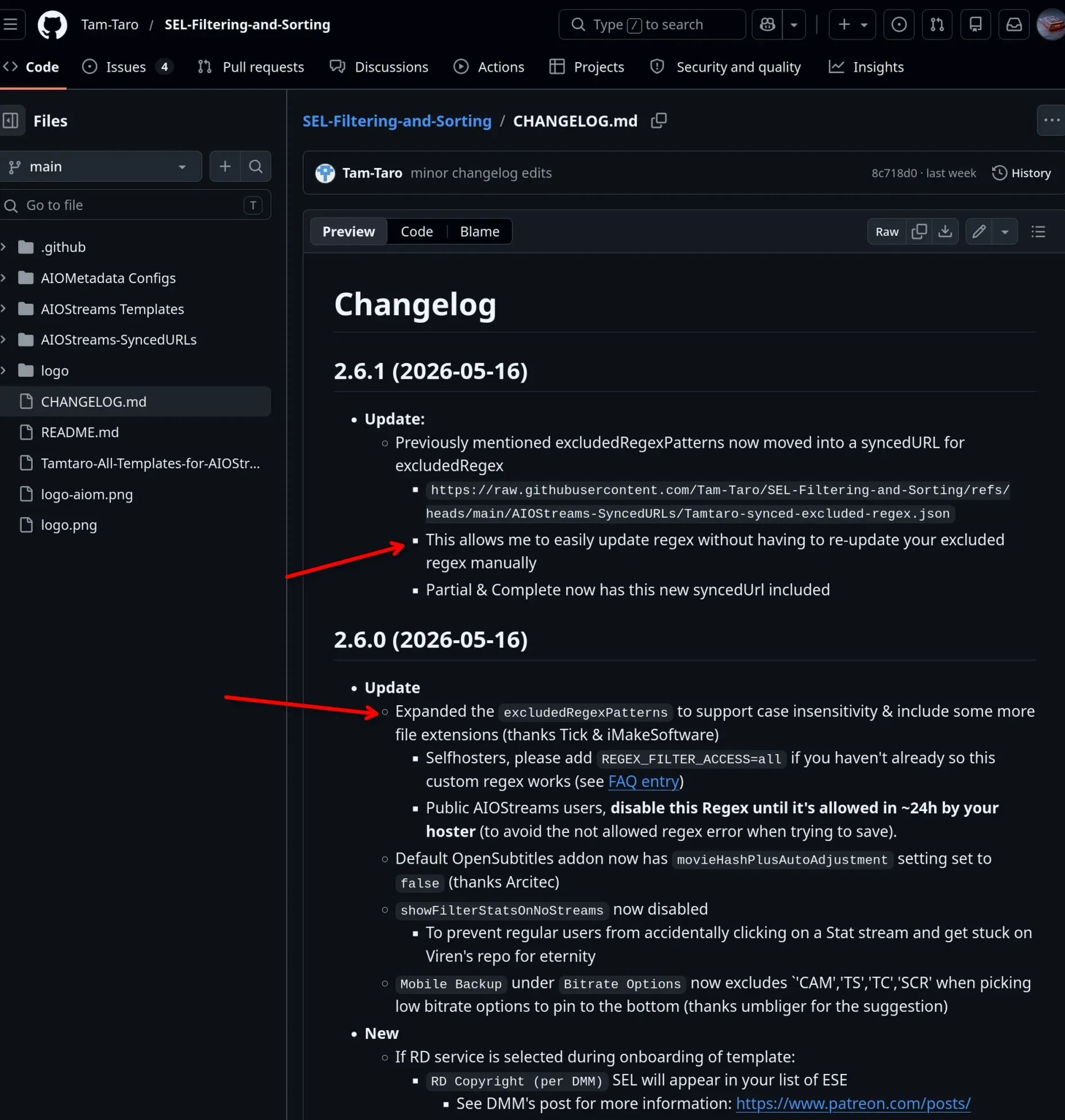
Click here for complete step-by-step detailed guide on configuring Stremio & AIOStreams with Debrid.
 Core Lab Joe
Option 2: Add Manual Filters
You could add the filter directly to your AIOstreams manually, which is done with the keyword filters during the setup. I don't recommend this option, because the developer of AIOStreams has already (QUICKLY) installed the filter themselves, and can update it dynamically without you needing to touch anything. Since RD cache is about 30 days, after on or about June 16th, most of the content that was banned/blocked by RD regex filter will be un-cached / purged anyway. Plus things change so fast, the filters may change before you can get to it.
Long-Term Alternatives to Real-Debrid Dependency (Usenet!)
Adding these filters keeps your download client queues clear of dead links, but it highlights the risks of relying on a single cloud dependency for data access. You will notice your automation hit-rate drop, and you might have to accept 1080p web-rips instead of pure 4K REMUXes to get past the filter.
If you want to completely bulletproof your setup against Real-Debrid downtime or filtering, you need a hybrid pipeline. I highly recommend reading my newest guide: The Hybrid Pipeline: Real-Debrid with a Usenet Backstop.
By pairing a cheap, non-expiring Usenet Block Account with your Real-Debrid setup, Usenet will automatically catch the 5% of files that Real-Debrid blocks, ensuring your media server never skips a beat.
Integrating Usenet indexers or private trackers alongside your Debrid setup will keep your home automation stable, no matter what compliance updates happen on the backend.
 Core Lab Joe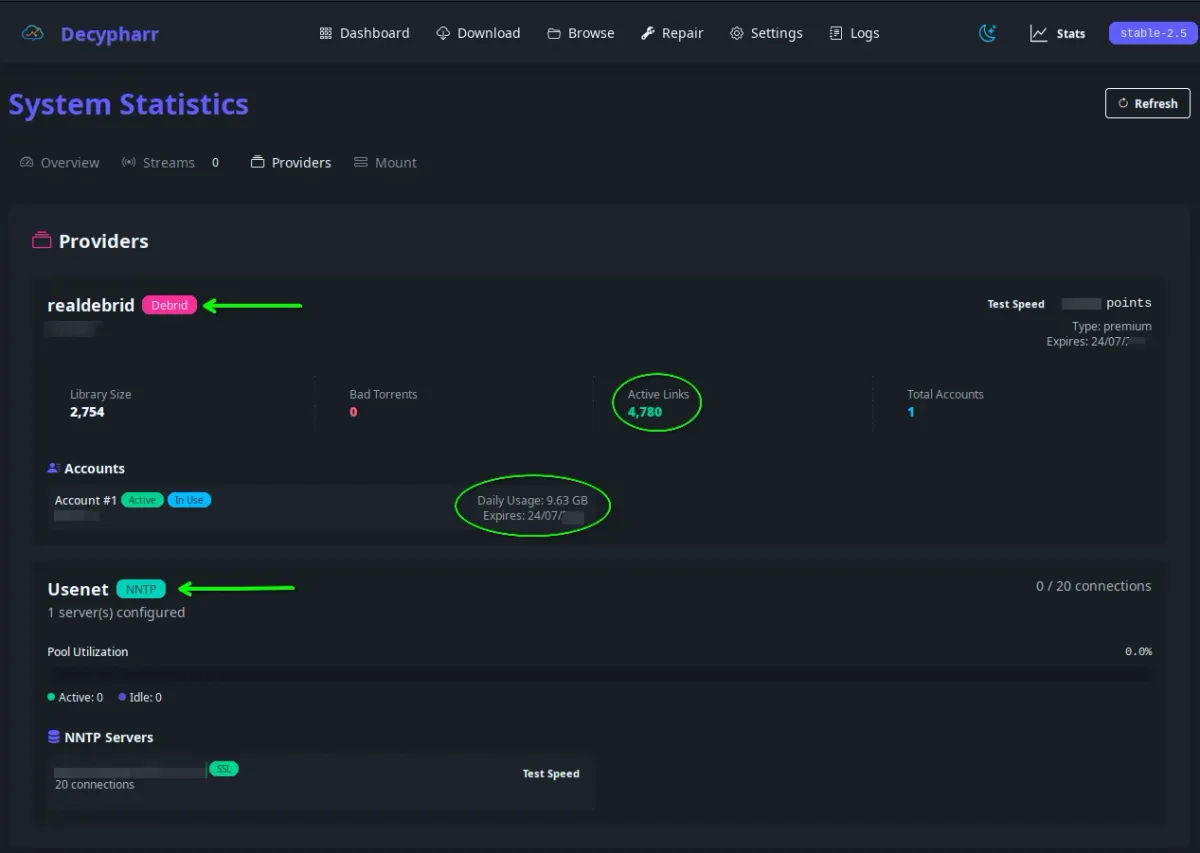
Private Trackers & Hybrid Automation
If you have access to any private trackers, or setup a hybrid automation where if debrid service cache fails, and you're ok with still downloading the file itself, that's a great option.
Real-Debrid is NOT Dead
With these fixes in place, I am able to still fully utilize the service for my needs. Linux ISO's and the works!
Post-Filtering applied - Streaming with Jellyfin and RD on the backend!
So no, Real-Debrid isn't dead, despite what a lot of very confident Reddit threads will tell you. I still use it daily, and about 95% of the time it just works exactly like it always has. What actually happened is more mundane and more permanent: a legal enforcement action tied to a corporate restructuring forced the filtering rollout in May 2026, and that pressure isn't going away.
The catch, and it's a real one, is that I had to loosen my Sonarr/Radarr quality profiles to “Any” to keep that success rate up. Before the filter, I was almost exclusively pulling pure 4K REMUXes for movies. Now my library is a more mixed bag of 1080p and 4K depending on what actually clears the filter. It's not a dealbreaker, but it's a real trade-off, and if you've been chasing REMUX-only libraries, expect to feel this one directly.
Treat Real-Debrid the same way you'd treat any single point of failure in your homelab. It's not down, but it's no longer something you should build your entire media pipeline around without a backup plan. That's also why “just switch to Torbox” isn't the clean answer a lot of people are giving it credit for right now.
Is Torbox Actually the Safer Bet? What Its Own Status Page Says
Since May, a wave of displaced Real-Debrid users has landed on Torbox, and on paper it looks like the obvious move: no keyword filtering, multi-IP support, and it's noticeably cheaper for what you get. But Torbox has been publishing its own incident history the whole time, and it tells a less settled story than the migration hype suggests.
Pulling directly from Torbox's public status page: 5 separate incidents in May, 5 more in June, and 5 more in just the first three weeks of July, including outright outages (Jul 17, Jun 3), API error spikes (Jun 12, Jul 7), and a May 7 incident explicitly logged as “Service Unavailable: Scaling issues under demand.” That last one is the tell. It's not that Torbox is a bad service. It's that a lot of people had the same idea you did at the same time, and the infrastructure is visibly working to catch up. Torbox has said they're targeting a v9 infrastructure release for Q3 2026 aimed at exactly this.
The practical takeaway: don't treat “switch to Torbox” as a permanent fix. Treat it as one leg of a redundant setup. If you're running Decypharr, this is exactly the kind of scenario multi-provider support exists for: wire up both Real-Debrid and Torbox rather than betting your whole library on whichever one is having a good week.
Frequently Asked Questions
Why is Real-Debrid showing “Infringing File” errors?
Real-Debrid introduced automated filtering systems in May 2026 to comply with enforcement requirements. Files containing specific release tags, scene markers, or tracker-related keywords may now return “infringing file” errors and fail instantly during automation workflows.
Which release tags are commonly blocked by Real-Debrid?
Commonly affected tags include:
- WEB-DL
- WEBRip
- AMZN
- DSNP
- YTS
- TGX
- TorrentGalaxy
- RARBG
- EZTV
The exact filtering behavior may continue evolving over time.
Does this completely break Sonarr and Radarr?
No. Sonarr and Radarr still work, but automated queues may repeatedly grab releases that Real-Debrid refuses to cache or download. Adding negative-scored Custom Formats prevents blocked releases from entering your queue in the first place.
How do I stop broken Real-Debrid downloads in Sonarr or Radarr?
The best solution is to create a Custom Format with regex filters matching blocked keywords, then assign a large negative score to that profile. This forces Sonarr and Radarr to ignore problematic releases automatically.
Can I still use Stremio with Real-Debrid?
Yes. Stremio users are generally less affected than full automation stacks. Updating AIOStreams filters or using Tam-Taro SEL profiles can significantly reduce dead or blocked links.
What is the best workaround for Decypharr users?
Decypharr users should implement the same filtering logic upstream in Sonarr and Radarr. Preventing blocked releases from being selected is far more effective than attempting to recover failed queue items later.
Will filtering these keywords reduce available content?
Yes. Tags like WEB-DL, WEBRip, AMZN, and DSNP represent a very large percentage of modern indexed releases. Filtering them improves queue stability but may reduce automation hit rates depending on your indexers and sources.
How can I clean broken torrents from my Real-Debrid library?
Tools like ElfHosted LitterBox can scan your Real-Debrid library for failed or blocked cached torrents and help remove invalid entries after the May 2026 filtering changes.
Is Real-Debrid dead after the May 2026 purge?
No, but it's also not the same service it was in April. The May 2026 filtering rollout was tied to a legal enforcement action, not a temporary bug, so treat it as permanent. The ecosystem has adapted with filtering profiles and hybrid setups, but the safer move now is redundancy: pair Real-Debrid with a second provider like Torbox (which has its own scaling growing pains right now) or a Usenet fallback, rather than depending on one service alone.
Is Torbox a safe replacement for Real-Debrid in 2026?
It's a legitimate option, not a guaranteed upgrade. Torbox doesn't filter by keyword the way Real-Debrid now does, but its own public status page shows a steady run of capacity-related incidents through May, June, and July 2026 as displaced Real-Debrid users migrate over. Best used as a second provider alongside Real-Debrid rather than a full replacement, at least until their planned Q3 2026 infrastructure upgrade lands.
Disclaimer - All technical instructions and guidance in this post & on this website / blog are provided as educational content only, use at your own risk! For further details please see Core Lab Tech Blog's full Privacy Policy & Disclaimer.
Written by
On this page
What's Next?