Decypharr Setup Guide: Replace Downloads with Instant Debrid Streaming (2026)
Hardware isn't getting cheaper in 2026, and that includes bulk storage. This is one way to deal with that!
If you’re already running Sonarr, Radarr, and Prowlarr, you’ve solved media automation. If you're still downloading torrents locally, managing incomplete files, and dealing with slow imports, you're doing unnecessary work in 2026.
Decypharr changes the game.
Instead of downloading media, it:
- Pulls instantly cached files from Debrid services
- Mounts them locally via WebDAV
- Creates symlinks that your Arr stack treats as completed downloads
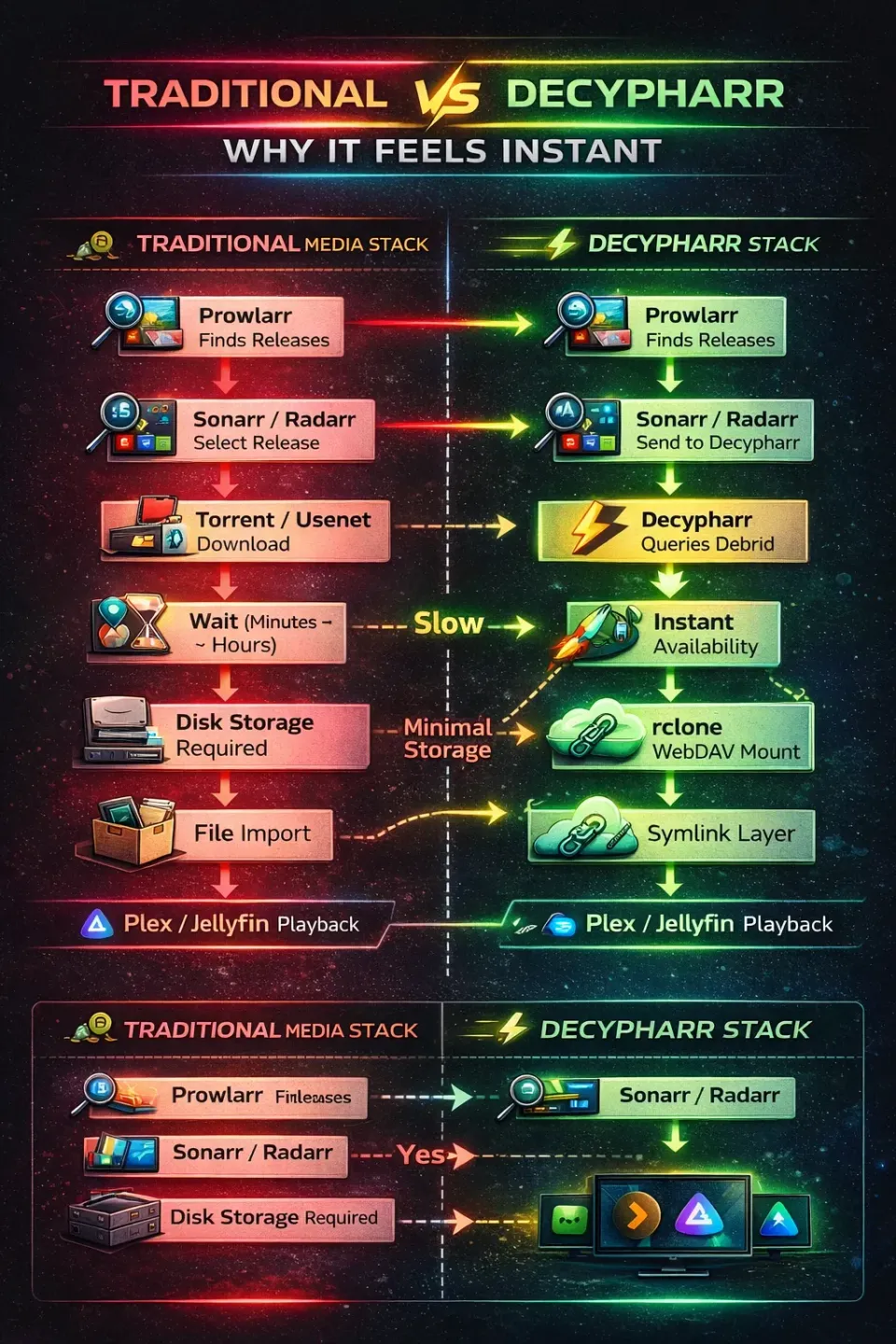
Traditional torrent-based setups still:
- Download large files locally
- Waste disk space
- Introduce delays before playback
The result?
⚡ Near-instant media availability
💾 Zero local storage waste
🔄 Fully automated workflows
The only drawback - If your internet goes offline, so does your media. But that's no different than any streaming service. This is the one true advantage of being a digital dragon, and hoarding all your media locally.
This guide walks you through a production-grade Decypharr setup, tuned for performance, reliability, and clean integration into modern self-hosted stacks.
The good news is that the ecosystem adapted quickly. With updated filtering and configuration changes, Decypharr continues to function well with Real Debrid, although you may notice fewer release options than before.
Many users have migrated to Torbox in search of greater consistency, and I'm actively testing it as part of a more resilient, failover-friendly media stack. However, I've chosen to continue using Real Debrid for the time being, as it's still working reliably for me in the vast majority of cases.
The bottom line: both Real Debrid and Torbox can be used successfully with Decypharr, Plex, and Jellyfin. If you value simplicity and already have a Real Debrid subscription, there's no urgent need to jump ship. If maximum redundancy and future-proofing are your priorities, experimenting with Torbox -or even running both services side-by-side - may be the ideal approach.
This is part of my Real-Debrid Media Server Series:
Choose Your Media Journey
Start with the path that best matches how you want to watch and manage your media.
Fastest Setup
Stremio + Real Debrid (2026)
Netflix simplicity with virtually no maintenance. No hard drives, no server, just press play.
Automation
Decypharr: Instant Downloads & Streaming
Automatically find and queue content while still leveraging Debrid services behind the scenes.
Ultimate Control
Plex/Jellyfin + Debrid (DUMB)
Share with family, build a true media server, and unlock the full power of the hybrid approach.
🧱How Decypharr Works (Architecture Overview)
The Shift
Old model: Indexer → Torrent Client → Download → Import → Plex/Jellyfin
New model: Decypharr acts as a bridge between your automation stack and Debrid providers.
Pipeline:
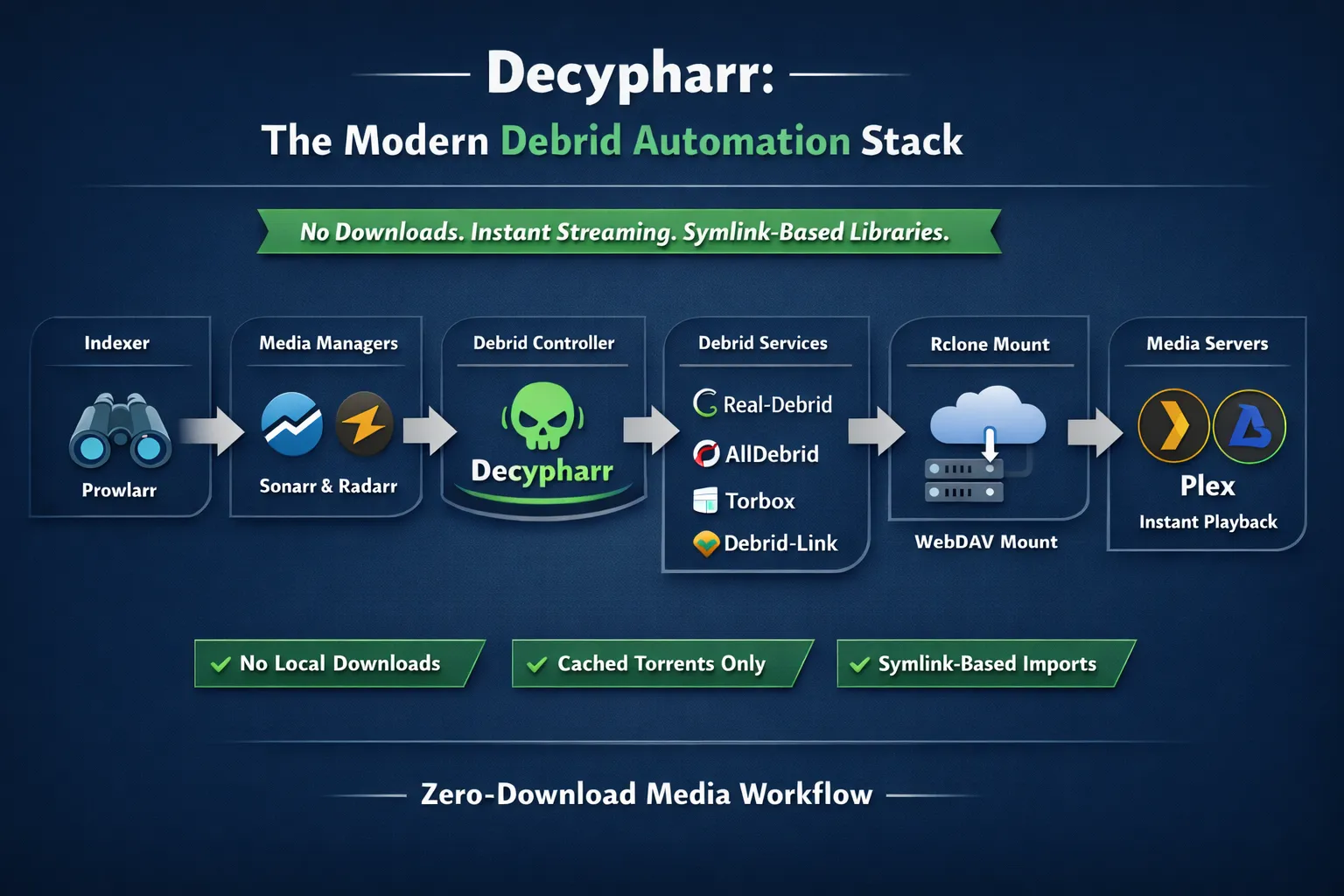
- Prowlarr finds releases
- Sonarr/Radarr send them to Decypharr
- Decypharr queries your Debrid provider
- Cached files are instantly available
- Files are mounted via WebDAV
- Symlinks are created
- Plex/Jellyfin imports the content
It looks more complex than it actually is, but to summarize, it's a drop in replacement for Qbittorrent, that only searches Debrid source. You can also run them side by side!
flowchart TD
%% ======================================================
%% USER REQUEST FLOW
%% ======================================================
subgraph Request["🎯 User Request Flow"]
USER["🧑💻 User"]
SEERR["🎬 Overseerr / Jellyseerr"]
USER -->|Request Movie / Show| SEERR
end
%% ======================================================
%% ARR STACK
%% ======================================================
subgraph Arr["🧠 Arr Stack"]
SONARR["📺 Sonarr"]
RADARR["🎥 Radarr"]
PROWL["📡 Prowlarr"]
SEERR --> SONARR
SEERR --> RADARR
SONARR -->|Search Request| PROWL
RADARR -->|Search Request| PROWL
PROWL -->|Returns Results| SONARR
PROWL -->|Returns Results| RADARR
end
%% ======================================================
%% CACHE DECISION
%% ======================================================
DECISION{"⚡ Cached Release?"}
SONARR -->|Download Request| DECISION
RADARR -->|Download Request| DECISION
%% ======================================================
%% FAST PATH (CACHED)
%% ======================================================
subgraph FastPath["⚡ Instant Path (Cached)"]
DECY["⚡ Decypharr"]
RD["🌍 Real-Debrid"]
RCLONE["🔗 rclone WebDAV Mount"]
SYMLINK["🪶 Symlink Layer"]
DECISION -->|Yes| DECY
DECY --> RD
RD -->|Instant| DECY
DECY --> RCLONE
RCLONE --> SYMLINK
end
%% ======================================================
%% FALLBACK PATH
%% ======================================================
subgraph SlowPath["🐢 Fallback Path (Optional)"]
TORRENT["⬇️ Torrent / Usenet"]
WAIT["⏳ Download Time"]
DECISION -->|No| TORRENT
TORRENT --> WAIT
WAIT --> SYMLINK
end
%% ======================================================
%% MEDIA SERVERS
%% ======================================================
subgraph Servers["🖥️ Media Servers"]
PMS["💽 Plex"]
JFS["🎬 Jellyfin"]
SYMLINK --> PMS
SYMLINK --> JFS
end
%% ======================================================
%% PLAYBACK
%% ======================================================
subgraph Players["📺 Playback Devices"]
TV["📺 TV"]
PC["💻 Desktop"]
MOBILE["📱 Mobile"]
PMS --> TV
PMS --> PC
PMS --> MOBILE
JFS --> TV
JFS --> PC
JFS --> MOBILE
end
%% ======================================================
%% CALLOUT
%% ======================================================
CALLOUT["⚡ Cached = Instant Playback | 🐢 Not Cached = Fallback Needed"]
DECISION -.-> CALLOUT
%% ======================================================
%% STYLING
%% ======================================================
classDef user fill:#e0f2fe,stroke:#0284c7,stroke-width:2px;
classDef arr fill:#dcfce7,stroke:#16a34a,stroke-width:2px;
classDef fast fill:#fee2e2,stroke:#dc2626,stroke-width:2px;
classDef slow fill:#fef3c7,stroke:#d97706,stroke-width:2px;
classDef storage fill:#ccfbf1,stroke:#0d9488,stroke-width:2px;
classDef server fill:#ede9fe,stroke:#7c3aed,stroke-width:2px;
classDef player fill:#e5e7eb,stroke:#374151,stroke-width:2px;
class USER,SEERR user;
class SONARR,RADARR,PROWL arr;
class DECY,RD fast;
class TORRENT,WAIT slow;
class RCLONE,SYMLINK storage;
class PMS,JFS server;
class TV,PC,MOBILE player;
style Request fill:transparent,stroke:#888,stroke-dasharray:4 4
style Arr fill:transparent,stroke:#888,stroke-dasharray:4 4
style FastPath fill:transparent,stroke:#888,stroke-dasharray:4 4
style SlowPath fill:transparent,stroke:#888,stroke-dasharray:4 4
style Servers fill:transparent,stroke:#888,stroke-dasharray:4 4
style Players fill:transparent,stroke:#888,stroke-dasharray:4 4
Simple 📊 Infographic
⚔️ Decypharr vs RDTClient vs Zurg
Here's how these tools stack up in features, compare to one another.
Feature Comparison
| Feature | Decypharr | RDTClient | Zurg |
|---|---|---|---|
| Arr Integration | ✅ Native (qBittorrent API) | ⚠️ Partial | ❌ None |
| Setup Complexity | Medium | Medium | High |
| Web UI | ✅ Yes | ✅ Yes | ❌ No |
| Symlink Support | ✅ Native | ⚠️ Limited | ❌ External |
| Multi-Debrid | ✅ Yes | ⚠️ Limited | ❌ No |
| Actively Developed | ✅ Yes | ⚠️ Slowing | ⚠️ Niche |
| Works Like Torrent Client | ✅ Yes | ⚠️ Sort of | ❌ No |
| Best Use Case | Full automation | Legacy setups | Power users |
🔥 Summary
- RDTClient was the bridge tool - but it’s aging and clunky
- Zurg is powerful but not designed for Arr workflows
- Decypharr is the first tool that feels native to the Arr ecosystem; it was made to integrate with intentionally
If you already use Sonarr/Radarr, Decypharr is the only one that fits cleanly.
🐳 Installing Decypharr (via Docker Compose)
It's very easy to get Decypharr running, you simply make a new docker compose and slap in this example, fire it up.
Pre-Requisites:
- Docker & Docekr Compose installed - Checkout my Ultimate Docker Compose primer
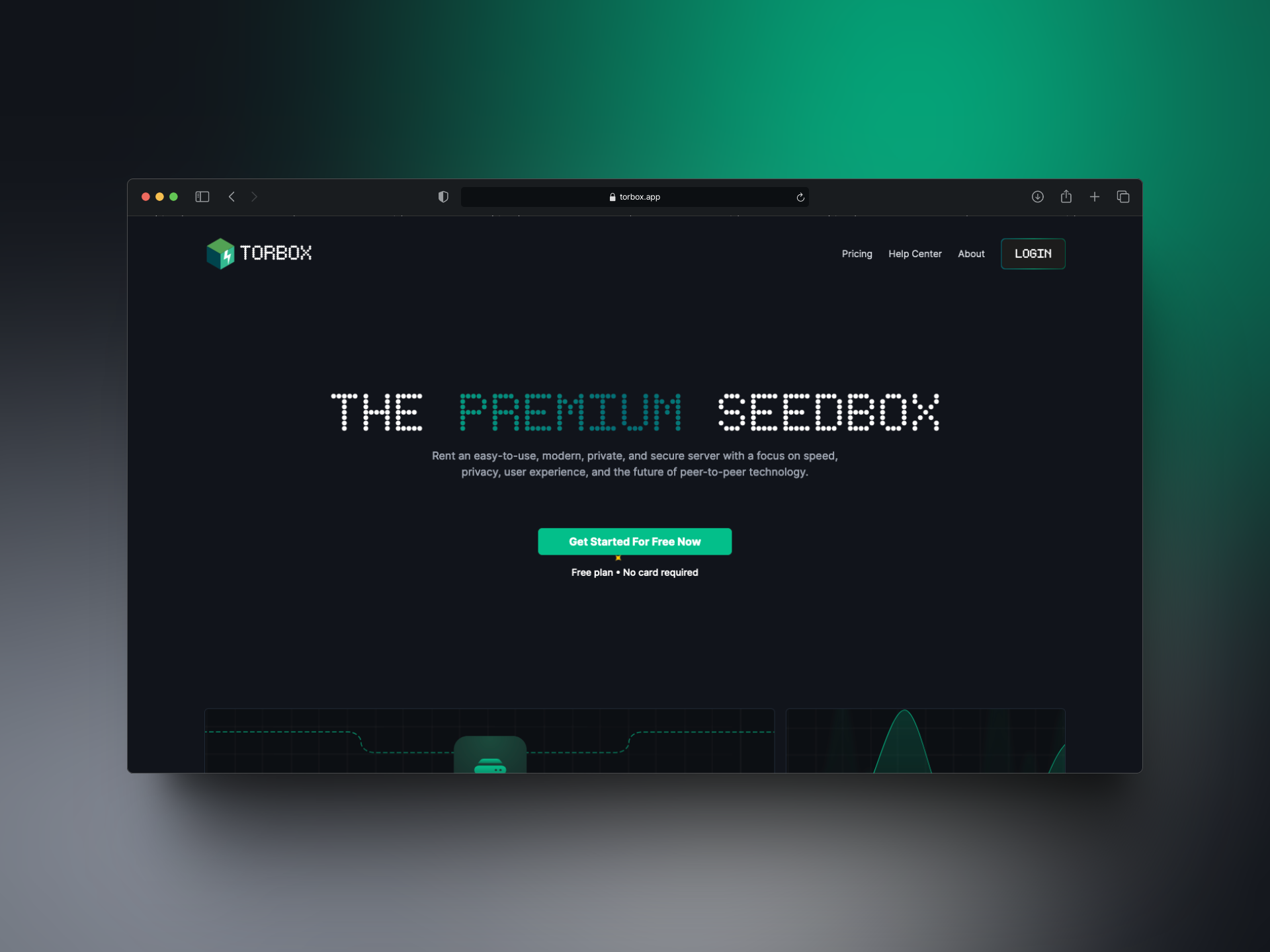
- At least 1 active Debrid subscription (Real-Debrid, Torbox, AllDebrid, DebridLink etc). This is the engine. It costs ~$4/CAD month. If you don't mind, sign up with my referral link which helps support the site.


- Optional - One of more of the *Arr apps (Sonarr, Radarr, Lidarr, Readarr etc)
- Host system with FUSE support for RCLONE mounting (May require installing package)
- Setup brand new media folders for your Plex or Jellyfin
- Setup new Libraries pointing to those folders and DO NOT ENABLE intro & outro detection, commerical or thumnail detection / generation, leave everything plain and default. Remember - you're not actually downloading the files! If you scrape all this out of Debrid, they'll ban you, and 9/10 it won't work in your media server anyway and your wasting resources having it try.
Docker Compose (Production Ready)
services:
  decypharr:
    image: cy01/blackhole:latest
    container_name: decypharr
    environment:
      - PUID=1000 # Optional, change to user you want to run as
      - PGID=1000 # Optional, change to user you want to run as
    ports:
      - "8282:8282"
    volumes:
      - /opt/dockers/decypharr:/app # config.json must be here
      - /mnt/media/decypharr_mnt:/mnt:rshared # Mandatory for mount propogation.
      - /mnt/media:/data # Root media path for aarr integration
    # OPTIONAL - uncomment next 4 lines if you want to maps a chunk of your RAM to the transcoder so it doesn't wear out your SSD.
#      - type: tmpfs
#        target: /transcode
#        tmpfs:
#          size: 4096000000 # ~4GB limit, adjust to your needs
    restart: unless-stopped
    devices:
      - /dev/fuse:/dev/fuse:rwm
    cap_add:
      - SYS_ADMIN
    security_opt:
      - apparmor:unconfined
Key Configuration Points:
| Setting | Purpose | Required |
|---|---|---|
Port 8282 | Main HTTP server for Web UI, API, and QBittorrent mock | Yes |
Volume /app | Persistent storage for config.json, auth.json, logs | Yes |
Volume /mnt with rshared | Mount propagation for Rclone mounts | If using Rclone or DFS |
Device /dev/fuse | FUSE device access for Rclone | If using Rclone or DFS |
SYS_ADMIN capability | Required for FUSE mounting | If using Rclone or DFS |
PUID/PGID | User/Group ID for file permissions | Optional |
- volumes: this can vary widely and will be wherever you want to store the symlinks and files for the decypharr container itself.
- /mnt/media/mnt:/mnt:rshared ◀️ This is where decypharr will put all the symlinks and associated folders (Detailed below). Has to be visible to the other *Arr apps!
- /opt/dockers/config:/app ◀️ This is where decypharr's app files will be, same as Sonarr or Radarr or any other docker, where it's configuration will live persistently. Can live anywhere.
Join the Core Lab Inner Circle
Forge Your Digital Fortress: Self-Hosting, Homelabs & VPS Mastery. Network auditor & server hardening scripts upon signup!
Decypharr Filesystem Layout (Important)
When configuring your apps, use these internal paths to ensure they stay on the same virtual file system:
AND each Aarr app also needs:
/mnt/media/mnt:/mnt:rslave
Or wherever you chose to be your mount point!
Path Mapping Table
| Application | Role | Container Path | Critical Notes |
|---|---|---|---|
| Shared Media Root | Unified Storage Namespace | /data |
CRITICAL: This must map to the same host path in ALL containers. Example: /mnt/media → /dataThis is the “source of truth” for all Arr apps. |
| Download Path | Arr Ingestion Point | /data/downloads |
Used by Radarr/Sonarr for Completed Download Handling. Decypharr writes symlinks here that point to /mnt.
|
| Decypharr | RD Mount + Symlink Source | /mnt |
CRITICAL: This is a DFS/rclone (FUSE) mount. Must be mapped in ALL Arr containers: /mnt/media/decypharr_mnt → /mntIf missing → imports FAIL (“file not found”). |
| Radarr | Movies Library | /data/movies |
Must see BOTH:/data (library + downloads)/mnt (to resolve symlinks)Hardlinks will NOT work (FUSE source). |
| Sonarr | TV Library | /data/tv |
Same requirements as Radarr. Missing /mnt = broken imports.
|
| Lidarr | Music Library | /data/music |
Optional with Decypharr. Same mount rules apply if used. |
| Plex / Media Server | Playback | /data |
RECOMMENDED: Use separate library for Decypharr content:/data/decypharr_mntDisable intro detection, thumbnails, and deep analysis to avoid full-file streaming. |
Path Mapping Table Summary
| App | Category Name | Download Subfolder | Media Storage Path (Hardlinks/Library) |
|---|---|---|---|
| Radarr | radarr | /mnt/media/downloads/radarr | /mnt/media/movies |
| Sonarr | sonarr | /mnt/media/downloads/sonarr | /mnt/media/tv |
| Lidarr | lidarr | /mnt/media/downloads/lidarr | /mnt/media/music |
You can change these paths to be /opt/media/ or /dockers/media or whatever you like for the path. Just stick with it consistently and ensure all the Aarrs can see it the same.
1. WebDAV Mount (Where Real Debrid is 'mounted')
Also where and how it will show up as a 'share' on your host system.
/mnt/media/decypharr/realdebrid/Can ignore this mostly for now
2. Download Path (Where it keeps track of which torrents to cache)
/mnt/media/downloads/{radarr, sonarr} there will be a folder each.3. Symlink Library (Where you'll point Jellyfin/Plex)
/mnt/media/{tv, movies} each folderCreating the Folder Structure
/mnt/media
     |
     ├── downloads
     │   ├── torrents
     │   └── usenet
     └───
         ├── movies
         ├── music
         └── tv
# 1. Create the full directory tree
sudo mkdir -p /mnt/media/decypharr/ \
/mnt/media/downloads/ \
/mnt/media/{movies,tv,music}
# 2. Set ownership to your user (replace $USER with your username if needed)
sudo chown -R $USER:$USER /mnt/media/
# 3. Set permissions (rwxrwxr-x)
sudo chmod -R 775 /mnt/media/
# 4. Verify the structure
ls -R /mnt/media/
Why this works best
- The Docker Rule: When you set up your Docker Compose, map the volume as
- /mnt/media/:/mnt. Inside the containers, Radarr will see/mnt/downloadsand/mnt/media. Because they share that top-level/mntmapping, the OS treats a move from "downloads" to "media" as a simple metadata rename rather than a slow copy-and-delete process. - Hardlinking: If you are using public or private trackers, this structure allows you to keep the file in
torrentsto continue seeding while a "hardlink" exists inmoviesfor your media player. This uses zero additional disk space. - Debian 13 Compatibility: These commands use standard core utilities present in the Debian 13 (Trixie) base, ensuring your permissions are persistent across reboots if your drive is mounted via
/etc/fstab. - Decypharr Symlinks: Sharing the same root folder mount
/mnt/media/:mntallows Decypharr to make it's symlinks from it's real-debrid mounted drive, to the symlink location:
Debrid will create directors under /mnt/media/decypharr/⚙️ Initial Decypharr Setup (Web UI)
When you first fire up Decypharr, and hit the webgui, it will force you to complete an Initial Onboarding which takes only a couple of minutes. Then we dig into the config!
To access, open your web browser and hit:
http://your-server:8282
- First Steps:
- Configure authentication (optional but recommended)
- I would not expose decypharr's (any of the arr*s) webgui to the internet without 2FA/MFA!
- Navigate to settings
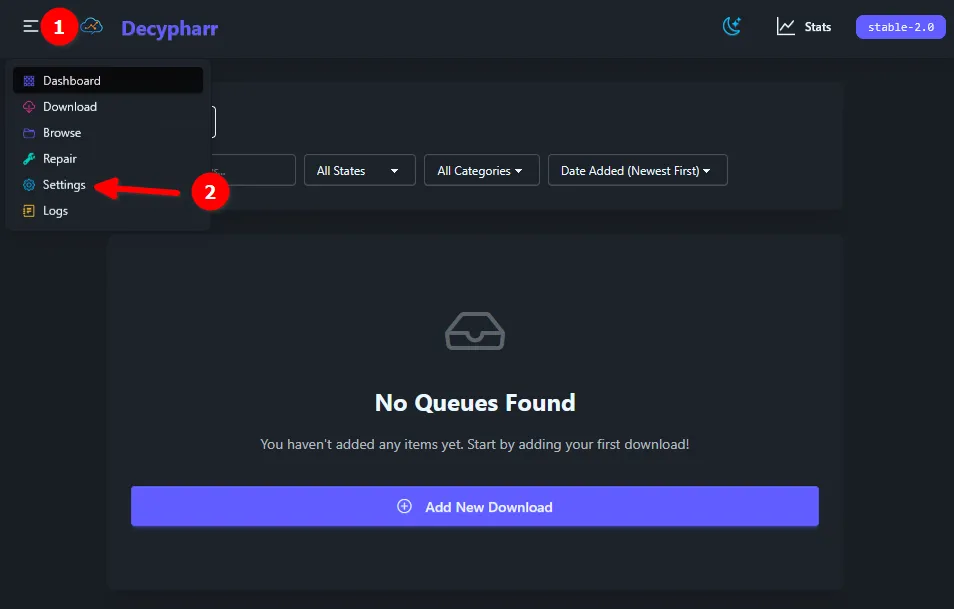
🔑 Configuring Debrid Providers
Now navigate from Settings->Providers, and configure which Debrid service you procured / have a subscription with. In my case, it's Real-Debrid.
You'll fill out the name, API Key & rate limits (250/minute for Real Debrid). Defaults are fine unless you have a reason to change them.
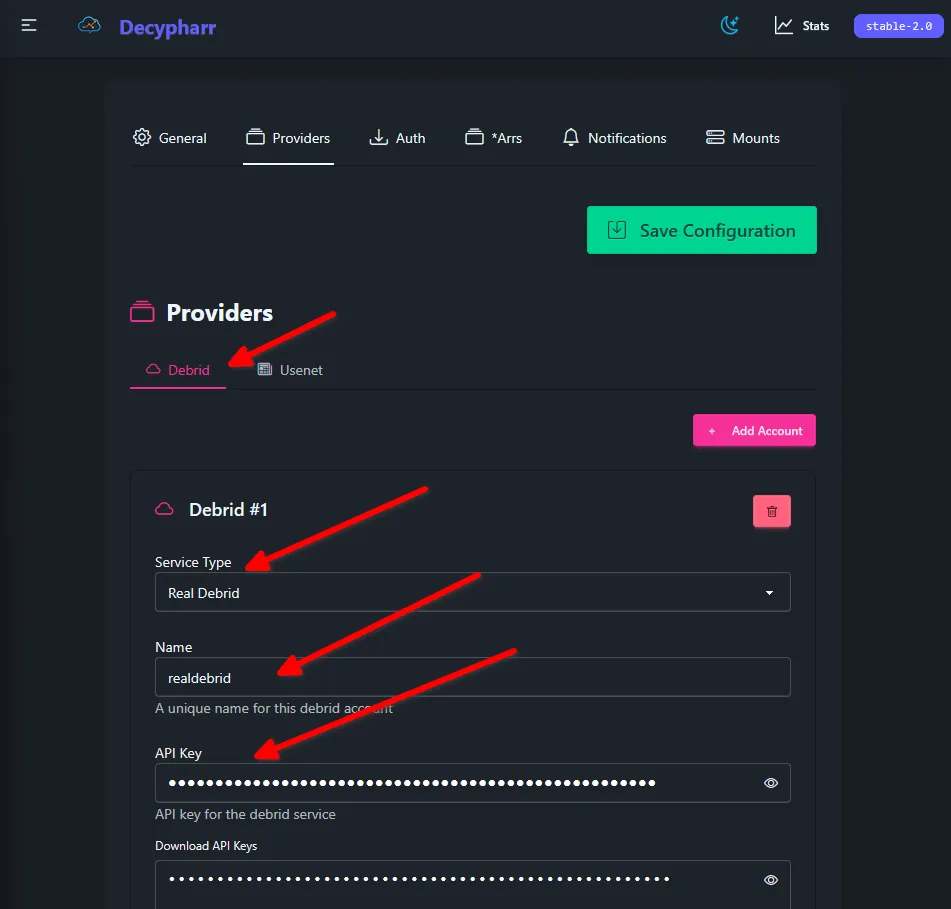
Note: You can add multiple Debrid providers and multiple concurrent subscriptions.
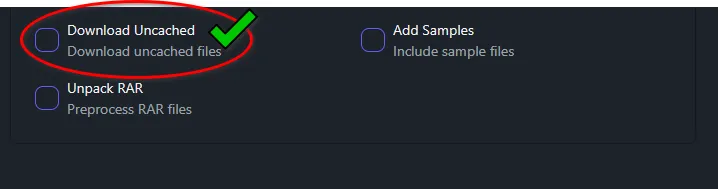
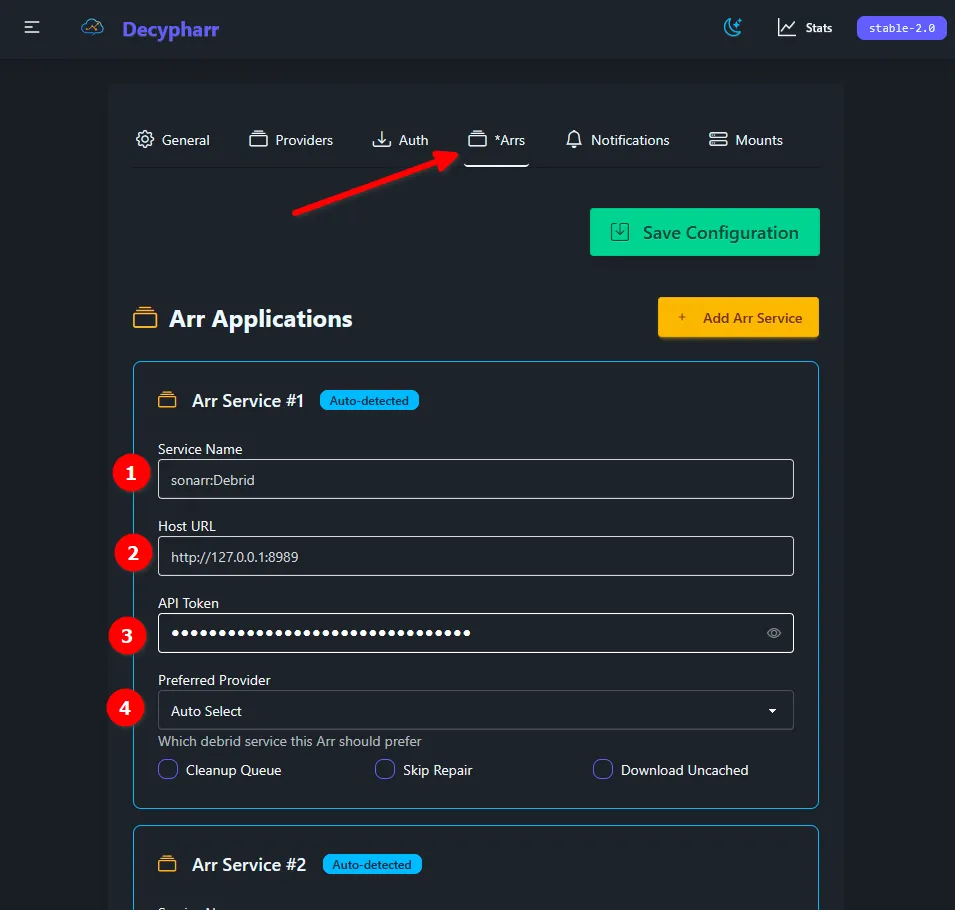
Configuring *Arrs Integration
Here you'll want to configure your Sonarr & Radarr instances to integrate with Decypharr. Remember, they view it as Qbittorrent and treat it as such, feeding it the file/link they end up finding from Prowlarr / your other indexers.
You will need to specify your HOST URL and ensure you use the proper IP address. In my example, I have http://127.0.0.1:8989 because I have Decypharr & the other relevant *Arrs on the same host.
- Service name
- Host URL
- API Token (Sonarr's, Radarr's, etc...)
Mount Configuration
Remember I made a big deal about folder structure up above? Yeah this is where it comes into play!
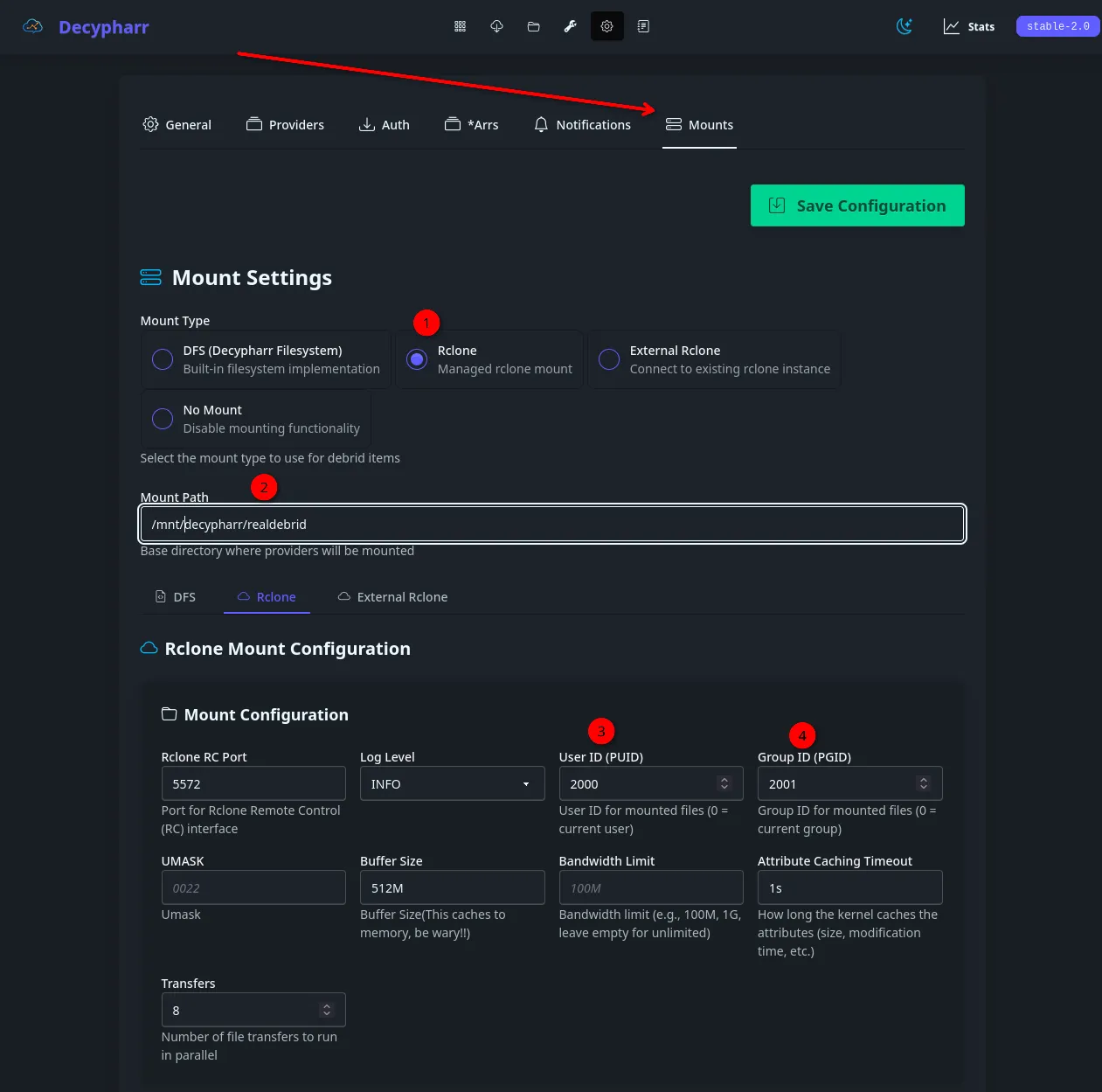
When you click to Decypharr->Hamburger Menu (Top Left)->Settings->Mounts, you'll instantly be presented with a pile of mount settings. It SHOULD already have reasonable defaults selected but here's the picture-proof to ensure you're successful.
Key Settings (Critical❗)
- Mount Type: Rclone shown first, then DFS
- Mount Path: /mnt/decypharr/realdebrid (For rclone)
- /mnt/ for DFS
- Or whatever you want it to be!
- Rclone Mount Config: Ensure User ID & Group ID is set as the user you specified, leave all else default for now.
Initial setup mount screen:
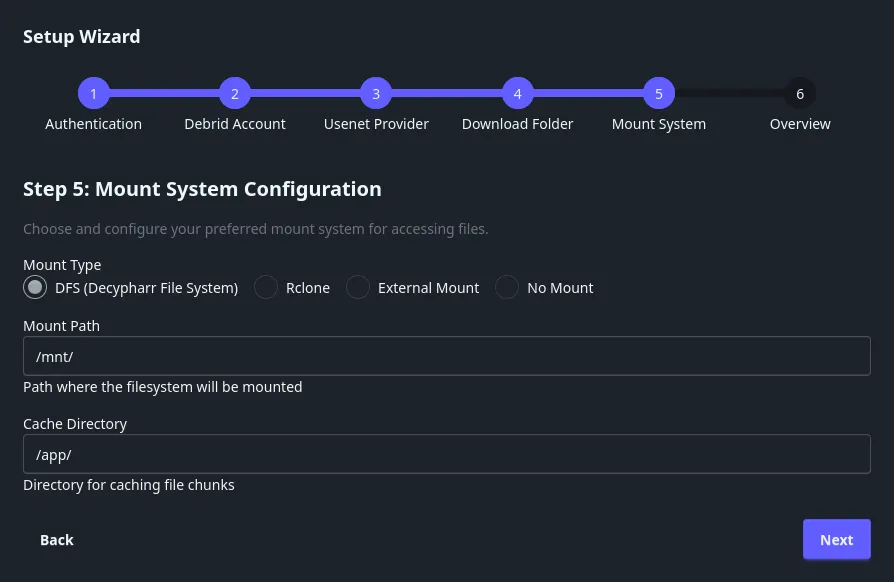
I chose DFS because I like trying the new things, and DFS is quite new. I personally found it 'snappier' but RCLONE works fine too.
/mnt/ - In the docker config this is /mnt/media/decypharr_mnt:/mnt:rshared
Here's how this should look:
Or, for DFS setup:
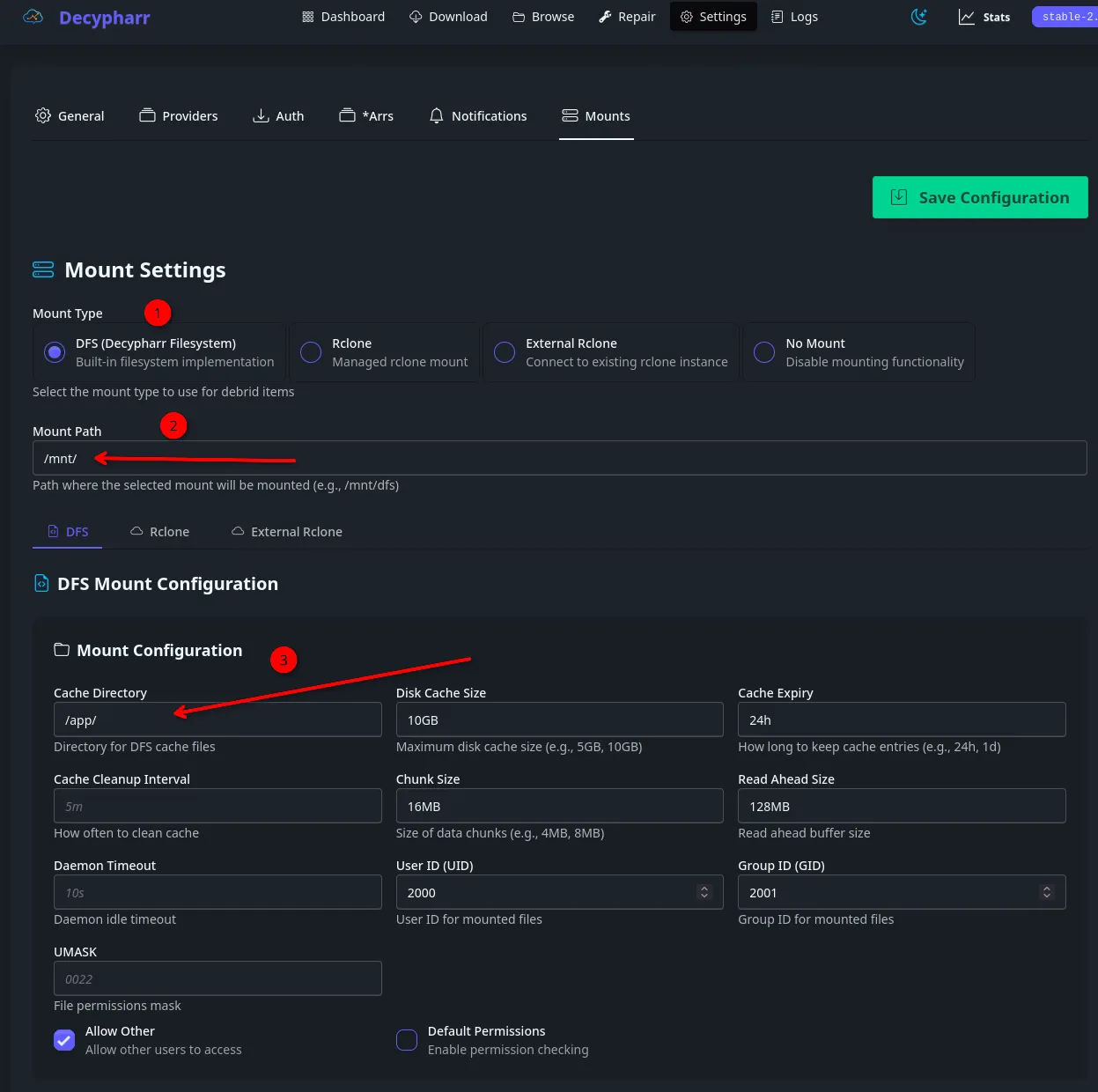
Regardless, if using rclone or DFS, you'll want to set the cache up and point it at NOT your NVME or SSD.
🔥 Golden Rule
Every container must see identical paths.
If not:
- Imports fail
- Files get stuck
- Plex/Jellyfin never sees content
Categories (CRITICAL)
Categories are not just "nice to have" - they are the connective tissue that prevents your media stack from becoming a chaotic mess. While you can technically run a single app without them, they become effectively mandatory as soon as you have two or more apps (like Radarr and Sonarr) sharing the same download client (Decypharr).
Here is the breakdown of why they matter and how they work in your specific stack.
1. The Role of Categories
Think of a category as a "label" that follows a file from the moment it’s grabbed until it’s imported.
- Prowlarr: Acts as the "Sync Master." When you add an indexer in Prowlarr, it asks which categories (e.g.,
5000for Movies,2000for TV) that indexer should support. It then pushes these settings to Radarr/Sonarr. - The Arrs (Radarr/Sonarr): When Radarr finds a movie, it sends it to Decypharr with the label
radarr. - Decypharr: It sees the incoming request. Because Decypharr mimics a qBittorrent API, it uses that
radarrcategory to decide which subfolder to put the file in (e.g.,/mnt/media/downloads/torrents/movies).
2. Is it Mandatory?
Strictly speaking: No. Pragmatically: Yes.
- Scenario A: Single App (Not Mandatory) If you only used Radarr, everything going into Decypharr is a movie. No confusion.
- Scenario B: Pre-existing Stack (Mandatory) Since you are adding Decypharr to an existing stack, categories are essential to prevent "Cross-Talk." Without categories, if Radarr and Sonarr both look at Decypharr’s "All" queue, Radarr might see a TV show download, think "I don't know what this is, but it's in my queue," and try to import it into your Movie library—or worse, delete it because it doesn't match a movie in its database.
3. Category Settings: How to Map Them
When adding Decypharr to your stack, you must align the following three areas:
Pro Tip: Always use lowercase for category names. Some systems are case-sensitive, and Radarr vs radarr can occasionally cause the "Arr" to lose track of the download, leaving it stuck at 100% in your queue.:
A. In Decypharr (The Target)
In the Decypharr settings, you define the "Mock Categories." You should have:
radarr-> Points to your movies download path.sonarr-> Points to your TV download path.
This is shown way up above, when you first setup the Arrs, you should have put these in. If you didn't it's no big deal, can go back into Settings->Arrs->Slap them in!
B. In Prowlarr (The Sync)
You don't usually set the "Download Category" in Prowlarr's indexer settings. Instead, Prowlarr ensures that when Radarr asks for a "Movie," the indexer only returns results tagged with movie-related category IDs (like 5000, 5040).
C. In Radarr/Sonarr (The Client Config)
When you go to Settings > Download Clients and add Decypharr (as a qBittorrent client):
- Find the Category field.
- Type
radarr(for Radarr) orsonarr(for Sonarr). - This is critical: This tag must match the "Category" name you set inside Decypharr.
- Same for the Tag field down below.
- This ensures when you add media from Seerr, it will search Decypharr and not your existing Qbittorrent and actually download the media. We're specifically trying to avoid that in this case!
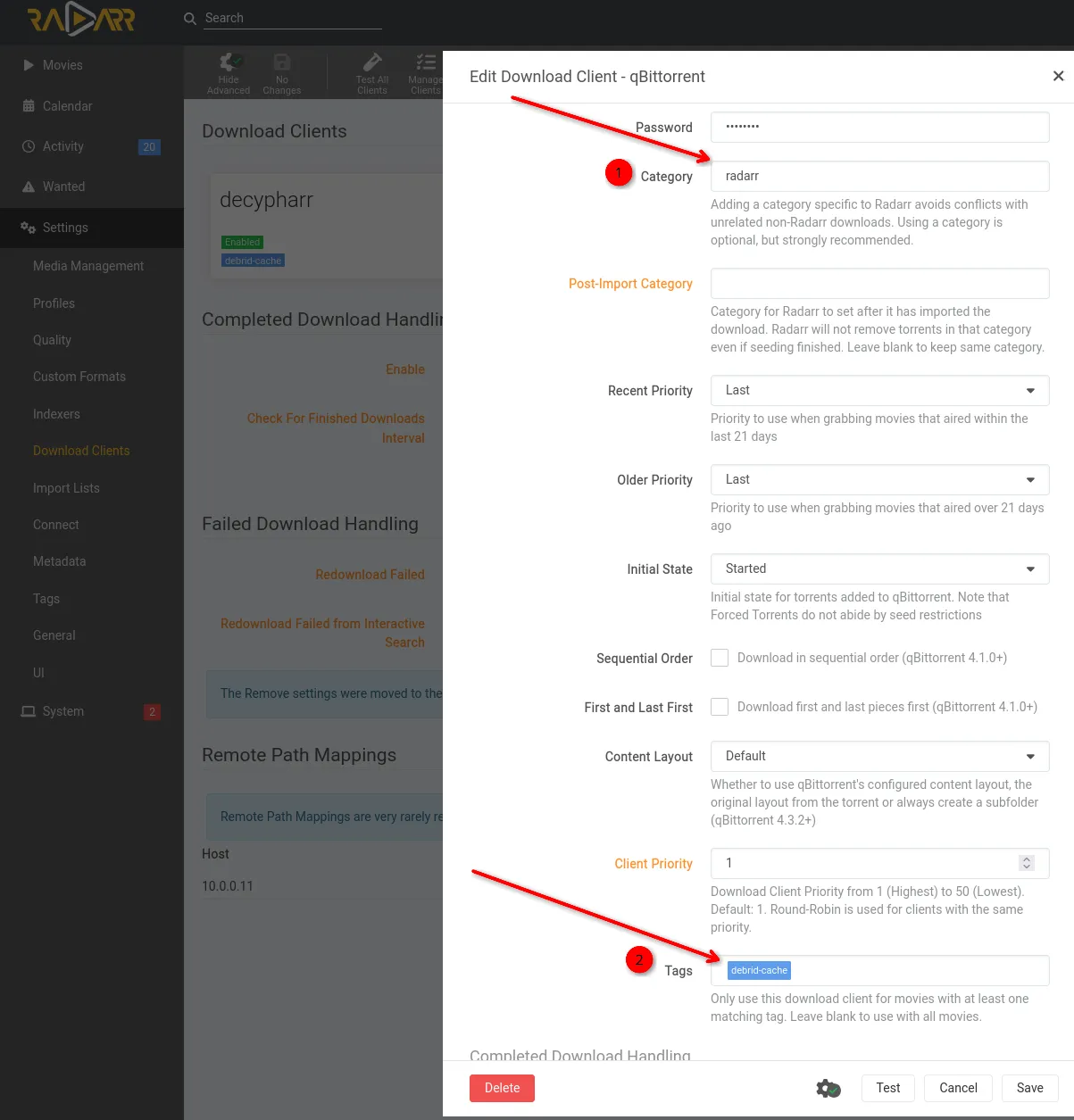
Summary Checklist for your Deployment
If you are modifying your /mnt/media setup as we discussed, your categories should look like this:
Media Management Table
| App | Category Name | Download Subfolder | Media Storage Path (Hardlinks/Library) |
|---|---|---|---|
| Radarr | radarr | /mnt/media/downloads/radarr | /mnt/media/movies |
| Sonarr | sonarr | /mnt/media/downloads/sonarr | /mnt/media/tv |
| Lidarr | lidarr | /mnt/media/downloads/lidarr | /mnt/media/music |
Quick Reminder on Hardlink Requirements
To ensure Hardlinks work correctly (which allows the file to exist in both folders without taking up double the space):
- Same File System: Both the
downloadsand themovies/tv/musicfolders must reside on the same physical disk or mount point (/mnt/media). - Atomic Moves: Since your paths both start with
/mnt/media, your setup is perfectly optimized for instant, "space-less" moves!
🚀Performance Optimization
Just get it working to start, play around with it for a bit, ensure it's 150% functional from Seerr request->Sonarr/Radarr->Prowlarr search->Back to Sonarr/Radarr->Decypharr->Cache hit->Result->Jellyfin/Plex shows new media and it's playable.
As long as you have the basic workflow function, and it's working well for you, don't need to touch or tweak anything! If it's stuttering, or pausing, or you have a 1Gbps+ WAN speed and a LOT to pull / cache, you may want to tweak these settings.
These settings are assuming a 500Mbps WAN download speed.
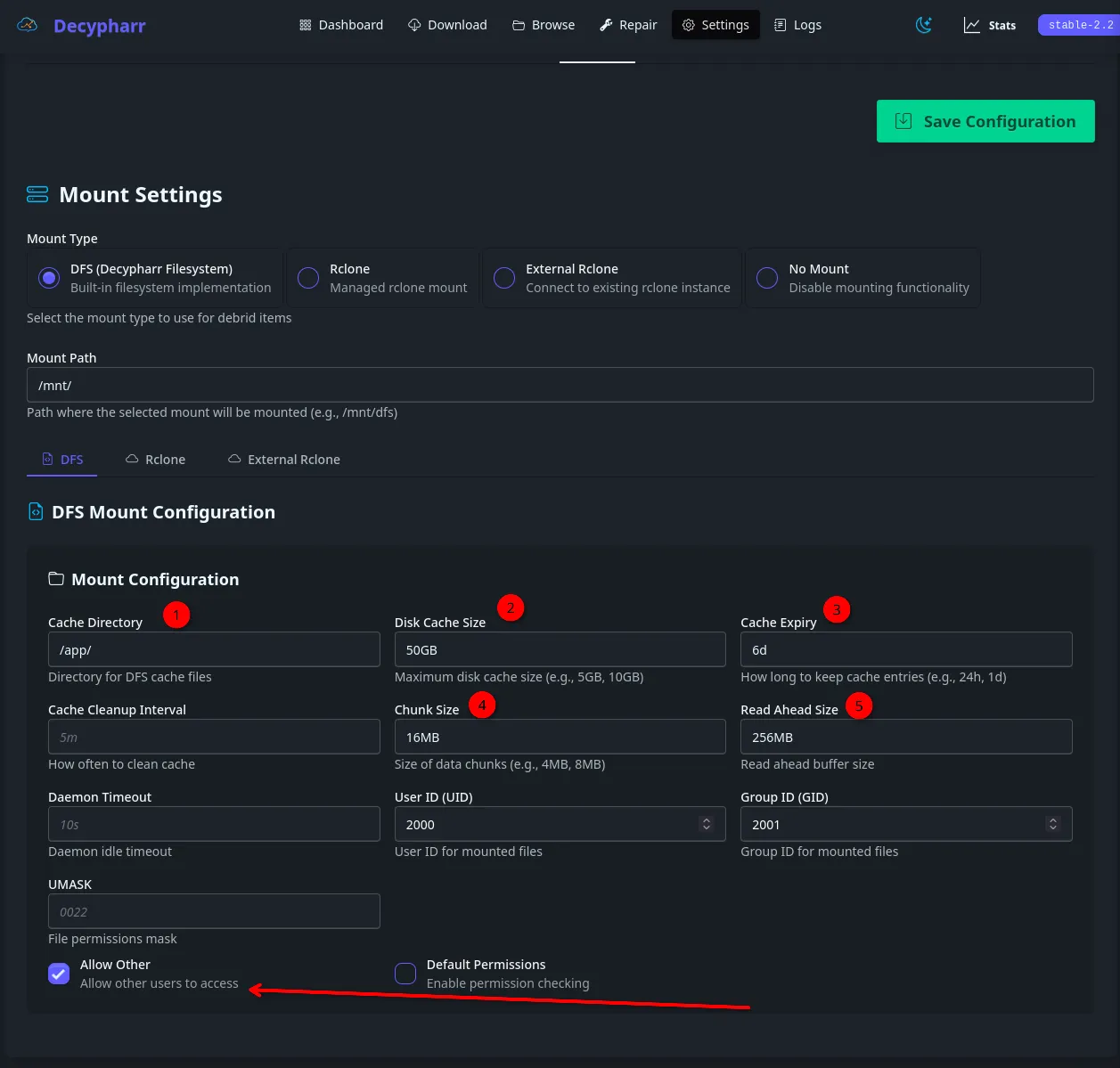
Decypharr DFS Configuration Breakdown
- Cache Directory (
/app/): This is the local storage area for your temporary data chunks. For high-performance, this should ideally be on an NVMe or SSD rather than a spinning disk to handle the high IOPS of simultaneous chunk writes. - Disk Cache Size (
50GB): Limited by how much storage you want to use for the rolling cache. For a 500 Mbps connection, this (50GB) is excellent - it allows you to keep several large 4K movies partially "warm" on disk, making seeking and rewinding nearly instantaneous. - Cache Expiry (
6d): Data stays on your disk for 6 days. This is great for "binge-watching" a series, as the next episode's shared assets or frequently accessed metadata won't need to be re-downloaded. - Chunk Size (
16MB): This is the "Goldilocks" zone for your speed.- Smaller chunks (4MB): Better for slow connections but higher overhead.
- Larger chunks (16MB+): More efficient for 500 Mbps WANs, as it reduces the number of individual requests sent to the debrid provider.
- Read Ahead Size (
256MB): This is the most critical for playback. When you hit "Play," DFS will grab 256MB immediately. At 500 Mbps, this buffer fills in roughly 4–5 seconds, providing a massive safety net for high-bitrate 4K REMUX files (which can spike to 120 Mbps).
Matching This Logic in Rclone
If you were to use the Managed Rclone or External Rclone option in Decypharr instead of DFS, you would use these equivalent flags to mimic your performance profile:
| DFS Setting | Rclone Equivalent Flag | Purpose |
|---|---|---|
| Cache Directory | --cache-dir /app/rclone_cache | Path for the local buffer. |
| Disk Cache Size | --vfs-cache-max-size 50G | Keeps your local disk usage in check. |
| Cache Expiry | --vfs-cache-max-age 144h | 144 hours = 6 days. |
| Chunk Size | --vfs-read-chunk-size 16M | Initial size of the data request. |
| Read Ahead | --buffer-size 256M | Amount of data held in RAM for smooth playback. |
Recommended Rclone "Power User" String:
If you want to maximize that 500 Mbps connection for a media server (Plex/Jellyfin), use this configuration:
rclone mount remote: /mnt/media \
  --vfs-cache-mode full \
  --vfs-cache-max-size 50G \
  --vfs-cache-max-age 144h \
  --buffer-size 256M \
  --vfs-read-chunk-size 32M \
  --vfs-read-chunk-size-limit 1G \
  --dir-cache-time 72h \
  --allow-other
⚡Advanced Features
Repair Workers
The Repair tab allows you to schedule repair workers which re-fetches the latest & freshest cached media in your Debrid provider of choice. Since this is all quite ephemeral and in the 'cloud' - every 30 days or so, the files / paths / qualities can change.
You can just run these as needed, or set them on a schedule. I set them on 600-610h intervals, roughly 25 days.
❌ Troubleshooting & Common Pitfalls
CLI way:
docker logs -f decypharr
GUI way: Top bar - far right - Logs
1. Stuck in "Downloading" or "Waiting" Loop
The Symptom: Your media player (Jellyfin/Plex) sees the file, but it never starts, or the "Arrs" show the download as 100% but never "import" it.
- The Cause: This is almost always a FUSE Mount or Path Mismatch. If the Decypharr mount is technically "active" but the internal logic can't find the data chunks, the file entry exists but is essentially an empty shell.
- The Resolution: * Check the Mount: Run
df -hon your host. If the Decypharr mount looks "hung" or doesn't show its size, perform a Lazy Unmount:sudo umount -l /your/mount/path.- Ghost Files: Sometimes, files get written to the folder where the mount is supposed to be before it actually mounts. Purge any "ghost" files in the host path and restart the Decypharr container.
- Sizing: Ensure your Disk Cache isn't 100% full with "dead" chunks.
2. Category & Path Mismatch
The Symptom: Radarr sends a movie to be downloaded, but it ends up in the tv folder or a generic uncategorized folder.
- The Cause: Decypharr relies on Category Tags passed from your Debrid provider. If your Radarr/Sonarr category names don't match the "Virtual Folder" settings in Decypharr, the symlink logic fails.
- The Resolution:
- Sync the Naming: Ensure the category name in Radarr (e.g.,
movies) is identical to the one in Decypharr's Virtual Folder settings. - Avoid Manual Folders: Don't manually create subfolders for categories. Let Decypharr manage the internal symlink structure. Use the Virtual Folders feature to let the app filter by category automatically.
- Volume Mappings: Double-check your
docker-compose. The path inside the container (e.g.,/mnt/media) must match the path Decypharr is told to mount to, or the "Arrs" won't be able to "talk" to the files.
- Sync the Naming: Ensure the category name in Radarr (e.g.,
3. Permissions "Access Denied" (Permission Denied)
The Symptom: You can see the files in the terminal, but Plex/Jellyfin says "Media not found" or "No permission."
- The Cause: The FUSE mount is restricted to the user who started the container (usually
rootor a specificPUID). - The Resolution: * The "Allow Other" Fix: In your DFS/Rclone settings, ensure the Allow Other flag is checked.
- FUSE Configuration: On some Debian/Ubuntu systems, you must uncomment
user_allow_otherin/etc/fuse.conffor this flag to actually work.
- FUSE Configuration: On some Debian/Ubuntu systems, you must uncomment
4. "Stuck Directory" (I/O Errors)
The Symptom: Trying to ls a directory results in an "Input/Output Error."
- The Cause: This usually happens after a network drop or a container crash where the mount wasn't closed properly.
- The Resolution: * Restart the Mount Service: Don't just restart the container; stop it, unmount the path on the host manually, and then start it back up.
- Check DNS: Since Decypharr is talking to Debrid APIs, a DNS failure on your host will cause the filesystem to "freeze" because it can't resolve the metadata for the files you're trying to list.
Conclusion & Next Steps
Now that you've got Decypharr running & integrated into your media stack, you've got one foot directly in the "no hard drive" media server realm! One of the fantastic things about self-hosting is you can do almost anything. Now if you'd like to fully make use of your newfound powers, pump your stack through my homelab Cybersecurity practical roadmap, and share your near limitless streaming with others via a reverse proxy!
 Core Lab Joe
 Core Lab Joe
❓ Frequently Asked Questions
Comprehensive FAQ for Decypharr
Q: What is the benefit of DFS over a standard Rclone mount?
A: DFS (Decypharr Filesystem) is a built-in implementation optimized specifically for debrid-cached media. It handles "read-ahead" buffering and chunk management more efficiently for media streaming than a generic Rclone mount, leading to faster start times and smoother seeking in 4K Remux files.
Q: Should I use an SSD or HDD for the Cache Directory?
A: Always prioritize an SSD or NVMe for your cache. Modern drives have high endurance (making "wear" a non-issue), and the near-zero latency of flash storage is required for instant seeking and to prevent the "spinner" during high-bitrate playback.
Q: Why do my files show up as "Downloading" even when the debrid service is finished?
A: This is usually a path or category mismatch. Ensure the Category Name in your "Arr" apps (Radarr/Sonarr) matches your Decypharr Virtual Folder settings exactly. Also, verify that your Docker volume mappings align with the mount path specified in the config.
Q: Does Decypharr support Hardlinks for the "Arr" suite?
A: Yes. As long as your downloads folder and your media library reside on the same mount point (e.g., /mnt/media), Decypharr facilitates "Atomic Moves" and hardlinks. This allows files to appear in both locations without doubling disk space usage.
Q: How do I fix "Permission Denied" errors in Plex or Jellyfin?
A: Ensure the Allow Other box is checked in the Mount Settings. On Linux hosts, you may also need to ensure that user_allow_other is uncommented in /etc/fuse.conf.
Q: What happens if my internet connection drops briefly?
A: If you have configured a Read Ahead size (e.g., 256MB), Decypharr stores that data locally in your cache. Your media player will continue to play from this buffer, providing a safety net against temporary WAN fluctuations.
Member discussion