
Homelab on a Budget: Your Zero-to-Hero Guide (2026)
For years, I’ve been fascinated by the "homelab" - a personal, self-built environment for experimentation, learning, and, just tinkering. I’ve spoken to countless people who are put off by the perceived cost. They see racks of glowing servers and $5,000 workstations and think, "I can't afford that." The truth: A truly effective homelab doesn’t need to break the bank. The most rewarding labs are built on a foundation of resourcefulness. It’s not about buying the latest gear; it’s about building a system around what you already have.
The Beauty of the "Scrap" Homelab
The philosophy of a successful budget lab is accepting the "scrap"- the neglected corners of your digital life.
- The Old Gaming Desktop: Still has plenty of cores for virtualization.
- The "Too Slow" Laptop: Built-in battery acts as a free UPS (Uninterruptible Power Supply) during power blips! Or a fire hazard? Can also remove the battery haha...
- The "TinyMiniMicro" Market: Used office PCs (Dell Optiplex, HP EliteDesk) are currently the gold standard for budget labbing.
🏗️ The Core Components
Before you buy anything, understand the four pillars of your lab:
- The Brain (Server): This could be anything. An old PC, a repurposed Mac Mini, or a modern sub-$200 N100 Mini-PC.
- The Gateway (Firewall/Router): Your first step into "pro" networking. See my OPNsense Remastered Guide for how to handle this.
- The Nervous System (Network): A basic unmanaged switch and some Cat6 cables. You really don't need 10GbE fiber on day one.
- The Vault (Storage): Where your data lives. Start with internal SATA drives before moving to fancy NAS arrays or SAS expanders.
🚀 What Can You Actually Build?
With "scrap" hardware and free software, you can host:
- The Digital Vault: Stop paying for password managers. Self-host Vaultwarden and take control of your keys.
- Media Empire: Use Jellyfin or Plex to stream your own movie library without monthly subscriptions.
- Privacy Guard: Run Pi-hole or AdGuard Home to block ads for every device in your house. (Guides to come)
- Home Automation: Use Home Assistant to make your "smart" devices actually talk to each other without sending data to anyone's cloud.
🕵️ Mastering the Marketplace: Buyer's Checklist
Don’t get stuck with a paperweight. When buying used gear, use the Core Lab Audit:
1. The Dealbreakers
- BIOS Setup Lock: If the BIOS is password-protected and the seller doesn't have it, walk away. You can’t reset these easily on modern units, and you'll be locked out of virtualization settings.
- Computrace / Corporate Ghost: Look for "Computrace" or "Absolute Persistence" in the BIOS. If it's "Enabled/Activated," the device is likely still managed by a company and can be locked remotely.
2. The Performance Sweet Spots
- The
"8th Gen" Rule"12th Gen Rule": For Intel, get a 12th Gen CPU or newer. This is the minimum for Windows 11 and, more importantly, includes Intel QuickSync for effortless 4K video transcoding. - The RAM Trap: Ensure the device has two physical RAM slots. Avoid "soldered" RAM. If you only have 8GB; you’ll hit a wall the moment you try to run more than 3-4 Docker containers.
3. The Hidden Taxes
- Proprietary Parts: Check if the power brick is included. A "genuine" replacement can cost $40. Also, check for proprietary internal HDD cables—they are a nightmare to find later.
- The Electricity Bill: Old enterprise servers (like the Dell R720) are cheap to buy ($100) but expensive to run ($30+/month in power). A modern Mini-PC often pays for itself in electricity savings within the first year.
4. The "Health" Check (Post-Purchase)
- SMART Data: As soon as you get it, run a tool like
CrystalDiskInfo(Windows) orsmartmontools(Linux). Check the "Power On Hours" and "Total Bytes Written" on the SSD. If the drive is at 90% "life used," budget for a replacement immediately. - The "Jet Engine" Test: Run a stress test for 10 minutes. If the fan sounds like a hairdryer or the CPU speed drops (throttling), you likely need to open it up and clear out 5 years of office dust and apply fresh thermal paste. I generally do a thorough cleaning & 'tune up' on every used piece I get, if applicable.
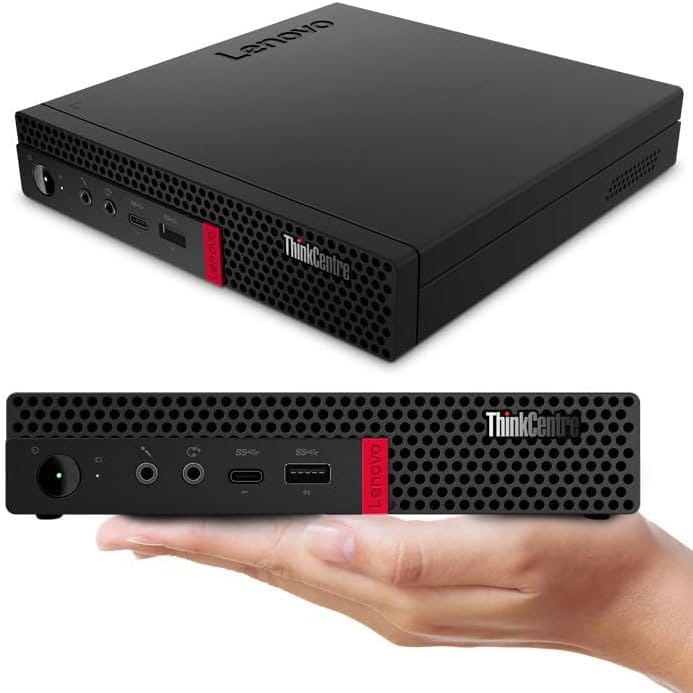
Lenovo ThinkCentre M720q Mini Desktop PC
- Intel Core i5-8500T
- 16GB RAM DDR4
- 256GB NVMe
- Windows 11 Pro 64-Bit (10T7007WUS)
- Renewed by Amazon - 30 day DOA warranty
💡 Pro-Tips for the Budget Architect
"Don't Over-Engineer." > It’s tempting to buy a 42U server rack immediately. Don't. Start with one machine on a shelf. Upgrade only when you run out of RAM or CPU cycles. Don't worry, you'll know when...
1. Power Consumption is the "Hidden Tax"
Old enterprise servers (like the famous Dell PowerEdge R710) are cheap to buy ($100) but expensive to run ($30/month in electricity). In 2026, a Modern Mini-PC often pays for itself in electricity savings within the first year.
2. Secondhand is Your Best Friend
Check eBay for "Thin Clients" or "SFF (Small Form Factor) PCs." These are quiet, power-efficient, and often come with a Windows license you can wipe to install Linux.
3. Open Source is Free
You never need to pay for a "Server OS." This is the BEST thing, FREE!
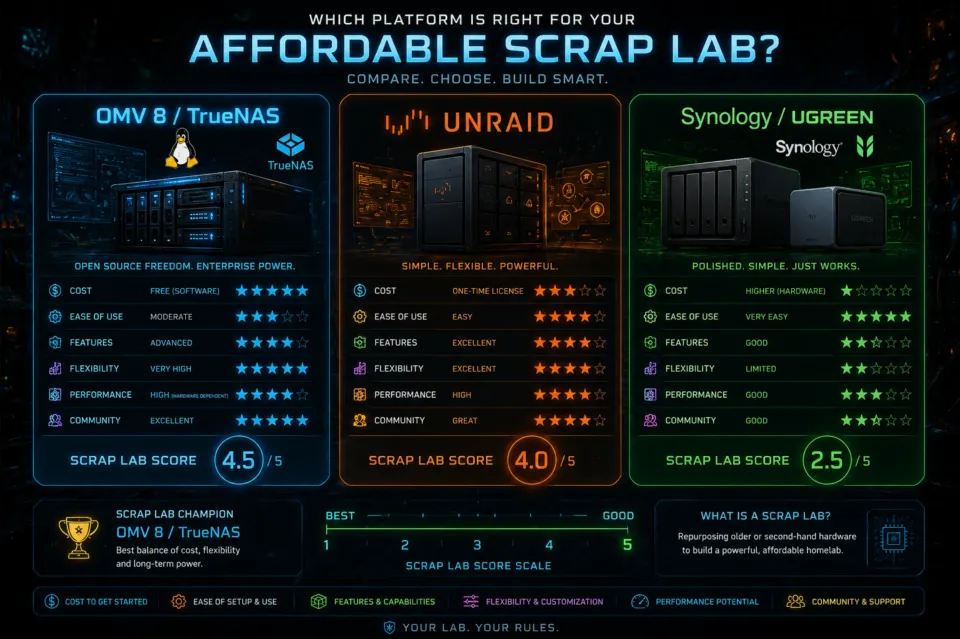
- OpenMediaVault: 100% free NAS / Server OS, build on Debian.
- TrueNAS: What put ZFS on the map of homelabbers!
- Debian/Ubuntu: The backbone of the internet.
- Docker Compose: The easiest way to run apps without breaking your system.
🛠️ The 2026 "Value-King" Starter Bundle
Okay but I’m overwhelmed. What do I actually buy or what to start with?
Building a lab for under $300 CAD in early 2026 is tight due to the recent spike in NAND and RAM prices, but it’s still the "sweet spot" for a high-value starter kit. By focusing on used enterprise "Tiny-Mini-Micro" PCs, you get the best efficiency and power.
The $290 CAD Shopping List
| Component | Device | Why? | Est. Cost |
| The Brain | Dell OptiPlex 3060 Micro | i5-8500T (6 cores), QuickSync, Tiny footprint. | $210 |
| The Memory | 8GB DDR4 SODIMM | Brings you to 16GB total—the "real" lab minimum. | $35 |
| The Nerves | TP-Link TL-SG105E | A managed switch so you can learn VLANs. | $45 |
| Total | **$290** |
With this $290 setup, you can comfortably run:
- Almost any "server/NAS os" to manage everything.
- Home Assistant (Home Automation).
- Pi-hole / AdGuard Home (Network-wide ad blocking).
- Jellyfin (4K Hardware Transcoding via QuickSync).
- A Minecraft/Game Server for a few friends.
Not bad eh?
The $290 Hardware in Detail
1. The Compute Node: Dell OptiPlex 3060 Micro
- Target Price: ~$190 - $215 CAD (eBay.ca / Local Refurbishers)
- Specs to look for: Intel Core i5-8500T (6 cores), 8GB RAM, 256GB NVMe.
- Why: 8th Gen Intel is the "Goldilocks" zone. It’s the first generation with 6-core i5s, officially supports Windows 11 (for resale value), and features QuickSync, which is essential if you want to run a Plex/Jellyfin media server later.
- Alternative: Lenovo ThinkCentre M720q (Great for its hidden PCIe slot expansion).
2. The Networking: TP-Link TL-SG105E (VLAN-Capable)
- Target Price: ~$40 – $45 CAD
- Why: Don't just get a "dumb" switch. This is an "Easy Smart" switch. It allows you to learn VLANs (Virtual LANs), which is the most critical networking skill for a homelabber. It lets you isolate your "lab" traffic from your "home" Wi-Fi.
3. The Memory Bump: 8GB DDR4 SODIMM
- Target Price: ~$35 CAD
- Why: Most used Micros come with 8GB. In 2026, 8GB is just enough for the OS, but 16GB is the minimum for a "real" lab. Adding a second 8GB stick is the cheapest way to double your capacity for running virtual machines (VMs) and Docker containers. 8GB is at least relatively still affordable as well.
🛒 The 2026 Budget Lab Shopping List Ideas
| Tier | Device Type | Best For... | Estimated Price (CAD) | Where to Look |
| The "Scrap" | Old Laptop / Desktop | Starting for $0, built-in battery backup (laptops). | Free - $50 | Your closet, family, FB Marketplace. |
| The "Efficiency King" | Intel N100 Mini-PC | 4K Media streaming (Jellyfin), 24/7 low-power apps. | $180 - $240 | Amazon, AliExpress (Beelink, Minisforum). |
| The "Workhorse" | Used SFF (Dell Optiplex / HP EliteDesk) | Virtualization (Proxmox), heavy multitasking, durability. | $120 - $180 | eBay, Local PC recyclers, Kijiji. |
| The "Network Pro" | MikroTik hAP ax² or Refurbished Mini-PC | Running OPNsense or pfSense to secure your lab. | $130 - $160 | Amazon, EuroDK, eBay. |
| The "Storage Starter" | 8TB-12TB Refurbished Enterprise HDD | Large media libraries and backups. | $100 - $140 | ServerPartDeals, eBay (look for "Manufacturer Recertified"). |
🛠️ Your "Day 1" Roadmap
Ready to start? Don't get overwhelmed. Follow this path:
- Audit Your Closet: Find an old PC, hand me down, or laptop to start. If you don't have even a RPi, you'll have to procure something.
- Learn the Basics: Read my Networking 101 Guide to understand how devices actually talk in a homelab environment & plan a bit.
- Deploy Docker Compose: This is the "Easy Button" for self-hosting.
- Secure It: Follow my Practical Cybersecurity for Self-Hosting roadmap.
The Real Value: The best benefit of a homelab is not the tech - it's the skills. Troubleshooting a broken Docker container on a Saturday night is how you actually learn how the internet works.
Next Step: Check out Complete Recommended Hardware List
 Core Lab Joe


Member discussion