Best GPU for Local LLMs (2026): VRAM Tier List & Buyer's Guide
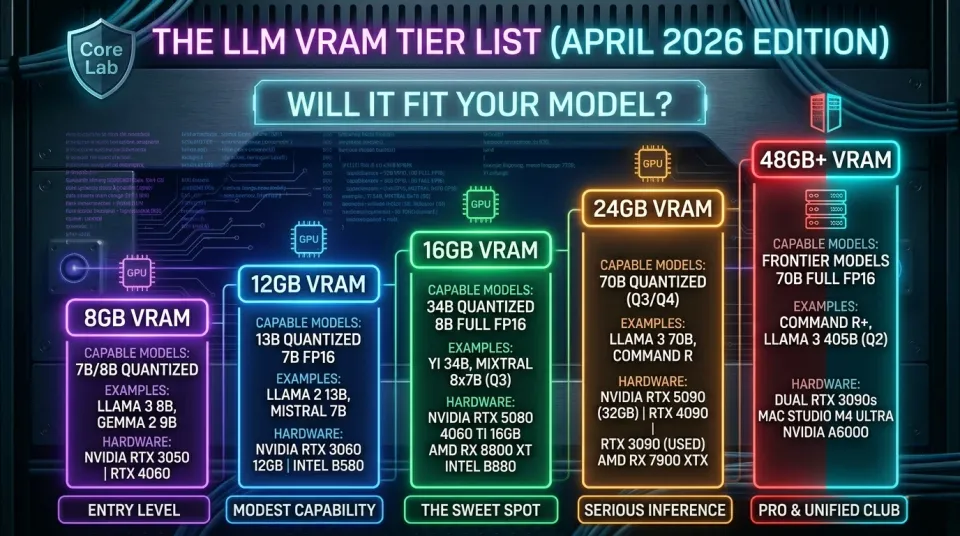
The 2026 Reality: VRAM is No Longer a Luxury
Most GPUs can run AI models. Very few can run them well enough to actually use every day.
If your model doesn’t fit in VRAM, performance collapses hard, no matter how powerful the card is.
🧠 Fast answer:
- 💰 Best value GPU: RTX 3090 (24GB) - cheapest way into serious usable daily driver LLMs
- ⚖️ Best balanced build: RTX 4060 Ti 16GB - efficient, modern, stable
- 🚀 Best overall performance: RTX 4090 / RTX 5090 - top-tier inference speed but sadly, top tier costs too
- 🧪 Best budget entry: Intel Arc B580 12GB - basic 7B models only
📊 What actually matters (in order):
- VRAM capacity (hard limit — if you exceed it, everything breaks)
- Model size (7B → 70B+)
- Quantization level (Q4, Q5, Q8)
- Memory bandwidth (affects speed, not capability)
⚡ Quick decision guide:
- Want ChatGPT-like experience locally? → 24GB VRAM minimum
- Want to experiment cheaply? → 12–16GB is enough
- Want 70B models? → 24GB single GPU OR dual GPU setup
- Want zero compromises? → 32GB+ (5090 / workstation / Mac Studio)
🧮 Not sure what fits your setup?
Use the planner below to instantly check:
- what models will run
- how fast they’ll run
- cheapest GPU that works
👉 Jump to the GPU Planner 🔽
The "Golden Rule" of local AI hasn't changed, but the goalposts have moved. In 2024, 8GB was an entry point (as noted by my usage of an old GTX1650). In 2026, 16GB VRAM is basically the minimum usable. This is due to the expanded capabilities of the LLMs, but at the cost of a higher bar of entry to operate them.
🏁 Core Lab 🏆 Best GPU by Model Size (2026 Quick Guide)
| Target / Use Case | Recommended Hardware | Tier / Value Prop |
|---|---|---|
| 7B Models (Entry Level) | RTX 3060 12GB | Best 12GB VRAM entry point |
| 13B Models (Mid-Tier) | RTX 4060 Ti 16GB | Efficient 16GB "Sweet Spot" |
| 34B Models (Advanced) | RTX 3090 / 7900 XTX | 24GB VRAM for high-logic inference |
| 70B Models (Frontier) | Dual 3090s / RTX 5090 | 48GB+ VRAM for massive models |
| Best Budget Start | Intel Arc B580 | Modern features for under |
| Best for Ollama | RTX 3090 (Used) | The "Gold Standard" community workhorse |
| Best for Linux | AMD RX 7900 XTX | Native ROCm support & Open Source |
| Best Quiet System | Mac Studio | Silent performance via Unified Memory |
LLM GPU Interactive Tools & Selectors⚡
📊 GPU Comparison for Local LLMs
Real-world LLM performance depends more on VRAM than raw compute.
| GPU | VRAM | 7B Performance | Best Use Case | Value Rating |
|---|---|---|---|---|
| RTX 5090 | 32GB | 🔥 75-100 tok/s | 70B / multi-model | 💸 Premium |
| RTX 4090 | 24GB | ⚡ 35-50 tok/s | Best all-around | 🔥 Best high-end |
| RTX 3090 | 24GB | 15-25 tok/s | Budget 24GB king | 💰 BEST VALUE |
| 4060 Ti 16GB | 16GB | 12-18 tok/s | Entry 13B | 👍 Solid |
| RX 7900 XTX | 24GB | 10-15 tok/s | VRAM heavy, slower stack | ⚠️ Mixed |
| Arc B580 | 12GB | 8-14 tok/s | Budget builds | 💰 Budget king |
| Tesla P40 | 24GB | 5-10 tok/s | Ultra cheap VRAM | 🧪 Niche |
🧠 The Golden Rule of 2026: VRAM Over Everything
Why VRAM Still Dictates Your "Intelligence"
If your model doesn't fit in your Video RAM, it spills over to your system RAM (DDR4/5), and your performance drops from 50 tokens/sec to 2 tokens/sec. It’s the difference between a conversation and reading a telegram through a straw.
The "Quick Math" for 2026: To run a model at Q4_K_M (the standard high-quality compression):8B Model: Needs ~6GB VRAM34B Model: Needs ~20GB VRAM70B Model: Needs ~42GB VRAM
Quantization Explained: How to Fit 70B Models on Consumer Gear
We no longer use FP16 for local inference. It’s wasteful. GGUF (IQ4_XS) and EXL2 are the 2026 standards. This is because the models have gotten so much better via much more granular training & optimization, therefore more like a scalpel, less like a sledgehammer!
- Q4_K_M: The "Gold Standard." Minimal logic loss.
- Q2_K: "The Lobotomy." Only used to cram a 70B model onto a single 24GB card.
In summary:
- VRAM (Video RAM): The most critical factor. LLMs are massive, and their parameters need to fit into VRAM. More VRAM = larger models.
- Precision (FP16, FP32, BF16): Lower precision (FP16, BF16) allows you to fit larger models into a given VRAM amount, but can sometimes impact accuracy. FP32 offers the highest accuracy but requires more VRAM.
- CUDA Cores/Tensor Cores: Impact performance. Tensor Cores are specifically designed for accelerating matrix operations common in LLMs.
- Memory Bandwidth: How quickly data can be transferred to and from VRAM.
What are Tokens?
For those new to Large Language Models (LLMs), understanding the term "token" is crucial. Tokens are essentially the building blocks of text that LLMs process. They're not always equivalent to words; a single word can be split into multiple tokens, and a token can sometimes represent punctuation or even parts of a word.
Think of it like this: an LLM doesn’t “read” words; it processes sequences of tokens. The number of tokens in a piece of text directly impacts the computational resources required to process it. Most LLMs have a token limit – the maximum number of tokens they can handle at once. Exceeding this limit can lead to errors or truncated responses. Gemma3 can handle 128k tokens however so they have some memory!
Note: Tokens/sec estimates are highly variable and depend on factors like model size, quantization, prompt length, and inference settings. These are rough estimates for a 7B model in FP16.
📉 What is Quantization? (Q4, Q5, Q8 Explained)
The Short Version: Quantization is "MP3 compression" for AI models. It shrinks the file size massively with almost zero loss in intelligence, allowing you to run huge models on consumer hardware.
The Deep Dive: Standard LLMs are trained in FP16 (16-bit Floating Point). This means every single number (parameter) in the model's brain takes up 16 bits of space.
- The Problem: A 70 Billion parameter model at FP16 requires ~140GB of VRAM. You would need an Enterprise server to run it.
Enter Quantization: We "round down" those high-precision numbers. Instead of 16-bit (3.14159265), we chop it down to 4-bit (3.14).
- The Result (Q4): That same 70B model now only needs ~40GB of VRAM. Suddenly, you can run it on dual 3090s or a Mac Studio!
The "Sweet Spot" Cheat Sheet
When downloading models (GGUF format), you will see these tags. Here is what they mean for your hardware:
QuantizationQualityVRAM UsageVerdictQ8 / FP16LosslessMassiveAvoid. Unless you are doing scientific research, you cannot tell the difference. Wastes VRAM.Q6_KNear PerfectHighGood for smaller models (8B) where you have VRAM to spare.Q4_K_MThe StandardLowThe Gold Standard. This is the "MP3 @ 320kbps" of AI. It is 99% as smart as the original but uses half the VRAM. Start here.Q2 / Q3DegradedLowest"Brain Damage" territory. The model starts to hallucinate and lose coherence. Only use if you are desperate for VRAM.
🟢 NVIDIA: The CUDA Standard (Tiered Recommendations)
NVIDIA remains the easiest path due to the sheer dominance of the CUDA ecosystem. If you want "plug and play," this is it. Painfully, due to costs in 2026.
| GPU | VRAM | 2026 Verdict |
|---|---|---|
| RTX 5090 | 32GB | The new "Endgame" card. 32GB allows for 70B models at high-q. |
| RTX 4090 | 24GB | The high-end value king. Still beats almost everything in speed. |
| RTX 5080 | 16GB | Fast, but the 16GB limit is frustrating for 2026's mid-tier models. |
| RTX 3090 (Used) | 24GB | The Core Lab Recommendation. Best bang-for-buck for 24GB VRAM. |
The 24GB+ Club: RTX 5090, 4090, and the 3090 Value King (The Best for 70B+ Models)
NVIDIA GeForce RTX 5090 32GB

- VRAM: 32GB
- Precision: FP16, FP32, FP8, BF16
- Tensor Cores: Yes (5th Gen)
- Typical LLM Compatibility: The new undisputed champion for consumers. 32GB of VRAM and blazing-fast GDDR7 memory can handle massive 70B+ models at high quantization, complex fine-tuning, and multi-modal models with ease.
- Performance: The fastest consumer card on the market, period. Expect 60-90+ tokens/sec on 7B models.
- Price Range: $1,999+ USD / $2,700+ CAD
NVIDIA GeForce RTX 4090 24GB
- VRAM: 24GB
- Precision: FP16, FP32, BF16
- Tensor Cores: Yes (4th Gen)
- Typical LLM Compatibility: The previous king and still an absolute beast for 70B models. Its 24GB of fast VRAM remains in high demand for its capability and speed.
- Performance: Top-tier performance, second only to the 5090. Expect 35-50+ tokens/sec.
- Price Range: $1,600 - $2,000 USD / $2,150 - $2,700 CAD (Prices remain very high)
NVIDIA GeForce RTX 3090 24GB (Used)
- VRAM: 24GB
- Precision: FP16, FP32
- Tensor Cores: Yes (3rd Gen)
- Typical LLM Compatibility: The best price-to-VRAM workhorse. Offers the same 24GB as a 4090, making it capable of running 70B models. The best value for getting into the 24GB club.
- Performance: Excellent, though a clear step behind the 4090. Expect 15-25 tokens/sec.
- Price Range: $700 - $900 USD / $940 - $1,210 CAD (Used market only)
🚀 Multi-GPU Secrets: How to Build a 48GB VRAM Monster with Dual 3090s
What's better than 24GB of VRAM? 48GB. If you are serious about running the massive "Frontier Models" (like Llama-3-70B at full precision, or Command-R+), a single card just won't cut it. As a "Blue Team" guy, I love efficiency. For the price of one new 5090, you can snag two used 3090s. With 48GB of VRAM, you can run a 70B model at near-lossless precision.
The secret weapon of the community is buying:
2X (Yes TWO) used RTX 3090s.
- Cost: ~$1,600 USD (Total)
- VRAM: 48GB
- Performance: Slower than a 5090, but infinite capability.
- The Magic: You don't even need NVLink (though it helps). Software like
llama.cppandOllamaautomatically split the model across both cards over your PCIe slots. This setup rivals enterprise workstations costing $10,000+.
If you'd like to explore this option, checkout the use case of building an "AIO Server/NAS" to support it.
 Core Lab Joe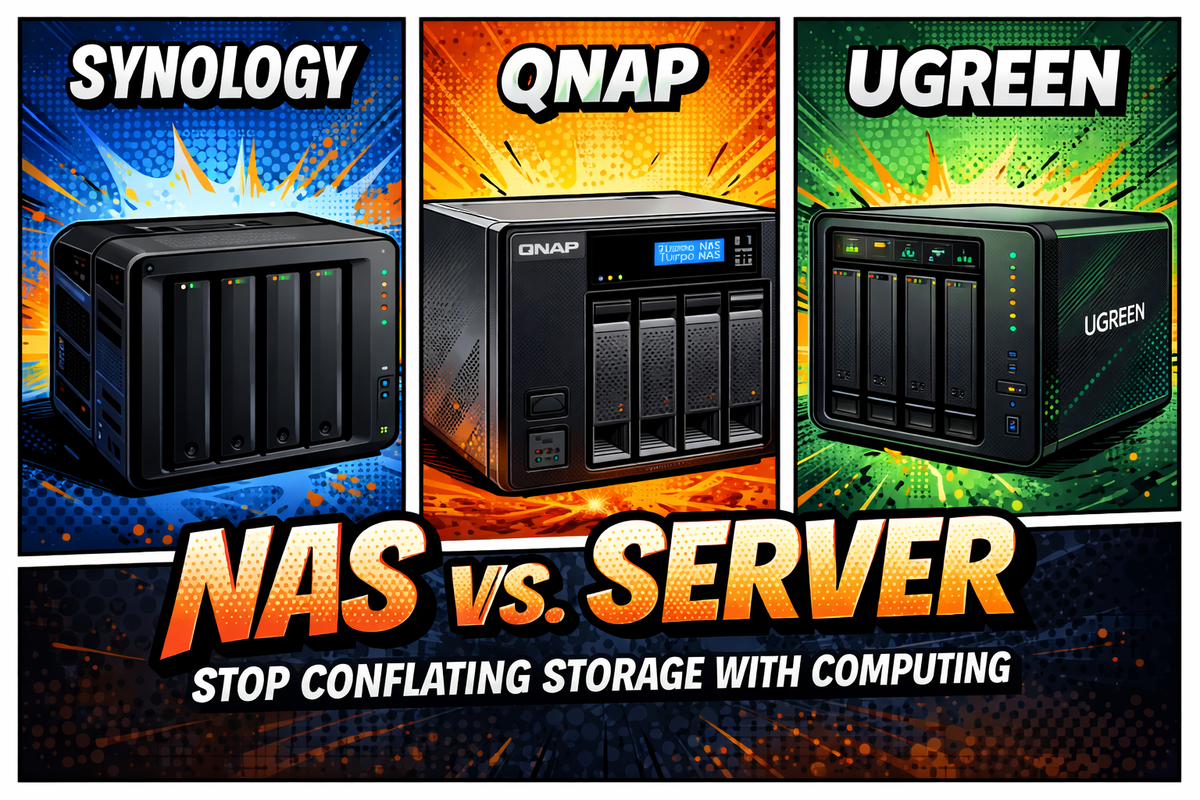
The 16GB Sweet Spot: RTX 5080 vs. 4060 Ti (The Sweet Spot for 34B Models)
NVIDIA GeForce RTX 5080 16GB
- VRAM: 16GB
- Precision: FP16, FP32, FP8, BF16
- Tensor Cores: Yes (5th Gen)
- Typical LLM Compatibility: A performance monster for 16GB. Ideal for 34B models at high quantization or 70B models at low-q. Its speed also makes it a potent fine-tuning card for smaller models.
- Performance: Exceptionally fast, massively outperforming the 4080. Expect 40-55 tokens/sec.
- Price Range: $1,199+ USD / $1,650+ CAD
NVIDIA GeForce RTX 4080 16GB
- VRAM: 16GB
- Precision: FP16, FP32, BF16
- Tensor Cores: Yes (4th Gen)
- Typical LLM Compatibility: A high-performance 16GB card. Easily handles 34B models and can run 70B models at low quantization.
- Performance: High-end, a significant step up from the 4060 Ti. Expect 25-35 tokens/sec.
- Price Range: $800 - $1,000 USD / $1,075 - $1,350 CAD
NVIDIA GeForce RTX 4060 Ti 16GB
- VRAM: 16GB
- Precision: FP16, FP32, BF16
- Tensor Cores: Yes (4th Gen)
- Typical LLM Compatibility: The best new budget VRAM card. Its 16GB VRAM is its key feature, making 34B models comfortable and 70B models (low-q) possible.
- Performance: Good, but limited by its 128-bit bus. A great "VRAM-first, speed-second" choice. Expect 12-18 tokens/sec.
- Price Range: $400 - $500 USD / $540 - $670 CAD
The 12GB VRAM Club (Great for 13B Models)
NVIDIA GeForce RTX 4070 Ti 12GB
- VRAM: 12GB
- Precision: FP16, FP32, BF16
- Tensor Cores: Yes (4th Gen)
- Typical LLM Compatibility: A very fast 12GB card. Excellent for 13B models and can run 34B models at very low quantization (q3/q4).
- Performance: Faster than a 3060, but VRAM is the limit. Expect 18-28 tokens/sec.
- Price Range: $550 - $700 USD / $740 - $940 CAD
NVIDIA GeForce RTX 3060 12GB

- VRAM: 12GB
- Precision: FP16, FP32
- Tensor Cores: Yes (3rd Gen)
- Typical LLM Compatibility: The long-time budget VRAM king for 12GB. Perfect for running 13B models and experimenting with 34B models (low-q). Works quickest with 7-8B models of course.
- Performance: A solid entry-level workhorse. Expect 7-12 tokens/sec.
- Price Range: $250 - $350 USD / $330 - $465 CAD
The 8GB VRAM Club (Entry-Level 7B Models)
NVIDIA GeForce RTX 3050 8GB
- VRAM: 8GB
- Precision: FP16, FP32
- Tensor Cores: Yes (3rd Gen)
- Typical LLM Compatibility: The bare minimum for entry. Can comfortably run 7B models.
- Performance: Entry-level. Expect slower generation speeds. 5-10 tokens/sec.
- Price Range: $200 - $250 USD / $270 - $330 CAD
🔴 AMD & ROCm: The High-VRAM Value Disruptors
In 2026, AMD is no longer the "broken driver" underdog. ROCm 7.x is stable and supported natively by Ollama and LM Studio. For years, the answer was simple: if you weren't using NVIDIA's CUDA, you were wasting your time. Not anymore!
AMD (ROCm): The Power User's Choice
AMD's compute platform, ROCm, has made massive progress. Thanks to community efforts (like llama.cpp, text-generation-webui, and Oobabooga) and AMD's own driver improvements, running LLMs on modern AMD cards is now completely viable, especially on Linux. AMD basically doubled-down on Linux support!
- The Hardware: The Radeon RX 7900 XTX (24GB) and RX 7900 XT (20GB) are now direct competitors to the 3090 and 4090. They offer huge VRAM pools for a competitive price.
- The 2026 Verdict: This is still the undisputed champion for AMD-based AI. It’s the "budget 3090" alternative. With ROCm 7.x stability, this card is a monster for running 70B models on Linux.
- Why it's a "Blue Team" pick: It offers 24GB of VRAM for hundreds less than a 4090/5090, making it the most pragmatic way to get high-parameter intelligence without the "NVIDIA Tax."
AMD Radeon RX 7900 XTX: 24GB of VRAM for under $800

- VRAM: 24GB
- Precision: FP16, FP32
- Typical LLM Compatibility: AMD's 24GB VRAM king. A direct competitor to the RTX 3090 for VRAM capacity, allowing it to run 70B models.
- Estimated Tokens/sec: 7-12
- Price Range: $750 - $900 USD / $1,000 - $1,210 CAD
AMD Radeon RX 9070 XT 16GB
- VRAM: 16GB
- Precision: FP16, FP32
- Typical LLM Compatibility: The new RDNA 4 performance card. Its 16GB VRAM and 2nd Gen AI accelerators make it an excellent choice for 34B models on a Linux-based system.
- Estimated Tokens/sec: 8-14
- Price Range: $599+ USD / $800+ CAD
AMD Radeon RX 9060 XT 16GB
- VRAM: 16GB
- Precision: FP16, FP32
- Typical LLM Compatibility: A direct competitor to the RTX 4060 Ti 16GB. This is AMD's "budget VRAM" option, perfect for 34B models.
- Estimated Tokens/sec: 6-10
- Price Range: $349+ USD / $470+ CAD
AMD Radeon RX 6900 XT 16GB (Used)
- VRAM: 16GB
- Precision: FP16, FP32
- Typical LLM Compatibility: A great used 16GB option. Can handle 34B models (low-q). Lacks the new AI accelerators, so performance relies on raw compute.
- Estimated Tokens/sec: 5-9
- Price Range: $350 - $500 USD / $470 - $670 CAD (Used market)
AMD Radeon RX 6800 XT 16GB (Used)
- VRAM: 16GB
- Precision: FP16, FP32
- Typical LLM Compatibility: Can handle 13B models well and 34B models at low quantization. A solid value on the used market.
- Estimated Tokens/sec: 4-8
- Price Range: $300 - $450 USD / $400 - $600 CAD (Used market)
As you can see, there's a lot to consider and you can run an LLM on almost any recent GPU. Much of this depends on your budget but if you've got an "old" GPU laying around, you can make use of it probably. I started playing with 4b LLM's via ollama on a GTX1660 6gb!
🔵 Intel Battlemage: The New Budget Entry Point
Intel is the new player on the block, and for a long time, they were a non-starter for AI. However, thanks to massive community and Intel-led software efforts (like OpenVINO, SYCL support in llama.cpp, and specific extensions for text-generation-webui), the flagship Arc card has become a fascinating budget option for tinkerers who are willing to get their hands dirty.
Intel Arc Comparison: Battlemage (Xe2) vs. Alchemist (Xe)
| Feature | Arc A380 (Legacy/Entry) | Arc B580 (Battlemage Mid) | Arc B770 (Battlemage High) |
|---|---|---|---|
| VRAM | 6GB GDDR6 | 12GB GDDR6 | 16GB GDDR6 |
| Architecture | Xe (Alchemist) | Xe2 (Battlemage) | Xe2 (Battlemage) |
| Precision | FP16, FP32 | FP8, BF16 (Native) | FP8, BF16 (Native) |
| 70B Support | No (System RAM only) | Poor (Requires 3-bit/GGUF) | Possible (4-bit/GGUF) |
| Optimal Model | TinyLlama (1.1B) / Phi-3 | 7B - 8B Models (Llama 3) | 12B - 14B Models (Mistral) |
| Price (Est.) | ~$100 USD | ~$250 USD | ~$399 - $449 USD |
Intel Arc A770 16GB
- VRAM: 16GB
- Precision: FP32, FP16, INT8
- Typical LLM Compatibility: This is the ultimate budget VRAM card for hobbyists. Its 16GB of VRAM is its entire selling point, allowing it to comfortably run quantized 34B models or even 70B models at very low quantization (q2/q3).
- The Catch: Performance is not its strong suit, and software support is experimental. This is NOT plug-and-play like NVIDIA. You must be comfortable using Linux, updating to the latest drivers, and using specific software like
llama.cpp(with SYCL) ortext-generation-webui(with the XPU extension). It is the definition of a "tinkerer's" card, but it's the cheapest 16GB of VRAM you can get, period. - Estimated Tokens/sec: 3-7 (Highly variable and software-dependent)
- Price Range: $200 - $300 (Used market)
- Note: This card is the direct gaming/consumer version of the Arc Pro B70, which features a massive 32GB VRAM buffer for workstation AI tasks. If you can find the "Pro" variant, it is the best value for 70B models outside of an RTX 3090/9900 XTX
Intel Arc B580 12GB (Battlemage)
- Typical LLM Compatibility: The 12GB buffer is a bit of a "middle child." It is fantastic for 7B-8B parameter models with room for a large 8k-16k context window. It struggles with 14B models unless they are quantized down to 4-bit.
- Estimated Tokens/sec: 10 - 15 t/s (for 8B models).
- VRAM Limitation: Users have reported "Out of Memory" (OOM) errors on 30B+ models during the "prefill" stage if the prompt exceeds 2,000 tokens, so keep your context lengths modest on this card.
Intel Arc A380 6GB (Alchemist)
- Typical LLM Compatibility: This is strictly an "entry-level" or "headless" AI card. At 6GB, it cannot run the most popular 7B/8B models at 4-bit precision comfortably (which usually require ~5.5GB plus context). It is best used for summarization tasks with tiny models like Phi-3 (3.8B) or as a dedicated encoder for AV1 video.
- Estimated Tokens/sec: 3 - 5 t/s (for 3.8B models).
- Fact: While it's a "budget beast" for video, it lacks the Xe2 architectural jumps, making it significantly slower for LLM inference than its Battlemage successors.
🏚️ The "Scrap Lab" Special: Enterprise E-Waste for AI
For the technical masochists (my people!), retired data center cards are 2026's best-kept secret. If you aren't afraid of 3D printing fan shrouds and hacking driver configs, you can get 24GB of VRAM for the price of a budget gaming card.
These are retired data-center cards. They are Headless (no HDMI/DisplayPort) and Passively Cooled (they rely on screaming loud server fans).
Tesla P40 & P100: 24GB VRAM for the Price of a Dinner
| GPU Model | VRAM | Architecture | The "Catch" | Est. Price (Used) | Best For... |
| NVIDIA Tesla P40 | 24GB (GDDR5) | Pascal | No FP16 Speed: It is slow at "training" precision. However, for running GGUF/Quantized models in llama.cpp, it uses FP32 math which works fine. Cooling: You MUST strap a blower fan to it. | $150 - $200 USD | The absolute cheapest way to run 70B Models. |
| NVIDIA Tesla P100 | 16GB (HBM2) | Pascal | Capacity: 16GB is awkward. It has incredibly fast memory (HBM2), but holds less data than the P40. | $130 - $180 USD | Fast inference on medium (34B) models. |
⚠️ Cooling and Powering Legacy Data Center GPUs at Home:
- Cooling: These cards will overheat and die in a normal PC case. You must buy or 3D print a fan shroud that forces air directly through the card.
- Video Output: They have no ports. You need a CPU with integrated graphics (iGPU) or a second cheap GPU just to see your monitor.
- Power: They often use EPS (CPU) power connectors, not standard PCIe plugs. You likely need a custom adapter cable.
- The "Driver Dance": You often need to enable "Above 4G Decoding" in BIOS and potentially hack Windows drivers to get them working alongside a GeForce card (WDDM vs TCC mode). Linux is highly recommended here.
📊 Expanded GPU Comparison Table (April 2026 Edition)
| GPU Model | VRAM | Precision | Tensor/AI Cores? | Power (W) | Tokens/sec (7B) | Price (USD) | Price (CAD) |
| NVIDIA (The Kings) | |||||||
| RTX 5090 | 32 GB | FP8, FP16, FP32 | ✅ (5th Gen) | 575W | 75 - 100+ | $1,999+ | $2,800+ |
| RTX 5080 | 16 GB | FP8, FP16, FP32 | ✅ (5th Gen) | 360W | 45 - 60 | $1,199+ | $1,650+ |
| RTX 4090 | 24 GB | FP16, FP32, BF16 | ✅ (4th Gen) | 450W | 35 - 50 | $1,500 - $1,800 | $2,100 - $2,500 |
| RTX 3090 (Used) | 24 GB | FP16, FP32 | ✅ (3rd Gen) | 350W | 15 - 25 | $650 - $800 | $900 - $1,100 |
| RTX 4060 Ti 16GB | 16 GB | FP16, FP32 | ✅ (4th Gen) | 160W | 12 - 18 | $380 - $450 | $520 - $620 |
| AMD (The Value) | |||||||
| RX 9070 XT | 16 GB | FP16, FP32 | ✅ (2nd Gen) | 300W | 15 - 22 | $599+ | $820+ |
| RX 7900 XTX | 24 GB | FP16, FP32 | ✅ (1st Gen) | 355W | 10 - 15 | $700 - $850 | $950 - $1,150 |
| Intel (The Budget) | |||||||
| Arc B770 (Battlemage) | 16 GB | FP16, XMX | ✅ (Xe2 XMX) | 240W | 10 - 18 | $349 | $480 |
| Arc B580 | 12 GB | FP16, XMX | ✅ (Xe2 XMX) | 190W | 8 - 14 | $249 | $340 |
| Specialty (Used) | |||||||
| Tesla P40 | 24 GB | FP32 Only | ❌ (Pascal) | 250W | 5 - 10 | $150 | $210 |
- Intel Battlemage (B770/B580): The B580 (12GB) is now the absolute budget king for entry-level LLMs, beating the RTX 3060 in price/performance. The B770 (16GB) replaces the A770 as the mid-range "tinkerer" choice.
- AMD RDNA 4 Boost: The RX 9070 XT performs better in AI than previous AMD cards because RDNA 4 doubled the AI throughput per compute unit. It's token estimate is very close or a match for the RTX 4070 class.
- Tesla P40 Added: Massive price gap ($150 vs $650 for 24GB VRAM).
🍎 How to Run LLM's on Apple Mac Studio: The "Unified Memory" Cheat Code - Apple Silicon
If you are allergic to fan noise and Linux terminal troubleshooting, the Mac Studio (M4 Ultra) is the answer.
- 192GB Unified Memory: You can run Llama-4-405B (quantized) on a desktop.
- Efficiency: It draws less power than a single RTX 5090 while providing 6x the VRAM.
Apple's M-Series chips use Unified Memory Architecture (UMA). This means the system RAM is the VRAM.
- Mac Studio (M1/M2 Ultra) with 128GB RAM: This allows you to load massive 120B+ parameter models that simply crash on an RTX 4090.
- The Trade-off: Speed. An M2 Ultra generates text at ~15-20 tokens/sec, while an RTX 4090 might hit 50+. But if you need to run the biggest models possible, Mac Silicon is currently the only consumer way to get 100GB+ of VRAM.
💡 Core Lab Buying Tip: You don't need to buy these new. The M1 Ultra is still a beast for LLMs. Look for "Amazon Renewed" units to save $500+.

Best For: Running 120B+ Models (Command-R+, Llama-3-405B-Q3)
VRAM: 128GB Unified
Status: The "Quiet Giant" of Local AI.
🏁 Summary: Which GPU Should You Buy?
- The "Money is No Object" Build: NVIDIA RTX 5090 (32GB).
- The "Serious Researcher" Build: Dual Used RTX 3090s (48GB Total).
- The "Best for Most People" Build: NVIDIA RTX 4060 Ti (16GB) or Intel B880.
- The "Local GPT-4 Rival" Build: Mac Studio with 128GB+ RAM.
🛠️ Build Checklist: Your First Local AI Rig
Before you hit "Order" or start tearing apart your current server, run through this tactical checklist to ensure your hardware can actually handle the heat of local inference.
1. The VRAM Verification
- [ ] Identify your "Target Intelligence": Are you running 8B (entry), 34B (mid-tier), or 70B+ (pro) models?
- [ ] The 20% Overhead Rule: Calculate your model size and add 20% for KV Cache and "Context Window" room. If a model needs 14GB to load, you need a 16GB card to actually talk to it.
- [ ] Multi-GPU Plan: If using two cards (e.g., dual 3090s), ensure your motherboard supports x8/x8 PCIe lane splitting. Running a second card at x4 will bottleneck your ingest speeds.
2. Power & Infrastructure
- [ ] PSU Headroom: 2026 high-end cards are thirsty. Ensure you have an ATX 3.1 compliant power supply with at least 1000W if running a 5090 or dual-GPU setup.
- [ ] The "Thermal Defence" Plan: AI inference keeps a GPU at 100% load for long periods. Do you have at least two intake and two exhaust fans? For "Scrapyard" enterprise cards, is your 3D-printed fan shroud ready?
- [ ] 12V-2x6 Cable Check: If using NVIDIA 40/50 series, ensure you are using native cables—no sketchy adapters that might melt during a 4-hour fine-tuning session.
3. OS & Driver Hardening
- [ ] Linux First: While Windows is catching up, Ubuntu 24.04 LTS or Debian 13 remains the gold standard for stability and driver support (especially for AMD ROCm).
- [ ] Kernel Check: Ensure your kernel version is compatible with the latest NVIDIA 570+ or ROCm 7.x drivers.
- [ ] Docker Ready: Install the
nvidia-container-toolkitso you can run Ollama or LocalAI in isolated containers without "polluting" your host OS.
4. Maintenance & Monitoring
- [ ] Install
nvtoporbtop: You need a way to see VRAM usage in real-time. If you hit 99% usage, the system will swap to system RAM and performance will tank. - [ ] Automated Pruning: Set up a cron job or script (like our Ghost Janitor logic!) to prune old, unused model weights—these files are 5GB–50GB each and will eat your SSD alive.
Ready to Build or Advance? 🤖
 Core Lab Joe
If you still need more or better hardware, checkout my Homelab Hardware Guide which has plenty of prebuilt systems to think around.
👉 If you're still exploring what AI tools you can actually use once your local LLM is running, Your Tech Compass has a practical guide to the best AI tools for getting real results, useful context before you dive into the deep end of self-hosting.
 Diana Nadim
Ask AI: For the bet AI tools for getting real results.
🙋♂️ Local AI Architect FAQ
Q: Is 16GB of VRAM enough for 2026-era models?
A: Yes, but it is now the "Mid-Tier" baseline. A 16GB card—like the RTX 5080, RTX 4060 Ti, or the new AMD RX 8800 XT—is the perfect home for 34B parameter models using Q4_K_M quantization. It also allows you to run "Small" models (8B) at maximum precision (Q8/FP16) for high-accuracy tasks like Python coding.
Q: Why should I buy a used RTX 3090 instead of a new RTX 4070 Ti?
A: In local AI, VRAM is non-negotiable. The 4070 Ti has faster clock speeds, but its 12GB limit means it will physically fail to load a 70B model. The 3090’s 24GB pool allows you to run much larger, more "intelligent" models that the 4070 Ti simply cannot touch. If the model doesn't fit in VRAM, speed is irrelevant.
Q: How much faster is the RTX 5090 compared to the 4090 for inference?
A: While raw compute is up, the real winner is the GDDR7 memory bandwidth. AI inference is often "memory-bound," meaning the speed at which data moves between the VRAM and the cores is the bottleneck. The 5090 processes tokens significantly faster, especially during "Prompt Ingest" on massive context windows (128k+ tokens).
Q: Can I mix NVIDIA and AMD GPUs in the same homelab server?
A: You can, but you shouldn't. Most inference engines (Ollama, llama.cpp, vLLM) expect a unified backend—either CUDA or ROCm. Mixing brands creates "Driver Hell" and often results in the system only recognizing one card or crashing during VRAM offloading. Stick to one ecosystem per build.
Q: What is the "Unified Memory" advantage for Macs?
A: Unlike PCs, where VRAM is soldered to the GPU, Apple Silicon uses Unified Memory. If you have a Mac Studio with 128GB of RAM, the GPU can use nearly all of it. This allows you to run massive 400B+ models that would require $20,000 worth of enterprise NVIDIA cards to fit on a PC.
Q: Does PCIe 5.0 matter for running local LLMs?
A: Not really. Once a model is loaded into your GPU, the PCIe bus sits mostly idle while the GPU does the heavy lifting internally. Don't spend extra on a PCIe 5.0 motherboard just for AI; put that money toward a card with more VRAM instead.

Member discussion