The SATA Pivot: Mitigating IOPS Bottlenecks in a 18+ Drive Homelab
In the world of self-hosting, we often talk about storage capacity as the "Final Boss." We chase terabytes like they’re high scores. But as my lab grew to 50+ containers and a 12-disk SAS array, I realized I wasn't fighting a capacity battle anymore. I was fighting a war of IOPS (Input/Output Operations Per Second).
Here’s how a simple "hardware pivot" saved my performance, reduced my power bill (should, will confirm over time!), and proved that you don't always need a new server - you just need a better plan.
Custom NAS & Servers
The Problem: "The SAS Thrash" and mechanical latency
My current setup is a beast: 12 SAS drives in a ZFS pool for bulk storage, backed by 5 additional SATA drives. For a long time, this worked. But as I added more intensive stacks - specifically Grafana, Prometheus, and Alloy - the performance hit a wall. I had a feeling this would happen at some point, but I was curious to see when/if it would actually occur.
Why 12 SAS Drives Couldn't Keep Up with Prometheus
Every time Prometheus scraped a metric or Grafana queried a dashboard, my 12-disk array would begin to "thrash." This happens when the drive seeker heads have to spin all over the drives to obtain the various bits of data, as they are being pushed to their limits.
This was all the while it's serving as a Plex Server, with an entire Aarr stack running, and 2 instances of Qbittorrent counting some of those 50+ containers. The mechanical latency of spinning platters trying to handle thousands of tiny Docker log writes and database queries was crushing the system responsiveness. Had I ONLY been running say, a dozen containers, it probably would have been ok.
My Plex users were seeing lag, and my containers were gasping for air basically. The entire system chugged and it took quite awhile to even get glances to load!
Furthermore, because Docker's appdata lived on the array, those 12 SAS drives could never spin down. They were pinned at full speed 24/7/365, burning power and wearing out bearings for the sake of a few kilobytes of log data. This is why I then quickly turned off the homelab SIEM stack, and cleaned out my completed Linux ISO's which, was numbering in the thousands, and removed any dockers I wasn't actively using any longer.
The Strategy: The "USB Pivot" Explained
I had a bottleneck: I needed a high-speed internal SATA III port for a new (to me, but 97% write life left) 2TB SSD to handle my Docker workload, but my motherboard was tapped out.
I was originally going to use OMV-Regen, which I use for my regular OMV backups, but I thought of something even simpler. If you have not noticed, hardware has gotten absolutely absurd in pricing so I want to squeeze out every drip of life I can from the hardware I already have. The drive I am running OMV on is fine, it's just a little to small, and taking up that precious critical SATAIII port I need!
The "Scrap Lab" solution? The Pivot.
Moving the OS to USB 3.0 (Without Breaking Boot)
- The OS Drive: My OMV8 install lived on an old 128GB Samsung SSD. Since a NAS OS mostly sits in RAM during operation, it doesn't actually need the massive bandwidth of an internal SATA III port once loaded.
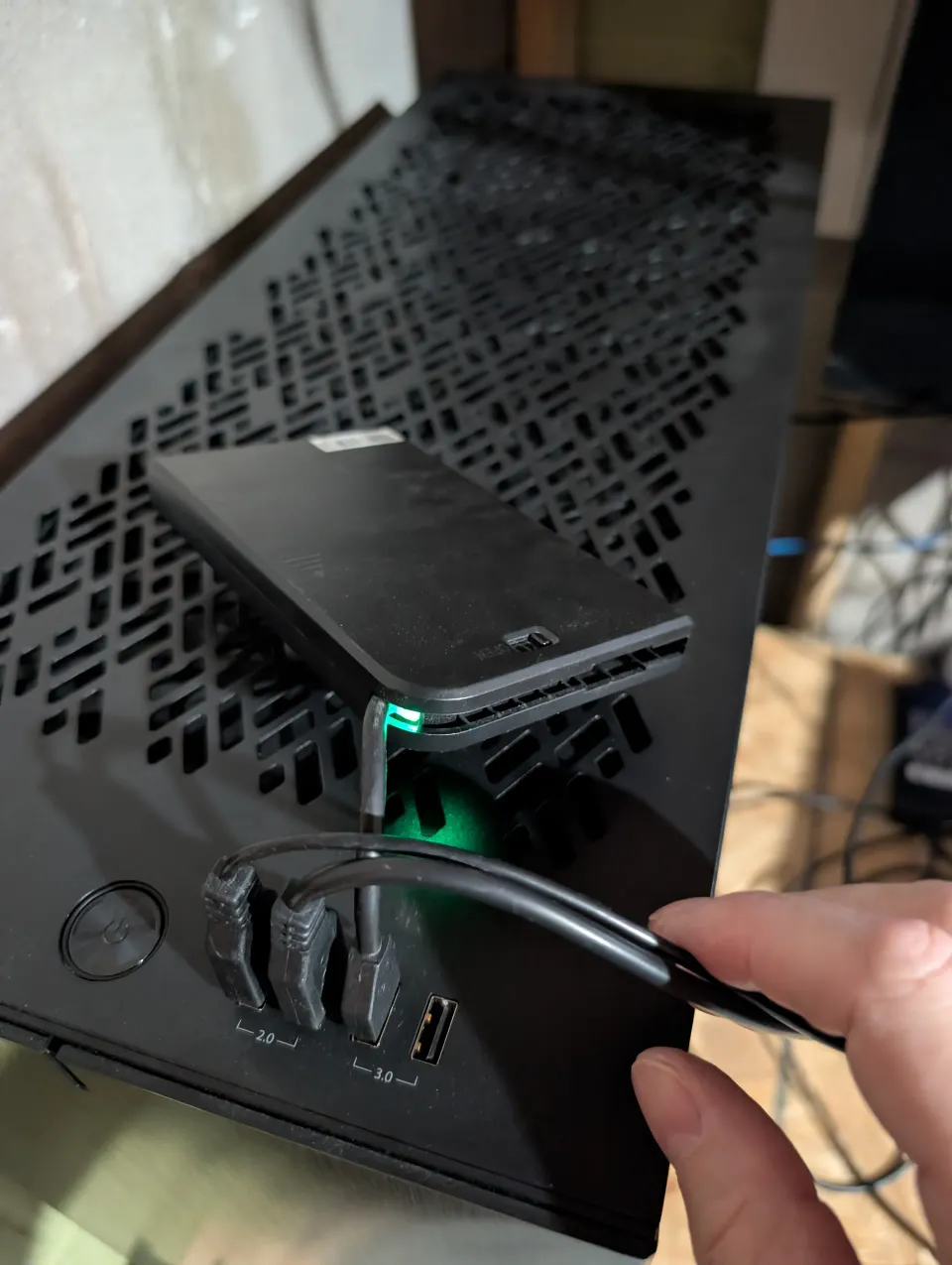
- The Transplant: I moved the 128GB OS drive into a USB 3.0 enclosure and plugged it into a rear USB port.
- The Prize: This freed up a prime, internal SATA III port for a brand new 2TB XFS-formatted SSD!
If you’re running OMV from a USB-connected SSD like I am now, ensure you have the Flashmemory Plugin installed. It moves your log writes to RAM, ensuring your "USB Brain" lasts for years to come.
Why it Worked (Without a Re-install)
You might think moving an OS drive from an internal port to a USB enclosure would break the boot sequence. In the Windows world, it usually does. But thanks to Linux's use of UUIDs (Universally Unique Identifiers), the "brain" of the server doesn't care how it's connected. It simply shouts for its ID at boot, finds it on the USB bus, and carries on as if nothing happened. Felt great to not even have to go into BIOS and tell the server where it's brain went! Love that sometimes these little things in tech seem like magic still.
Tactical Execution: Reclaiming the Internal SATA Bus
1. Preparing the XFS SSD for Docker
Once the 2TB SSD was connected internally, I formatted it using XFS. While ext4 is a classic, XFS is the professional’s choice for Docker. Its ability to handle parallel I/O and dynamic inode allocation means that even with 100 containers, the filesystem won't choke on metadata. It's a perfect use case.
I mounted it with the noatime flag to ensure the SSD isn't wasting writes every time a file is simply read. I also do this with all my media mounts for Plex or Jellyfin as well.
Now you may be thinking, but what about RAID so that single disk isn't holding all your precious data?! This is what my backup plan is for! The backups move off that single SSD, to my 12 disk Enterprise SAS ZFS raid array, aaannndd to a 3rd location completely off the box, and out of my house. The 3-2-1 backup strategy in action.
Why Not NVMe?
Sure, NVMe is obviously a lot faster and supports even more IOPS, but the $15 USB 3.0 enclosure I had in a drawer solved the bottleneck today. A reminder about my "Scrap-Lab" focus & mentality - use what you have, as much as you can! Save some $.
HBA Upgrade - While I Was Already Down There
I had been pondering upgrading my HBA from a 9300 to 9400 for the past year or more, basically since I found out that the 9300-16i was basically two 9300-8i's slapped together on the same PCB. It was kind of a lazily engineered way of doing it and not their best or most efficient work. The prices dropped in the past 6 months or so on 9400-16is, so I pulled the trigger on Ebay! I purchased the LSI HBA 9400-16i for about $96 CAD and it took two weeks to arrive.
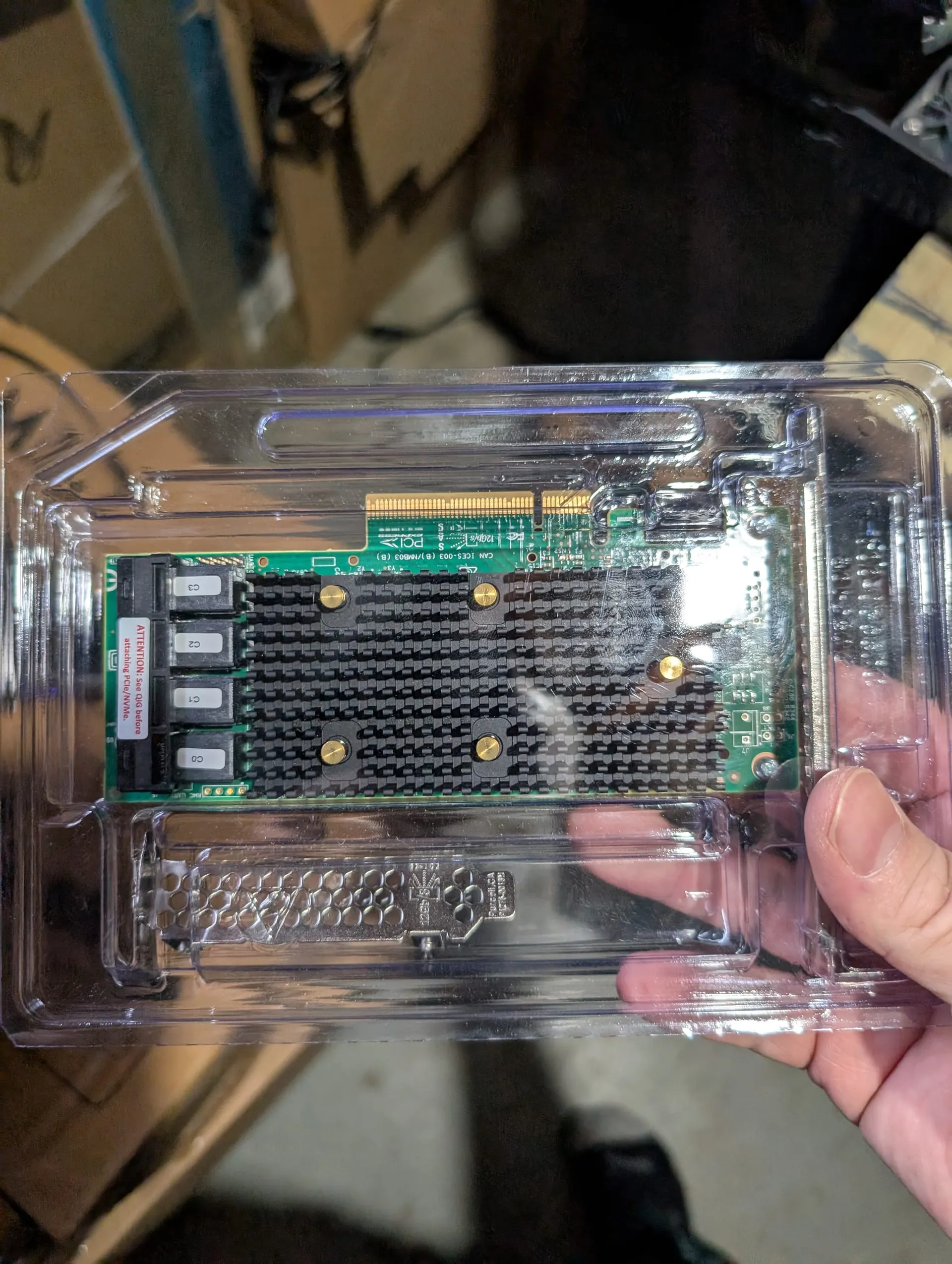
While I'm currently utilizing it for my SAS/SATA array, the 9400-16i is a Tri-Mode controller. This means if I decide to pivot again in two years toward U.2 NVMe storage, the infrastructure is already in place. Architecture beats raw horsepower, but architecture that allows for growth is the ultimate win! Even if I do a complete re-build from scratch, I will be keeping this HBA and utilizing it for it's maximum lifespan.
2. Relocating the Docker Engine (daemon.json)
To move the heavy lifting off the USB bus and onto the internal SATA SSD, I am contemplating moving the Docker data-root (downloaded docker images, etc). I haven't done this yet, but it would be as simple as stopping all my dockers via docker compose, and editing the docker daemon.json file to re-point it as such:
sudo systemctl stop docker
# Edit /etc/docker/daemon.json
{
  "data-root": "/srv/dev-disk-by-uuid-YOUR-NEW-SSD/docker-root"
}
sudo systemctl start docker
3. The Plex Metadata Migration Strategy
Plex is the heaviest hitter in my lab. I migrated its metadata - the millions of tiny files that make up posters and watch history - from the old bare-metal location to the new 12 disk ZFS array using rsync to preserve permissions. I did this way back when I built this in 2023 and since ZFS uses ARC - adaptive read cache, the metadata is ridiculously fast.
Between ZFS ARC and Plex's own db cache (which I increased) which stores commonly accessed metadata in ram, I have no performance issues.
Jump to this link if you'd like to deep-dive into how to squeeze every ounce of performance from your hardware for Plex in this Plex optimization guide.
 Core Lab Joe
The Result: Silence, Speed, and Hardware Longevity
The transformation was immediate.
- IOPS Offloading: Prometheus and Grafana now "sing" on the SSD. Dashboard load times dropped from seconds to milliseconds. (This is huge if you've never experienced it.)
- Array Silence: With the "chatter" of Docker moved to the SSD, my 12 SAS drives can finally enter a lower power state when not being used for active media streaming.
- Longevity: By reducing the constant head-parking and seeking on the SAS array, I’m extending the mechanical life of my most expensive components.
Final Thoughts
This upgrade cost me nothing, because I already owned the 2TB SSD from a previous facebook marketplace buy! Eve then, it would have been the price of a single SSD and a $15 USB enclosure. In an era where we are told to "upgrade to NVMe" or "buy a newer rack server," the Pivot reminds us that architecture often beats raw horsepower.
If your array is thrashing, stop looking at the drives - start looking at the system bus.
Stay Tactical. - Joe


Member discussion