
UGREEN USB 3.0 to 2.5GbE Adapter as an OPNsense WAN NIC (Realtek RTL8156B, 1.5Gbps)
My 18-month field report: using a sub-$25 UGREEN USB 3.0 to 2.5GbE adapter (Realtek RTL8156B) as a plug-and-play OPNsense WAN NIC on a 1.5Gbps symmetrical fiber plan.

Here is a frustrating problem almost nobody warns you about when upgrading residential internet: you subscribe to a multi-gigabit fiber tier, plug the fiber optical network terminal (ONT) into your home firewall, run a speed test, and top out at roughly 940 Mbps. You call your ISP to complain. The ISP is not the problem.
Your bottleneck is the standard 1GbE network interface on your firewall!
Which physically cannot pass more than 940 Mbps of real TCP throughput after packet overhead. If your plan is 1.5Gbps or faster, that gigabit port is quietly discarding over a third of the bandwidth you pay for every single month.
My residential internet connection is 1.5Gbps symmetrical fiber. To actually receive that speed on my network, my WAN interface had to exceed 1GbE. The traditional recommendation is to buy an expensive dual-port PCIe Intel I226 card or replace your entire firewall with a costly multi-gigabit appliance. Instead, in August 2024, I plugged in a sub-$25 UGREEN USB 3.0 to 2.5GbE Ethernet Adapter.
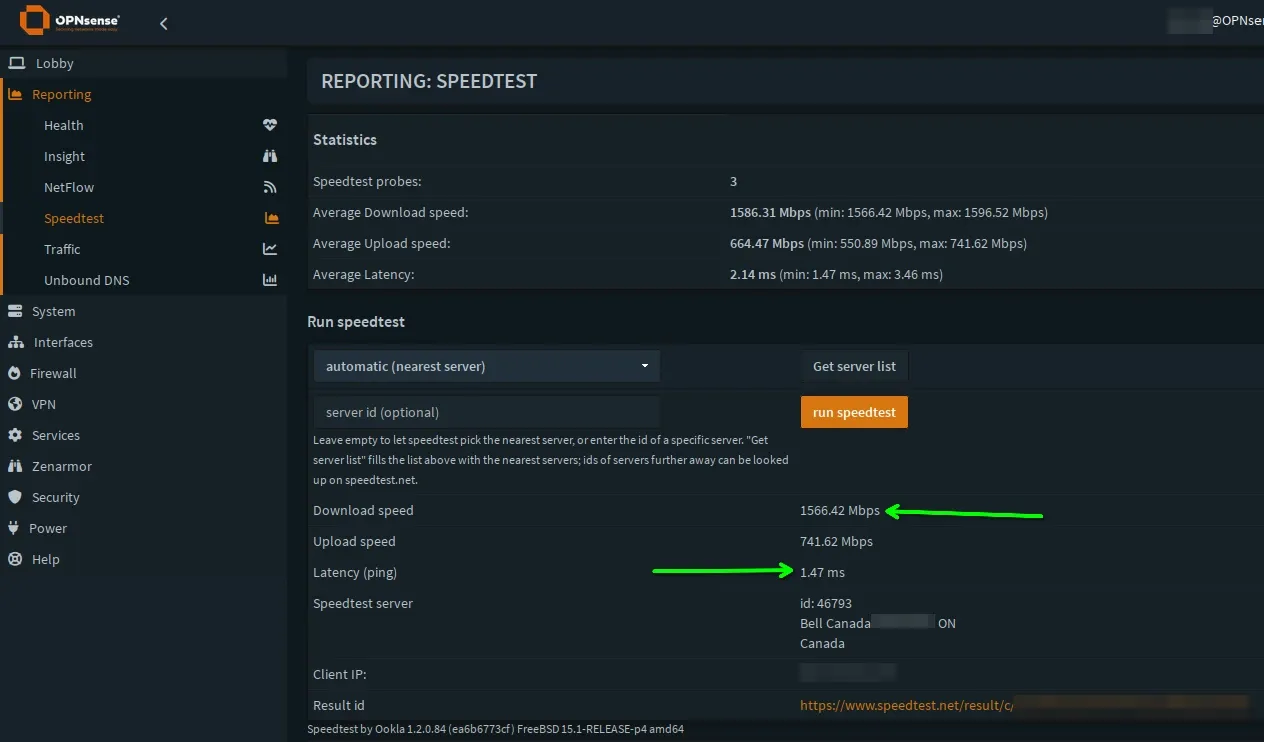
Over eighteen months later, it has been genuinely boring, and that's a good thing: delivering full 1,540 Mbps throughput with zero kernel panics and flawless uptime.
Mastering OPNsense Firewall Architecture
Deploy enterprise-grade routing on bare metal, construct resilient alias hierarchies, enforce Layer 7 threat defence, and automate encrypted off-site disaster recovery.
The Math: Why Gigabit Ports Break Modern Fiber
Gigabit networking is a hard physical ceiling. Because of Ethernet framing, IP headers, and TCP acknowledgment overhead, a theoretical 1,000 Mbps connection caps out at roughly 940 Mbps of payload data:
- 1GbE Port Ceiling: ~940 Mbps real-world download/upload. On a 1.5Gbps plan, you lose 560 Mbps of paid bandwidth.
- 2.5GbE Port Ceiling: ~2,350 Mbps real-world capacity. It effortlessly swallows a 1.5Gbps symmetrical fiber stream with nearly a gigabit of headroom to spare.
If your OPNsense box is an older desktop or a small-form-factor (SFF) machine with only one onboard gigabit NIC and no spare PCIe slots, you are trapped. A USB 3.0 port provides 5Gbps of raw bus bandwidth, making a USB 3.0 to 2.5GbE dongle the fastest, cheapest path to full-speed routing.
The Hardware: UGREEN USB 3.0 to 2.5GbE Adapter
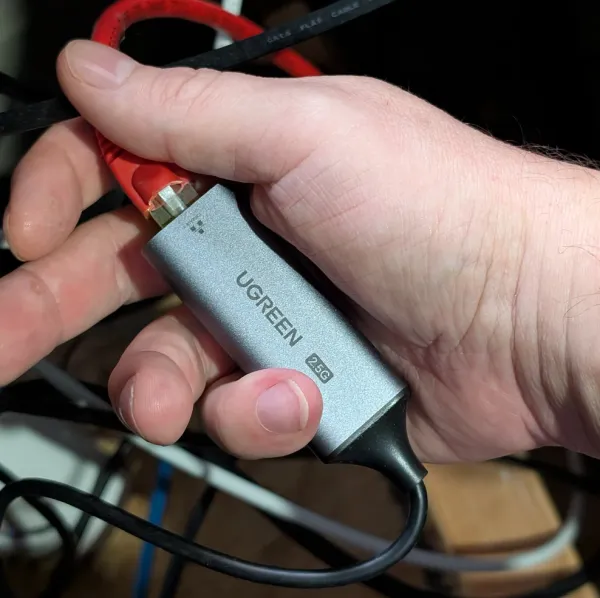
The UGREEN USB 3.0 to 2.5GbE Adapter is a compact high quality machined aluminum dongle featuring a USB Type-A 3.0 connector on one end and an RJ45 multi-gigabit port on the other. It is powered entirely by the USB bus and features integrated link and activity LEDs.
Realtek RTL8156B
USB 3.0 Type-A (5 Gbps)
2500Base-T Full Duplex
37.5°C Sustained Load
Why the "B" Suffix in RTL8156B is Critical:
The original Realtek RTL8156 controller (non-B) had notoriously buggy USB power-management firmware. Under Linux and FreeBSD, when the connection sat idle, aggressive USB power-saving states caused the interface to enter sleep mode, dropping the WAN connection and requiring a physical replug. The revised RTL8156B silicon inside the UGREEN adapter completely fixed these sleep-state regressions, drastically lowered idle thermal output, and established rock-solid stability under FreeBSD.
Here's how OPNsense sees the device itself:
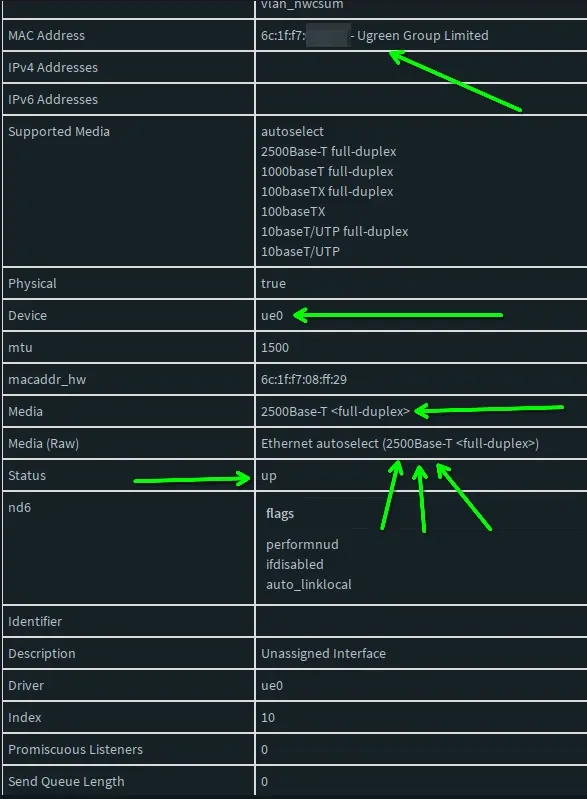
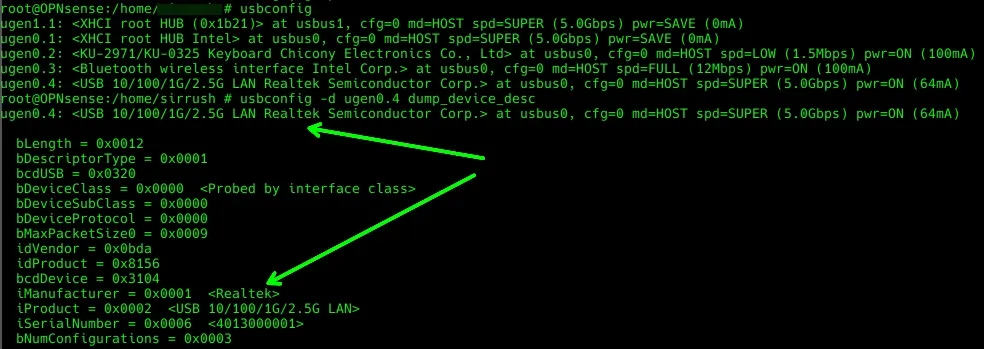
This website is being served over my adorable little UGREEN adapter!
Network Topology: Where the Dongle Fits
The adapter acts as the direct physical WAN gateway into my OPNsense firewall, receiving the high-speed fiber stream from the ISP optical terminal and passing it to internal PCIe networking:
%%{init: {'theme': 'base', 'themeVariables': { 'fontSize': '16px', 'fontFamily': 'system-ui' }}}%%
flowchart TD

ISP["🌐 ISP 1.5G Symmetrical Fiber ONT"] -->|"Cat6 Cable [2.5GbE Sync]"| DONGLE["⚡ UGREEN USB 3.0 to 2.5G Adapter (RTL8156B)"]
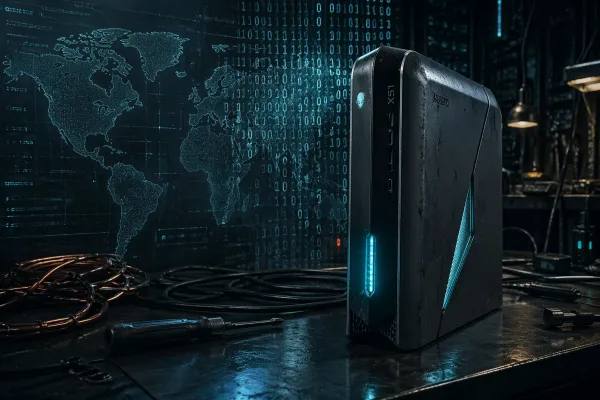
DONGLE -->|"USB 3.0 5Gbps Bus [ue0]"| OPN["🛡️ OPNsense Firewall (Intel i7-6700K Alienware)"]
OPN -->|"PCIe Gigabit Trunk [em0]"| USW["🔌 UniFi 24-Port Core Switch"]
USW --> LAN["🏠 Internal VLANs & 10GbE Storage Network"]

classDef wan fill:#fee2e2,stroke:#dc2626,stroke-width:2px,color:#7f1d1d
classDef fw fill:#0f172a,stroke:#38bdf8,stroke-width:2px,color:#38bdf8
classDef core fill:#e0f2fe,stroke:#0284c7,stroke-width:2px,color:#0c4a6e

class ISP,DONGLE wan
class OPN fw
class USW,LAN core
Driver Configuration: FreeBSD & OPNsense Setup
In modern OPNsense releases (24.x and 26.x), the Realtek RTL8156B adapter is recognized out of the box by FreeBSD's native ure (USB Realtek Ethernet) driver. However, to guarantee maximum throughput and eliminate any chance of USB watchdog timeouts under heavy multi-threaded torrent or Usenet saturation, you should install the official vendor driver package.
Step 1: Install the Vendor kmod Package
Navigate to System > Firmware > Plugins in the OPNsense web GUI and install:
os-realtek-re (Realtek vendor NIC driver package)Alternatively, open an SSH root terminal on your OPNsense firewall and run:
pkg install os-realtek-re-kmodStep 2: Verify Link Negotiation
Once assigned to your WAN interface (typically appearing as ue0), check Interfaces > Overview > WAN. You should verify that the interface negotiates at full multi-gigabit speeds:
media: Ethernet autoselect (2500baseT <full-duplex>)
status: activeStep 3: Prevent USB Power Suspension
To ensure your server motherboard never throttles USB bus power during quiet overnight hours, navigate to System > Settings > Tunables and ensure USB auto-suspend is disabled by adding or verifying:
hw.usb.no_suspend_wait=1Core Lab Telemetry Benchmarks: Real-World Performance
Here are the actual metrics captured from my production firewall on my 1.5Gbps symmetrical fiber connection over eighteen months of continuous operation:
The Honest Caveats: When Should You NOT Use USB?
I would be doing you a disservice if I claimed USB networking is universally superior to dedicated PCIe silicon. You must understand the trade-offs:
- USB Bus Interrupt Overhead: Unlike PCIe network cards that utilize Direct Memory Access (DMA) to offload packet processing directly to system memory with zero CPU intervention, USB devices generate CPU software interrupts for packet transfers. On an Intel Core i5 or i7, this is negligible (adding roughly 3% to 5% CPU overhead during multi-gigabit bursts). However, on an extremely weak dual-core Celeron N3050 or ancient Atom processor, USB interrupt handling can saturate the CPU.
- Physical Cable Tug Risk: A PCIe NIC is screwed rigidly into a server chassis. A USB adapter hangs off the back or front of your server. If you work inside your rack frequently without securing your cables, an accidental yank can disconnect your entire home internet. Pro tip: use a zip-tie or velcro strap to anchor the dongle to your chassis.
- Avoid Cheap Unbranded Knock-Offs: Generic $12 adapters on eBay often use unbranded RTL8152 (100Mbps) or defective RTL8156 non-B chips that throttle to 300 Mbps when warm. Stick strictly to verified aluminum-cased adapters like the UGREEN RTL8156B.
The Bottom Line: The Cheapest Multi-Gigabit Upgrade
If you have an OPNsense firewall with available PCIe slots and a flexible budget, by all means buy an Intel I226-V PCIe network card. But if your firewall is a compact desktop, a mini-PC without expansion slots, or you simply want to unlock your 1.5Gbps fiber connection this afternoon for less than twenty-five dollars, the UGREEN USB 3.0 to 2.5GbE Adapter is the ultimate homelab life hack.
It is inexpensive, dead simple to configure, runs cool, and has delivered flawless, continuous multi-gigabit throughput in Core Lab for over 500 days.
→ Check Current Price on Amazon (UGREEN USB 3.0 to 2.5GbE Adapter)
Related Core Lab Guides
Written by
On this page
What's Next?