
How to Deploy CrowdSec AppSec (WAF) with SWAG in Docker
Learn how to successfully deploy CrowdSec's Web Application Firewall behind a LinuxServer SWAG reverse proxy across a Docker Macvlan without getting 'connection refused' errors.
Why the Official CrowdSec Docs Break in a Docker Macvlan/IPvlan
Deploying CrowdSec's Web Application Firewall (AppSec) behind a LinuxServer SWAG (Nginx) reverse proxy is a great way to automatically block exploit payloads. However, if you are running them in separate Docker containers on a Macvlan or IPvlan network, following the official CrowdSec documentation verbatim will leave you with a bouncer that silently skips the WAF entirely or crashes with "connection refused" errors.
Here is how to properly configure the LinuxServer swag-crowdsec Mod and the CrowdSec AppSec engine to communicate across your Docker network, avoiding the undocumented pitfalls.
Mastering Reverse Proxies with SWAG
Deploy SWAG in Docker, configure Let's Encrypt certificates, integrate centralized Authelia MFA, and enforce Layer 7 CrowdSec AppSec (WAF) defense.
Pre-Requisites:
- Existing installation of SWAG and;
 Core Lab Joe

- Existing installation of CrowdSec.
 Core Lab Joe

1. Fixing the SWAG Bouncer: Injecting the CROWDSEC_APPSEC_URL Variable
The official CrowdSec documentation instructs you to manually edit /etc/crowdsec/bouncers/crowdsec-nginx-bouncer.conf and add your APPSEC_URL. Do not do this in SWAG!
The LinuxServer CrowdSec Docker Mod executes an initialization script on every boot that aggressively strips the APPSEC_URL string from the configuration file if a specific Docker environment variable is missing. This will silently disable your WAF after every restart.
To fix this, you must inject the URL directly into your SWAG compose.yaml environment block:
services:
  swag:
    image: lscr.io/linuxserver/swag:latest
    environment:
      - DOCKER_MODS=linuxserver/mods:swag-crowdsec
      # Other variables...
      - CROWDSEC_API_KEY=your_bouncer_key_here
      - CROWDSEC_LAPI_URL=http://10.0.0.5:8080
      - CROWDSEC_APPSEC_URL=http://10.0.0.5:7422
You're simply telling SWAG that you've turned on CrowdSec WAF, and your bouncer will now accept the variable to reach it on a new port
[7422].2. Solving "Connection Refused": Changing the AppSec Listen Address
By default, CrowdSec's AppSec component is configured to listen on 127.0.0.1:7422. The official documentation explicitly warns you to "Keep listen_addr on 127.0.0.1" for security reasons.
While this is true for bare-metal deployments where Nginx and CrowdSec share the same host, it completely breaks Docker deployments where SWAG and CrowdSec are in separate containers (which is the standard deployment with SWAG & CrowdSec). SWAG cannot reach 127.0.0.1 inside the CrowdSec container.
You must modify your CrowdSec AppSec acquisition file to listen on all interfaces (0.0.0.0). There's a warning in the official docs about this, but if you configured your CrowdSec container correctly, it only has 1 interface and only talks to SWAG anyway.
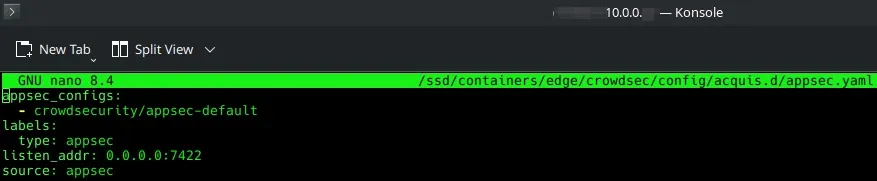
Edit /config/acquis.d/appsec.yaml inside your CrowdSec container (or mapped volume):
appsec_configs:
  - crowdsecurity/appsec-default
labels:
  type: appsec
listen_addr: 0.0.0.0:7422
source: appsec
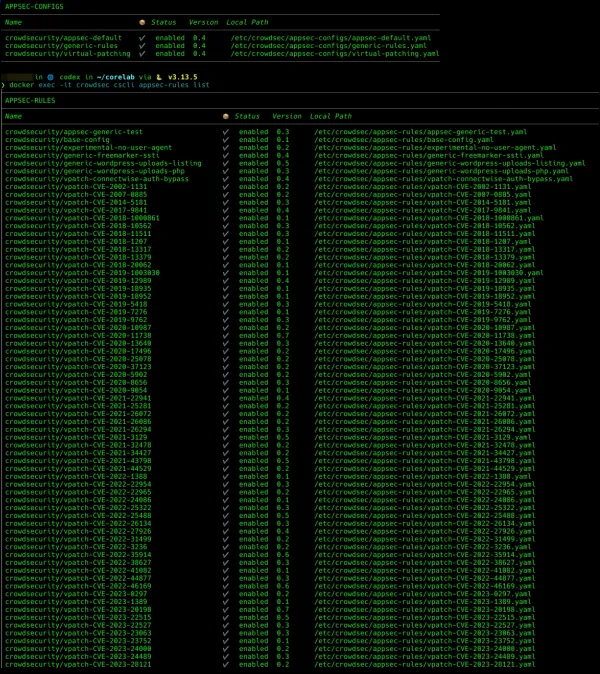
3. Installing CrowdSec Virtual Patching Rules for the WAF
Before the WAF can block anything, you need to install the virtual patching rules inside the CrowdSec container. Add these to your existing crowdsec container COLLECTIONS variable:
- COLLECTIONS=crowdsecurity/nginx crowdsecurity/base-http-scenarios crowdsecurity/appsec-virtual-patching crowdsecurity/appsec-generic-rules crowdsecurity/whitelist-good-actorsRestart the CrowdSec container first to bind to 0.0.0.0:7422, and then restart your SWAG container so the bouncer picks up the environment variable.
docker compose restart crowdsec && docker logs -f crowdsec
Watch the logs and you'll see it download & install the new collections, CTRL-C to cancel out. Then SWAG:
docker compose restart swag && docker logs -f swag and watch it fire up. It can take a few minutes to download all your mods/configs.
4. Testing the CrowdSec WAF with an External XSS Payload
To verify the setup is working, you need to trigger a rule. Keep in mind that CrowdSec automatically whitelists private LAN IP ranges (like 10.0.0.x or 192.168.x.x). If you test from your local network or a VPN split tunnel, you will get a 200 OK response, falsely leading you to believe the WAF is broken.
Disconnect from your VPN and test from an external connection (like a cellular network) using curl or a browser:
curl -I https://yourdomain.com/.env
If configured correctly, the AppSec engine will intercept the request and return the HTML ban page with a 403 Forbidden status.
Finally, check your internal metrics to confirm the AppSec engine is processing and blocking payloads:
docker exec crowdsec cscli metrics show appsec
Join the Core Lab Inner Circle
If this saved you hours of troubleshooting, subscribe to the CoreLab newsletter so you don't miss the next deep-dive!
What's Next?
Did you want to advance your security further? Jump on over to my OPNsense Master Series and gain advanced threat protection & defence right at your perimeter!
 Core Lab Joe
Frequently Asked Questions
Why does CrowdSec AppSec return "connection refused" in Docker?
This happens when the CrowdSec WAF engine is bound to 127.0.0.1 (localhost). In a Docker environment where SWAG and CrowdSec run in separate containers, SWAG cannot reach CrowdSec's localhost. You must change the listen_addr to 0.0.0.0:7422 in your appsec.yaml configuration.
Why does the LinuxServer SWAG CrowdSec mod wipe my APPSEC_URL config?
The official swag-crowdsec Docker Mod runs an initialization script on every boot that deletes the APPSEC_URL variable if the CROWDSEC_APPSEC_URL environment variable is not defined in your Docker Compose file. To make the setting persistent, define the URL directly in your compose.yaml instead of manually editing the bouncer configuration file.
How do I test if my CrowdSec WAF is working?
You can test your WAF by sending a common exploit payload (like an XSS script or a .env file request) to your web server using curl. However, make sure you test from an external network (like a cellular connection), because CrowdSec automatically whitelists private LAN IP ranges (such as 10.0.x.x and 192.168.x.x).
Written by
On this page
What's Next?