
Advanced Sonarr & Radarr Guide: Implementing the "Native Hunting" Protocol
Right now, your media stack is likely a passive collector. It grabs the first "good enough" file it sees and stops. But in 2026, with HDR10+, AV1, and Tier-1 release groups shifting the landscape, "good enough" is sub-optimal.
After the recent collapse of Huntarr (due to critical security vulnerabilities and a nuked repository), the community learned a hard lesson: Never trust third-party wrappers with your API keys...
Today, we’re going native. No wrappers!
We are going to use Profilarr and and internal logic of both Sonarr & Radarr to build a self-healing, "Always Hunting" system that replaces the need for external scripts entirely.
Media Server Mastery
The Philosophy: "The Grab" vs. "The Hunt"
Standard Sonarr setup uses The Grab: It sees a file that meets the minimum requirement and stops.
The "Native Hunting Protocol" uses The Upgrade: It treats your library as a living entity, constantly scouring your indexers for a superior version until it hits your "Tactical Cutoff."
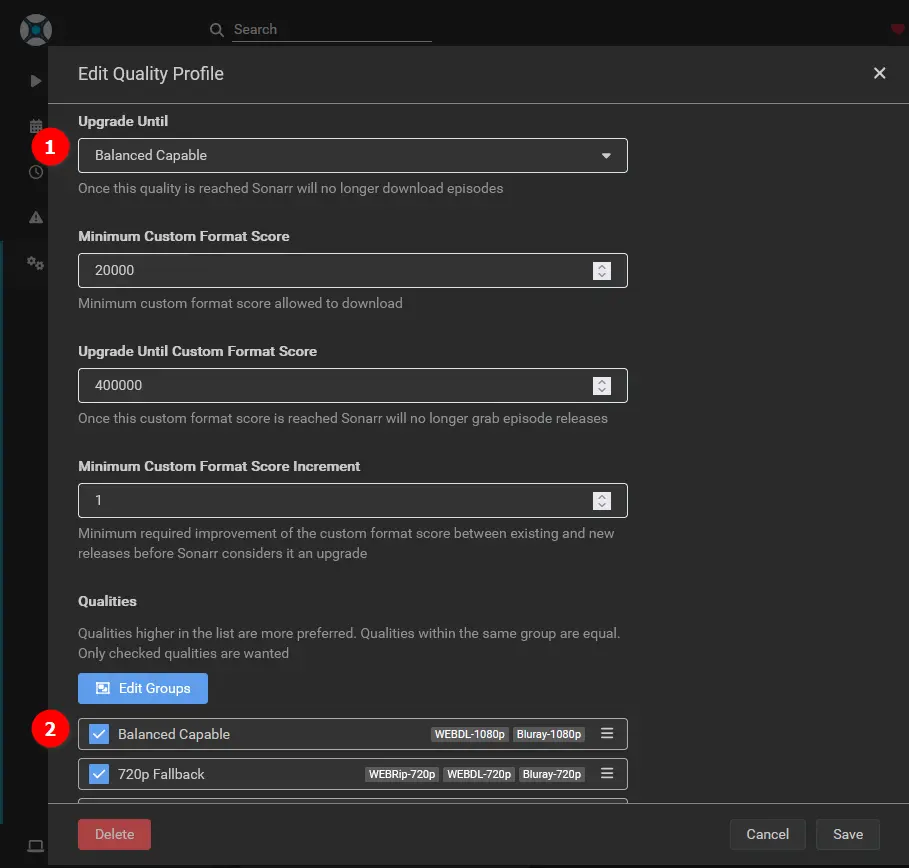
What drives me nuts when I float across the sea of mediocre Sonarr / Radarr guides, are simply 'install' guides. No optimization, no tuning. You set it up, add some indexers, yay! Not good enough. Once you've sync'd your Aarrs with Profilarr, you can edit a custom quality profile like this:
Phase 1: Signal Intelligence (SIGINT) - Deploying Prowlarr
Before the hunt begins, you need eyes on the target. In a high-efficiency media stack, we don't manually configure indexers inside every individual app - that’s a waste of compute cycles and mission-time. We use Prowlarr as our centralized Signal Intelligence hub. It scouts your trackers (both public and private) and "pushes" those definitions into your hunters, automating the entire process once you've set them up.
The Centralized Scout (Why it's Mandatory)
In a "Scrap-Lab" environment, overhead is the enemy. Instead of Sonarr and Radarr both pinging the same 20 indexers every 15 minutes, Prowlarr performs a single "Scout" and distributes the intel. This prevents your SFF (Small Form Factor) hardware from spiking and keeps your home IP from being rate-limited by over-eager scraping.
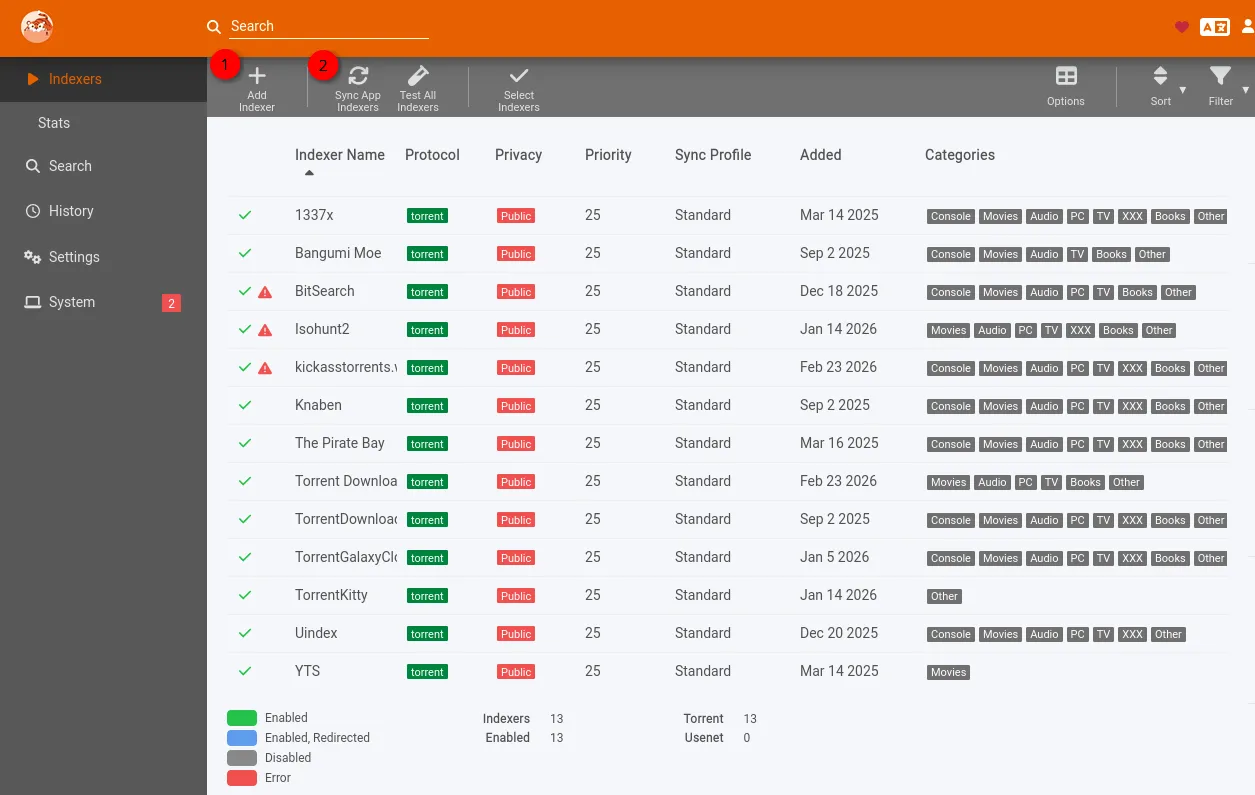
Here's a quick docker compose file to get your Prowlarr fired up:
  prowlarr:
    container_name: prowlarr
    image: lscr.io/linuxserver/prowlarr:develop
    restart: unless-stopped
    ports:
      - "9696:9696"
    environment:
      - TZ=America/Toronto
      - PUID=2000
      - PGID=2001
    volumes:
      - /opt/DOCKERS/prowlarr/config:/config
2.2 Linking the "Arrs" to the Hub
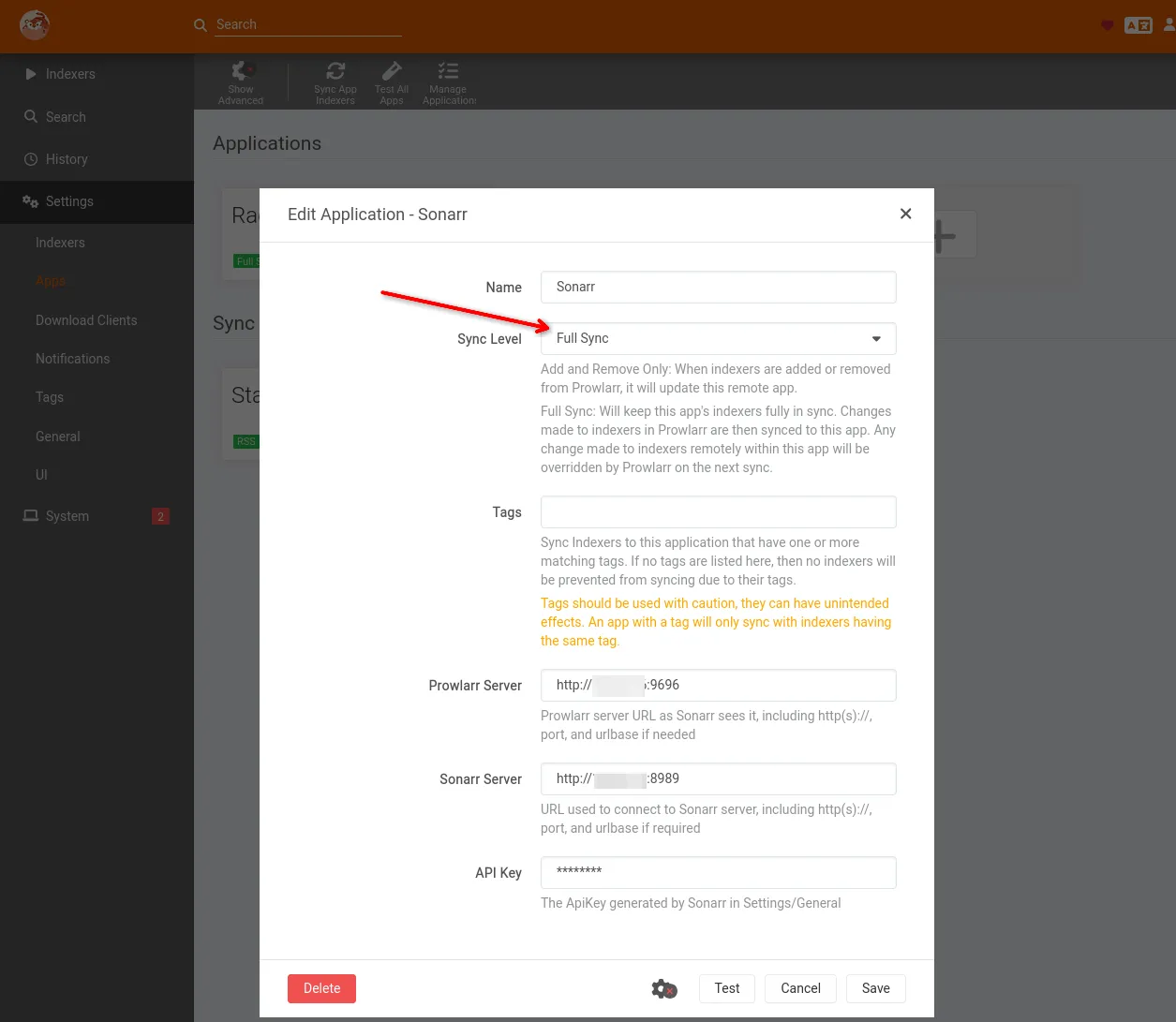
Navigate to Settings > Apps in Prowlarr. You aren't just linking apps; you are establishing a Full Sync protocol.
- Sync Level: Set this to Full Sync. This ensures that if a tracker goes dark or you update a URL in Prowlarr, it is instantly reflected across the entire stack.
- Tactical URL: Use internal Docker DNS (e.g.,
http://sonarr:8989) to keep traffic off your local network bridge and inside the container environment.
2.3. Mission Parameters: Tag-Based Logic (Optional)
A true hunter is precise. You don't want 4K Movie trackers cluttering up your TV show searches. We use Tags to define mission parameters:
- In Prowlarr, edit your indexers and assign tags like
tv-hqormovie-4k. - Go to Settings > Apps and edit your Radarr connection.
- Filter it by the
movie-4ktag.
The Result: Prowlarr only feeds Radarr the intel it needs for high-quality movie hunting, keeping the database lean and the search results relevant.
2.4. The "Force Multipliers": FlareSolverr & Profilarr
To truly reach "Advanced" status, Prowlarr needs two sidekicks:
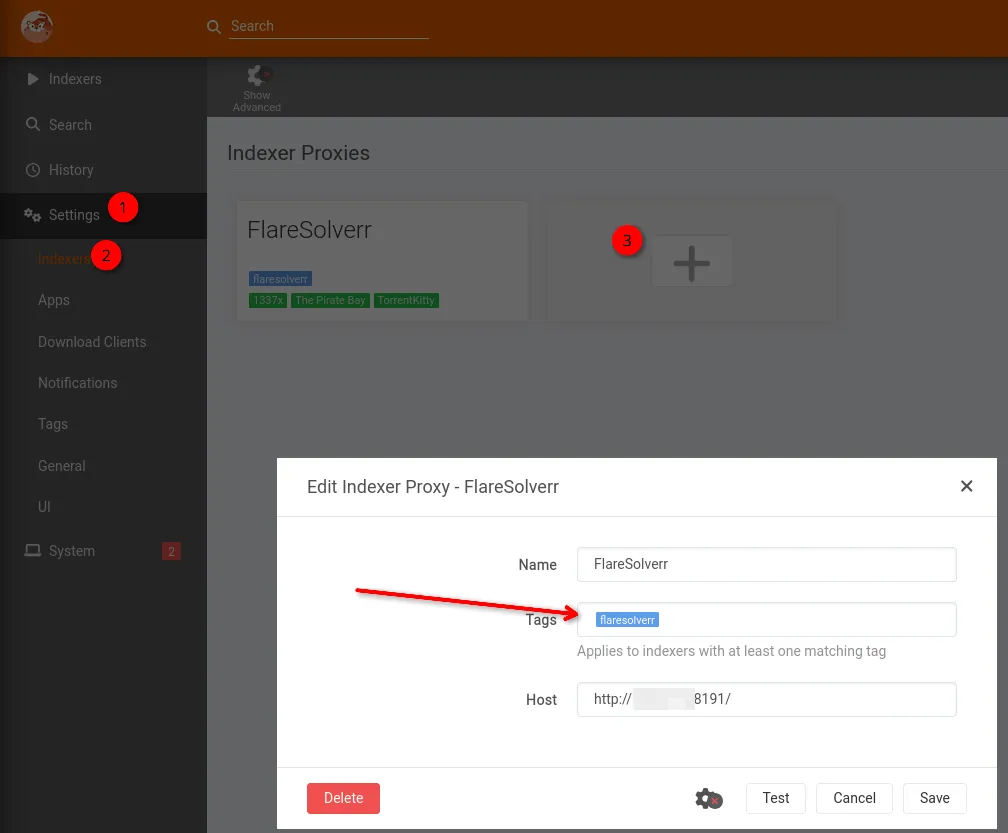
- FlareSolverr: Some indexers use heavy Cloudflare protection that will block your server's IP. FlareSolverr acts as a "browser proxy" to solve those challenges. In Prowlarr, add it under Settings > Indexers > Add FlareSolverr.
You can set it up very quickly with this chunk of compose:
  flaresolverr:
    container_name: flaresolverr
    image: ghcr.io/flaresolverr/flaresolverr:latest
    restart: unless-stopped
    ports:
      - "8191:8191"
    security_opt:
      - no-new-privileges:true
    environment:
      - TZ=America/Toronto
      - LOG_LEVEL=info
      - LOG_HTML=false
      - CAPTCHA_SOLVER=none
Then in Prowlarr, simpy hit Settings->Indexers->Click the "+" button and add your FlareSolverrr container by name or IP, ensure you give it a tag (Mandatory!). Here's what this looks like:
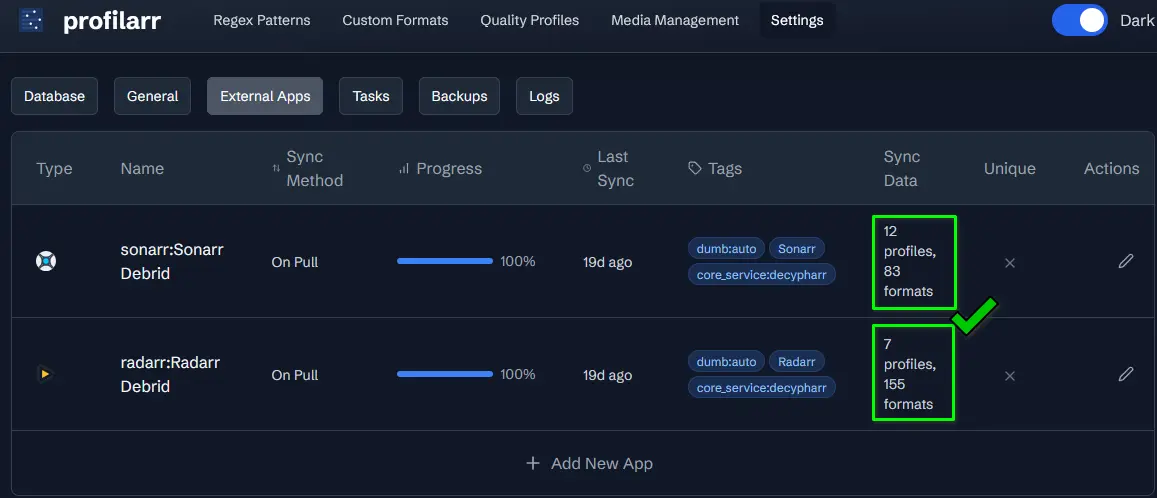
- Profilarr (The Quality Master): Since you’re using my recommended "Trash-Guides" profiles, Profilarr can sync those exact quality definitions across both apps simultaneously. No more manual clicking to ensure "1080p WEB-DL" means the same thing in both places.
- Profilarr is detailed & integrated below in Phase 2 below👇
Phase 2: The Intelligence Feed: Profilarr + Dictionarry
To hunt effectively, Sonarr needs to know exactly what "Quality" looks like in 2026. We'll use Profilarr (the successor to manual Trash Guides) to inject high-precision Custom Formats directly into the Brain.
The Setup:
- Connect Profilarr to your Sonarr instance.
- Sync the Dictionarry PCD: This is a curated, Git-backed database of release groups and encoding standards.
- The Result: Sonarr no longer just sees "1080p." It now sees "1080p | HEVC | Tier 1 Group | Internal Release | No-Bloat." -> FAR better (and picky!) results.

Phase 3: Defining the Rules of Engagement: Custom Formats & "Always Hunting" Logic
This is where the "Hunting" happens. In your Quality Profiles, we are going to move away from standard definitions. Once the data is synced, you need to tell the system which codecs and groups to prioritize. This is handled through Custom Formats (CFs).
By assigning "Score" values to specific attributes (e.g., +100 for AV1, +50 for Atmos, -1000 for "No-Bloat" exclusions), you create a mathematical hierarchy of what you actually want on your drives. This should be whatever your client playback devices can direct play, preferably, otherwise you'll end up transcoding.
Example, if you have a tv with a paired soundbar which is a 2.1 audio solution, and 90% of the time you'll be watching on that, you should highly favour 2.1 audio so that you don't have to transcode every file to play if you're downloading stereo, or 5.1 (VERY common!).
The Configuration: In Settings > Profiles, edit your primary quality profile. Instead of stopping at a resolution (like Bluray-1080p), set your Upgrade Until to the highest possible Profilarr tier.
- How it works: Every time an indexer RSS sync happens, the system checks if a new upload beats the score of your current file.
- The Outcome: If a 40GB Remux appears that beats your 15GB Web-DL, the upgrade is automatic and silent.
Take a peek at the screenshot below for what these custom scores look like, in conjunction with the "Upgrade Until" cutoff fields.👇
The "Always Hunting" Profile Configuration:
| Setting | Tactical Value | Why? |
| Upgrade Allowed | ✅ Yes | Allows Sonarr to replace existing files. |
| Upgrade Until | Custom Format Score | This is the "Hunt" trigger. |
| Cutoff Score | 10,000 (or max) | Tells Sonarr to never stop until it finds the "Perfect" release. |
| Min. CF Score | 500 | Prevents "sideways" upgrades to files that aren't actually better. |
Here's what this looks like in the webgui in Sonarr's Quality profiles (Sonarr->Settings->Profiles->Edit a Quality Profile):
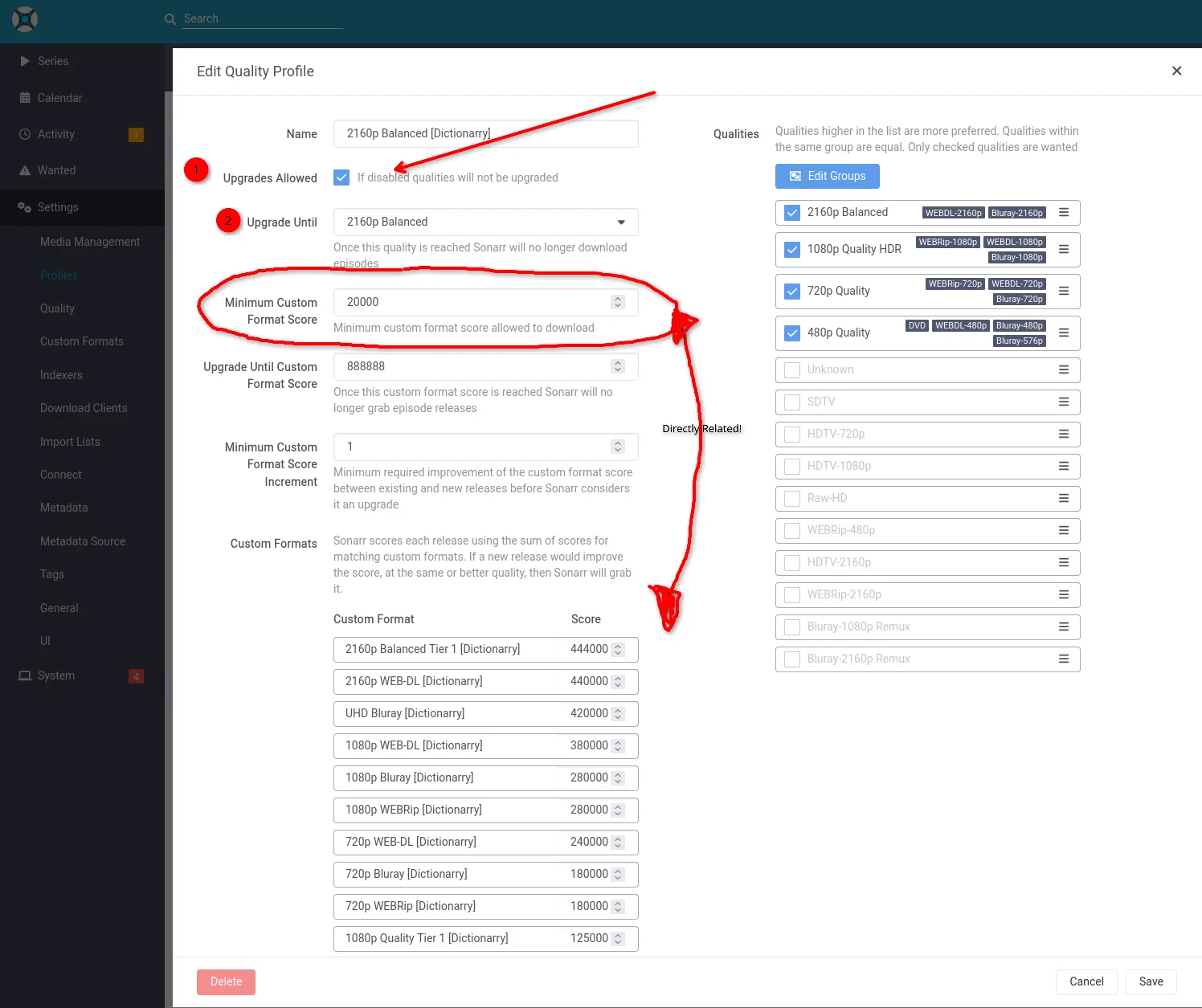
ALL of these initial settings are done by Profilarr, but you can tweak them to your liking aallll you want!
Phase 4: The Cleanup Crew: Integrating Decluttarr
An "Always Hunting" protocol leads to a busy download queue. If a hunt stalls, it can clog your "Gatehouse" (the download client). Decluttarr acts as the logic bridge between your download client (qBittorrent) and your managers (Sonarr/Radarr).
Decluttarr monitors qBittorrent and keeps the pipes clear by removing failed/stalled downloads.
- The Logic: If a "better" version is found but the download stalls for more than 30 minutes, Decluttarr nukes it and sends a "Failed" signal back to the stack.
- The Result: The system immediately moves to the next best target without manual intervention.
We integrate Decluttarr to monitor qBittorrent.
 Core Lab Joe
Technical Appendix: The "Decluttarr" Integration
How-to: Automating the Stalled Queue
- Network Alignment: Ensure Decluttarr and qBittorrent are on the same Docker bridge network.
- API Handshake: In the
config.yml(of the decluttarr docker), point Decluttarr to your qBittorrent internal IP and port. - The "Nuke" Logic: Set the
stalled_timeoutto 1800 (30 minutes). - Signal Loop: Enable
remove_and_blacklist. This is critical: it tells Sonarr / Radarr the specific release is "Bad," triggering an immediate search for the next-best score in your Profilarr rankings.
Phase 5: Final Integration: The Full-Stack Sync
To achieve peak efficiency, these units must communicate over an internal Docker network:
- Prowlarr: Scouts the indexers & helps bypass Cloudflare, if needed.
- Profilarr: Defines the "Rules of Engagement" (Quality standards).
- Sonarr/Radarr: Executes the hunt and manages the library.
- Bazarr: Utilizes SubGen (AI-Whisper) to generate local subtitles for every new upgrade.
Why Native Hunting Wins (Big time!):
- Enhanced Security: No exposing API keys to unverified third-party scripts.
- Native Speed: No middleware; it uses the *arrs' own database engines.
- Future Proof: As new codecs (like AV1 or VVC) become standard, Profilarr updates your scores automatically. Or you change which client device you're using and it can now natively play something like AV1 or HEVC.
FAQ: The Native Hunting Protocol
Q: Won't this constant "Hunting" kill my hard drives? A: Modern HDDs are rated for high workloads. The real "wear" is on your parity drive during writes. However, by setting a strict "Tactical Cutoff" in Step 3, you ensure the hunting stops once your quality ceiling is hit. It’s not infinite; it’s targeted.
Q: Why not just use a third-party script like the old Huntarr? A: Security and overhead. Native logic uses the built-in SQLite/Postgres database of the *arrs. It’s faster, consumes fewer resources, and—most importantly—doesn't require you to pass your API keys through an unmaintained wrapper.
Q: Does this work with both Sonarr and Radarr? A: Yes. The Profilarr/Dictionarry logic is unified. Once you define a "Tier 1 Release Group" in your dictionary, it applies the same quality logic to a 4K movie as it does to a 1080p TV show.
Q: What happens if my VPN drops during a "Hunt"? A: If you follow the "Full Stack" network logic, your download client (qBittorrent) should be bound to a specific tunnel interface (tun0). If the tunnel drops, the download stalls, and Decluttarr will simply wait or nuke it based on your timeout.


Member discussion