

UGREEN NASync Black Friday & Cyber Monday 2026: The Homelabber’s Hardware Breakdown
A no-nonsense technical breakdown of UGREEN’s 2026 Black Friday NASync deals (up to $500 CAD off). Find the right x86 or ARM chassis for OpenMediaVault, TrueNAS, Proxmox, and Docker.

If you have been holding off on building a dedicated storage node, consolidating a noisy rack server, or setting up an off-site replication target, UGREEN’s 2026 Black Friday / Cyber Monday (BFCM) window is live through November 30, 2026!
Rather than dumping a wall of retail links and marketing fluff, I have broken down the discounted NASync lineup by actual homelab workload, hardware architecture, and third-party OS compatibility - including the NAS + DC UPS bundles that actually make sense for protecting ZFS and Btrfs pools.
(Note on regional pricing: The headline "Save up to $500 CAD" applies to top-tier models and multi-bay bundles on the Canadian storefront. All links below should route automatically to your regional UGREEN storefront - US, Canada, UK, EU, or Australia - so you see local pricing and warranty coverage.)
Core Lab has partnered directly with UGREEN to secure an exclusive discount code for our homelab community, valid on the DXP4800 Pro, DXP4800 Plus, and the entire NASync series. It stacks directly on top of early Black Friday and Cyber Monday promotional prices!
To prevent coupon scraping and ensure deals go directly to authentic self-hosters, this discount code is unlocked exclusively for Core Lab Insiders. Create a free account in 10 seconds to reveal the code immediately on this page.
Quick Decision Matrix: Which Chassis Fits Your Lab?
Tier 1: The Homelab Sweet Spot (DXP4800 Pro, DXP4800 Plus & DXP2800)
For most self-hosters running a stack of 20 to 60 Docker containers—Arr media pipelines, Plex/Jellyfin with hardware transcoding, Immich, Vaultwarden, and reverse proxies—the x86 DXP series hits the ideal balance between idle power draw and compute headroom. (If you are cross-shopping against Synology DiskStations or TerraMaster, read my in-depth comparison in Best Pre-Built NAS for a Homelab (2026).)
UGREEN NASync DXP4800 Plus (4-Bay + 2x M.2 NVMe)

- Homelab Role: High-Efficiency 4-Bay Hybrid ZFS Storage Pool & Dedicated Media Server
- Silicon and Media Engine: Intel Pentium Gold 8505 (5C/6T: 1P core up to 4.4GHz, 4E cores up to 3.3GHz, 15W TDP) with Intel UHD Graphics (48 EUs). Full Intel QuickSync hardware transcoding for 4K HEVC 10-bit, VP9, and AV1 decode.
- High-Speed I/O and Networking: Native 10GbE RJ45 plus 2.5GbE RJ45 networking, dual M.2 2280 PCIe 4.0 NVMe slots, 8GB DDR5 4800MHz RAM (expandable to 64GB), USB 3.2 Gen 2 (10Gbps), and 4K HDMI.
- Deployment Note / Architectural Fit: The sweet spot for self-hosters wanting compact 4-bay storage with native 10GbE networking out of the box. Runs standard x86 UEFI BIOS, allowing seamless migration to TrueNAS SCALE, Debian 13 with OpenMediaVault 8, or Proxmox VE with full hardware transcoding passthrough.
- Why it belongs in a lab: Unlike standard consumer 4-bay boxes stuck on dual 2.5GbE ports, the DXP4800 Plus pairs a 5-core/6-thread Intel Pentium Gold 8505 with native 10GbE networking, DDR5 SO-DIMM expandability (up to 64GB), and two internal M.2 NVMe slots for Docker appdata or ZFS L2ARC/SLOG caching.
- Bare-metal OS swap: Because it runs standard x86_64 UEFI firmware, you are not locked into UGOS. You can swap or boot off an internal NVMe drive to run Debian 13 + OpenMediaVault 8, TrueNAS Scale, or Proxmox VE with full Intel Quick Sync (
i915/xe) hardware transcoding support. - Check DXP4800 Plus BFCM Pricing & UPS Bundles at UGREEN →
UGREEN NASync DXP4800 Pro (4-Bay + 2x M.2 NVMe)
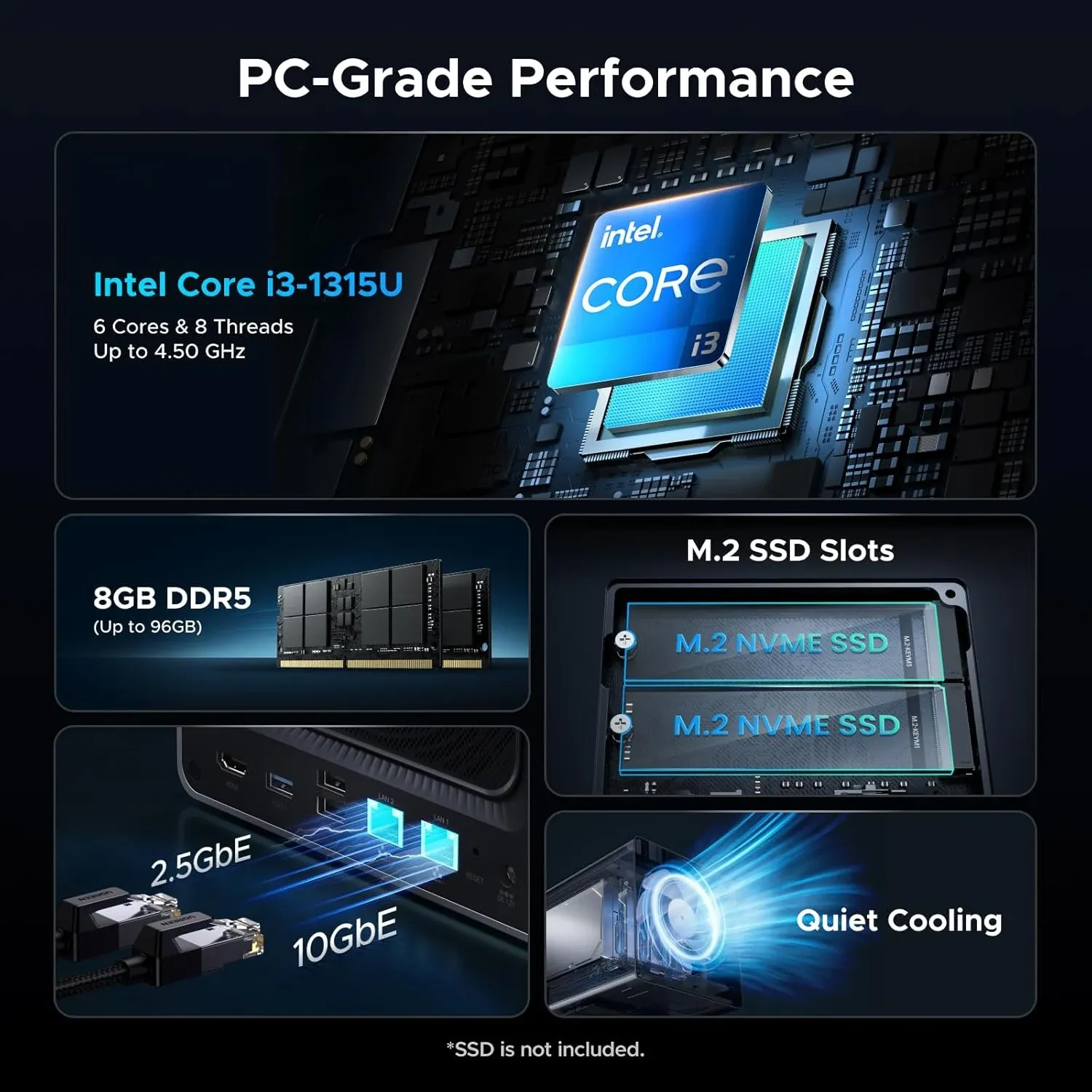
- Homelab Role: Workstation-Class 4-Bay Virtualization Node & High-Throughput ZFS Storage Server
- Silicon and Media Engine: Intel Core i5-1235U (10C/12T: 2P cores up to 4.4GHz, 8E cores up to 3.3GHz, 12MB Smart Cache, 15W TDP) with Intel Iris Xe Graphics (80 EUs). Full QuickSync media transcode engine and multi-stream hardware acceleration.
- High-Speed I/O and Networking: Native 10GbE RJ45 plus 2.5GbE RJ45 networking, dual Thunderbolt 4 / USB4 ports (40Gbps bidirectional), dual M.2 2280 PCIe 4.0 NVMe slots, 8GB DDR5 4800MHz RAM (expandable to 64GB), SD card reader, and 8K HDMI.
- Deployment Note / Architectural Fit: The flagship 4-bay all-in-one homelab powerhouse. The 10-core hybrid topology and dual 40Gbps Thunderbolt 4 ports allow running heavy Proxmox VE virtualization stacks, high-density Docker clusters, and direct-attached ultra-fast external storage arrays simultaneously with negligible CPU overhead.
- Why it belongs in a lab: Powered by the 10-core / 12-thread Intel Core i5-1235U with native 10GbE plus 2.5GbE networking, dual 40Gbps Thunderbolt 4 / USB4 ports, and support for up to 64GB of DDR5 RAM. This is the pinnacle 4-bay compute powerhouse for running intensive virtual machines alongside high-density storage arrays.
- Bare-metal OS flexibility: Like the DXP4800 Plus, the Pro runs standard x86 UEFI firmware. You can boot TrueNAS SCALE, Proxmox VE, or Debian 13 with OpenMediaVault 8 straight from an internal NVMe drive with full Intel QuickSync hardware transcoding passthrough.
- Check DXP4800 Pro Pricing on Amazon → (or apply code
corelab8for 8% OFF on the official UGREEN store)
UGREEN NASync DXP2800 (2-Bay + 2x M.2 NVMe)
- Why it belongs in a lab: Powered by the Intel N100 (6W TDP) with 8GB DDR5 (upgradable to 16GB/32GB), 2.5GbE, and dual M.2 slots. If you do not need four spinning disks—or you store bulk media elsewhere and just want a silent, sub-15W Docker/Immich/Plex appliance—this gives you full Quick Sync AV1/HEVC transcoding without building an N100 mini-PC from scratch.
- Check DXP2800 BFCM Pricing at UGREEN →
Tier 2: High-Density ZFS Pools & All-Flash Storage (DXP6800 Pro, DXP8800 Plus & DXP480T Plus)
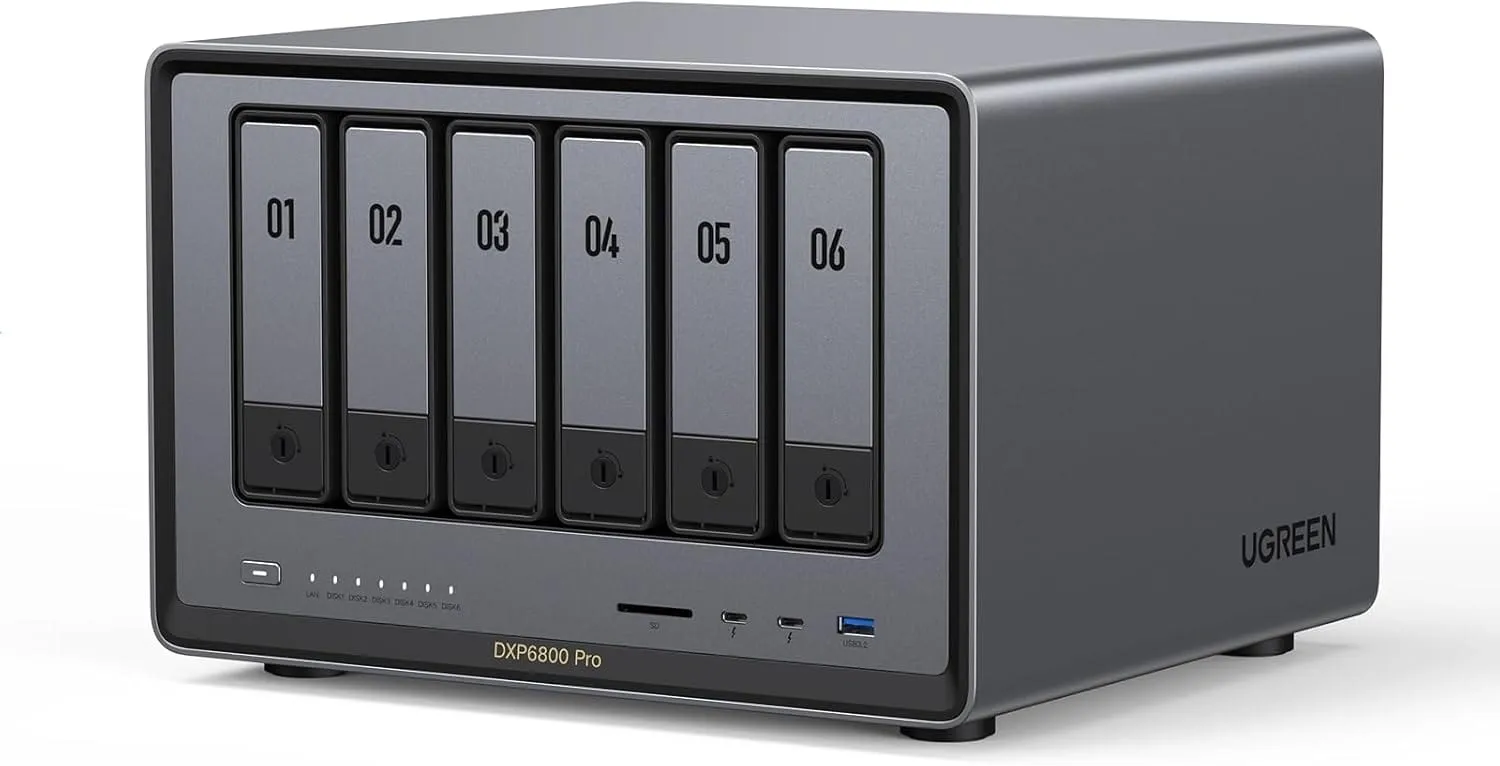
- Homelab Role: High-Density 6-Bay Enterprise ZFS RAIDZ2 Storage Monolith & Hypervisor Host
- Silicon and Media Engine: Intel Core i5-1235U (10C/12T: 2P cores, 8E cores, 12MB Cache, 15W TDP) with Intel Iris Xe Graphics (80 EUs). Full QuickSync hardware acceleration for media transcoding and multi-user concurrent transfers.
- High-Speed I/O and Networking: Dual 10GbE RJ45 ports (supporting LACP link aggregation or multi-subnet isolation), dual Thunderbolt 4 / USB4 ports (40Gbps), PCIe 4.0 x4 low-profile expansion slot (for 25GbE SFP28 or external SAS HBA), dual M.2 PCIe 4.0 NVMe slots, and 8GB DDR5 RAM (expandable to 64GB).
- Deployment Note / Architectural Fit: Engineered for serious homelab storage consolidation. The 6-bay chassis delivers the optimal drive geometry for 6-disk ZFS RAIDZ2 (4 data + 2 parity) with dual 10GbE links capable of saturating multi-gigabit LAN backbones while running TrueNAS SCALE or Proxmox VE.
If you are consolidating an aging, power-hungry rack chassis into a desktop footprint without sacrificing 10GbE throughput or PCIe expansion, step up to the 12th-Gen Core i5 models.
UGREEN NASync DXP6800 Pro (6-Bay) & DXP8800 Plus (8-Bay)
- Why they belong in a lab: Both units step up to a 10-core/12-thread Intel Core i5-1235U, dual 10GbE ports (ideal for LACP link aggregation or dedicating one NIC to storage VLAN traffic and the other to VM bridges), dual Thunderbolt 4 ports, and a PCIe x4 expansion slot for a 25GbE NIC or HBA card.
- ZFS Readiness: With support for up to 64GB of DDR5 RAM and 6 or 8 bays for RAIDZ2 arrays, these chassis handle multi-user 10GbE saturating transfers and heavy Proxmox VM workloads effortlessly.
- Check DXP6800 Pro BFCM Deals at UGREEN →
- Check DXP8800 Plus BFCM Deals at UGREEN →
UGREEN NASync DXP480T Plus (4-Bay All-NVMe)
- Why it belongs in a lab: Zero spinning rust, zero mechanical noise, and 10GbE connectivity over four M.2 2280 NVMe slots. Ideal as a dedicated Proxmox Backup Server (PBS) target, fast shared iSCSI/NFS datastore for a mini-PC cluster, or living-room media/photo server where drive clicks are a dealbreaker.
- Check DXP480T Plus All-NVMe BFCM Pricing at UGREEN →
Tier 3: Off-Site Replication & Entry Storage (DH4300 Plus & DH2300)
Not every box in a 3-2-1 backup strategy needs an Intel Core processor or 10GbE. If you are dropping a secondary NAS at a family member's house for encrypted WireGuard/Tailscale off-site backups, power efficiency and simplicity matter most.
- DH4300 Plus (4-Bay) & DH2300 (2-Bay): ARM-based architectures engineered for low idle wattage and quiet operation. Keep these on stock UGOS Pro as dedicated SMB/Rsync targets for your primary server's nightly snapshots.
- Check DH4300 Plus & DH2300 BFCM Pricing at UGREEN →
Why the NAS + DC UPS Bundles Are Worth Grabbing
During this BFCM sale, UGREEN is bundling several NASync units with their compact DC Mini UPS modules (discounted up to ~31–32% off bundle retail).
If you run ZFS, Btrfs, or active SQLite/PostgreSQL databases inside Docker containers, an abrupt power loss mid-write is the fastest way to corrupt metadata or force a multi-hour scrub. A dedicated DC UPS keeps the NAS alive through brownouts and triggers a clean automated shutdown without taking up the footprint or inverter overhead of a full 1500VA tower UPS. Look for the "NAS + UPS Bundle" option on the product pages above if you do not already have that node wired into a rack UPS.
(I documented this exact danger firsthand when an unbuffered power outage triggered severe filesystem and kernel drift in When Power Outages Break Everything: Recovering an OMV8 NAS.)
Related Core Lab Architecture Guides
Planning a migration or fresh build once your hardware arrives? Start here:
- Best Homelab Hardware Guide (2026): Servers, Mini-PCs, CPUs & Parts - How I size ZFS pools, cache drives, and UPS runtime.
- The Best NAS OS of 2026: Beyond Synology & Vendor Lock-in - Architectural comparison of OpenMediaVault 8, TrueNAS Scale, and Unraid when migrating away from stock UGOS.
- Core Lab Hardware Shop (Turnkey NAS Section) - Explore verified homelab hardware, storage chassis, and multi-gigabit networking gear.
Core Lab Sizing: Drive & Memory Pairing Checklist
Buying a diskless NAS chassis means sizing drives and memory properly from day one. Avoid SMR drive performance penalties and mismatched RAM timings with these two golden rules:
Never use SMR drives in RAIDZ or Btrfs storage pools. Stick strictly to 7200 RPM enterprise CMR drives like Seagate IronWolf Pro, Exos, or WD Red Plus.
→ Read My NAS Hard Drive Buying GuideThe Intel Alder Lake-N and 12th Gen Core processors in the DXP series are sensitive to XMP profiles. Stick to standard 1.1V JEDEC Crucial DDR5-4800 / 5600 SODIMMs for hassle-free 16GB, 32GB, or 64GB upgrades.
→ View Hardware Baseline GuideFrequently Asked Questions (BFCM 2026)
Can I install TrueNAS Scale, OpenMediaVault 8, or Proxmox on a UGREEN NAS?
Yes, on all x86 DXP models (DXP2800, DXP4800 Plus, DXP6800 Pro, DXP8800 Plus, and DXP480T Plus). You can enter the BIOS during boot, disable the hardware watchdog timer, and boot from USB to install Debian 13 + OpenMediaVault 8, TrueNAS Scale, Unraid, or Proxmox VE onto an internal NVMe SSD. Keep in mind that UGREEN only provides official technical support for stock UGOS Pro, and the ARM-based DH2300 and DH4300 Plus models are designed to stay on UGOS Pro.
Does the "Save up to $500 CAD" Black Friday discount apply outside Canada?
The headline "Save up to $500 CAD" reflects maximum bundle and flagship discounts on UGREEN's Canadian storefront (ai-ca.ugreen.com). However, UGREEN is running parallel Black Friday and Cyber Monday promotions through November 30, 2026, across its US, UK, EU, and Australian stores. Core Lab's affiliate links automatically route you to your local regional storefront with local currency pricing and regional warranty support.
Are the UGREEN NAS + DC UPS bundles worth getting for a homelab?
Yes, if the NAS is not already connected to a dedicated rack or tower UPS. UGREEN's BFCM bundles pair select NASync chassis with a compact DC Mini UPS at roughly 31% to 32% off bundle retail. For self-hosters running ZFS, Btrfs, or active SQLite/PostgreSQL containers, a DC UPS prevents dirty shutdowns during power blips and triggers a graceful power-off without the footprint or inverter idle draw of a full AC UPS.
Written by
On this page
What's Next?