
The Ultimate 2026 Guide to Self-Hosting Game Servers: Docker, LinuxGSM & Security Hardening
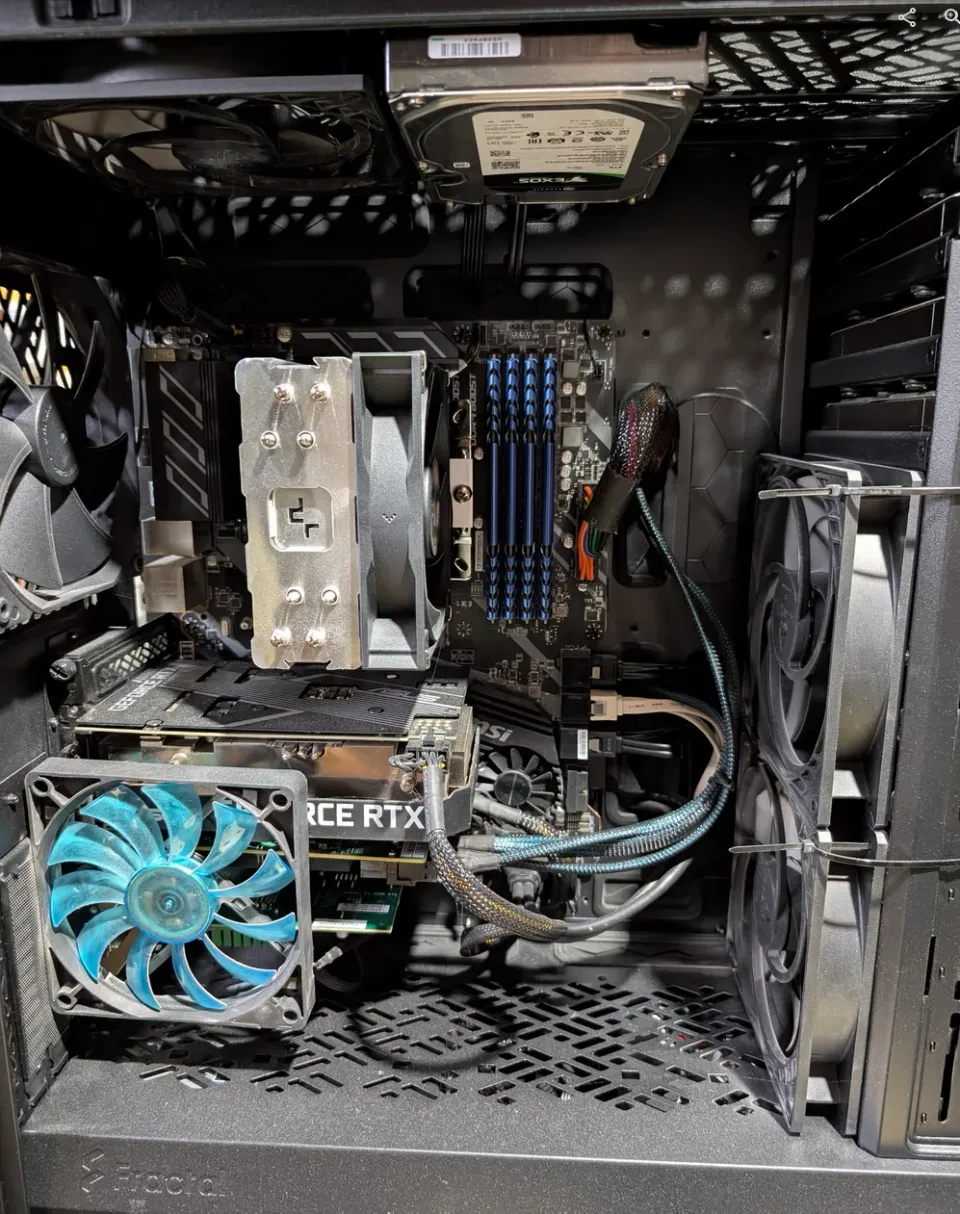
For over two decades, the landscape of game server hosting has evolved from manual config files and dial-up connections to sophisticated, containerized infrastructure. In 2026, the stakes are higher. Whether you are hosting a private Palworld sanctuary, a Satisfactory build, or a competitive Counter-Strike 2 arena, your home network is absolutely a target.
It's a different time from the late 1990's and early 2000's when I'd be manually configuring a game between me and a buddy via dial-up 26k modem, or an IPX lan game (Hello original Starcraft?!) to the increasingly sophisticated tools we have today.
This guide isn't just about getting a server "up." It’s about building a Digital Fortress for your gaming community - efficient, performant, and battle-hardened. When you have a blueprint, it's not as hard as you would think.
Why Self-Host? Control, Performance and the "Fortress" Mindset
You can self-host a gaming server at home, or on a VPS (Virtual private server). People have been doing this for decades now. There are a lot of benefits to self-hosting your gaming servers such as:
- Cost savings (Use your own hardware)
- Control & customization for your games
- Privacy & security - You can ensure only those you want to join your game or environment, do
1. The 2026 Gaming Stack: Why I Still Use LinuxGSM + Docker
In the homelab world, "consistency is king." Managing game servers manually leads to "dependency hell" and security vulnerabilities.
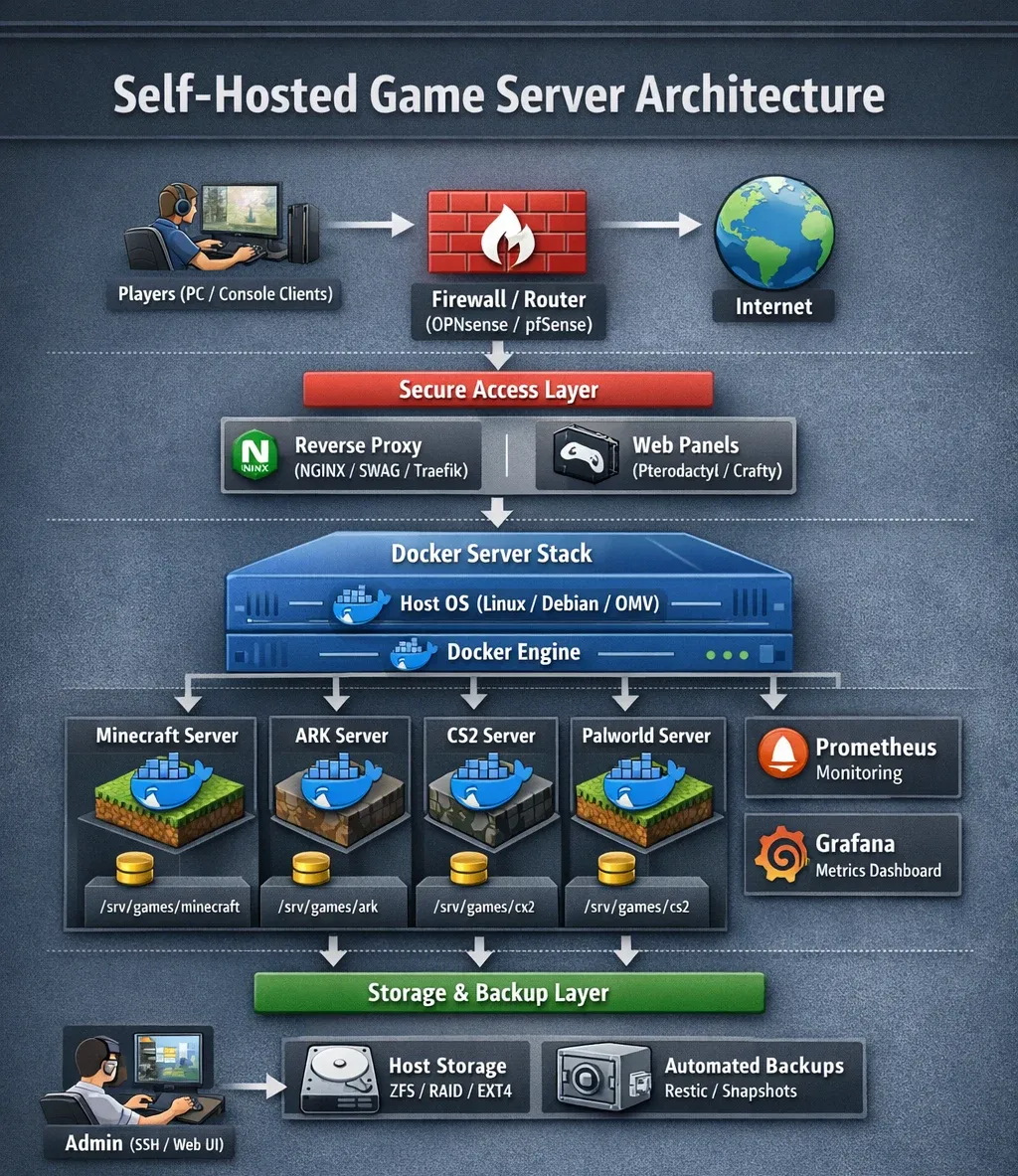
- LinuxGSM (Linux Game Server Managers): The gold standard command-line tool. It abstracts the complexity of updates, backups, and configurations for hundreds of games & is very simple to use.
- Docker Compose: This provides the "isolation chamber." By containerizing LinuxGSM, you ensure that a vulnerability in a game binary doesn't give an attacker the keys to your entire host OS.
Here's what this looks like in practicality:
Additional Reasons to Love LinuxGSM
- Simplified Management: LinuxGSM abstracts away the complexities of server setup. It provides a consistent command-line interface for common tasks: starting, stopping, updating, backing up, and configuring.
- Cross-Game Compatibility: The beauty of LinuxGSM is its modular design. It supports hundreds of games, all using a standardized approach. This means you’re not locked into a specific platform or vendor.
- Automated Updates: Keeping your servers secure is paramount. LinuxGSM handles updates gracefully, minimizing downtime and reducing the risk of exploits. (More on this below!)
- Configuration Control: While simplifying management, LinuxGSM doesn’t sacrifice control. You still have full access to the server’s configuration files, allowing for granular customization.
- Community Driven: The active community constantly expands support for new games and provides valuable troubleshooting assistance.
Containerization: Why Docker is Mandatory in 2026
Docker is everywhere. It's ubiquitous by this point and will serve you very well moving forward. It allows you to fully utilize the hardware you have, with a much lower overhead than running multiple virtual machines, and allows you to simply manage, backup and operate your gaming servers.
You'll also find an almost limitless source of information on how to run various docker based gaming servers and a huge user-base & ecosystem. If you're new to docker, have no fear and read my ultimate docker compose guide for beginners.
Quick Benefits of Docker Containers:
- Reproducibility: A Docker Compose file defines the exact environment your server needs. This ensures consistent behavior across different machines – development, staging, production. No more "it works on my machine" scenarios.
- Isolation: Docker containers isolate your game server from the host system. This enhances security and prevents conflicts with other applications.
- Portability: Move your entire server setup – dependencies and all – to different hosts with minimal effort. Cloud providers? Bare metal? It doesn't matter.
- Simplified Rollbacks: If something goes wrong, reverting to a previous version is as simple as redeploying a previous Compose file. Not so simple for one of your game servers per say...
2. Gaming Servers are Needy: 2026 Hardware Recommendations
In 2026, "Single-Threaded Performance" and "RAM Density" are the two most important metrics for gaming servers. High core counts look good on paper, but a high-frequencies provided by CPU's such as Intel Core Ultra or AMD Ryzen 9000 will provide a smoother, lag-free experience. That said, those have significant dollar values. Single-Thread Clock Speed is king. An old Xeon is often worse than a new N150 or Core Ultra for gaming because of lower IPC (Instructions Per Clock). It's wild how performant newer CPUs are compare to aging Enterprise hardware even.
The "Scrap Lab" Tier (Use What you Have)
If you have an old gaming PC around, or spare parts from various builds, or hand-me-down computers, you'd be surprised how capable they are at being repurposed! Even an older i7 8600K, or a less old Ryzen 3700X can be a gaming server, albiet not at the same power efficiency as newer CPUs. DDR3 & 4 ram is quite cheap in comparison to DDR5, so you can probably upgrade old hardware for an affordable price. RAM is just as important as the CPU for game server performance so you don't end up caching to the hard drive, or worse, have a crash with the infamous "OOM (Out of Memory) killer" on linux.
The "Gatehouse" Tier (Entry Level)
Ideal for Minecraft (Vanilla), Terraria, or Valheim for a small group of friends. The KAMRUI P2 Mini PC with a Ryzen 4300U works wonders. It is remarkably power-efficient while maintaining the clock speeds necessary for low-latency lightweight gaming.
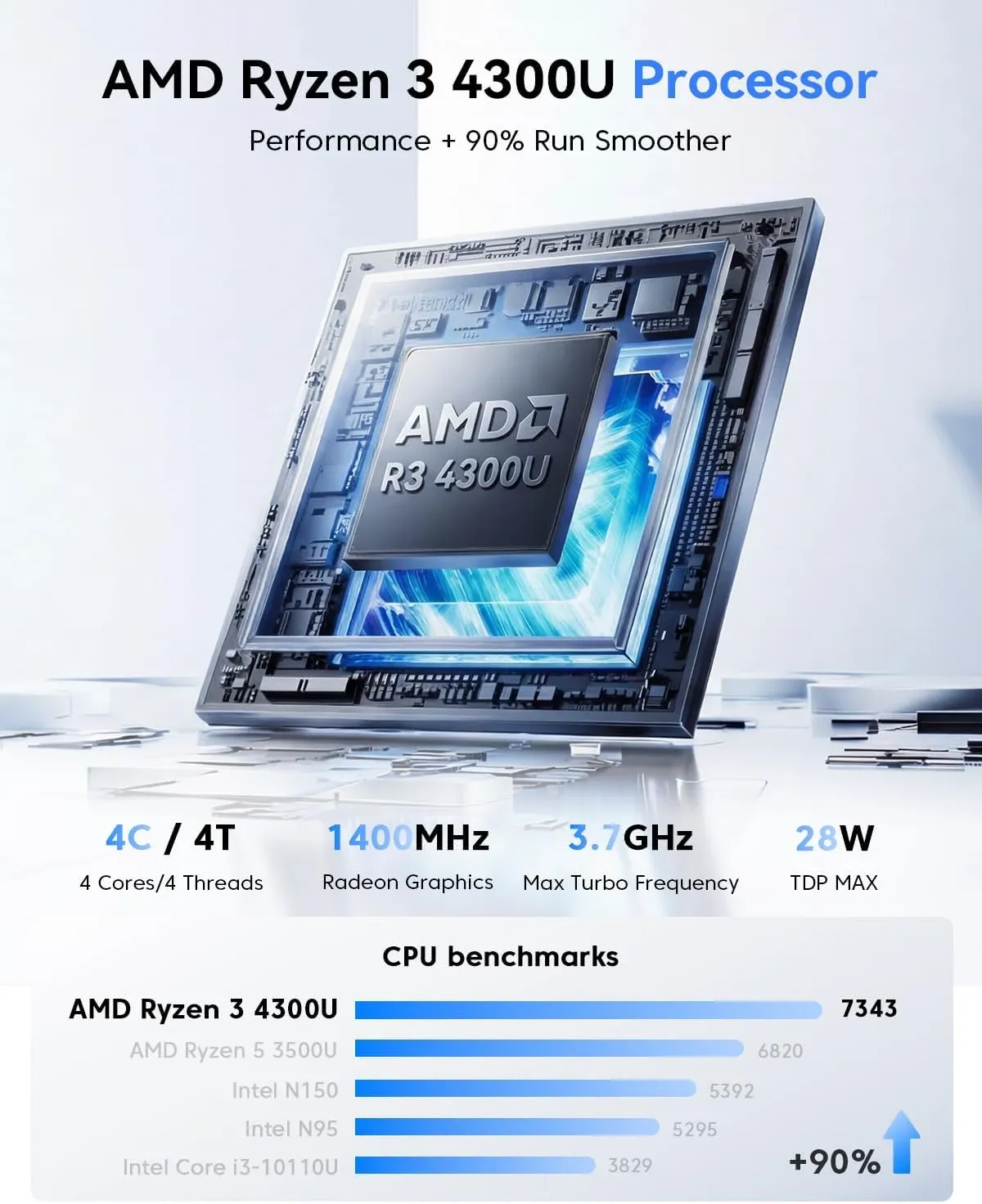
KAMRUI Pinova P2 Mini PC 16GB RAM 512GB SSD
AMD Ryzen 4300U (Beats 10110U/3500U/N150/N95,Up to 3.7 GHz) Mini Computers, 16GB DDR4
The "Command Center" Tier (High Performance)
Necessary for Palworld, Ark: Survival Ascended, and Counter-Strike 2. The ACEMAGIC M5 Mini-PC uses the Intel Core 14500HX, which competes with the horsepower of the Core Ultra 7 256V. Except, this is a lot cheaper! Its high burst frequency eliminates the "rubber-banding" often found on underpowered hardware, and it supports the massive RAM overhead required by modern open-world games, coming with 32GB of DDR5 all at just 55 watts!

ACEMAGIC M5 Mini PC
Intel Core 14500HX 32GB DDR4 1TB SSD Mini Computers(Beat i9-13900HK/R9 6900HX) NVMe PCIe4.0/USB3.2/Type-C/BT5.2
Gaming servers are probably the most hardware-intense self-hosted use cases! Make sure you pay attention to the minimum specs for whichever game you want to serve. Recommendations on VPS below.
Another option to achieve gaming on Linux, is via the brand new hardware Steam has just announced, said to be released early 2026. Tech Between the Lines provides comprehensive coverage of Valve's new Hardware Comback!
 Justin
Rather Use a VPS in the Cloud?

Core Lab VPS Recommendations
These hosting providers have powerful servers you can rent & fully customize. I chose them due to the performance / price ratio. There are specialized gaming VPS hosts out there, which I might add later after review.
These are affiliate links and I may earn a commission at no cost to you.

#1 - Web Hosting Canada is like the cats meow of VPS. Powerful, secure, actual 24/7 customer support. They are like the cadillac and, unlimited bandwidth!

#2 - Host Papa - 100% Canadian owned & operated, in operation since 2006. They have a HUGE range performance tiers to select from, but you can start right and have a beefy cloud VPS in minutes!
- "Progress" plan is a great spot to start out on, but if you will end up running a LOT of gaming servers off 1 VPS, likely long term you'll land at the "Excel" plan.

#3 - Green Geeks - 100% renewable energy powered datacentres & two Canadian locations! I used to host my websites with them and my VPS/hosting reseller panel as well. They have some very affordable plans if you're just starting out.
🎮Step-by-Step: Deploying Your First Hardened Server
Let's get this party started!
Prerequisites & Environment Prep
- Docker compose setup and ready to rock & roll.
- Notice the
PUIDandPGIDvariables below. It's always advised to run game servers as a non-root user on the host. If a container is escaped, they won't have root access to the filesystem.
- Notice the
- Something to act as a server, your laptop, extra PC, whatever you intended to run as a gaming server. If you're not that far yet, checkout this hardware guide for helping you decide how to build a gaming server, or review the VPS recommendations above.
- 🚧Regardless of having rented a VPS or running your own local server, follow this 10 minute Linux hardening checklist❗
- Optional: It's best if you host your gaming servers through a reverse proxy, but not strictly necessary but very highly recommended.
Example LinuxGSM's with Docker Compose
Here's a basic outline. These are simplified examples – refer to the official LinuxGSM documentation for complete instructions. 👉https://hub.docker.com/r/gameservermanagers/gameserver
🧱Minecraft
- Create a
docker-compose.ymlfile:
services:
  linuxgsm-mcserver:
    image: gameservermanagers/gameserver:mcserver
    # image: ghcr.io/gameservermanagers/gameserver:mcserver
    container_name: mcserver
    volumes:
      - /path/to/mcserver:/data
    ports:
      - "27015:27015/tcp"
      - "27015:27015/udp"
      - "27020:27020/udp"
      - "27005:27005/udp"
restart: unless-stopped- Run the server:
docker-compose up -d - Manage the server: Use
linuxgsm serverconsoleto interact with the server.
🦖Ark Survival Evolved
- Create a
docker-compose.ymlfile:
services:
  linuxgsm-arkserver:
    image: gameservermanagers/gameserver:arkserver
    # image: ghcr.io/gameservermanagers/gameserver:arkserver
    container_name: arkserver
    volumes:
      - /path/to/arkserver:/data
    ports:
      - "27015:27015/tcp"
      - "27015:27015/udp"
      - "27020:27020/udp"
      - "27005:27005/udp"
restart: unless-stopped- Run the server:
docker-compose up -d - Manage the server: Use
linuxgsm serverconsoleto interact with the server.
🔫Counter-Strike 2 (CS2) Hardened Stack
We’re moving away from generic scripts to the joedwards32/cs2 image. It is the most stable and "Docker-native" way to run CS2 in 2026.
services:
  cs2-server:
    image: joedwards32/cs2:latest
    container_name: cs2_prod
    environment:
      - SRCDS_TOKEN=YOUR_STEAM_GSLT # Get at https://steamcommunity.com/dev/managegameservers
      - CS2_SERVERNAME=CoreLab_Tactical_HQ
      - CS2_RCONPW=YourSuperSecretRCON123
      - CS2_PW=OptionalServerPassword
      - CS2_MAXPLAYERS=12
      - CS2_STARTMAP=de_inferno
      - CS2_GAMEALIAS=competitive # casual, deathmatch, competitive
    ports:
      - "27015:27015/tcp"
      - "27015:27015/udp"
      - "27020:27020/udp"
    volumes:
      - /srv/games/cs2:/home/steam/cs2-dedicated/
    restart: unless-stopped
    deploy:
      resources:
        limits:
          cpus: '2.0'
          memory: 4G
Palworld Dedicated Server (The "Memory Beast")
Palworld is notorious for memory leaks. In 2026, the thijsvanloef image remains the community gold standard. Note the Healthcheck and Memory Reservations - essential for preventing a server crash from taking down your entire host.
services:
  palworld:
    image: thijsvanloef/palworld-server-docker:latest
    container_name: palworld_server
    restart: unless-stopped
    stop_grace_period: 30s
    ports:
      - "8211:8211/udp"
      - "27015:27015/udp" # Query port
      - "25575:25575/tcp" # RCON - Secure this!
    environment:
      - PUID=1000
      - PGID=1000
      - PORT=8211
      - PLAYERS=16
      - SERVER_NAME=CoreLab_Pal_Sanctuary
      - ADMIN_PASSWORD=AdminSecurePass123
      - SERVER_PASSWORD=JoinPass123
      - COMMUNITY=false
      - MULTITHREADING=true
    volumes:
      - /srv/games/palworld:/palworld/
    deploy:
      resources:
        reservations:
          memory: 8G
        limits:
          memory: 16G # Palworld will eat this eventually
Satisfactory Dedicated Server
LinuxGSM-specific deployment for Satisfactory, this YAML uses the official gameservermanagers image. For 2026, I've optimized this for Satisfactory 1.x+ with proper resource limits and the necessary ports for the modern Server Manager.
services:
  sfserver:
    image: gameservermanagers/gameserver:sfserver
    container_name: sfserver_prod
    restart: unless-stopped
    # LinuxGSM needs these to handle permissions correctly
    environment:
      - PUID=1000
      - PGID=1000
      - TZ=America/Toronto # Set to your local timezone
    volumes:
      - /srv/games/sfserver:/data
    ports:
      - "7777:7777/udp"   # Game Port
      - "7777:7777/tcp"   # Game Port (TCP often required for handshake)
      - "15000:15000/udp" # Beacon Port
      - "15777:15777/udp" # Query Port
    # Satisfactory is a RAM-heavy application
    deploy:
      resources:
        reservations:
          memory: 6G
        limits:
          memory: 16G
Are you a 'game completionist' and want to get 100% rates on every mission, level or objective, and have every rare item possible? Ensure you're hitting those targets with help from Game-Checklists.come!
Non-LGSM Dedicated Gaming Servers?
If there's a specific gaming server you want to run but it's not in LGSM's list, or you'd prefer to use a different docker or release, it's as easy as 1-2-3 with docker compose.
Satisfactory Dedicated Docker here:
  satisfactory-server:
    container_name: SFserver
    hostname: 'SFserver'
    image: 'wolveix/satisfactory-server:latest'
    networks:
      vlan8_gaming:
        ipv4_address: 10.30.0.10
    ports:
      - '7777:7777/udp'
      - '7777:7777/tcp'
      - '8888:8888/tcp'
    volumes:
      - '/yourpath/DOCKERS/satisfactory-server:/config'
    environment:
      - MAXPLAYERS=8
      - PGID=1000
      - PUID=1000
      - ROOTLESS=false
      - STEAMBETA=false
      - AUTOSAVENUM=15
    restart: unless-stopped
    healthcheck:
      test: bash /healthcheck.sh
      interval: 30s
      timeout: 10s
      retries: 3
      start_period: 120s
    deploy:
      resources:
        limits:
          memory: 12G
        reservations:
          memory: 4G
In this example, you get a server of your choice (Satisfactory) and it's setup to limit things and not eat your entire system.
Read more details about this version of SF server here: https://github.com/wolveix/satisfactory-server
Blue Team Tactics: Securing Your Gaming Infrastructure
Now you have a new server or mini-pc and you want to get cranking frames out? Here's how you should properly secure it so when you publicly expose it, it doesn't become part of someone's bot-net in about 20 minutes.
Network Segmentation (VLANs) for Game Servers
Hopefully you have a firewall like OPNsense, if not at least a router or firewall that allows you to create VLANs and subnets? You need to put anything you host publicly in it's own VLAN, away from the rest of your home network or in the case of VPS, other services / dockers running on there.
- Create a new Gaming DMZ VLAN and subnet that is unique:
- VLAN 10, subnet 192.168.100.0/24 as an example
- Assign your mini-pc a static IP in that network
- Run all your gaming servers off this!
- Now you only open the ports absolutely required to the outside world for the game to function & friends to connect.
- RCON Hardening: Never leave RCON ports (like
25575) open to the entire internet. Use a firewall (like OPNsense or UFW) to only allow your specific home IP to hit the RCON port.- This would be like a 'management' flow allowing your PC from inside your home LAN to reach into the gaming DMZ and manage the gaming server.
Why Go Through That?
If a gaming server has a vulnerability that you're running (it happens ALL the time), it can be exploited in minutes without you knowing. If that server is sitting inside your home LAN, the attacker's first action will be to scan the entire network and see what else is living in that environment, and pivot. They will perform a "living off the land" attack and find vulnerabilities in other devices across your LAN! This is how they gain multiple footholds and maintain persistence.
If you separate your gaming servers & services into a separate firewalled-off VLAN, they can't do this! The explosion radius of their attacks is hampered and they are 'stuck'.
You then format your gaming server, kicking them out, and call it a day, vs them somehow getting access to your own PC and turning your entire home into a crypto-mining solution for themselves or worse.
Mitigating DDoS attacks without Giving Up Your Home IP
This is a little more complex, but essentially if you sign up to serve your domain name with a free DNS provider, they often offer a 'proxy' service. I use CloudFlare for this and it allows me to host things like this website publicly, but no one can see my true internet WAN IP address.
So if someone finds out you're hosting a gaming server and wants to crash your party, GOOD LUCK - they'd have to get through an entire ISP level of ddos protection and likely get their own IP blocked across the internet.
🧰Maintenance, Monitoring, and Automation
The daily. The grind! So great, you fired up a LGSM operated gaming server via docker, how do you interact with this darn thing!? Well, it's in a docker so first you have to jump into that docker, execute your commands, and get out without leaving the door unlocked.
1. Accessing the Command Center
To interact with a LinuxGSM server, you must "attach" to the container's shell. Instead of just jumping in blindly, we use a specific command to ensure a functional terminal.
The Command: docker exec -it <container_name> /bin/bash
Example for our 2026 stack:
- Palworld:
docker exec -it palworld_prod /bin/bash - CS2:
docker exec -it cs2_prod /bin/bash - Satisfactory:
docker exec -it sfserver_prod /bin/bash
Once inside, you are no longer the "host user"; you are the "operator" inside the sandbox.
2. The LinuxGSM Command Reference
LinuxGSM uses a standardized naming convention. Your primary tool is the executable named after the game (e.g., ./sfserver, ./cs2server).
💡 Pro-Tip: Always run ./gameserver update-lgsm before updating the game itself. This ensures the management scripts are patched against the latest SteamCMD quirks or security flaws before you touch the game binaries.
| Command | Action | Why it matters for Blue Team |
|---|---|---|
./gameserver update | Update Game | Patches security vulnerabilities and bugs. |
./gameserver backup | Create Backup | Essential before any major OS or Docker update. |
./gameserver monitor | Check Health | Auto-restarts the server if the process hangs. |
./gameserver details | System Info | Shows ports, config locations, and resource usage. |
./gameserver console | Live Console | View real-time player logs and chat (Exit with Ctrl+B, D). |
3. Game-Specific "Tactical" Commands
Each game has unique operational requirements. Here is how you handle the "big three" for 2026:
- Satisfactory:
./sfserver mods-update- Crucial for keeping your factory functioning after a game patch. - Counter-Strike 2:
./cs2server map-cycle- Quickly rotate the AO if the players are getting bored of de_dust2. - Palworld:
./palserver backup- Because Palworld is still in active development, world corruption is a real risk. Automate this.
Here's the whole list of commands!
| Command Name | Command | Short |
|---|---|---|
| Install | ./gameserver install | ./gameserver i |
| Auto Install | ./gameserver auto-install | ./gameserver ai |
| Start | ./gameserver start | ./gameserver st |
| Stop | ./gameserver stop | ./gameserver sp |
| Restart | ./gameserver restart | ./gameserver r |
| Details | ./gameserver details | ./gameserver dt |
| Post Details | ./gameserver postdetails | ./gameserver pd |
| Skeleton | ./gameserver skeleton | ./gameserver sk |
| Backup | ./gameserver backup | ./gameserver b |
| Update LinuxGSM | ./gameserver update-lgsm | ./gameserver ul |
| Monitor | ./gameserver monitor | ./gameserver m |
| Test Alert | ./gameserver test-alert | ./gameserver ta |
| Update | ./gameserver update | ./gameserver u |
| Check Update | ./gameserver check-update | ./gameserver cu |
| Force Update | ./gameserver force-update | ./gameserver fu |
| Validate | ./gameserver validate | ./gameserver v |
| Console | ./gameserver console | ./gameserver c |
| Debug | ./gameserver debug | ./gameserver d |
🐳 Essential Docker Lifecycle Commands
You shouldn't always have to "go inside" the container. Use these host-level commands for quick monitoring:
docker logs --tail 50 -f <container_name>- Use case: Use this to watch the server boot up or troubleshoot why a friend can’t connect without entering the CLI.
docker stats- Use case: Essential for Palworld. If you see memory usage creeping toward your 16GB limit, it's time for a proactive restart to clear the memory leaks.
docker system prune- Use case: Cleans up old, unused image layers. Game server images are massive; run this monthly to reclaim 20GB+ of NVMe space.
2026 Game Server Hosting FAQ
Why should I use Docker and LinuxGSM instead of a traditional install? In 2026, containerization is the only way to ensure security and portability. Docker isolates the game server from your host OS, preventing a vulnerability in a game binary from compromising your entire system. LinuxGSM provides a standardized command-line interface that simplifies updates and backups across hundreds of different games.
What hardware do I need for a Palworld or Counter-Strike 2 server in 2026? For modern titles like Palworld and CS2, single-thread CPU clock speed and RAM density are the most critical factors. You should aim for a minimum of 16GB of RAM (32GB is preferred for Palworld due to memory leaks) and a processor with high burst frequencies, such as the Intel Core Ultra or Ryzen 9000 series. Older enterprise hardware often suffers from lower IPC (Instructions Per Clock), leading to "rubber-banding" during gameplay.
How do I protect my home network when hosting a public game server? The most effective "Blue Team" tactic is network segmentation. You should place your gaming server on a dedicated VLAN (Gaming DMZ) to isolate it from your personal devices. Additionally, never expose RCON ports to the public internet; use a firewall to whitelist only your specific IP address for management tasks.
How often should I update my LinuxGSM and game binaries? You should check for updates at least once a week. Always run the ./gameserver update-lgsm command before updating the game itself. This ensures your management scripts are patched against the latest SteamCMD changes or security flaws before you touch the game files.
Can I run multiple game servers on a single Mini PC? Yes, provided you have sufficient RAM. Using Docker Compose, you can define multiple services (e.g., Minecraft and CS2) on the same host. To ensure stability, use Docker resource limits in your Compose file to prevent one server from consuming all the host's CPU or memory.

Member discussion