Best Plex Server Hardware (2026): Budget Builds to Enterprise NAS Guide
This guide explains the best Plex server hardware to use in 2026, including CPUs, GPUs, custom NAS/server builds, and real-world transcoding performance.
Choosing the best hardware for a Plex Media Server isn't about buying the most expensive gaming PC. For homelab builders, the goal is a system that balances transcoding performance, storage scalability, and power efficiency.
Whether you're repurposing an old desktop to use as a personal media library, or building a 100TB media vault for friends and family, the right hardware choices determine how smoothly Plex runs.
Who is this guide for?
- Beginners: Repurposing an old laptop or small PC for a personal Plex server. Core Lab Start Here Guide BTW.
- Enthusiasts: Building a power-efficient 24/7 NAS capable of serving family and friends.
- Power Users: Running large libraries with 10+ remote users and 4K HDR transcoding.
This is part of a Plex server mastery series:
Plex Mastery Guides
Media Server Strategy
Part 1: Plex, Jellyfin & the Aarrs, an overview!
Curated Plex Server Builds
Part 2: Best Plex Hardware Selection
Transcoding Deep Dive
Part 3: Understanding Transcoding, NVENC vs QuickSync and why it matters?
Ultimate Plex Optimization
Part 4: How to Tune Plex to run like a powerhouse on your already existing hardware.
In 2026, the landscape has shifted. We are moving away from bloated consumer "gaming" rigs and toward power-efficient Intel QuickSync builds and reliable, second-hand enterprise iron (hard drives). This guide assumes a modern, resilient software stack: Debian or OpenMediaVault 8 (OMV8) using ZFS for storage, with Plex running in Docker. That isn't set in stone of course. Plex will run off of almost any x86 processor and any storage system, and directly installed vs being in a docker.
For additional hardware selection, here's the entire homelab hardware series:
The Hardware Strategy
What Hardware Do You Actually Need for a Plex Server?
- X86 CPU or iGPU for transcoding
- Storage for media
- RAM or flash for metadata caching (Optimal)
- Network bandwidth!
If you just want the best Plex hardware without reading the full guide, these are the top picks for 2026. 👇
Quick Picks: 2026 Plex Essentials
Intel Core i5-12600K
The 2026 value king. UHD 770 graphics handle 10+ 4K transcodes with ease and AV1 Decode Support.
Check Price18TB Seagate Exos
Recertified enterprise-grade reliability at a fraction of consumer NAS prices.
Grab 18TB DealFractal Node 804
The GOAT for NAS builds. Fits 8+ drives in a quiet, dual-chamber cube.
Check PriceMSI PRO Z690-A
Plenty of SATA ports and dual M.2 slots for a high-speed ZFS metadata pool.
Grab this MoboBest Plex Server Hardware by Use Case (2026)
The best Plex server hardware depends on how you plan to use it. Whether you're running a personal media server or sharing your library with friends and family, the table below provides quick recommendations for the most common Plex setups.
| Use Case | Recommended Hardware | Why It Works |
|---|---|---|
| Personal Plex Server | Intel N100 Mini PC | Ultra-low power draw and enough QuickSync performance for a few 4K streams. |
| Family Streaming Server | Intel i5-12600K / i5-13500 | UHD 770 dual media engines can handle multiple simultaneous 4K HDR transcodes. |
| Large Shared Library | Intel i5 + Intel Arc A310/A380 | Dedicated AV1 hardware encoding and higher concurrent stream capacity. |
| Massive Plex Libraries (100TB+) | Enterprise Server + Intel Arc GPU | Maximum storage scalability and unrestricted hardware transcoding. |
| Lowest Power Consumption | Intel N100 / N250 Mini PC | 6–8W idle power draw makes it ideal for 24/7 operation. |
Recommendation: For most homelab builders, an Intel i5-12600K or i5-13500 with UHD 770 graphics offers the best overall balance of transcoding performance, power efficiency, and cost for a Plex server in 2026.
Plex Hardware Requirements (Quick Reference)
If you're wondering what hardware you actually need to run a Plex server, the answer depends almost entirely on how many streams you plan to transcode and whether those streams are 1080p or 4K. Plex server hardware requirements depend primarily on whether your server needs to transcode media or simply direct play files to compatible devices.
The table below shows common Plex streaming scenarios and the hardware typically required to support them.
| Plex Streaming Scenario | Typical Use Case | Recommended CPU / iGPU | Example Dedicated GPU | Notes |
|---|---|---|---|---|
| Direct Play | Local playback on devices that support the file format | Any modern CPU (Intel i3 / Ryzen 3) | Not Required | No transcoding occurs. Even low-power systems like Intel N100 mini PCs work perfectly. |
| 1080p Transcoding | Streaming to older TVs, tablets, or remote users | Intel UHD 630 (8th Gen+) | Intel Arc A310 | Handles several simultaneous 1080p transcodes efficiently. |
| 4K HDR → 1080p | Remote streaming from 4K libraries | Intel UHD 770 (12th Gen+) | Intel Arc A380 | Hardware tone mapping is critical here. Linux provides best performance. |
| High Concurrency | Large Plex libraries with many remote users | Intel i5-13500 / i5-14500 | Intel Arc B580 | Capable of 20+ simultaneous transcodes depending on bitrate. |
| AV1 Encoding | Future-proof media workflows | Intel 15th Gen+ iGPU | Intel Arc B580 / A770 | Required if you want to encode AV1 content instead of just decoding it. |
Direct Play vs Transcoding: When a device supports the original video format, Plex simply streams the file without modifying it. This is called Direct Play and requires almost no CPU or GPU power. Transcoding only occurs when Plex must convert the video or audio format to match the playback device or network bandwidth.
Info above distilled from experience and Plex's own official requirements:


How a Modern Plex Media Server Works (Architecture Overview)
Before we talk iron, here is how a high-performance media stack should be structured:
flowchart TD
A[Internet]
B[Cloudflare Proxy]
C[OPNsense Firewall]
D[SWAG Reverse Proxy]
E[Internal Applications]
F[Jellyfin Media Server]
PM[Plex Media Server]
G[AdGuard DNS]
H[Local NTP Server]
A --> B
B --> C
A -->|Plex/Jellyfin Bypass - Direct WAN| C
C -->|HTTPS Traffic| D
D --> E
C -->|Jellyfin Media Port| D
D -->|Authenticated Traffic via SWAG| F
C -->|Plex Port Forward 32400| PM
C -->|Forced DNS| G
C -->|Forced NTP| H
%% Groups
subgraph Edge
    A
    B
end
subgraph Network_Perimeter
    C
end
subgraph Application_Layer
    D
    E
    F
    PM
end
subgraph Infrastructure_Services
    G
    H
end
%% CoreLab cyberpunk styling
classDef edge fill:#000000,stroke:#00ff88,color:#00ff88,stroke-width:2px
classDef firewall fill:#001a12,stroke:#00ff88,color:#00ff88,stroke-width:3px
classDef apps fill:#001f1a,stroke:#00ffaa,color:#00ffaa
classDef infra fill:#001a1a,stroke:#00dddd,color:#00dddd
class A,B edge
class C firewall
class D,E,F,PM apps
class G,H infra
%% Clickable documentation links
click C "https://corelab.tech/opnsensept1/"
click D "https://corelab.tech/swag-reverse-proxy-guide/"
click F "https://corelab.tech/ultimate-media-server-guide/"
click PM "https://corelab.tech/ultimate-media-server-guide/"
click G "https://corelab.tech/cloudflare-protection-free/"
In 2026, AV1 is rapidly becoming the dominant codec for high-efficiency streaming. Major platforms like YouTube, Netflix, and modern browsers increasingly support AV1 hardware decoding. For Plex users, this means two things:
• New hardware should ideally support AV1 decode (minimum)
• Power users may want AV1 encode capability for future transcoding workloads!
How Many Plex Streams Can Different Hardware Handle?
One of the most common questions when building a Plex server is how many simultaneous streams your hardware can support. The answer depends heavily on whether your users are Direct Playing content or requiring video transcoding.
Estimates assume hardware transcoding with Plex Pass enabled on Linux for best performance.
| Hardware | 1080p Transcodes | 4K → 1080p Transcodes | Typical Use Case |
|---|---|---|---|
| Intel N100 | 4–6 | 1–2 | Personal Plex server |
| Intel UHD 630 (8th–10th Gen) | 6–10 | 2–3 | Small household server |
| Intel UHD 770 (12th–14th Gen) | 18–25+ | 6–8 | Family / shared server |
| NVIDIA GTX 1650 | 15–20 | 4–6 | Budget hardware transcoding GPU |
| NVIDIA RTX 3060 (12GB) | 30–40+ | 10–15 | High concurrency Plex + homelab workloads |
| Intel Arc A310 | 20–30+ | 8–10 | Efficient dedicated Plex GPU |
| Intel Arc A380 / B580 | 30–40+ | 10–15 | Large Plex communities |
Note: Direct Play streams place almost no load on the server. Most modern Plex servers can support dozens of Direct Play streams as long as the network bandwidth and storage speed are sufficient.
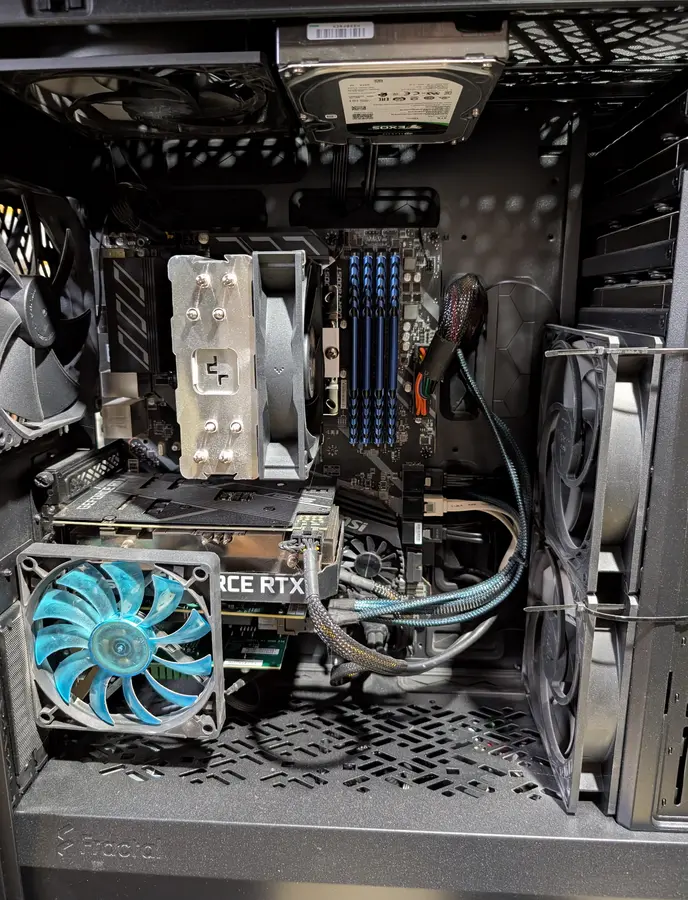
Real-world usage & example: My current Plex server runs an RTX 3060 12GB, which comfortably handles multiple simultaneous 4K transcodes while also accelerating other workloads like Frigate object detection and LLM usage. For most homelab users, this level of GPU is massive overkill unless you are sharing your Plex library with many remote users. Take a peek at this screenshot -
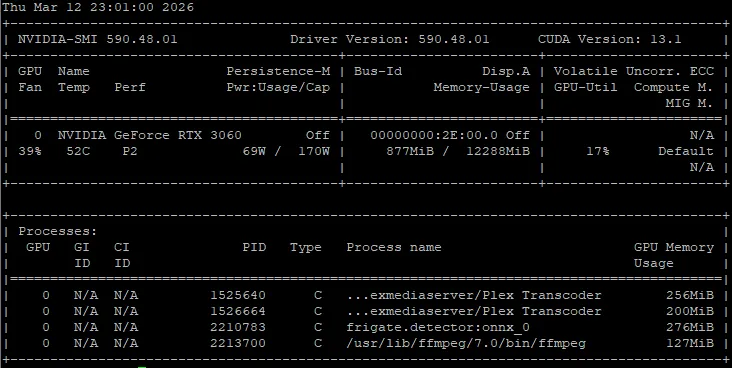
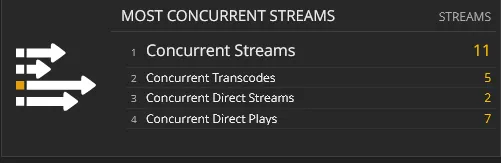
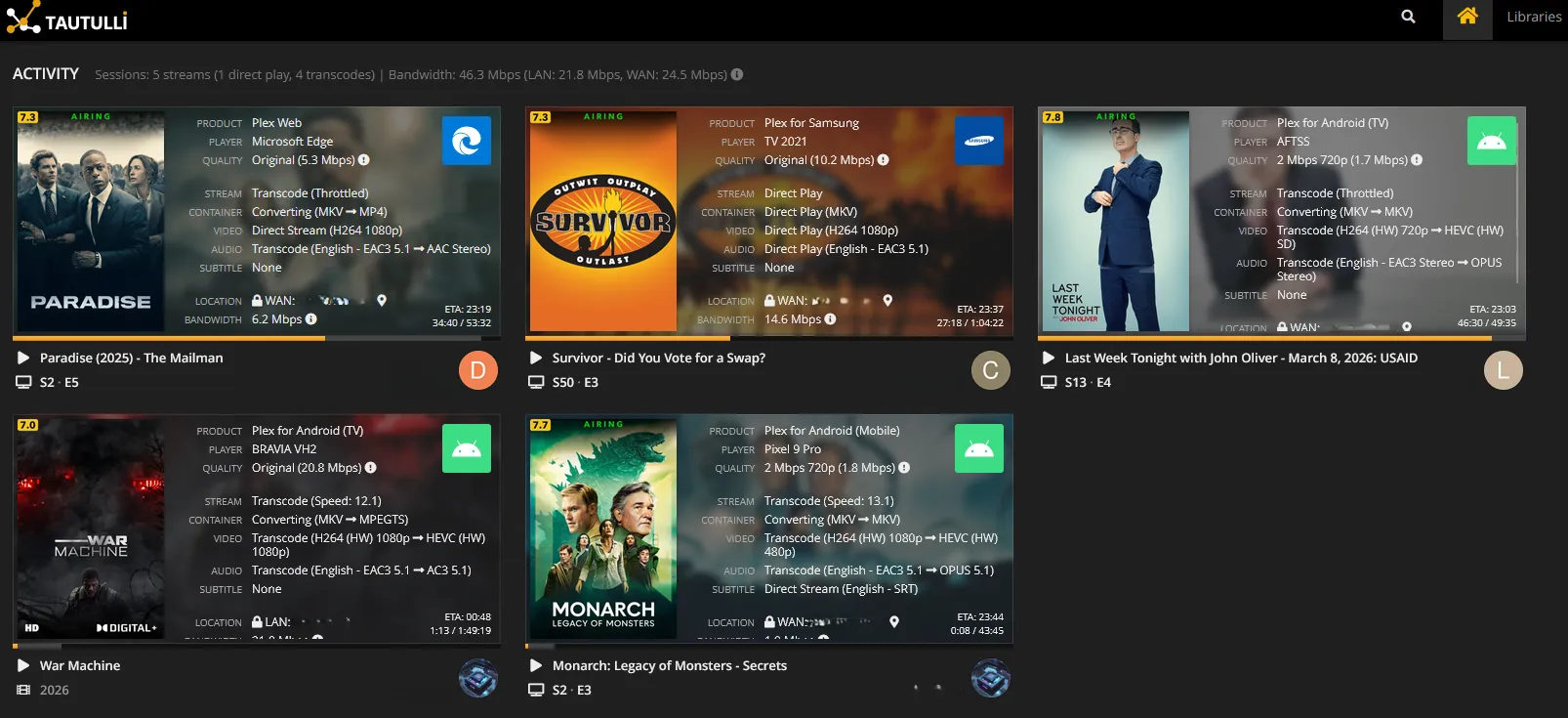
Figure2: RTX 3060 handling multiple concurrent Plex transcodes and a view of ny max via Tautulli.
Plex Hardware Transcoding Performance Comparison (2026)
| Tier | Generation | Max 4K Transcodes | AV1 Support | Dual Engines? | Est. Cost | Value (Transcode/$) |
| UHD 630 | 8th - 10th Gen | 3–5 | No | No | ~$80 (Used PC) | Moderate |
| UHD 770 | 12th - 14th Gen | 15–20 | Decode Only | Yes (i5+) | ~$160 (CPU) | High |
| Intel Arc A310 | Alchemist (dGPU) | 10–12 | Encode/Decode | No | ~$100 (New) | Excellent |
| Intel Arc B580 | Battlemage (dGPU) | 22–25+ | Encode/Decode | Yes | ~$200 (New) | High |
Key Takeaways for "Transcode per Dollar"
- The "Dual Engine" Secret: Starting with the i5-12500 (UHD 770), Intel included two Multi-Format Engines (MFX). This effectively doubles the transcoding throughput compared to the i3 models (UHD 730) or the N100, which only have one. For a $30 - $40 price difference, the i5-12500 offers nearly triple the 4K streams, making it the current "gold standard" for value.
- AV1 Future-Proofing: While AV1 isn't standard for most libraries yet, an Intel Arc A310 is the cheapest way to add AV1 encoding to an older server. At roughly $100, it offers a "Transcode per Dollar" ratio that beats almost any dedicated NVIDIA card.
- The N100 Trap: The Intel N100 is highly popular for low-power builds, but its QuickSync performance is closer to the UHD 630 than the UHD 770. It typically caps out at ~4 - 5 simultaneous 4K HDR transcodes. It's excellent for a personal server, but lacks the "headroom" for a shared library.
- Power Efficiency: Integrated graphics (UHD 770) will always win on idle power consumption (<1W overhead). Dedicated Arc cards (A310/B580) typically add 10W - 15W to the system's idle floor, which can add ~$15 - $20/year in electricity costs depending on your local rates.
For a deeper breakdown, see my QuickSync vs NVENC performance comparison.
 Core Lab Joe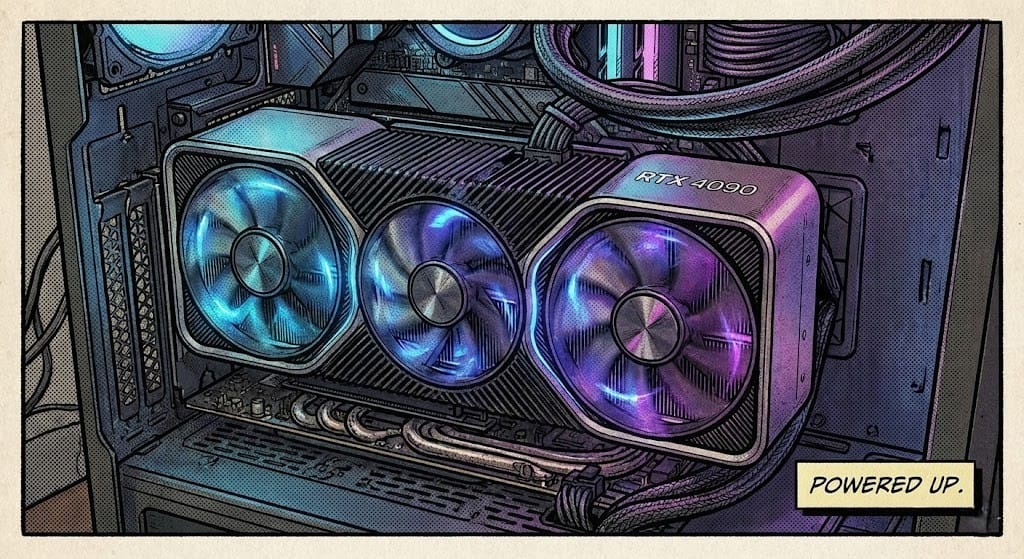
Tier 1: The Scavenger Build
Focus: Budget Plex Server $100 - $200 Goal of Maximum "Transcode per Dollar" with zero ego.
This tier is for the pragmatic nerd who wants a server that "just works" without a four-figure price tag. In 2026, we have two distinct paths: the Refurbished Enterprise SFF (The Classic) and the Intel N-Series Mini PC (The Modern). There's also finding spare and hand-me-down PCs from family/friends!
The "Classic Scavenger" (Used Enterprise SFF)
You are looking for off-lease office hardware. Look for a Dell Optiplex 5060/70, HP Elitedesk 800 G4/G5, or Lenovo ThinkCentre M720q.
- The Sweet Spot: Intel 8th or 9th Gen (i5-8500 or i5-9500). Preferably 12th gen in newer models.
- Why: These chips feature Quick Sync (UHD 630), which handles multiple 4K HEVC transcodes like a champ.
- The Trade-off: They idle higher than modern mini-PCs (~15-20W) but offer more PCIe lanes and SATA ports for internal storage expansion.
The "Modern Scavenger" (Intel N100 / N250)
If you care about your power bill and want future-proof codecs, this is the winner. The Intel N100 (and its "Twin Lake" successor, the N250) has completely disrupted this tier.
- The Powerhouse: Devices like the Beelink S12 Pro or GEEKOM Air series.
- Why: These chips support AV1 hardware decoding. While you might not have a full AV1 library yet, the industry is moving there. These units idle at a measly 6-8W.
- The Trade-off: You are limited to one or two internal drives (usually one NVMe and one 2.5" SATA). You’ll likely need a DAS (Direct Attached Storage) or a separate NAS as your library grows.
The Scavenger's Comparison
| Feature | Classic SFF (8th/9th Gen) | Modern Mini (N100/N250) |
| Price (Used/New) | $100 - $130 | $140 - $180 |
| Idle Power | 15W - 22W | 6W - 9W |
| Quick Sync | UHD 630 (Rock Solid) | UHD Graphics (AV1 Support) |
| Storage | 1-2x 3.5" + NVMe | 1x 2.5" + NVMe |
| Expandability | PCIe Slots available | USB/Thunderbolt only |
The Pragmatic Verdict: If you already have a pile of 3.5" hard drives, buy a used Optiplex SFF. If you want a silent, tiny box that handles modern 4K HDR tone mapping for the price of a few pizzas, get an N100/N250 Mini PC.
Tier 2: The Prosumer NAS (The DIY Sweet Spot)
Focus: Pragmatic Efficiency & Massive Expand-ability, DIY Sweet Spot ($800-$1500)
This is for the user who wants a 24/7 "set and forget" machine that balances upfront cost with electricity savings.
This is the "Goldilocks" build for most Core Lab readers. It’s for the user who has outgrown their 2/4-bay pre-built NAS and wants a dedicated machine that can handle 5–8 concurrent 4K transcodes without breaking a sweat or the power bill.
The Build Logic: The "Modern Golden Standard"
In 2026, we are skipping the high-power "K" series CPUs. They generate too much heat for a 24/7 NAS. Instead, we’re looking at the Intel i5-13500 or i5-14500. Why? Because these chips feature the UHD 770 iGPU with dual Multi-Format Codec engines. Most Plex libraries today use H.264 or HEVC (H.265), while newer formats like AV1 are rapidly gaining adoption due to improved compression efficiency.
It’s a transcoding monster that stays cool and sips power at idle.
- CPU: Intel i5-13500 or i5-14500. Due to market volatility, maybe you can't find those parts or the slightly older models are cheaper - Intel Core i5-12600K or i5-13400. 12th/13th gen Intel chips are the current "GOAT/sweet spot" for Plex. They support HDR Tone Mapping in hardware and can handle 4-6 concurrent 4K transcodes via QuickSync without a dedicated GPU.
- RAM: 32GB DDR5 (Overkill for Plex, but perfect if you’re also running Docker containers like Tautulli or Radarr/Aarr stack).
- Case: Fractal Design Node 804. (Still the GOAT for NAS builds because it fits 10+ drives in a compact dual-chamber design).
- Alternative: Jonsbo N4 if you want that modern aesthetic with 8 hot-swap bays.
- Storage Strategy: Buy Manufacturer Recertified Enterprise Drives (Seagate Exos or WD Ultrastar). Sites like ServerPartDeals offer 18TB–22TB drives for nearly half the price of consumer NAS drives. Other deals I've found are Amazon & Ebay of course. And always, reddit! I once snagged a great deal from a Facebook group, of all places. You can often find these for under $15/TB with a solid 2-year warranty.
- Why No GPU? By skipping a dedicated GPU, you save $200+, reduce idle power by 15–20W, and keep your PCIe slots open for 10GbE networking or even more storage, via an HBA!
The Pragmatic Verdict
This build is for the person who wants to "set it and forget it." By using OMV, Unraid or TrueNAS Scale, you get a system that scales with your library. It’s quiet enough for an office yet powerful enough to serve your entire extended family during the holidays.
🛒 Middle Tier Shopping List: The "Pragmatic Powerhouse"
Estimated Total (Excluding Drives): ~$850 – $950 CAD Estimated Total (With 36TB Raw Storage): ~$1,500 – $1,650 CAD
1. Core Components (The Brains)
| Part | Recommendation | Est. Price (CAD) | Why? |
| CPU | Intel Core i5-12600K | $190 – $220 | The 12th Gen is the value king in 2026. 10 cores (6P+4E) handle background tasks easily, and the UHD 770 graphics are a Plex transcoding beast. |
| Motherboard | MSI PRO Z690-A WIFI DDR4 | $180 – $210 | Solid VRMs, plenty of SATA ports, and dual M.2 slots for your ZFS AppData mirror. |
| RAM | 32GB DDR4-3200 (2x16GB) | $100 – $130 | ZFS loves RAM for its ARC (cache). 32GB allows you to run Plex, the Arr stack, and home automation without swap lag. |
| Cooler | Thermalright Peerless Assassin 120 SE | $45 – $55 | Incredible value. Whisper quiet—essential if the server lives in a living area. |
2. Storage (The "Vault")
| Part | Recommendation | Est. Price (CAD) | Why? |
| OS/AppData SSD | 2x 1TB NVMe Gen4 (Crucial, Samsung etc) | $160 – $190 (Pair) | Mirror these in ZFS. This ensures your Plex metadata remains snappy and your OS is redundant. |
| Media HDDs | 2x 18TB Seagate Exos (Recertified) | $600 – $700 (Pair) | Sourcing these "Recertified" from vendors like ServerPartDeals or eBay (with warranty) is the homelab meta. You get enterprise reliability at consumer prices. |
3. Chassis & Power (The Foundation)
| Part | Recommendation | Est. Price (CAD) | Why? |
| Case | Fractal Design Node 804 | $135 – $170 | The "Gold Standard" for compact NAS builds. Fits 8+ 3.5" drives in a dual-chamber cube design. |
| PSU | Corsair RM750e (80+ Gold) | $120 – $140 | You want Gold efficiency for a 24/7 machine. 750W is overkill for the draw, but it ensures the fan stays off (silent) most of the time. |
Tier 3: The Enterprise Behemoth (High-End)
Focus: Brute Force, Maximum Concurrency, & AI Crossover, Maximum Power ($2000+)
When you are serving dozens of remote users and managing massive 4K Blu-ray remuxes, you need specialized horsepower. This is the "No Compromises" tier. If you have 20+ users, a library that is 90% 4K REMUX, and an interest in running local AI (LLMs), this is your rig. We aren't building this from scratch; we’re repurposing enterprise muscle. If you can afford it, this is your key to running everything & anything at home. Checkout my automated homelab media server setup. Mine is basically a hybrid between the Tier 2 and Tier 3 setup here.
- The Concept: In 2026, the Dell PowerEdge R740xd has hit the absolute sweet spot on the secondary market. It’s a 2U beast that supports 12 to 24 drives and has the PCIe lanes to support dedicated GPUs for the "AV1 era."
- CPU: Dual Intel Xeon Scalable or AMD EPYC (high core count for background tasks/unrar/optimization). Dual Intel Xeon Silver or Gold (Scalable 2nd Gen) if going with a Dell R740.
- GPU: GPU: Intel Arc B580 (Battlemage).
- The Game Changer: While Nvidia’s consumer cards still have arbitrary stream limits (can be overcome with a patch!), Intel Arc is unrestricted. The B580 handles AV1 encoding like a dream and can easily handle 20+ simultaneous 4K HDR transcodes. Runner up: Intel Arc A310/A380. They still support AV1 encoding but aren't as beefy or have as much VRAM as the B580! A310 is low profile too however.
- Note: Avoid consumer GeForce cards (RTX 3080/4090) for this specific task. They pull massive power at idle and often have driver-enforced session limits.
- OS: Ubuntu 24.04 or 25.10 or Debian 13. To get the best out of Intel’s latest drivers and HDR tone mapping, a modern Linux kernel is a requirement.
- Storage Pool/Config: An LSI HBA (e.g., 9300-8i) flashed to IT Mode, passing raw disks directly to ZFS. 22TB+ Used Enterprise Drives in a RAID-Z2 or RAID-6 configuration.
The "AI Crossover" Factor
Since you’re already running a server with massive PCIe bandwidth and an Intel Arc GPU, this machine pulls double duty. In 2026, we’re seeing more homelabbers use these rigs to run Ollama or Local Stable Diffusion alongside their media stack. It’s the ultimate "everything box."
My very own server is a middle ground between used Enterprise parts, and consumer parts, check it out.
 Core Lab Joe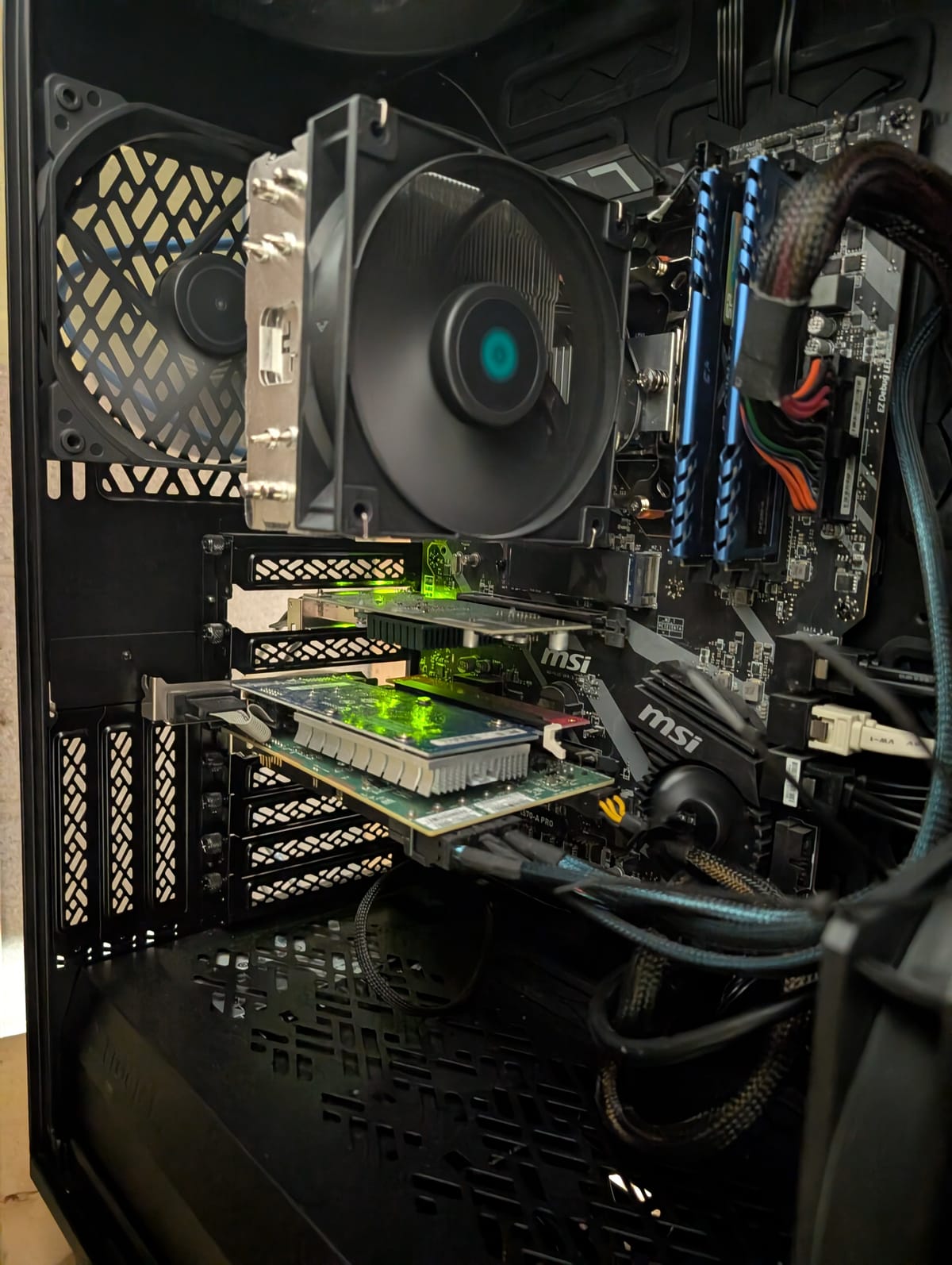
The ZFS Plex Blueprint: Optimizing Your Data
If you use OMV8, ZFS is non-negotiable for data integrity. However, don't just create one giant "pool." Split your storage by intent. Here's a deep-dive into ZFS as well.
1. The "Fast" AppData Mirror (Pool 1)
Plex creates thousands of tiny files (metadata, thumbnails, database entries). Running this on spinning HDDs makes the UI feel laggy. Click the following link to learn how to optimize Plex or move your metadata to fast storage.
- Setup: Two 500GB–1TB NVMe SSDs in a ZFS Mirror.
- Benefit: Instant poster loading and lightning-fast database searches. SSD/NVME's have massive IOPS in comparison to even Enterprise traditional spinning disks. There's no contest... You can also use this to run all your docker containers for the aarr stack!
2. The Bulk Media Vault (Pool 2)
This is for your large video files. We optimize for density.
- Setup: 4 to 8 Enterprise HDDs in RAID-Z2.
- Why RAID-Z2? Large drives (20TB+) take days to rebuild. RAID-Z2 allows two drives to fail simultaneously without losing your collection. If a third one goes though, you're SOL!
| Setting | Recommended Value | Why? |
| ashift | 12 | Standard for 4Kn/512e enterprise drives. |
| recordsize | 1M | Optimizes sequential reads for large 4K video files. |
| atime | off | Prevents unnecessary writes every time a file is read. |
| compression | lz4 | Minimal CPU hit; great for small gains and metadata. |
Pro Tip: OS Plex runs on Matters🖥️
To achieve the numbers in the "Max 4K Transcodes" column, you generally need to be running Linux (Ubuntu/Debian) or Unraid/TrueNAS Core. Windows still has overhead limitations with Hardware Tone Mapping (HDR to SDR) that can cut these performance numbers by 30% to 50% depending on driver version!
Final Verdict: Which should you build?
Plex Server Hardware Tier Comparison
| Feature | Tier 1 (Scavenger) | Tier 2 (Prosumer) | Tier 3 (Enterprise) |
| Max 4K Streams | 1–3 | 10–15 | 20+ |
| Best For | Students / Beginners | Families / Enthusiasts | Power Users / Media Groups |
| Transcode Tech | Intel QuickSync (N100 or 8th Gen+) | Intel QuickSync (UHD 770 Dual-Engine) | Dedicated GPU (Arc B580 / Quadro) |
| Storage Cap | <10TB | 20TB – 100TB | 100TB+ |
| Est. Idle Power | 6W – 15W | 25W – 45W | 100W – 250W+ |
Key Insights on These Tiers
- Tier 1 Efficiency: The low idle draw is driven by modern "N-series" chips (like the N100), which can sip as little as 6W while still handling a few 4K transcodes.
- The Tier 2 "Sweet Spot": By moving to a modern i5 (like the 13500 or 14500), you gain access to dual MFX engines in the UHD 770 graphics. This is why the stream count jumps so significantly while keeping power under 50W.
- Tier 3 Scaling: The high power draw here isn't just the GPU—it's the enterprise-grade motherboards, high-RPM fans, and large arrays of spinning hard drives that never fully "sleep."
The Bottom Line: For most readers, the Tier 2 Intel-based build is the objective winner. It offers the best balance of performance per watt and is compatible with the "off-lease" enterprise drive market. You should be able to find a 'sweet spot' here.
The Golden Rule of Homelab Hardware
If there is one takeaway when spec'ing out your build, it is this: Do not overbuy brand new consumer hardware.
The used enterprise market almost always offers better value than new consumer hardware. Off-lease servers and enterprise drives deliver higher reliability, more expandability, and lower cost per terabyte than most retail NAS solutions.
This is obviously not available for everyone and highly depends where you live. I myself don't live in a large city so I have limited access to used Enterprise gear vs living somewhere like Toronto, Ottawa or say, NYC where you can find off-lease Enterprise and office hardware almost EVERYWHERE.
Next Steps✅
Choosing the right hardware is the foundation of a reliable Plex Media Server, but it is only the first step in building a truly resilient home lab. Whether you’ve decided on a dedicated NAS, a repurposed "scrap-lab" PC, or a high-end QuickSync-capable build, the goal remains the same: seamless streaming and complete control over your data.
As you move from selecting hardware to configuring your OS, networking, and automation, you’ll want a roadmap to keep everything organized. For a comprehensive look at how all these components fit together - including deep dives into software stacks and storage management - check out the Ultimate Media Server Guide. This pillar page serves as a living table of contents for the entire "Digital Fortress" project, ensuring you have the most up-to-date documentation as your setup evolves.
For even more choice and examples of great builds, check out my Core Lab Hardware Guide.
 Core Lab Joe
 Core Lab Joe
❓ Frequently Asked Questions (FAQ)
Add these to the end of your post to address common "friction points" for new builders. This also helps you capture those elusive Google Featured Snippets.
1 Can I use an AMD CPU for my Plex server?
Yes, but with a caveat. While AMD CPUs are excellent for raw processing and ZFS tasks, they lack Intel’s QuickSync technology. To get efficient hardware transcoding on an AMD system, you will almost certainly need to add a dedicated GPU like an Nvidia Quadro or an Intel Arc A310.
2 Is 16GB of RAM enough for a Plex server?
For a basic Tier 1 or Tier 2 setup, 16GB is sufficient. However, if you are using ZFS, more RAM is always better. ZFS uses a feature called ARC (Adaptive Replacement Cache) to store frequently accessed data in your RAM, which significantly speeds up your server. For a Tier 2 build, 32GB is the sweet spot.
3 Do I really need a Plex Pass?
If you want to use Hardware-Accelerated Transcoding (using your CPU's QuickSync or a dedicated GPU), a Plex Pass is required. Without it, Plex will use "Software Transcoding," which puts a massive load on your CPU and will likely cause buffering on 4K files.
4 Why use Enterprise HDDs instead of Consumer NAS drives?
Enterprise drives (like Seagate Exos) are designed for 24/7 operation and have a much higher Mean Time Between Failure (MTBF). By buying manufacturer recertified drives, you can often get these high-end drives for less than the cost of a standard Western Digital Red or Seagate IronWolf.
5 Is hardware transcoding really necessary?
If most of your devices support the video format you store, Plex will Direct Play the file and no transcoding occurs. In this scenario even very small servers can support dozens of streams.
Hardware transcoding becomes important when:
• Streaming to remote users
• Converting 4K HDR to 1080p
• Serving older TVs or mobile devices
6 What is the best GPU for Plex?
For most homelab builders, a dedicated GPU is unnecessary because Intel QuickSync already provides excellent transcoding performance.
However, GPUs like the Intel Arc A310/A380 or NVIDIA RTX 3060 become useful when:
• running very large shared libraries
• supporting many simultaneous remote users
• combining Plex with workloads like Frigate or AI inference

Member discussion